AI Script Writing Generator: How to Generate the Perfect Script for Your Next Screenplay
Learn how AI script writing tools turn simple ideas into engaging scripts. Follow this step-by-step guide to create professional screenplays faster and overcome writer’s block.


Creating scripts manually takes a lot of time and effort. They require attention to every detail. A good script must mention even the smallest movement in the background. Sometimes, even if there is an idea in mind, some writers are unable to write a script due to writer’s block. With the help of artificial intelligence tools, one can now create high-quality scripts in a short period of time. They are able to write scripts like professionals. Are you interested in AI script writing and how you can use an AI tool to write a script? Here is a detailed guide.
- What is AI Script Writing?
- Pre-Generation Preparation: Setting Up the Foundation
- How to Generate an Attention-Grabbing Script Using AI: Step-by-Step Guide
- 1. Input the Storyline
- 2. The Scene Type
- 3. Generate the Script
- 4. Edit and Optimize
- Pro Tips to Generate a Successful Screenplay Script
- Mistakes to Avoid While Using AI for Script Writing
- Conclusion
What is AI Script Writing?
AI script writing is the use of an artificial intelligence tool to generate a script for a screenplay. The tool writes the script just like any human script writer would, but more efficiently. It saves you time by generating long scripts within a few minutes.
Even if you are not a professional script writer, it can help turn a simple story into a compelling script. On top of everything, it is usually trained on a vast amount of datasets.
The tool uses this data to analyze the patterns, determine the style of script, and interpret the flow of dialogues. By doing so, it is able to produce alluring scripts for movies, advertisements, and video games.
Pre-Generation Preparation: Setting Up the Foundation
Before generating a script, you must have an interesting story. For the story, you can get inspiration from real-life stories, people around you and their natural behaviours. Once you have a rough idea, you can use AI for script generation.
AI tools are quick, but they still require detailed information about the screenplay. This helps them understand your requirements precisely and generate an accurate script in every aspect.
Therefore, before preparing the script, you must be clear about the:
Genre of the screenplay and your target audience.
Main characters and their arcs throughout the video.
Tone of the script.
Lesson you want to convey to your audience through the screenplay.
How to Generate an Attention-Grabbing Script Using AI: Step-by-Step Guide
Here is a detailed guide on how to generate a captivating script for your screenplay using an AI tool.
1. Input the Storyline
First, you need to provide a storyline to the AI generator to understand your ideas thoroughly. Go to the Prompt box of the AI tool and start writing the storyline. It must include:
Logline: A one or two-line summary about what the screenplay features. It must include a rough title, the overall idea of the video, and the target audience.
Inciting Incident: Mention the details about how you want the story to start. It can begin from character introductions, location reveal, or some intense scene.
Midpoint: Add how you want the script to progress
Climax: Write about the peak turning point of the screenplay and how you want it to end.
Here is an example of the logline:
“Write a script about the topic “The Insiduous: What is Behind the Door.” In a crumbling haunted house, a family's desperate bid to silence the blood-curdling screams echoing from a forbidden room every night reveals demonic forces that won't rest until they claim every soul inside.”
Then you can mention the starting, mid-point, and the finale of the screenplay like:
“The story starts with a husband and wife who uncover mysteries about haunted houses and they come across a certain house that has screams coming from a specific room from sunset to sunrise. They move into the house and start their investigation. Midpoint: They do not find anything behind the door every time they unlock the room. One day as the husband is away, the wife opens the door and sees a clone of herself mimicking her every move. As the story progresses, the woman starts having hallucinations that continuously reminds her of her inferiority complex leading her to attempt suicide. The Finale: The husband uncovers the truth about the screams. The ghost targets people using their shortcomings. The ghost is of a woman who died as her colleagues bullied her about her ethnicity.”
2. The Scene Type
Some AI generators have integrated options to choose the scene type and concept of the script. For others, you have to manually enter the details in the prompt box.
If the option is available, click on your preferred scene type.
If not, you can mention in the description box whether the scene is a fight, chase, physical conflict, or horror-themed, etc.
Choose the timing of the scene, the location, and the overall environment in which it takes place.
Follow the same rules for each subsequent scene to generate a script for the complete screenplay. Here is an example of the first scene:
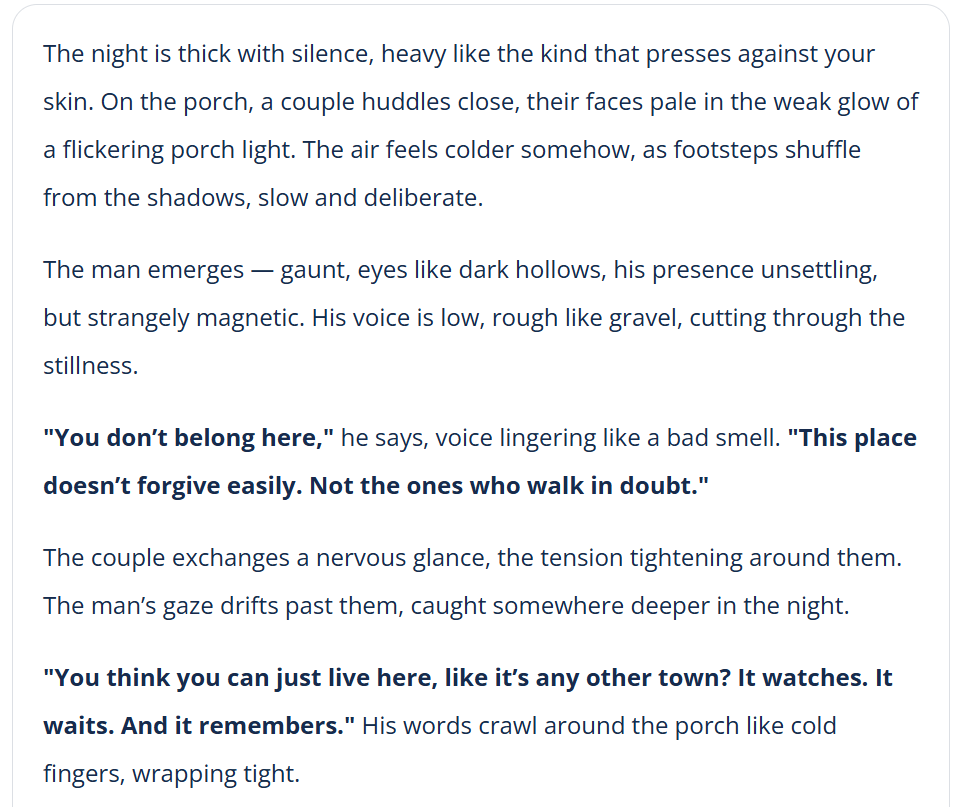
“The first scene is an intense conversational scene between the couple and a weird man living in the society where the house is. The overall mood must be horror and dark. The location is inside the porch of the house and at night.”
3. Generate the Script
Now, it is time to generate the script content. Your prompt for the script content must include:
Character Details: Add the script-oriented details about the character that is focused on in the scene. Mention the ethnicity, any regional influences on their dialect, or the tone when they speak.
Action Line: Mention what the character is doing in the scene and their emotional state.
Dialogue Delivery: Depending upon the emotional state, add the details about the dialogue delivery including formal/informal language, happy/stressed state, or stutters, etc.
Relationship Between the Characters: If there is another character, add details about the relationship between the two and their interaction with each other.
Here is an example:
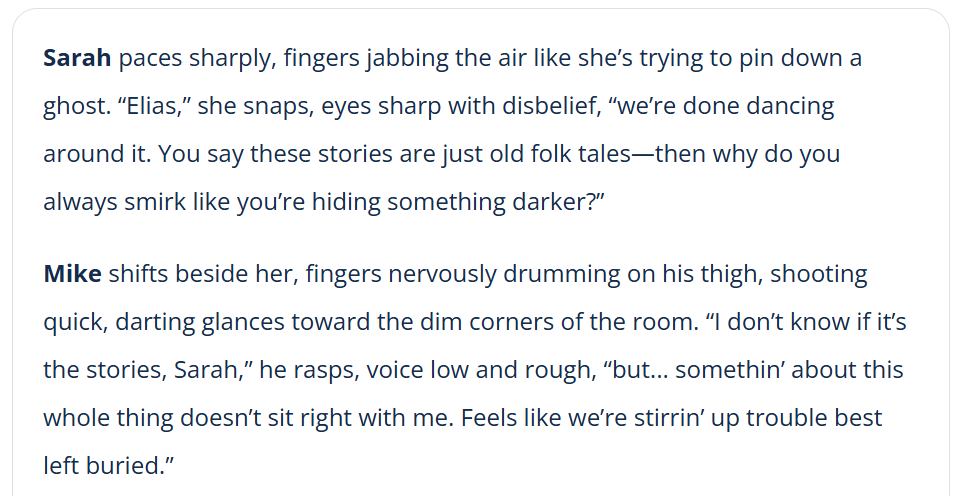
“Sarah (30s NYC skeptic, sharp stressed tone) paces jabbing fingers while commanding skeptical partner Mike (30s Southern ex-cop, gravelly stutters, paranoid fidgeting with fearful glances); they confront Elias (60s Appalachian historian, slow eerie drawl with cryptic pauses/smirk, scratching scars unblinking), who toys cat-and-mouse withholding haunted secrets.”
Once done, hit the “Generate” button, and the AI tool will analyze your entire prompt to generate the screenplay scene-by-scene.
4. Edit and Optimize
Once the script is generated, carefully read it and optimize further for a better output. To enhance the script, you must:
Identify any plot holes.
Ensure the character, their speech, and actions align with the concept of the screenplay.
Confirm whether the script follows the grammar, style, and other formatting rules accurately.
Notice the pacing of the scenes as it might be too fast or too slow according to your requirements.
Pro Tips to Generate a Successful Screenplay Script
When using an AI script generator, you can follow these tips to generate a script that accurately reflects the concept of your screenplay:
Provide Details: Provide as many details as you can while prompting the AI to generate a script. The more details, the better outcome the tool will generate. The prompt must include topic, important turning points, characters, and genre, etc.
Iterate: Read the first draft carefully and revise it to ensure that the script aligns with your goals. Iterations allow you to generate high-quality scripts that are engaging for the audience.
Be Clear and Concise: While prompting the tool, use clear and concise descriptions. It helps AI understand your vision better and generate the script accordingly.
Breakdown Long Prompts: Instead of providing prompts in one single sentence, break down the description into short sentences. Make it simple and describe each new detail in the next sentence.
Mistakes to Avoid While Using AI for Script Writing
Some descriptions can make the prompt confusing for the AI tool. As a result, it generates substandard scripts. Here’s what to avoid while generating scripts using an AI tool:
Avoid Contraindicating words: While writing the prompt, you must be aware of every word you are writing. Mentioning the contraindicated words to the tool may cause confusion. For instance, avoid mentioning “A brave coward policeman”. Rather, you can write “A brave policeman who secretly fears the mafia leader.”
Rely Entirely on AI: Sometimes, even with the perfect prompt, AI can easily mess up. Therefore, you must not rely entirely on the tool, especially if the script contains facts and figures.
No Proofreading: The script might have formatting or tone errors. Finalizing it without proofreading might prove to be an expensive mistake later. Therefore, carefully read the output and ensure that the style, tone, formatting, and pacing align with your idea.
Conclusion
AI tools can help generate professional screenplays. They can help reduce the work from days to a few hours only. However, AI-generated scripts usually look generic. They lack emotional depth. Thus, it is advisable to use AI as a helper and not a full replacement of your creative vision.
An artificial intelligence script, which is subject to manual editing, is efficient and requires no time to produce perfect scripts. This mixed method produces perfect scripts that are production-ready and grab attention in the saturated market.
Related articles

150+ Instagram Bio Ideas for Moms

140+ Facebook Bio Ideas: Short, Professional, Unique, and More
80+ X(Twitter) Bio Templates and Examples

How to Create Aesthetic Instagram Posts That Stand Out in 2026

Telegram Bio Ideas: 100+ Cool, Aesthetic & Unique Bio Examples (2026)

100+ Good Quotes for Instagram Bio (Copy & Paste Ideas)
150+TikTok Bio Ideas That Attract Followers
The Best Times to Post Reels on Instagram for Every Creator

How Automatic Prompt Engineering Works
AI Assignment Generator for Teachers, Students, and Educational Institutions

The Best AI Tools for Writing GPT Prompts

150+ Instagram Bio Ideas to Catch Eyes at a Glance in 2026

How to Turn Images Into AI Prompts

100+ Trending Instagram Bios for Boys to Upgrade Your Profile

60 Instagram Business Bio Examples

7 Ways to Use an AI Topic Generator

Create Stories With a Text Story Maker

Generate Flawless Sentences for Free

5 Ways To Use Journal Prompts

10 Best AI Content Generators of 2026

130+ Unique Instagram Bios for Girls

AI Response Generator: Create Professional Replies in Seconds

100 Short Success Quotes to Inspire Your Creative Journey

30 Graduation Quotes to Celebrate Your Achievement and Inspire Your Journey

30 Teamwork Quotes That Build Stronger and Smarter Teams

40 Quotations About Education That Inspire Learning, Growth, and Success

80 Quotations About Leadership That Will Transform Your Leadership Journey

Student Success Motivational Quotes to Inspire Growth and Confidence