1080p vs 4K: Technical Differences, Real-World Results & Hidden Costs (2026)
4K has four times the pixels of 1080p - but that does not automatically make it the right choice for every setup. This guide breaks down the real visual difference, scenario-by-scenario performance, the storage and bandwidth costs, and what to do when your video library is still in 1080p.


1080p and 4K are the two most common display resolutions across TVs, monitors, cameras, and streaming platforms. The pixel math is simple: 4K UHD (3,840 x 2,160) contains exactly four times the total pixels of 1080p Full HD (1,920 x 1,080) - 8.3 million versus 2.1 million.
But the raw pixel count does not settle the question of which resolution is right for a given setup. The visible difference between 1080p and 4K depends on screen size, viewing distance, content source, and what the hardware around it can actually push. This guide covers what the pixel gap means in practice, which scenarios benefit clearly from 4K, what the 4K vs 1080p resolution difference costs in storage and bandwidth, and what to do when your existing video library is still in 1080p.
Where relevant, 1440p (QHD) is included in the comparison. The top-performing search results on this topic cover all three tiers, and 1440p is the format many buyers land on when 4K proves overkill and 1080p feels like a step back.
The Technical Breakdown: Pixels, Resolution, and Key Numbers
The difference between 1080p and 4K starts with the pixel grid. Understanding the actual numbers makes the rest of the comparison easier to follow.
Pixel Count and Resolution Compared
1080p Full HD is 1,920 x 1,080 pixels, totaling 2,073,600 pixels per frame. 4K UHD is 3,840 x 2,160, totaling 8,294,400 pixels. 4K has exactly four times the total pixel area of 1080p - not four times the width or height, but four times the combined pixel count.
On a 55-inch TV, that translates to roughly 40 PPI at 1080p and 80 PPI at 4K. Double the pixel density at the same screen size. At desk distance, on a 27-inch monitor, 1080p sits at 82 PPI and 4K reaches 163 PPI - near print-quality sharpness.
Color depth is a separate but related advantage of 4K content. Standard 1080p uses 8-bit color, which covers about 16.7 million distinct colors. Most 4K content is mastered at 10-bit or 12-bit, covering up to 1.07 billion colors. This is the technical foundation for HDR - High Dynamic Range - which most 4K displays support and most 1080p displays do not.
For reference, 1440p QHD (2,560 x 1,440) sits between the two: 3,686,400 pixels, approximately 1.78 times 1080p and 44% below 4K. It is a practical middle tier that becomes relevant in the gaming and monitor sections below.
|
Spec |
1080p (Full HD) |
4K UHD |
1440p (QHD) |
Notes |
|---|---|---|---|---|
|
Resolution |
1,920 x 1,080 |
3,840 x 2,160 |
2,560 x 1,440 |
Standard widescreen |
|
Total Pixels |
2,073,600 |
8,294,400 |
3,686,400 |
4K = 4x 1080p |
|
PPI (55-inch TV) |
~40 PPI |
~80 PPI |
~54 PPI |
At same screen size |
|
Aspect Ratio |
16:9 |
16:9 |
16:9 |
All widescreen |
|
Color Depth |
8-bit (16.7M colors) |
10-bit / 12-bit (1.07B colors) |
8-bit / 10-bit |
HDR requires 10-bit+ |
|
Streaming BW |
5-12 Mbps |
15-25 Mbps |
10-15 Mbps |
Recommended rates |
|
File Size (1hr H.264) |
~1.2 GB |
~4.8 GB |
~2-3 GB |
At 30fps |
|
GPU for 60fps gaming |
RTX 4060 (~$299) |
RTX 5080 (~$999 MSRP) |
RTX 4060 Ti / RX 7700 |
2026 mid-high range |
What the Pixel Difference Means Physically
At the same screen size, 4K fits four pixels in the space one 1080p pixel occupies. That compression of detail is what makes edges sharper, textures more defined, and fine content readable at closer distances.
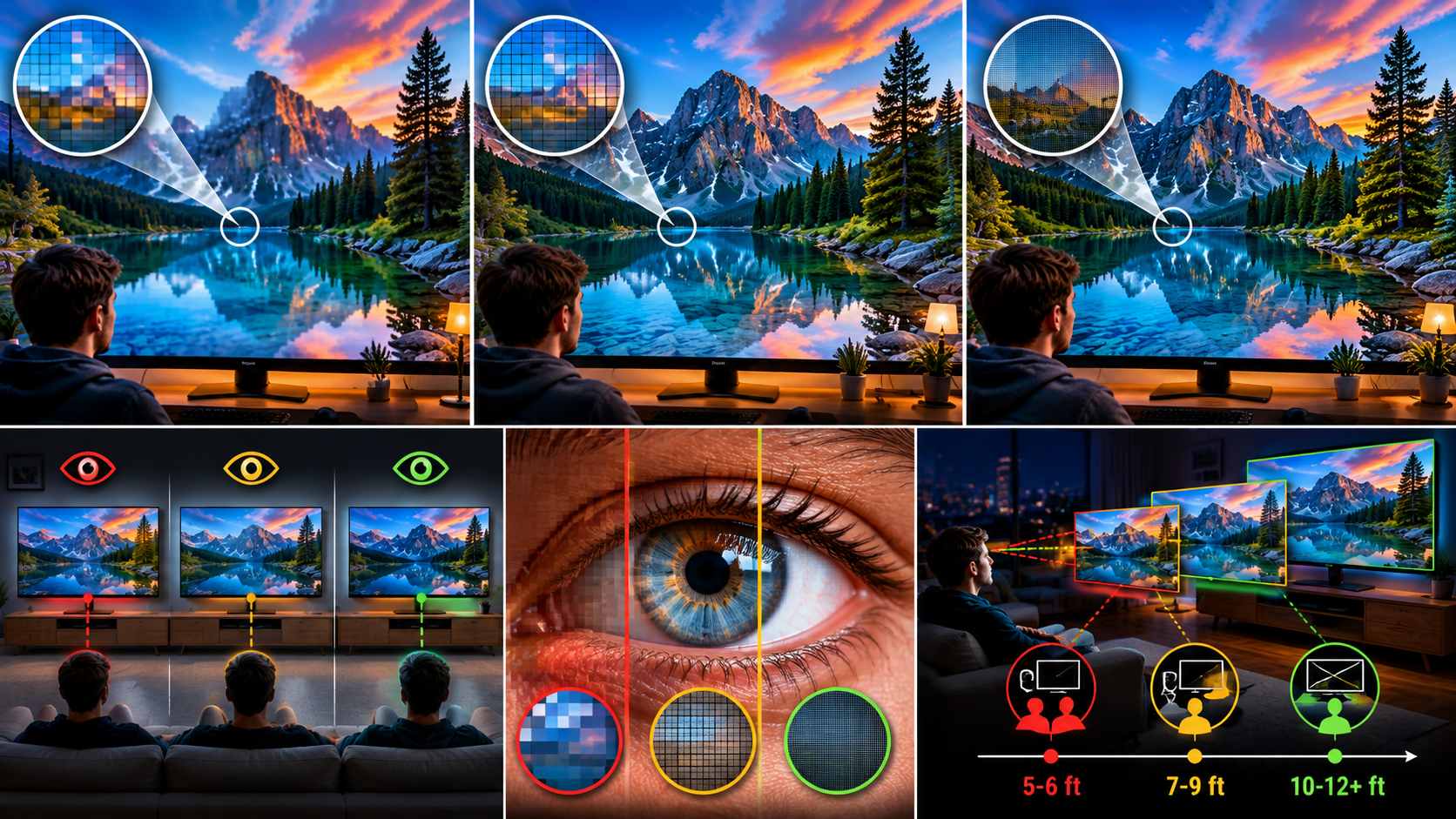
The threshold where that advantage becomes visible is tied to viewing distance. On a 55-inch TV, the full sharpness benefit of 4K over 1080p is perceptible within about 6.5 feet. Beyond 10 feet, the human eye cannot resolve individual pixels on 1080p at that size either, so the gap narrows. This is why seating position matters as much as resolution when evaluating a TV upgrade.
On a 27-inch monitor used at 60 to 75 cm desk distance, the viewing distance is already inside the threshold where 4K's higher PPI is fully visible. That is a stronger case for 4K at a monitor than on a living room TV at standard couch distance.
The Real-World Visual Test: Can the Human Eye Actually Tell the Difference?
The 4K vs 1080p resolution gap is clear on a spec sheet. Whether it shows up in a real viewing environment depends on several variables that the pixel count alone cannot answer.
When 4K Is Clearly Better
Large screens at close viewing distances are the strongest case for 4K. On a 55-inch or larger TV watched from under 8 feet, the pixel density difference is visible without side-by-side comparison. 1080p at that size and distance starts to show pixel edges on fine text and sharp lines.
Source quality matters just as much as display resolution. Native 4K content - 4K UHD Blu-ray, native 4K streams from Netflix or Apple TV+ - fully uses the panel's pixel density. The sharpness advantage is clear on fine-detail subjects: hair, fabric texture, foliage, architectural detail, and faces in close-up shots.
Professional color work and photo editing on a 27 to 32-inch 4K monitor is another strong use case. At that size and desk distance, 163 PPI approaches the density of print. Color accuracy and fine-detail rendering at that level is genuinely useful for retouching and grading work.
HDR is often bundled into this comparison because most 4K displays include it and most 1080p displays do not. A well-mastered HDR image expands contrast range and color volume beyond what SDR can show. In practice, the jump from 1080p SDR to 4K HDR reflects both the resolution upgrade and the HDR upgrade at the same time. Separating their individual contributions is difficult in a normal viewing environment.
When the Difference Is Less Visible
Living room TVs at typical sofa distances of 10 feet or more reduce the visible 4K advantage significantly. At that distance, on a 55-inch screen, most viewers are already past the visual acuity threshold where individual 1080p pixels are resolvable.
Upscaled 1080p content on a 4K display is a specific case to understand. When a 4K TV displays a 1080p source, it stretches the image using interpolation to fill the 4K pixel grid. The result is smoother than a 1080p native display but does not reach the sharpness of true 4K content. The display's upscaling chip quality affects how visible the difference is.
Compressed 4K streams are a common disappointment. A 4K stream throttled to 10 or 15 Mbps on a slow connection will show visible compression artifacts. A high-bitrate 1080p stream at 12 Mbps on the same connection will often look cleaner. Resolution only shows its benefit when the bitrate supports it.
Screens under 40 inches at a typical desk or seating distance are also a case where the 4K advantage is harder to justify. The pixel density increase is real, but the viewing conditions do not always create the conditions where it shows.
The HDR Factor
HDR is not the same thing as 4K resolution, but the two are sold together often enough that they are worth separating. Most 4K TVs and monitors ship with HDR support. Most 1080p displays do not.
HDR expands the contrast ratio between the darkest and brightest parts of an image, and increases color volume beyond the standard SDR color space. A well-mastered HDR image can look more visually distinctive than an SDR 4K image - brighter highlights, deeper shadow detail, and more saturated colors where the scene calls for it.
When someone upgrades from a 1080p SDR display to a 4K HDR display, what they see as improvement may be partly or mostly the HDR effect rather than the resolution increase. Both matter, but they are separate improvements with different underlying causes.
Scenario Showdown: Where 4K Wins and Where 1080p Holds Its Ground
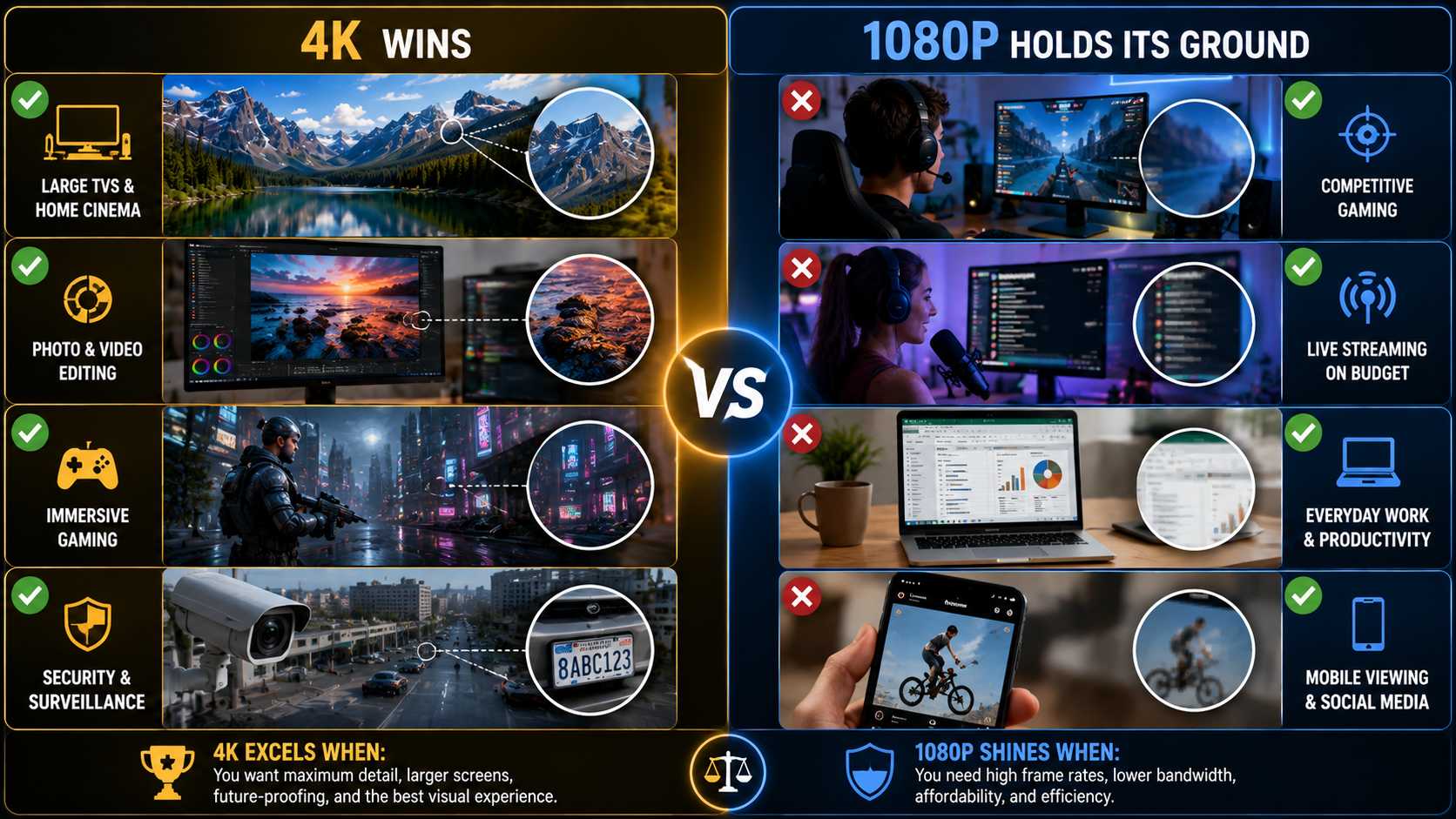
The question of whether 4K resolution is better than 1080p does not have a single answer. The right choice varies by use case. Here is how the comparison breaks down across common scenarios.
TV and Home Entertainment
4K wins clearly for screens 55 inches and above, viewers who sit within 8 feet of the display, and content libraries built on Blu-ray, Netflix 4K, Disney+, or Apple TV+. At this end of the market, 4K TVs now account for over 80% of new unit sales above 43 inches. The price difference over 1080p at that size has largely disappeared.
1080p holds its ground on smaller screens - under 43 inches - and at typical living room viewing distances of 10 feet or more. It also remains the practical choice in households where internet bandwidth makes 4K streaming unreliable. A high-bitrate 1080p stream on a stable connection often outperforms a throttled 4K stream where bandwidth is shared or limited.
Gaming
The 1080p vs 4K resolution question in gaming has a GPU cost attached to it. In 2026, sustaining 60fps at 4K on high settings in demanding titles requires hardware in the RTX 5080 range - MSRP $999, street price around $1,250 for AIB models. Running the same titles at 1080p on high settings is achievable with an RTX 4060 at around $299.
4K makes the most difference in story-driven, open-world, and visually focused titles - the kind where you are absorbing environments rather than reacting to fast-moving targets. Console players on PS5 or Xbox Series X with a 4K TV get a straightforward path to 4K output without the GPU cost question.
Competitive multiplayer is a different calculation. Players in titles like CS2, Valorant, or Apex Legends generally prioritize frame rate over resolution. Most pro and semi-competitive players run 1080p at 240Hz or higher. At those refresh rates, frame timing and responsiveness matter more than pixel count.
1440p is worth naming here as the middle ground most enthusiast PC gamers actually land on. It delivers a visible sharpness improvement over 1080p and can be driven at 144Hz or higher by mid-range hardware in the $350 to $450 range. The RTX 4060 Ti or AMD RX 7700 handle most 2026 titles at 1440p and 60 to 100fps on high settings without the GPU budget that 4K demands.
DLSS and FSR upscaling narrow the gap further. Both systems render internally at a lower resolution and reconstruct output at near-native quality. A 4K display using DLSS Quality mode on an RTX 5080 renders at around 1440p internally. The result approaches native 4K sharpness with lower GPU load.
Streaming and Online Video
For streaming, the difference between 1080p and 4K depends on platform, bitrate, and connection. YouTube supports 4K uploads and applies less destructive compression at 4K bitrates than at 1080p. On a fast connection, 4K YouTube is visibly sharper. Netflix 4K requires the Premium plan and a 25 Mbps recommended connection.
1080p remains the practical choice for live streaming, where encoding overhead and upload bandwidth limits make 4K impractical for most setups. Mobile viewing is another case where screen size makes the 4K advantage difficult to perceive. Older content libraries with no 4K master have no path to true 4K regardless of the display.
Video Production and Content Creation
Shooting in 4K and delivering in 1080p is a workflow that has become standard among creators who want flexibility in post. 4K footage gives room to reframe, crop, stabilize, and punch in without hitting the resolution floor before export. The final 1080p delivery is pixel-for-pixel clean because it is a downscale rather than a stretch.
1080p wins on efficiency. File sizes run approximately four times smaller than equivalent 4K footage at the same codec and bitrate. Preview rendering is faster. Storage and drive costs are lower. For creators shooting long-form content or working on tight hardware, 1080p remains a practical and fully deliverable format for most platforms.
Storage numbers at H.264 and 30fps: one hour of 1080p footage runs approximately 1.2 GB. The same hour in 4K runs approximately 4.8 GB. A full shooting day in 4K at standard bitrates can produce 100 to 300 GB, which requires planning around storage hardware and backup workflow before the first shoot.
Security Cameras
4K security cameras extend the usable range for identifying faces and license plates. More pixels mean tighter digital zoom into recorded footage without hitting the resolution floor before the subject is identifiable. For wide-area coverage where a camera cannot be repositioned, this is a meaningful advantage.
1080p holds for close-range indoor monitoring, doorbell cameras, and setups where storage and bandwidth costs are constrained. 4K camera systems require compatible NVR or DVR hardware and higher network bandwidth for live and recorded feeds. Budget recording hardware designed for 1080p will downsample 4K input, removing the resolution advantage at the point of storage.
What to Do When Your Videos Are Still in 1080p
A 4K display does not automatically improve existing 1080p footage. Older recordings, compressed video files, user-generated content, and archive material shot at 1080p appear upscaled rather than natively sharp on a 4K screen. The display has to fill the gap between 2.1 million source pixels and 8.3 million display pixels somehow. Standard upscaling fills that gap mathematically. The result is bigger but not sharper.
AI video upscaling is a different approach. Instead of averaging surrounding pixels to estimate the missing values, a neural network trained on large matched datasets predicts what the higher-resolution content would actually look like. It reconstructs edges and texture rather than interpolating them.
Standard Upscaling vs. AI Upscaling
Standard upscaling is built into most TVs and media players. The algorithm takes the existing pixel grid, enlarges it to fill the display, and fills gaps by averaging the values of surrounding pixels. This produces a softer result. No new detail is added. The image is larger but the visual information is unchanged.
AI upscaling runs each frame through a trained neural network. The model has seen large volumes of matched low-resolution and high-resolution image pairs. When it encounters a blurry edge or a soft texture in a 1080p frame, it applies learned patterns to reconstruct what that detail would look like at higher resolution. The result is sharper edges, more readable fine detail, and fewer of the halo artifacts that standard interpolation produces around contrast edges.
The practical difference: standard upscaling produces a 4K-sized file that still looks like 1080p. AI upscaling produces a 4K-sized file that holds up at 4K viewing distances on a 4K display. The gap is visible in side-by-side playback, particularly on detail-heavy footage.
Upscaling Your 1080p Video to 4K with AI Video Enhancer
For creators with a library of 1080p footage, archivists working with older recordings, or anyone whose video files were compressed before they reached their current display, AI upscaling closes the gap that pixel-stretching cannot.
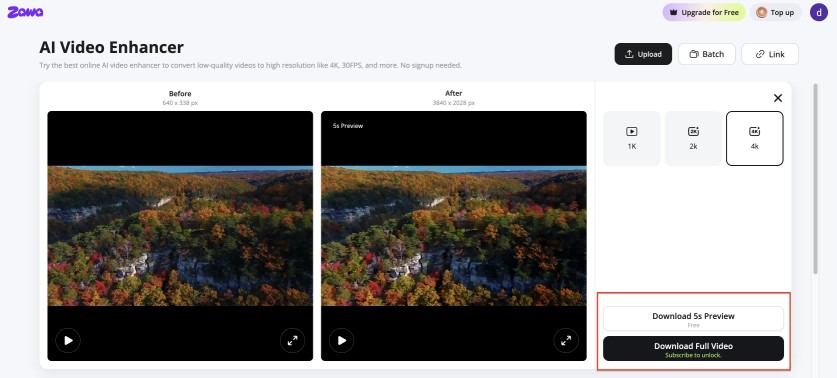
Zawa Video Enhancer handles this at the frame level. It recovers edge sharpness, reduces compression artifacts, and outputs files that hold up at 4K playback. Standard upscaling predicts nothing and recovers nothing. Zawa analyzes frame content and reconstructs detail, which produces a different class of output. After enhancing video quality, Zawa also offers AI-powered tools for video watermark removal and video background removal, allowing users to complete more post-production tasks without switching between multiple platforms.
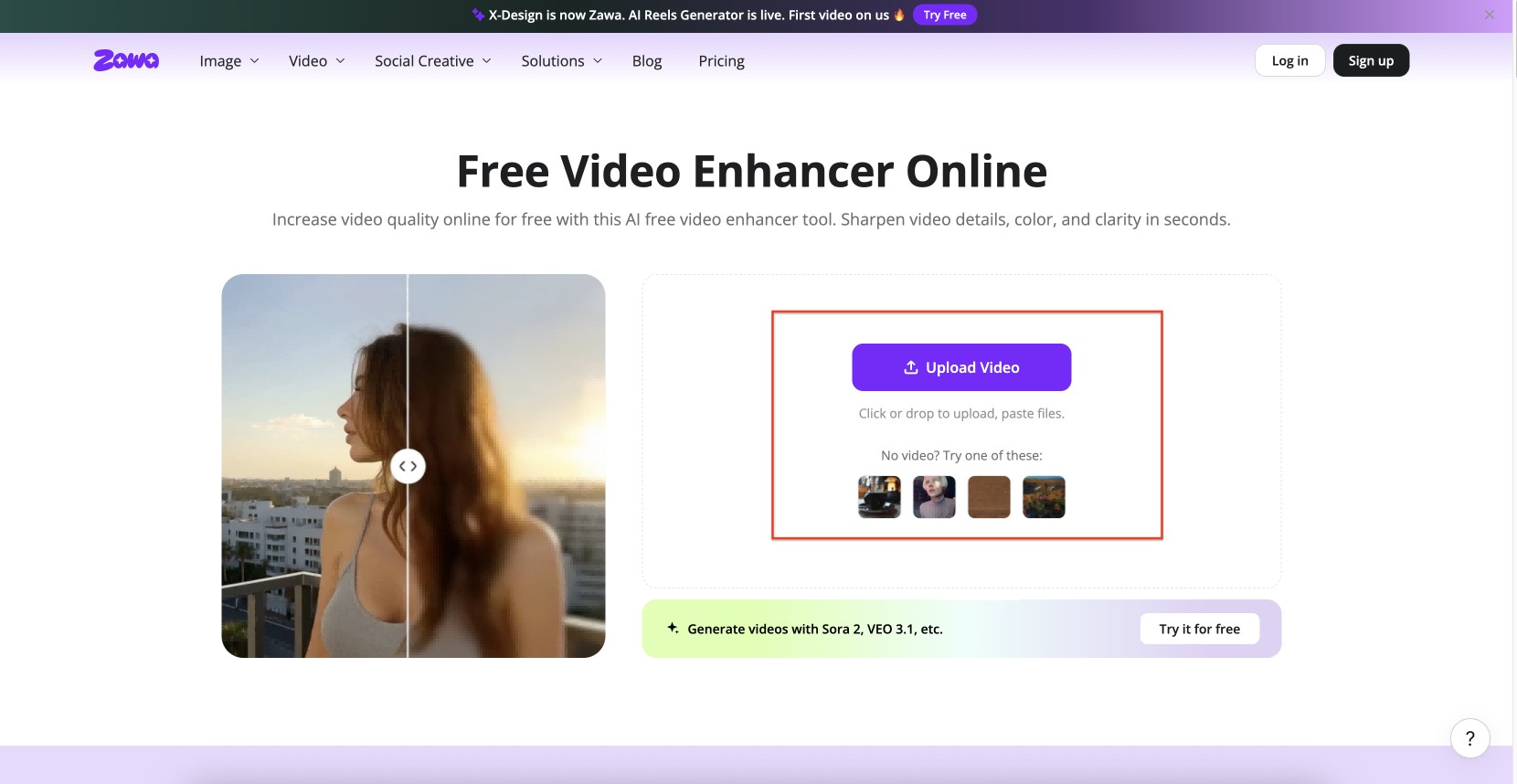
Step 1: Open the tool and upload your 1080p file
Find Video Enhancer in the tool panel at the bottom-right of the Zawa workspace. MP4, M4V, MOV, AVI, and 3PT files all work. . No desktop install is required.
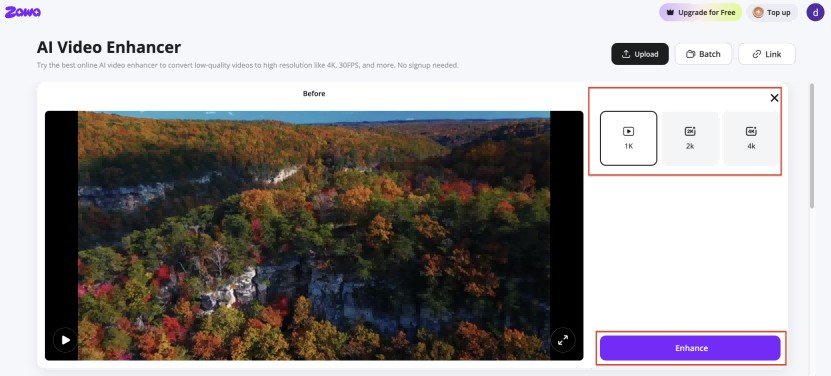
Step 2: Set the target resolution to 4K and run the enhancement
The output panel shows resolution options. Pick 4K resolution and hit Enhance. The tool works through the file frame by frame, rebuilding detail rather than stretching existing pixels.
Step 3: Check the preview and download
A split-view loads when processing finishes. Move through the clip and check sections where detail matters most - hair, text, fabric, or fast-motion edges. Download when the output looks right.
The Hidden Costs of 4K: Bandwidth, Storage, and Equipment
The quality argument for 4K is straightforward. The downstream cost argument is less often discussed. Before committing to a 4K workflow or purchase, the numbers below are worth knowing.
Bandwidth Requirements
Streaming 1080p requires a minimum of 5 Mbps and a recommended 8 to 12 Mbps for consistent quality. Streaming 4K requires 15 to 25 Mbps. Netflix recommends 25 Mbps for 4K HDR content.
On a shared or congested connection, a high-bitrate 1080p stream at 10 to 12 Mbps may deliver cleaner playback than a throttled 4K stream. Resolution only matters if the bitrate is there to support it.
Codec efficiency changes the math. H.265 (HEVC) and AV1 reduce bandwidth requirements significantly compared to H.264. 4K content encoded in H.265 at 15 to 25 Mbps delivers quality comparable to H.264 at 35 to 45 Mbps. Most modern streaming platforms use H.265 or AV1 for 4K delivery.
Storage Costs
One hour of 1080p footage at H.264 and 30fps runs approximately 1.2 GB. The same hour in 4K runs approximately 4.8 GB - four times larger. A 2-hour 4K film averages around 14 GB; the same film in 1080p averages around 3 GB.
For video creators, a full day of 4K shooting at standard bitrates can easily produce 100 to 300 GB. That requires a storage workflow planned before production starts - fast NAS, external drives with headroom for both raw footage and edited exports, and a backup strategy that accounts for the volume.
H.265 reduces file size by 40 to 50% compared to H.264 at equivalent quality. The trade-off is higher CPU and GPU decoding load, which can slow preview performance on older editing hardware.
Equipment Costs
The 4K TV price premium over 1080p has largely disappeared at 43 inches and above in 2026. Below 40 inches, 1080p models remain common and cost-effective.
Gaming GPU cost is where the gap is most concrete. Driving 4K at 60fps on high settings in current titles requires hardware around the RTX 5080, which carries an MSRP of $999 and a street price closer to $1,250 for available AIB models. Running 1080p at high settings on the same games is achievable with an RTX 4060 at around $299. That is a $700 to $900 hardware gap tied directly to the resolution choice.
For content creation, mid-range mirrorless cameras in the $1,500 to $2,500 range now record 4K as standard. Entry-level video cameras and higher-end smartphones also capture 4K from around $500 to $1,000. The camera hardware cost for 4K is lower than it was three years ago. The storage and processing costs remain significant.
Streaming subscription cost is a smaller but real factor. Netflix Standard (1080p) runs $15.49/month; Netflix Premium (4K) runs $22.99/month in the US — a $90/year premium tied directly to the resolution choice. Pricing varies by region.
Conclusion
The difference between 1080p and 4K is real. On a large screen at close viewing distance, with native 4K content and adequate bandwidth, 4K is visibly sharper and carries HDR capability that 1080p displays typically do not match.
The case for 1080p is not that it looks the same. It is that the upgrade conditions for 4K are specific. Screen size, viewing distance, content source, connection speed, GPU budget, and storage capacity all need to align for 4K to deliver on its spec sheet. When they do not align, the pixel count advantage does not show up in the viewing experience.
1440p is worth considering as a practical middle tier, particularly for PC monitor use. It offers a meaningful improvement over 1080p at 27 inches and can be driven at high refresh rates by mid-range hardware without the GPU budget that 4K demands.
For existing 1080p video libraries, the answer is not to accept soft upscaling from a 4K display. AI video upscaling tools recover edge detail and texture that standard interpolation cannot, producing output that holds up at 4K rather than just filling the pixel count.
FAQs
Is 4K resolution better than 1080p?
4K delivers sharper images, more detail, and HDR support that 1080p cannot match on paper. Whether the improvement is visible depends on screen size, viewing distance, and content source. On screens 55 inches and above at close viewing distances with native 4K content, the difference is clear. On smaller screens or at typical room distances with upscaled content, the visible gap is smaller than the spec sheet suggests. When a video has a relatively low resolution but needs to be displayed on a large screen, Zawa Video Enhancer can upscale it to 4K, improving clarity and restoring detail so the content looks sharper and more visually appealing on larger displays.
Can the human eye tell the difference between 1080p and 4K?
Yes, under the right conditions. The key variable is viewing distance relative to screen size. On a 55-inch TV watched from under 6.5 feet, most people can see the difference without a side-by-side comparison. Sitting 10 or more feet from the same screen, the visible advantage of 4K over 1080p shrinks significantly. On a 27-inch monitor at desk distance, the difference is clearly perceptible.
What is the difference between 1080p and 4K in terms of pixels?
1080p is 1,920 x 1,080 = 2,073,600 total pixels. 4K UHD is 3,840 x 2,160 = 8,294,400 total pixels. 4K contains exactly four times the pixel count of 1080p. This is also why 4K is referred to as 2160p in some contexts. The horizontal and vertical dimensions each double, and doubling both directions produces a fourfold increase in total pixel area.
Does 4K use more internet data than 1080p?
Yes, considerably more. Streaming 1080p requires 5 to 12 Mbps depending on quality settings. Streaming 4K requires 15 to 25 Mbps. Netflix recommends 25 Mbps for 4K HDR. On a slower or congested connection, a high-quality 1080p stream often delivers cleaner playback than a throttled 4K stream. H.265 and AV1 codecs help reduce 4K bandwidth requirements compared to H.264.
Is 4K worth it for gaming in 2026?
For visually immersive single-player titles on a large TV, yes - especially on PS5 or Xbox Series X, which handle 4K output without a separate GPU purchase. For PC gaming, 4K at 60fps on high settings in current titles requires an RTX 5080 class GPU at around $999 MSRP. Most competitive multiplayer players stay at 1080p and prioritize frame rate. 1440p at 144Hz remains the most commonly recommended setup for enthusiast PC gaming in 2026.
Is upgrading from 1080p to 4K worth it?
It depends on the screen size, viewing distance, content access, and hardware budget. On a 55-inch or larger TV, with a stable 25 Mbps connection and access to native 4K content, the upgrade is justified. On a smaller screen at longer distances with a limited internet connection, the visible difference is harder to find. For PC gaming, the GPU cost is the main constraint. Upgrading the monitor without the GPU to support it produces an upscaled 1080p image on a 4K panel, which is not the same as native 4K.
You May Be Interested
How to Increase Resolution of Image Without Losing Quality
Veo 4 Could Change AI Video From Clip Generation to Scene Direction

10 Best AI Video Enhancers to Upscale Your Videos

15 Best AI Video Generators in 2025

Sora 2 vs Veo 3: A Head-to-Head Comparison for Video Content