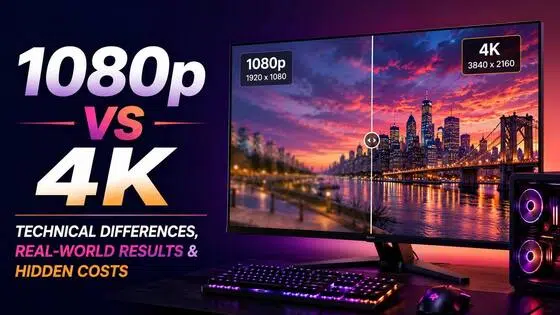
What Is 2K Resolution? Dimensions, Quality, and Real-World Use Cases (2026)
2K is one of the most inconsistently labeled resolutions in consumer tech. This guide explains both definitions - cinema DCI 2K and consumer QHD 2K - compares them to 1080p and 4K, and covers where 2K video quality makes a practical difference.

'2K' is one of the most inconsistently defined terms in display and video technology. It does not point to a single fixed set of pixel dimensions. Depending on the context, 2K resolution refers to either 2,048 x 1,080 pixels in the digital cinema world, or 2,560 x 1,440 pixels in the consumer monitor and security camera market.
That gap matters. The two formats are not interchangeable, and buying a product labeled '2K' without checking the spec sheet can mean getting something quite different from what the label implies. This article explains both definitions, why consumer usage diverged from the original standard, how 2K compares to 1080p and 4K across pixel count, pixel density, storage, and hardware cost, and which use cases benefit most from 2K video quality in 2026.
What Is 2K Resolution? Two Different Standards, One Confusing Label
The label '2K' originated in professional film production and has since been applied to a different set of pixel dimensions in the consumer market. Understanding which definition a product uses requires looking past the label.
Cinema 2K: The Original Standard (DCI 2K: 2,048 x 1,080)
Cinema 2K is defined by the Digital Cinema Initiatives (DCI), the standards body that sets specifications for digital film projection in commercial theaters. The DCI 2K standard is 2,048 x 1,080 pixels, which equals 2,211,840 total pixels per frame.
The name comes directly from the horizontal pixel count. 2,048 is approximately 2,000, so the format was called '2K.' The aspect ratio is approximately 17:9, which is wider than the standard 16:9 used in consumer displays. DCI 2K content is used in professional film production, digital cinema projectors, and high-end broadcast workflows.
Consumer TVs and monitors do not natively display DCI 2K. If DCI 2K content is played on a standard 16:9 consumer screen, the display scales and crops the image to fit its native resolution. Most people who work in consumer video production never encounter true DCI 2K directly.
Consumer 2K: The Common Usage (QHD: 2,560 x 1,440)
The 2K resolution dimensions most buyers encounter on monitor boxes, security camera listings, and consumer video gear are 2,560 x 1,440 pixels, totaling 3,686,400 pixels per frame. This format goes by several names: QHD (Quad HD), 1440p, WQHD, and '2K.' All four refer to the same pixel dimensions.
Consumer 2K video is what virtually every monitor, display, and camera sold as '2K' actually contains. The horizontal pixel count is 2,560, which is higher than the DCI standard, but the '2K' marketing label stuck because the format sits between 1080p and 4K in the product lineup and starts with a '2.'
Some manufacturers have started using '2.5K' to more accurately reflect the 2,560 horizontal pixels. That label is more technically precise, but '2K' remains the dominant consumer term. In practice, when you see '2K' on a consumer product today, the actual 2K resolution dimensions in the spec sheet will almost always be 2,560 x 1,440.
Why the Label Diverged from the Standard
The disconnect between cinema 2K and consumer '2K' follows the same pattern as the 4K label. Consumer 4K is 3,840 x 2,160, while true DCI 4K is 4,096 x 2,160. In both cases, consumer manufacturers adopted a naming convention based on the rough horizontal pixel count without adhering to the cinema standards body definitions.
For practical use, the rule of thumb is this: '2K' in a cinema or broadcast context means 2,048 x 1,080. '2K' on a monitor spec sheet, security camera listing, or consumer video product means 2,560 x 1,440. Always check the actual pixel dimensions rather than relying on the label.
The Comparison Matrix: 2K vs. 1080p vs. 4K
All comparisons below use consumer 2K (2,560 x 1,440 / QHD) as the reference, since this is the format most readers encounter when shopping for monitors, cameras, or video gear. The table covers the key specs side by side.
|
Spec |
1080p (Full HD) |
2K / QHD (Consumer) |
4K UHD |
Notes |
|---|---|---|---|---|
|
Resolution |
1,920 x 1,080 |
2,560 x 1,440 |
3,840 x 2,160 |
All 16:9 aspect ratio |
|
Total Pixels |
2,073,600 |
3,686,400 |
8,294,400 |
2K = 78% more than 1080p |
|
PPI (27-inch) |
82 PPI |
109 PPI |
163 PPI |
At same screen size |
|
Color Depth |
8-bit (16.7M colors) |
8-bit / 10-bit |
10-bit / 12-bit (1.07B+) |
HDR needs 10-bit+ |
|
File Size (1hr H.264) |
~1.2 GB |
~1.8-2.5 GB |
~4.8 GB |
30fps estimate |
|
Streaming BW |
5-12 Mbps |
8-15 Mbps |
15-25 Mbps |
Recommended ranges |
|
GPU for 60fps |
RTX 4060 (~$299) |
RX 9070 / RTX 5070 (~$549-630) |
RTX 5080 (~$999 MSRP) |
2026 mid/high tier |
|
Common Use |
Mainstream, streaming |
Enthusiast monitors, gaming, cameras |
TVs 55in+, pro editing |
/ |
Key Numbers Side-by-Side
1080p Full HD sits at 1,920 x 1,080, giving 2,073,600 pixels per frame at a pixel density of 82 PPI on a 27-inch screen. Consumer 2K QHD at 2,560 x 1,440 produces 3,686,400 pixels, a 78% increase over 1080p, and reaches 109 PPI at the same screen size. 4K UHD at 3,840 x 2,160 delivers 8,294,400 pixels and 163 PPI at 27 inches.
The jump from 1080p to 2K is proportionally larger than the jump from 2K to 4K in terms of what you can see at desk distance. Going from 82 PPI to 109 PPI on a 27-inch monitor is a visible change in text sharpness and fine detail. Going from 109 PPI to 163 PPI is also real, but less immediately noticeable without deliberate comparison, particularly at normal viewing distances.
Visible Difference at Typical Viewing Distances
On a 27-inch monitor at standard desk distance of 60 to 75 centimeters, the step up from 1080p to 2K is clearly visible without a side-by-side comparison. Text edges are sharper, icons are cleaner, and fine image detail holds better. The 2K quality improvement over 1080p at this size and distance is one of the reasons QHD panels dominate the enthusiast monitor market in 2026.
The 2K to 4K step at the same screen size and distance is visible under close inspection but requires deliberate attention to notice during normal use. For desk work and everyday screen use, many people sit in the comfort zone where both resolutions look similar in practice.
On a TV at typical room distance of 8 to 12 feet, 2K offers less advantage over 1080p than at a desk monitor. At that angular distance on a 55-inch or larger screen, most viewers are past the visual acuity threshold where the resolution difference is clearly perceptible without moving closer to the screen.
Storage and Bandwidth
2K video resolution at 30fps encoded in H.264 runs approximately 1.8 to 2.5 GB per hour, which is roughly 1.5 to 2 times the file size of equivalent 1080p footage. 4K at the same settings runs approximately 4.8 GB per hour, which is 2 to 2.5 times larger than 2K footage.
Streaming 2K content requires approximately 8 to 15 Mbps, sitting between 1080p (5 to 12 Mbps) and 4K (15 to 25 Mbps). For most home internet connections in 2026, 2K streaming bandwidth is manageable. 4K streaming becomes the constraint on congested or slower connections.
Why 2K Video Quality Matters: Key Application Scenarios
2K quality video makes a practical difference in specific contexts. The scenarios below cover where the resolution upgrade from 1080p is measurable and where the step to 4K may or may not be worth the added cost.
PC Monitors and Productivity
Consumer 2K (QHD) is the most common enthusiast monitor resolution sold in 2026. At 27 inches and 109 PPI, it produces noticeably sharper text than a 1080p panel at the same size. The difference is not subtle for desk work. Extended reading, coding, spreadsheet navigation, and detailed design work all become visibly more comfortable at 109 PPI than at 82 PPI.
The workspace benefit compounds the sharpness gain. A 2K display at 27 inches shows more content on screen at once than a 1080p panel, without requiring reduced font sizes to achieve it. Code editors show more lines. Video timelines show more of the clip. Multi-window workflows have more room to breathe. These are everyday usability gains, not just pixel count wins.
The price-to-value ratio reinforces 2K's position. A 27-inch QHD IPS monitor with 144Hz refresh runs $250 to $400 in 2026. A comparable 4K panel costs more and requires a more expensive GPU to drive it. For productivity-focused buyers, 2K is the rational choice at this screen size.
Gaming
2K at 144Hz is the most commonly recommended PC gaming setup in 2026. It delivers a sharp image improvement over 1080p while remaining achievable on mid-range GPU hardware without the premium that 4K gaming demands.
For 2K gaming at 60fps in 2026 titles on high settings, the AMD RX 9070 or NVIDIA RTX 5070 are the practical reference points. Both carry an MSRP of $549, with the RTX 5070 currently available at around $630 street price. For sustained 2K gaming at 144Hz in demanding titles, the RX 9070 XT ($599 MSRP, around $700 street) or RTX 5070 Ti ($749 MSRP, around $880 to $1,000 street) are the step up. These figures replace the RTX 3060 Ti and RX 6700 XT referenced in older content; both of those are previous-generation cards that are no longer the relevant 2026 benchmark for this tier.
NVIDIA DLSS 4 and AMD FSR 4 extend mid-range GPU performance further. Both upscaling systems render the game internally at a lower resolution and reconstruct output at near-native 2K quality. On an RX 9070 using FSR 4 Quality mode, internal rendering drops to around 1080p while the output approaches 2K sharpness. GPU load drops meaningfully, and frame rates climb without a proportional drop in visual quality.
For competitive multiplayer, 1080p at 240Hz or higher remains the setup most pro and high-ranked players use. At those refresh rates, frame timing and responsiveness matter more than pixel count. 2K at 144Hz suits players who want both visual quality and smooth gameplay without going all the way to the frame rate extremes.
Video Production and Content Creation
Recording in 2K and delivering in 1080p is a workflow that gives creators room to work in post without resolution loss. Cropping, zooming in on a subject, stabilizing shaky handheld footage, or reframing a shot all consume resolution. Starting at 2K and exporting at 1080p keeps the final output pixel-for-pixel clean rather than relying on upscaling.
YouTube treats 1440p as a distinct quality tier. The platform labels it '1440p HD' and applies less destructive compression than it applies at 1080p. Creators who upload at 1440p get noticeably sharper playback on desktop for viewers watching at full quality. For channels where visual sharpness matters, recording and uploading in 2K video resolution produces a better result than 1080p at YouTube's compression settings.
File size is manageable compared to 4K. A full day of 2K shooting at 30fps runs roughly 40 to 80 GB, which most editing setups can handle without dedicated NAS infrastructure. The same day at 4K can produce 100 to 300 GB, which requires more deliberate storage planning.
Security Cameras
Security cameras marketed as 2K QHD (2,560 x 1,440) are common in residential and small business installations. The resolution improvement over 1080p matters specifically for digital zoom. Post-event review often involves zooming into recorded footage to identify a face, reading a license plate, or confirming a detail at the edge of the frame. 2K resolution holds more detail before hitting the pixel floor.
2K security cameras are widely available in the $80 to $200 range and pair with standard NVR and DVR hardware that supports 1440p feeds. The bandwidth and storage overhead compared to 1080p cameras is moderate. This makes 2K quality video a practical upgrade for residential coverage where 4K camera costs and storage requirements are excessive.
Systems running 2K cameras require network infrastructure that supports the higher bitrate streams for both live viewing and recording. Budget recorders rated for 1080p may downsample the input to fit their limitations, removing the resolution advantage at the point of storage.
Drones and Action Cameras
Consumer drones and action cameras frequently offer 2.7K recordings (2,720 x 1,530), a format that sits within the broader 2K family. GoPro and DJI both include 2.7K modes across their current lineups as a middle option between 1080p and 4K.
2.7K footage gives useful digital zoom headroom when the export target is 1080p. A creator shooting aerial footage at 2.7K can reframe and crop in post without the export dropping below 1080p quality. For long-duration flights where battery life determines recording time, 2.7K produces smaller files than 4K while preserving most of the practical post-production flexibility.
Is 2K the Right Choice for You?
The answer depends on screen size, use case, GPU budget, and whether 4K's added cost clears the bar for the specific setup. Here is a direct breakdown by scenario.
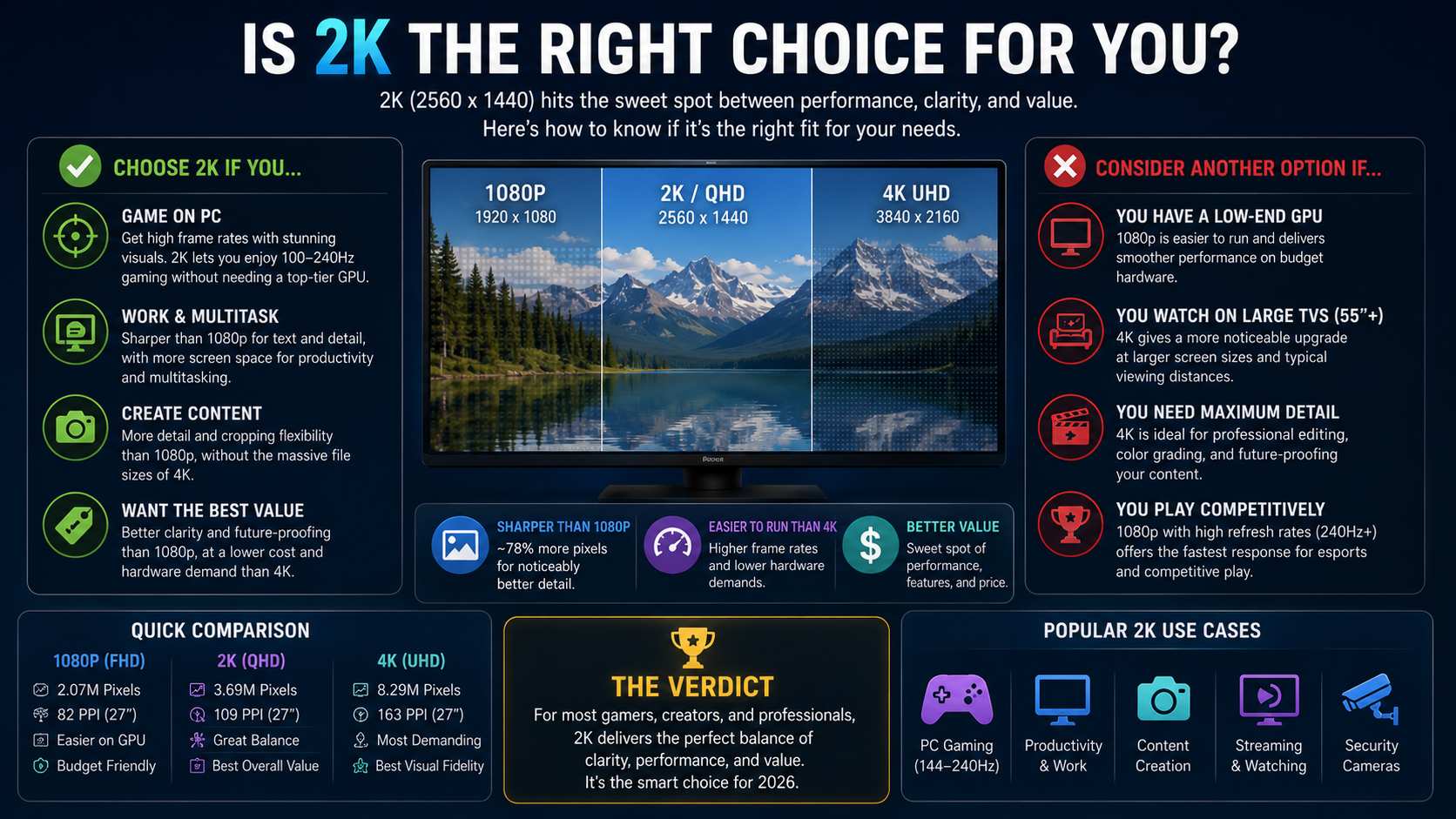
Choose 2K if:
You are buying a PC monitor primarily for productivity, gaming, or content creation at 27 to 32 inches. At 27 inches, 2K hits 109 PPI, which is the sharpest you can get without moving to 4K. At 32 inches, 2K drops to around 92 PPI; some buyers find this sufficient, while others prefer 4K at that size for comparable density.
You want high-refresh-rate gaming (144Hz and above) on a mid-range GPU. Sustained 144Hz at 2K is achievable on the RX 9070 or RTX 5070 class hardware at around $549 MSRP. The same frame rates at 4K require an RTX 5080 at $999 MSRP and up.
You record video for 1080p delivery and want post-production reframing room. 2K recording to 1080p export is the most cost-efficient workflow for this use case.
You are upgrading a security camera system. 2K cameras offer meaningful image quality improvements over 1080p at storage and bandwidth costs that are manageable for residential and small business deployments.
Consider 4K instead if:
You are buying a TV at 55 inches or above. 4K is the default in this size range in 2026, and the price premium over 1080p has largely disappeared. There is no practical reason to buy a 1080p or 2K TV at 55 inches in 2026.
You want the maximum image quality for professional photo editing, color grading, or video production without hardware constraints. At desk distance on a 27-inch monitor, 4K's 163 PPI approaches print-quality sharpness.
You have a GPU in the RTX 5070 Ti range or above and want to maximize visual fidelity in single-player or cinematic games without a frame rate trade-off. With DLSS 4 on an RTX 5070 Ti ($749 MSRP, ~$880 to $1,000 street), 4K gaming becomes more manageable through AI upscaling.
1080p still makes sense if:
You are a competitive multiplayer gamer prioritizing frame rate above everything else. 1080p at 240Hz or higher keeps GPU resources pointed at frame rate rather than pixel count. Most high-level CS2, Valorant, and Apex Legends players are at 1080p for this reason.
You are on a tight hardware or storage budget where the added cost of 2K file sizes and a faster GPU is not practical. The RTX 4060 at around $299 handles 1080p on high settings in current titles. Stepping to 2K adds GPU cost on top.
The display is under 24 inches at normal viewing distance. At smaller screen sizes and typical desk distances, 1080p and 2K are harder to distinguish during normal use. The pixel density gap is real but the visual payoff is smaller.
Elevate Your Content: How to Enhance Videos to 2K Resolution and Beyond
Existing video shot or archived in 1080p or lower does not automatically look better when played on a 2K display. The display has to stretch each source pixel across more screen pixels than it was designed for. Standard upscaling fills that gap using mathematical averaging of neighboring pixels. The result is a larger image that does not recover any detail the original file did not contain.
For content creators, video archivists, or anyone with a 1080p library who wants 2K or 4K output quality, AI video upscaling takes a different approach. Zawa Video Enhancer analyzes each frame and reconstructs detail at the higher resolution — free to try with new-user credits, no software install required. The output recovers edge sharpness, reduces compression artifacts from the original file, and produces 2K video resolution files that hold up at actual 2K playback.
Step-by-Step: Using Zawa AI Video Enhancer
Step 1: Open the tool and upload your video file
Find Video Enhancer in the tool panel at the bottom-right of the Zawa workspace. MP4, M4V, MOV, AVI, and 3PT files all work. The file uploads directly to the editor with no software install required.
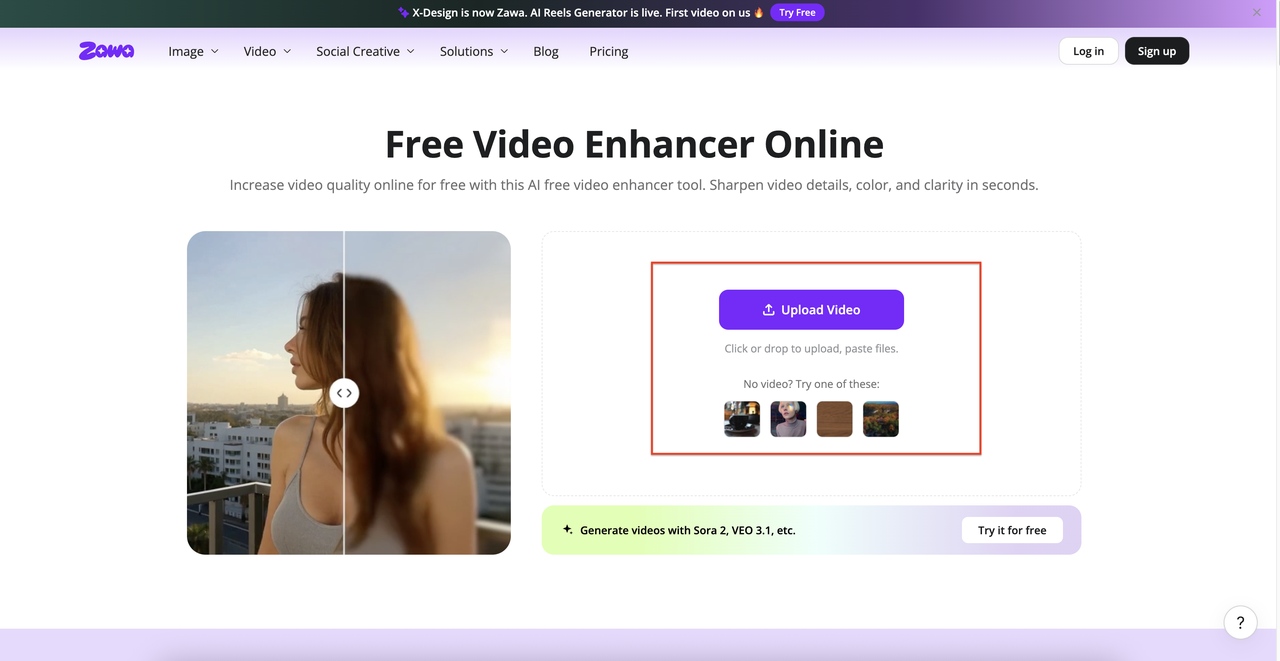
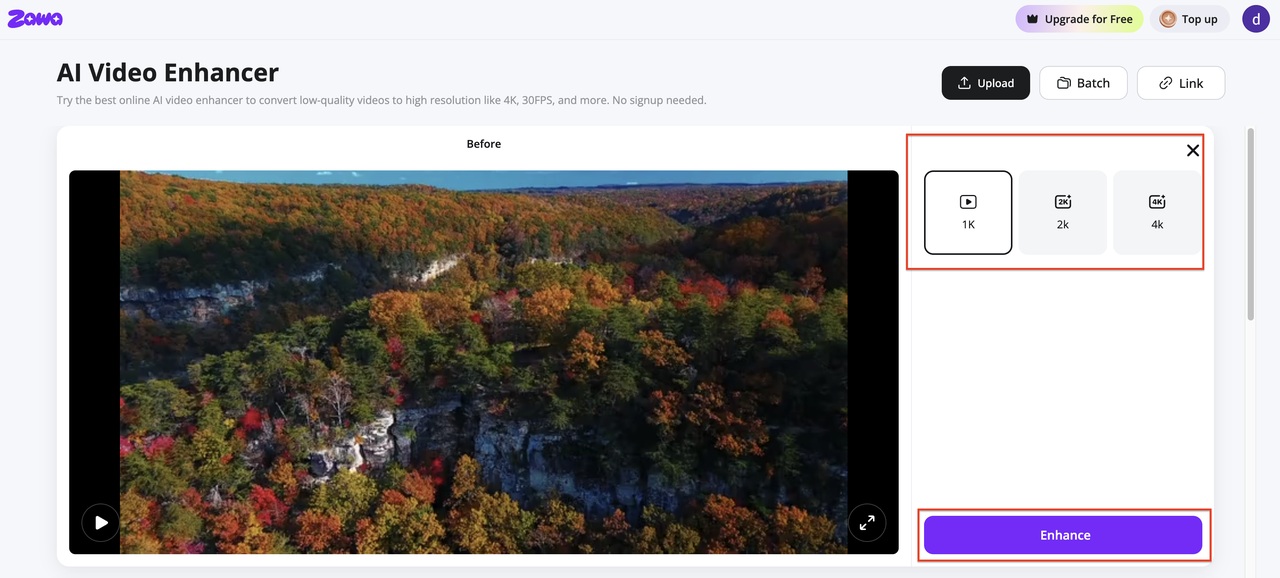
Step 2: Select your target resolution and run the enhancement
The output panel shows 2K and 4K as resolution options. Pick the target that fits your delivery format. Hit Enhance. The tool processes the video frame by frame, rebuilding detail rather than stretching existing pixels. Progress updates as processing runs.
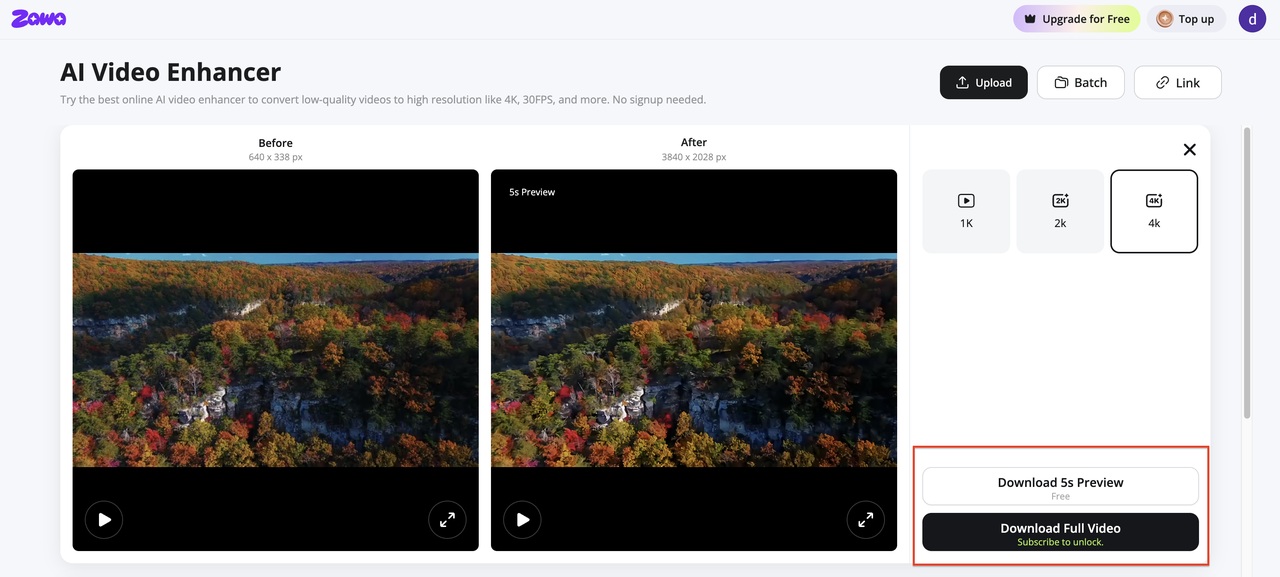
Step 3: Check the preview and download the enhanced file
A split-view comparison loads when processing finishes. Scrub through the clip and check detail in high-texture sections like edges, and text overlays etc.. When the output looks right, download the file in your chosen format.
Beyond video enhancement, Zawa is an all-in-one AI video creation platform. Simply upload a product image to generate high-converting marketing videos or ready-to-post social media content, streamlining the entire workflow from content creation to publishing.
Conclusion
2K resolution is not a single fixed standard. In cinema contexts, it means 2,048 x 1,080. In every consumer context, from monitors and security cameras to drones and action cameras, it means 2,560 x 1,440. Always check the actual pixel dimensions on the spec sheet.
As a consumer format, 2K QHD sits in a practical position. It offers a 78% pixel count increase over 1080p, which is visible at desk distance on a 27-inch monitor. It costs significantly less to drive than 4K, both in GPU hardware and storage. For monitors, gaming, security cameras, and video production workflows that deliver to 1080p, 2K is a meaningful upgrade that does not require top-tier hardware to justify.
4K makes more sense for large-screen TVs, professional editing environments, and high-end gaming builds with the GPU budget to support it. 1080p remains appropriate for competitive gaming at very high refresh rates and for budget-constrained setups. The right choice depends on where the content will be viewed, how it will be produced, and what the surrounding hardware can support.
FAQs
What are the dimensions of 2K resolution?
It depends on the context. Cinema 2K (DCI standard): 2,048 x 1,080 pixels. Consumer 2K (QHD): 2,560 x 1,440 pixels. The DCI standard is used in digital film projection and professional broadcast production. The consumer standard is used in monitors, security cameras, and video gear sold to general buyers. Always check the spec sheet for actual pixel dimensions rather than relying on the label.
Is 2K the same as 1440p?
In consumer electronics, yes. '2K' and '1440p' are used interchangeably for 2,560 x 1,440 displays. Technically, the original 2K standard refers to the DCI cinema format at 2,048 x 1,080. The consumer use of '2K' for 1440p is a marketing convention driven by the fact that 2,560 horizontal pixels roughly approximates '2,000 pixels.' It is not a standardized specification, but it is the definition you will encounter on virtually every consumer product box.
Is 2K video quality better than 1080p?
Yes, for most use cases at desk distance or close viewing. 2K QHD (2,560 x 1,440) has 78% more pixels than 1080p, producing noticeably sharper text and image detail at typical monitor distances. On a 27-inch screen, pixel density increases from 82 PPI to 109 PPI, a visible improvement in sharpness during everyday use. The difference is less clear on larger screens at longer viewing distances, where the angular resolution falls below the threshold where most viewers can distinguish the two.
Is 2K worth it over 4K?
For most monitor and gaming use cases at 27 inches, 2K delivers the better value. It costs less to drive, requires a less expensive GPU, produces smaller video files, and still provides a clear visual improvement over 1080p. 4K makes more practical sense on TVs 55 inches and above, for professional color and photo editing at desk distance, and for gaming builds with high-end GPU hardware. The upgrade from 2K to 4K is real but costs significantly more to achieve across display, GPU, and storage.
Is 2K resolution good for gaming in 2026?
Yes. 2K at 144Hz is the most widely recommended PC gaming setup in 2026 across enthusiast communities and hardware review publications. It delivers a clear visual upgrade over 1080p while remaining achievable on mid-range GPUs like the RX 9070 or RTX 5070, both at $549 MSRP. High-refresh-rate 2K monitors are widely available in the $250 to $450 range. For competitive multiplayer at 240Hz and above, 1080p is still the preferred setup to maximize frame rates. For everything else, 2K at 144Hz is the practical sweet spot.
You May Be Interested

How to Increase Resolution of Image Without Losing Quality

Veo 4 Could Change AI Video From Clip Generation to Scene Direction

10 Best AI Video Enhancers to Upscale Your Videos

15 Best AI Video Generators in 2025

Sora 2 vs Veo 3: A Head-to-Head Comparison for Video Content
What Is 1440p Resolution? QHD Explained (2026)