
10 Best Remove.bg Alternatives Tested & Ranked (2026)
Remove.bg is fast and accurate, but its credit-based pricing and lack of batch processing push many users toward alternatives. This guide reviews Remove.bg honestly, then ranks the 10 best tools by use case, with a head-to-head comparison table.


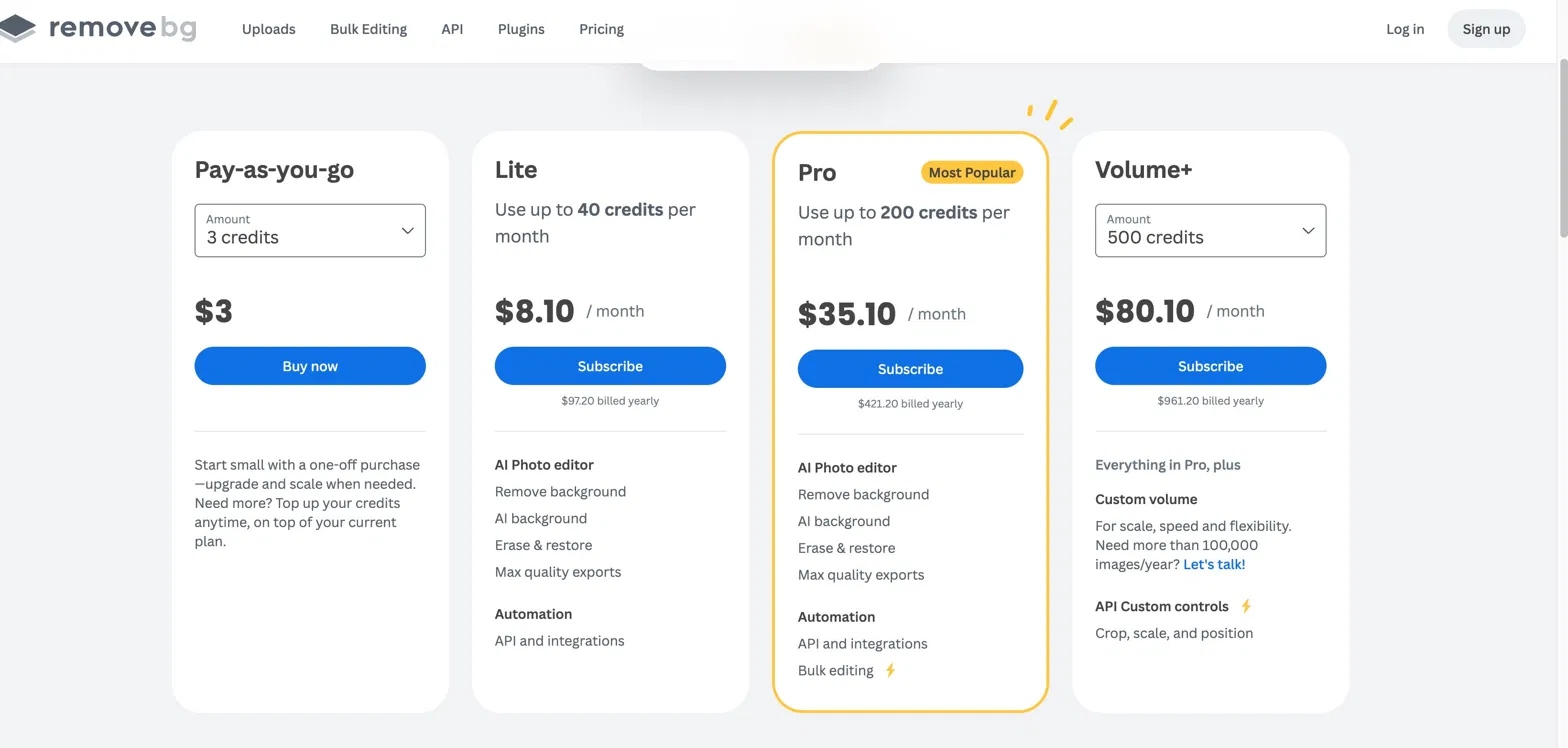
Remove.bg processes over 3 million images daily. For simple product shots and clean portraits, it delivers fast, accurate results. The issue is cost. Pay-as-you-go is $3 for 3 credits, roughly $1 per image. The Lite plan gives you 40 credits per month for $8.10. If you are removing backgrounds from more than a handful of images a week, those numbers escalate quickly.
There is also no online batch processing. The browser version handles one image at a time. Batch removal requires either the desktop app or an API integration, both of which add setup friction that most casual users would rather avoid.
This guide covers what Remove.bg genuinely does well, where it falls short, and 10 background removal tools that handle those gaps better, matched to specific use cases so you can find the right one without trying all of them.
Remove.bg: What It Does Well and Where It Falls Short
Remove.bg is not a bad tool. It is fast, accurate on the right image types, and accessible across web, API, desktop, and plugin. Understanding exactly where it works and where it does not is more useful than dismissing it or overpraising it.
What Remove.bg Gets Right
-
Speed: automated background removal in approximately 5 seconds per image
-
Accuracy: strong on people, clean product shots, and images with clear foreground/background contrast
-
Broad access: web interface, API, desktop app, Photoshop plugin, Zapier and Make connectors
-
Output: transparent PNG by default; background replacement with white or custom options supported
-
Bulk editing available via API and desktop app
Limitations That Push Users Toward Alternatives
-
Pricing: no unlimited plan. Lite starts at $8.10/month for 40 credits; pay-as-you-go is $1 per image at the entry tier
-
Credit model: the limited access option (1 preview-quality image per month for unregistered users) is not practical for any regular workflow
-
Complex edges: wispy hair, pet fur, semi-transparent fabric, and fine lace produce inconsistent results
-
No post-processing tools: no built-in design interface, background templates, or further editing after removal
-
Privacy: images are processed on remote servers, which may be a concern for sensitive commercial or personal content
-
No manual correction: if the AI makes an error, there is no brush or eraser to fix it within the same platform
-
No online batch processing: the browser version handles one image at a time
How We Ranked These Alternatives: Our Criteria
To keep this list honest, the tools below were evaluated across six specific criteria rather than general impressions. Each was tested hands-on and cross-referenced against real user reviews from independent platforms.
-
Edge accuracy: performance on hair, fur, transparent fabric, and complex backgrounds
-
Pricing value: cost per image relative to output quality; whether a usable access tier genuinely exists
-
Batch processing: ability to handle multiple images simultaneously without manual intervention
-
Post-removal tools: background replacement, design templates, image enhancement built in
-
Ease of use: learning curve for non-technical users
-
Privacy: whether processing happens locally or on a remote server
The ranking reflects overall performance across these criteria, not any single factor. Use cases are noted for each tool so you can skip straight to the ones relevant to your workflow.
The 10 Best Remove.bg Alternatives in 2026
Remove.bg works well for simple jobs, but it is not the right fit for every workflow. The tools below cover the gaps: better edge accuracy, lower cost at volume, batch processing without a desktop app, and options that keep your images off remote servers entirely. Each entry is matched to a specific use case so you can find the one that fits your situation without reading through tools that do not apply.
1. Adobe Express
Best for: Content creators and small businesses who need background removal as part of a broader design workflow.
Adobe Express integrates background removal directly into a full design suite. You remove the background and immediately start building the rest of the asset in the same tool: add text, place the cutout on a template, resize for different platforms, and export. Brand Kit saves your logo, fonts, and colors so every asset stays consistent. The template library covers Instagram Stories, YouTube thumbnails, and social ad formats.
Key features
-
One-click background removal inside the design editor
-
Brand Kit for consistent asset output across campaigns
-
Layer support: combine multiple cutouts in one design
-
Direct integration with Photoshop and Lightroom
Pros & Cons
-
Pros: all-in-one design + removal; professional templates
-
Cons: requires Adobe account; batch editing locked behind paid plans
Pricing:
-
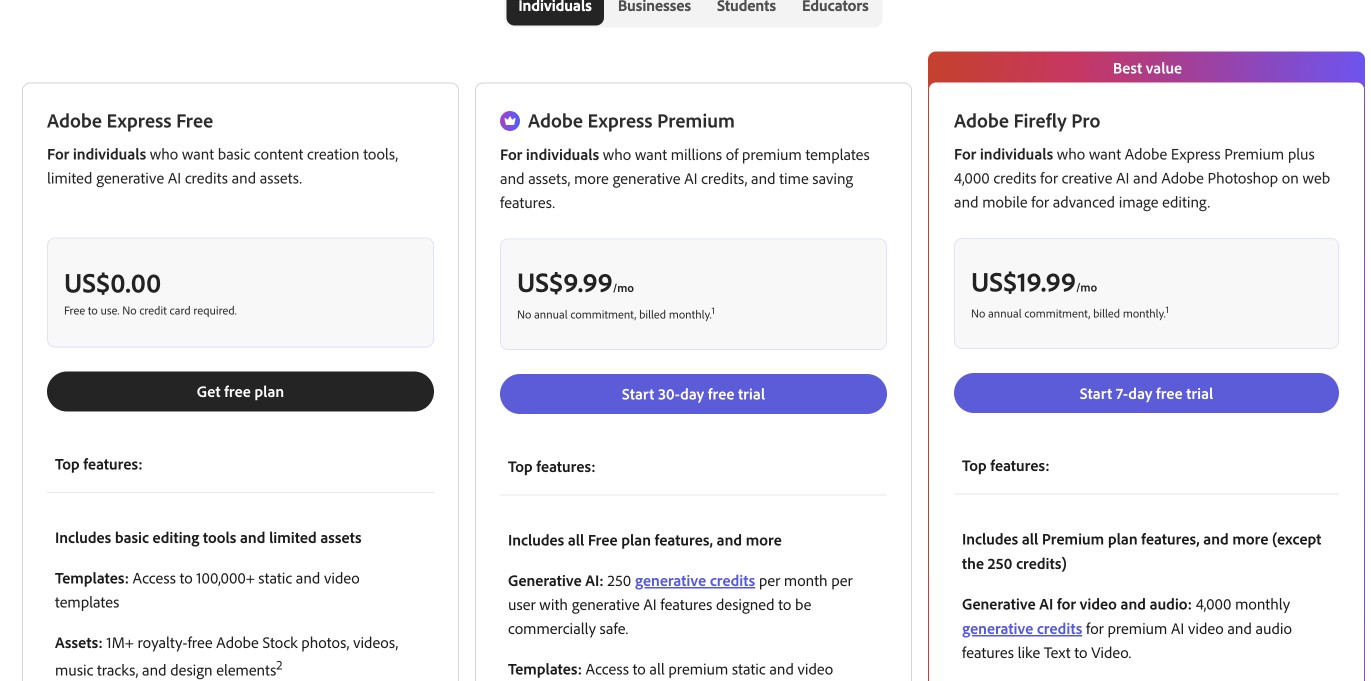
Plan available at $0/month with limited assets. Adobe Express Premium at $9.99/month; Adobe Firefly Pro at $19.99/month with advanced AI credits.
2. Photoroom
Best for: e-commerce sellers who need product photo backgrounds replaced at scale.
Photoroom is purpose-built for product photography. It removes the background and immediately lets you swap in a white studio backdrop, a lifestyle scene, or an AI-generated environment. Product photography templates are pre-sized for Amazon, Etsy, and Shopify listings. Batch processing handles multiple product images simultaneously, which makes it practical for sellers with large catalogs.
Key features
-
AI background removal with instant replacement options
-
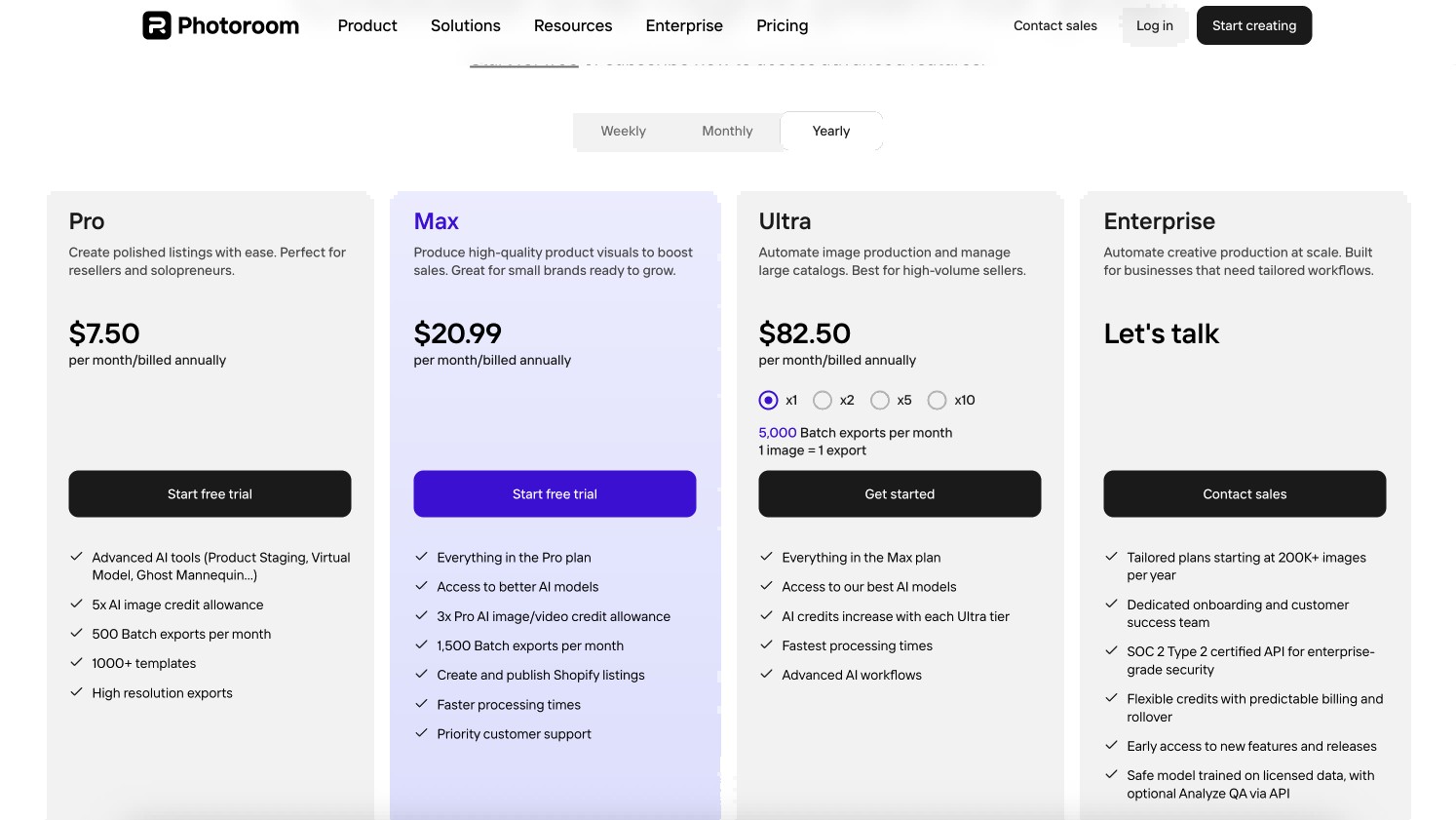
Batch processing: up to 1,500 exports per month on Max plan
-
Mobile app on iOS and Android alongside the web version
-
Product templates optimized for major e-commerce platforms
Pros & Cons
-
Pros: Purpose-built for e-commerce with templates pre-sized for Amazon, Etsy, and Shopify; batch processing handles up to 1,500 exports per month on the Max plan; available as a mobile app on iOS and Android
-
Cons: AI-generated background scenes vary noticeably in quality; advanced tools require a paid plan even for basic product work
Pricing:
-
Pro at $7.50/month billed annually. Max at $20.99/month. Ultra at $82.50/month with 5,000 batch exports.
3. Canva Background Remover
Best for: non-designers who need background removal inside an existing content creation workflow.
If you already use Canva, the Background Remover is the most convenient option on this list because you never leave the tool. Remove the background and continue building your design, swapping in a new background from Canva's library or using the cutout in a social media template. The Erase and Restore brush lets you fix any edge issues manually.
Key features
-
Built into Canva's editor; available on Canva Pro
-
Instant removal with manual Erase and Restore correction tools
-
Access to Canva's full template and design library after removal
Pros & Cons
-
Pros: No tool switching needed if you already use Canva for design work; Erase and Restore brush lets you fix edge errors manually inside the same editor; the full Canva template library is immediately available after removal.
-
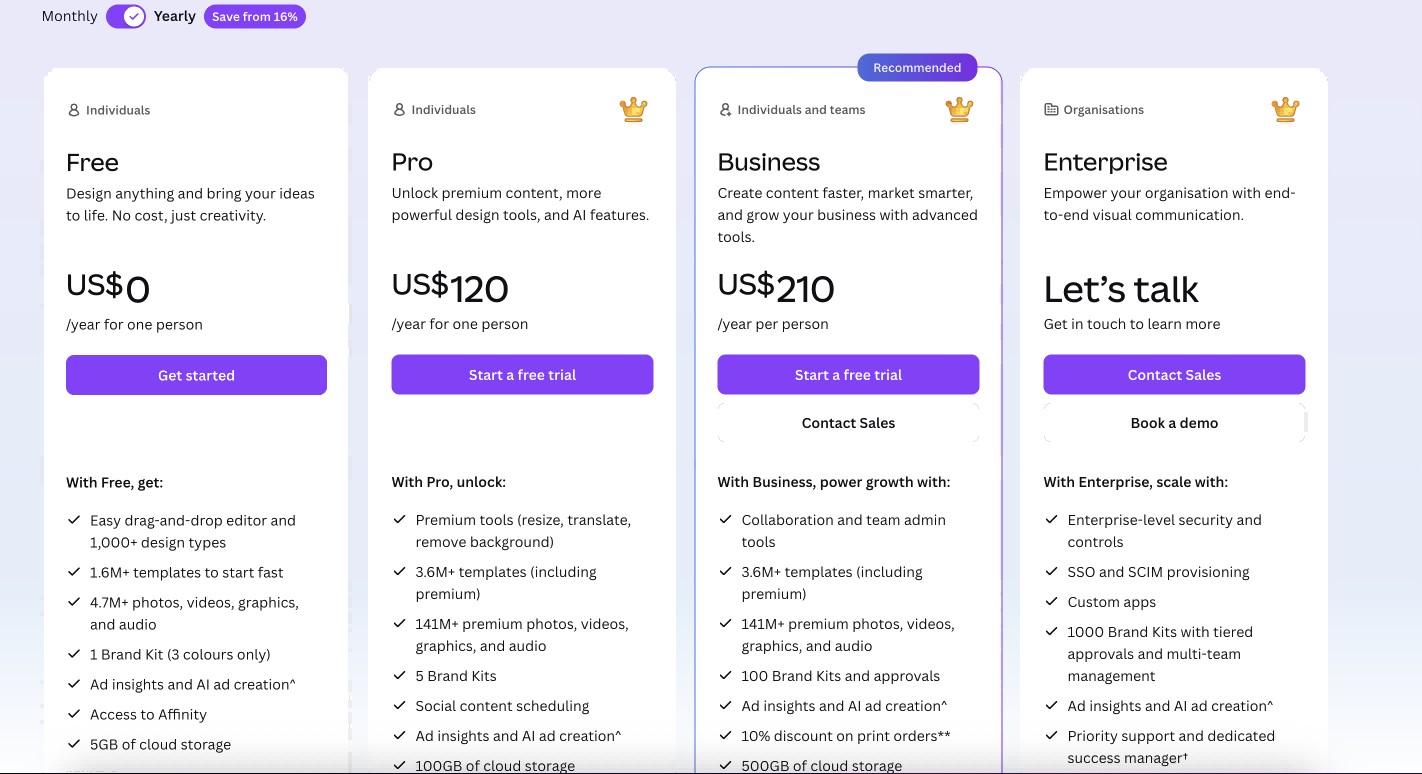
Cons: Requires a Canva Pro subscription at $15/month; not available on the plan at all.
Pricing:
-
Canva Pro at $120/year ($10/month) or $15/month billed monthly. Business at $210/year per person.
4. Zawa AI Background Remover
Best for: users who need background removal alongside other editing tasks (object removal, watermark removal) in one browser-based workflow.
Zawa is the only tool on this list that combines background removal, object removal, and watermark removal in a single browser session. If you regularly need to do more than just cut out a background, that multi-function workflow saves meaningful time. The Quick Start auto-detection mode handles removal in one click.
Key features
-
Browser-based; no installation required; works on any device.
-
Quick Start auto-detection for one-click removal.
-
Combines background removal with object removal and watermark removal.
-
Outputs clean transparent PNG.
Pros & Cons
-
Pros: Handles background removal, object removal, and watermark removal in a single browser session without switching tools; online batch processing available without a desktop app; manual brush and selective cutout tools give precise edge control.
-
Cons: Requires an internet connection for processing; plan has daily usage limits.
Pricing:
-
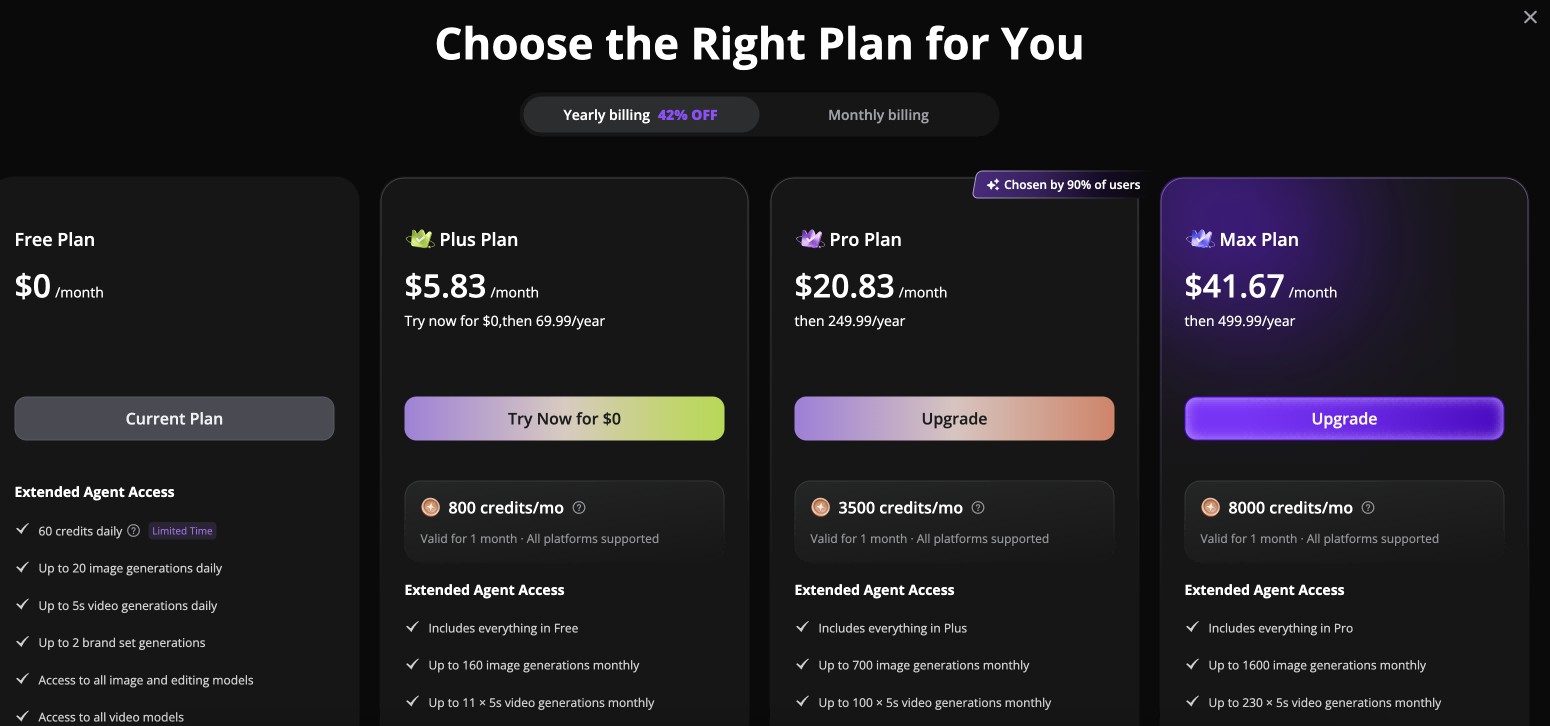
Plan at $0/month with daily limits. Plus at $5.83/month billed annually. Pro at $20.83/month. Max at $41.67/month
5. Aiarty Image Matting
Best for: photographers and e-commerce sellers who prioritize edge precision and data privacy.
Aiarty runs locally on your computer. No image data is sent to a server. For studios or businesses handling sensitive commercial content, this matters. The specialized AI models handle the edge cases that most cloud tools miss: pet fur, flyaway hair, semi-transparent lace, and fine fabric weave. Manual edge refinement tools let you correct the AI output with the same precision as a dedicated masking application.
Key features
-
Desktop app for Windows and Mac; all processing is local.
-
Specialized AI models for complex edges: fur, hair, lace, transparent fabric.
-
Manual edge refinement for fine-tuning AI output.
-
Batch processing of up to 3,000 images simultaneously.
-
Built-in 2x Super Resolution upscaling.
Pros & Cons
-
Pros: All processing happens locally with no image data sent to a server; specialized AI models handle the edge cases most cloud tools miss, including pet fur, flyaway hair, and semi-transparent fabric; batch processing of up to 3,000 images simultaneously.
-
Cons: Desktop installation required; not accessible via browser.
Pricing:
-
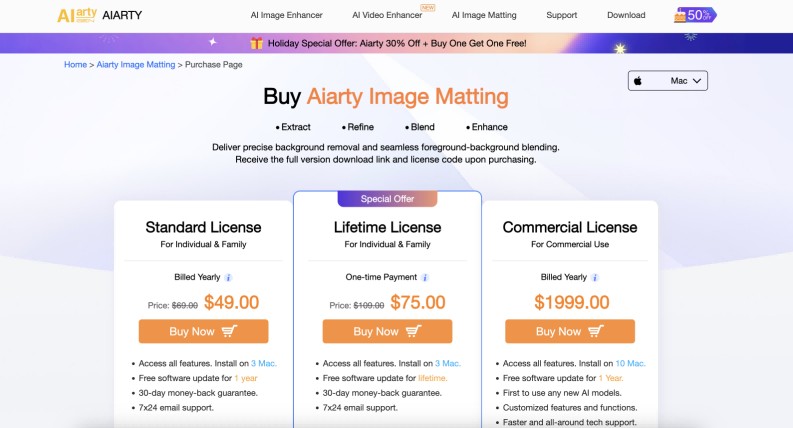
Standard License at $49/year. Lifetime License at $75 one-time payment. Commercial License at $1,999/year.
6. Clipdrop
Best for: users who want fast, API-powered background removal with a clean browser interface and integration options.
Clipdrop, now part of Stability AI, offers background removal alongside a suite of AI image tools including image upscaling, relighting, and text removal. The background removal is clean on standard subjects and integrates directly via API into existing workflows. It is a practical option for developers or teams who want background removal as part of a broader AI image pipeline rather than a standalone tool.
Key features
-
Background removal alongside relighting, upscaling, and text removal in one suite.
-
API access for integration into existing image workflows.
-
Web-based interface; no desktop install required.
Pros & Cons
-
Pros: Background removal sits alongside relighting, upscaling, and text removal in one suite; clean API makes it straightforward to integrate into existing developer workflows; no desktop install required.
-
Cons: Less specialized on complex edges like hair and fur compared to dedicated removal tools; API dependency makes it less suitable for non-technical users.
Pricing:
-
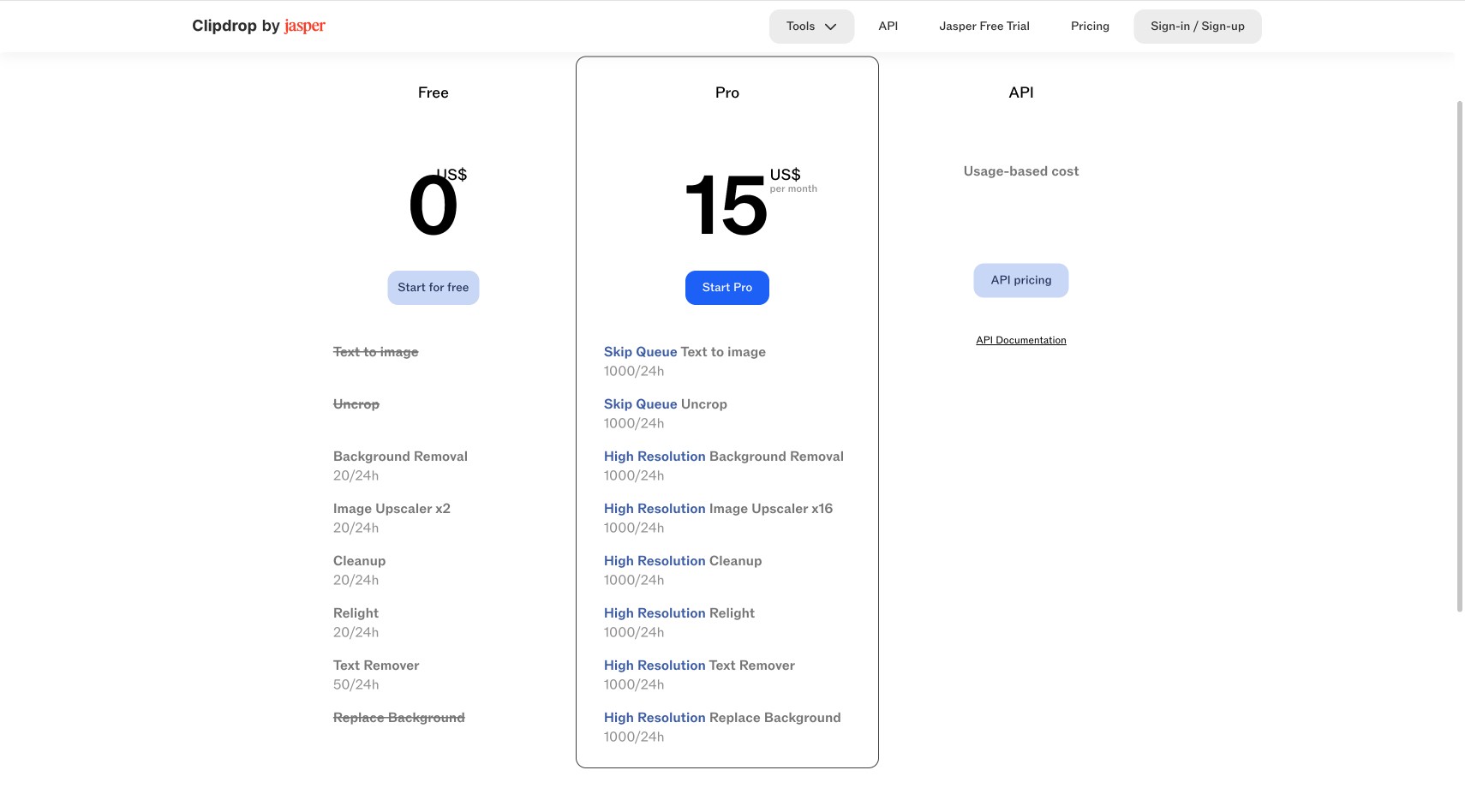
Plan available with limited credits. Paid plans from $15/month
7. Erase.bg
Best for: quick one-off background removal with no account or software required.
Erase.bg is the lowest-friction option on this list. Upload an image, get the result, download it. No account needed for standard downloads. This makes it the right choice when you have a one-off image to clean up and do not want to create yet another account. It supports HD to 5K resolution images and import from URL as well as local file.
Key features
-
No signup required for standard downloads.
-
Supports local file upload and URL import.
-
Handles HD to 5K resolution images.
-
Account required only for original-resolution downloads.
Pros & Cons
-
Pros: No account required for standard downloads; works in mobile browsers with no install; no watermarks added to downloaded images.
-
Cons: No manual editing tools to fix edges after removal; original resolution download requires account registration.
Pricing:
-
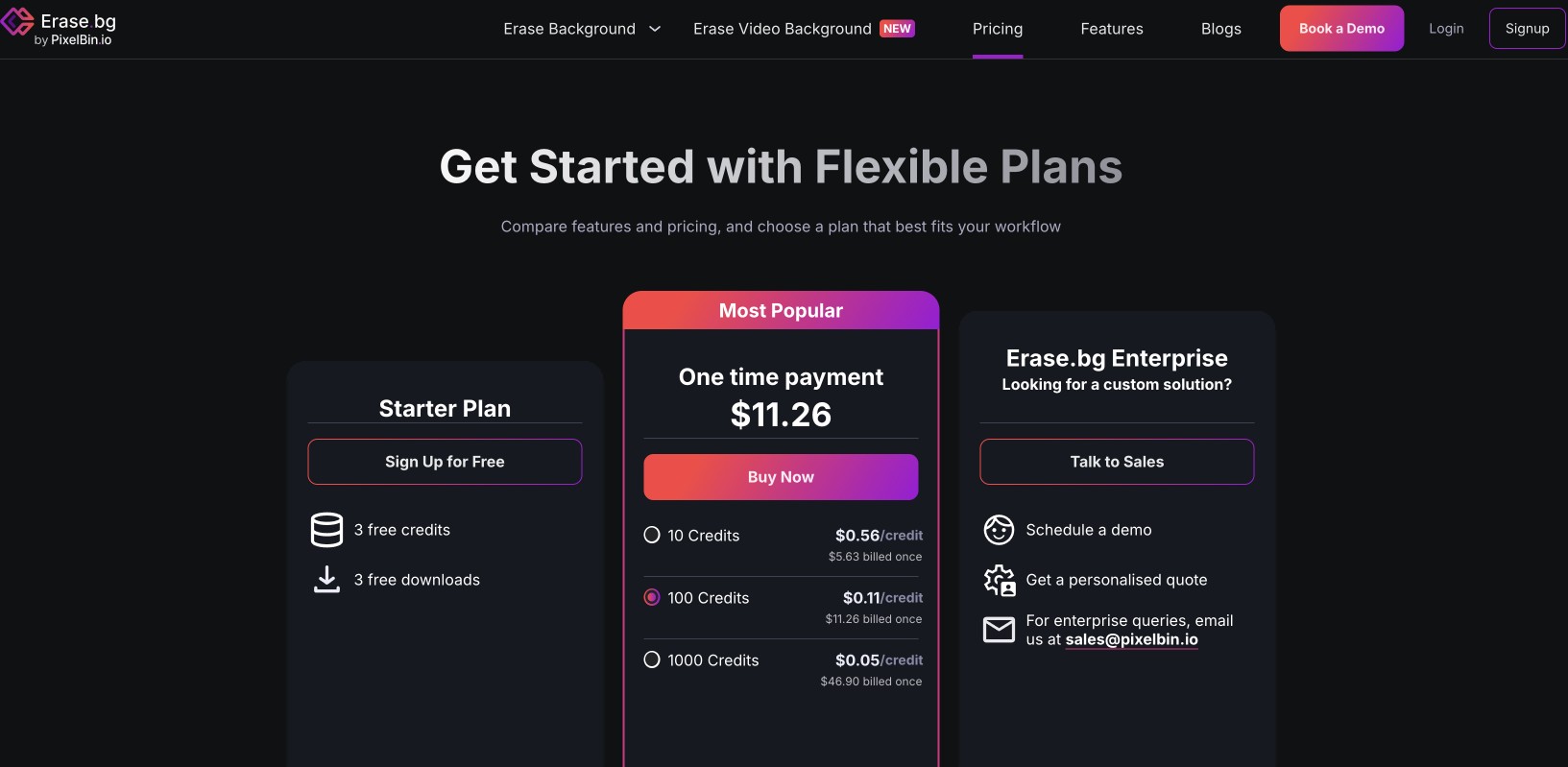
Standard downloads at $0. One-time packs from $11.26 for 100 credits ($0.11 per credit). Starter plan: 3 credits at no cost.
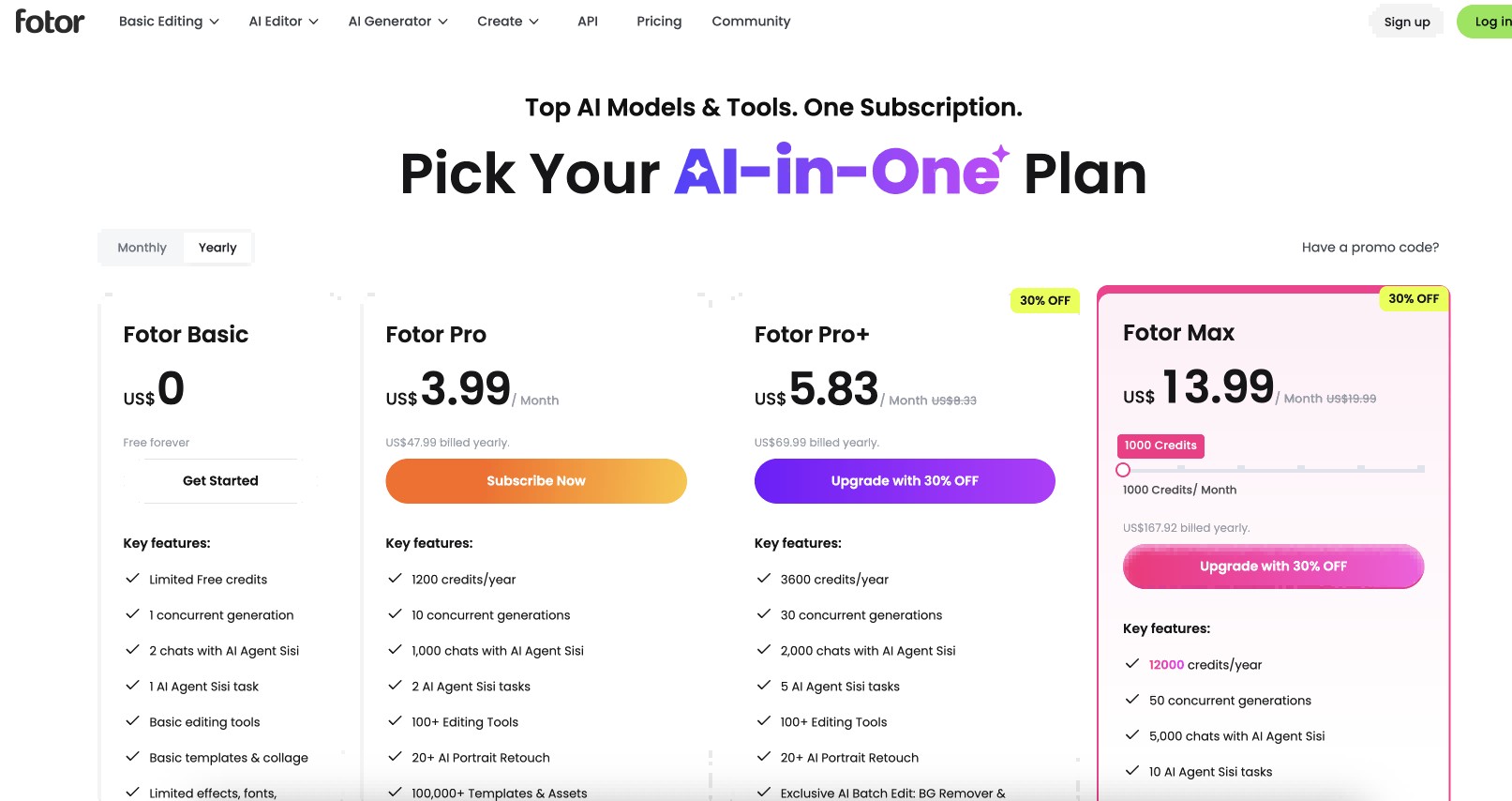
8. Fotor Background Remover
Best for: beginners who want background removal and basic design tools in one place.
Fotor pairs background removal with a collage maker, background template library, and a simple guided interface that requires almost no learning curve. It is not the most precise tool on this list, but for users who need occasional removal and want to do basic design work with the result without switching platforms, it covers both in one place.
Key features
-
One-click AI background removal with guided interface.
-
Built-in collage maker and background template library.
-
Background swap: solid colors, gradients, or stock scenes.
Pros & Cons
-
Pros: Lowest learning curve on this list; built-in collage maker and background template library let you continue editing after removal; background swap includes solid colors, gradients, and stock scenes.
-
Cons: Lower accuracy on complex edges compared to specialized tools; advanced features are behind a paywall.
Pricing:
-
Plan at $0. Fotor Pro at $3.99/month billed yearly. Pro+ at $5.83/month. Max at $13.99/month.
9. Pixelcut
Best for: mobile-first product photographers and e-commerce sellers on iOS and Android.
Pixelcut leads with its mobile app experience. If most of your product photography is shot on a phone and edited on the same device, Pixelcut removes the background and gives you access to over 2 million replacement backgrounds and AI-generated product scene options without transferring files to a computer. The web version exists but the mobile app is the core product.
Key features
-
Mobile-first AI editor: iOS and Android apps with web version.
-
Access to 2 million professional backgrounds for replacement.
-
AI-generated product scenes for studio or lifestyle settings.
-
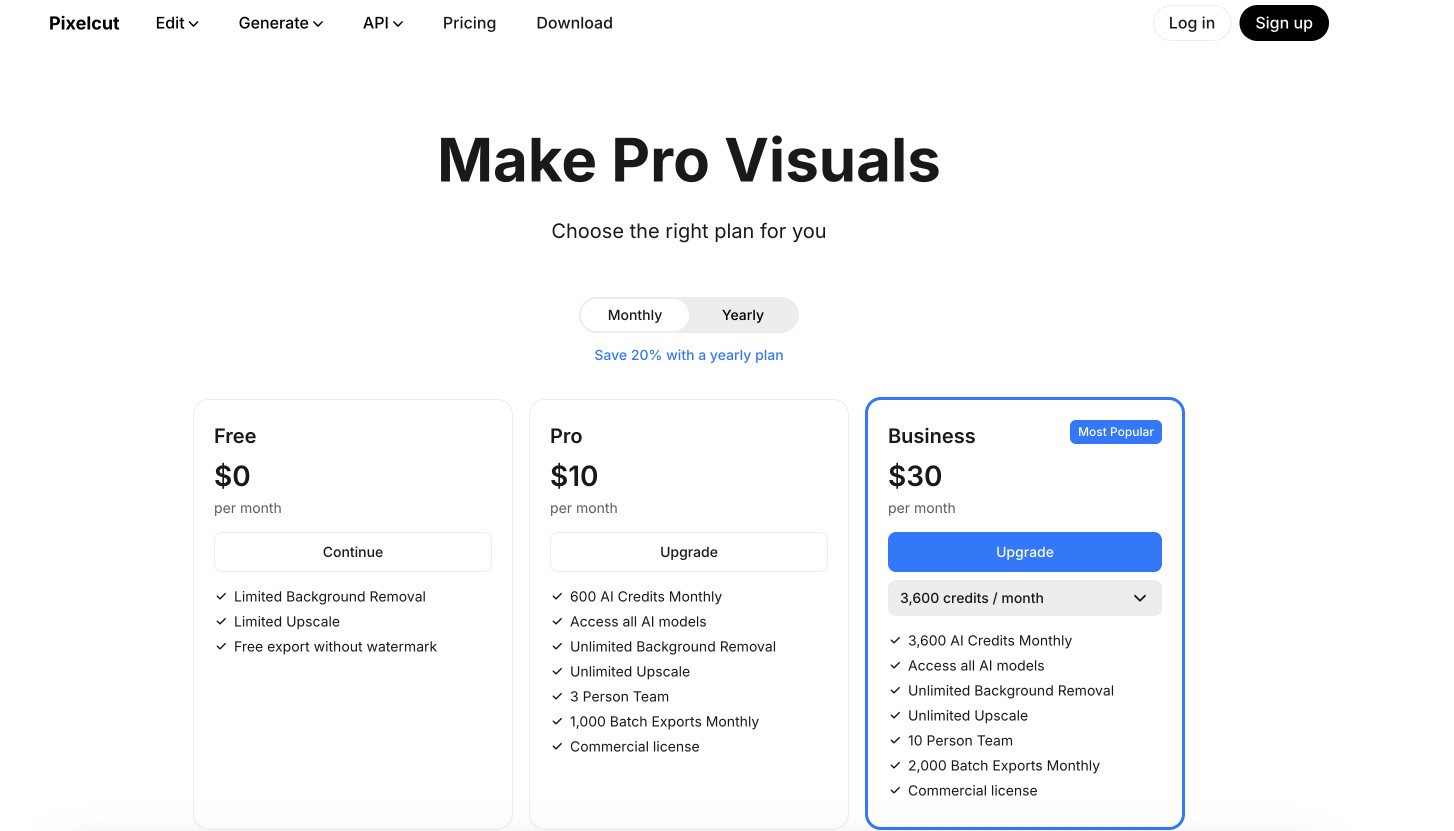
Batch exports: 1,000 per month on Pro, 2,000 on Business.
Pros & Cons
-
Pros: Strongest mobile app experience on this list for on-the-go product photography; access to over 2 million replacement backgrounds and AI-generated product scenes; batch exports up to 1,000 per month on Pro.
-
Cons: Desktop experience is secondary to the mobile app; advanced features including unlimited removal require a subscription.
Pricing:
-
Plan at $0 with limited exports. Pro at $10/month. Business at $30/month with 2,000 batch exports.
10. SammaPix (Local Browser-Based)
Best for: privacy-conscious users who need background removal with no server upload whatsoever.
SammaPix processes images entirely in the browser using WebGPU and ONNX. No image data leaves the device at any point. This is distinct from cloud tools that claim to be private but still send files to a server. If your use case involves sensitive content and you need the privacy guarantee of local processing without installing a desktop app, SammaPix is the only browser-based option here that delivers that.
Key features
-
Runs entirely in the browser using WebGPU and ONNX; no data leaves the device.
-
Averages approximately 12 seconds per image on mid-range hardware.
-
Uses RMBG 1.4 and U2-Net AI models for hair and semi-transparent objects.
Pros & Cons
-
Pros: No image data leaves the device at any point, making it the only browser-based tool here with genuine local processing; no account or signup required; handles hair and semi-transparent objects well using RMBG 1.4 and U2-Net models.
-
Cons: Slower than cloud tools at approximately 12 seconds per image; performance depends on local hardware.
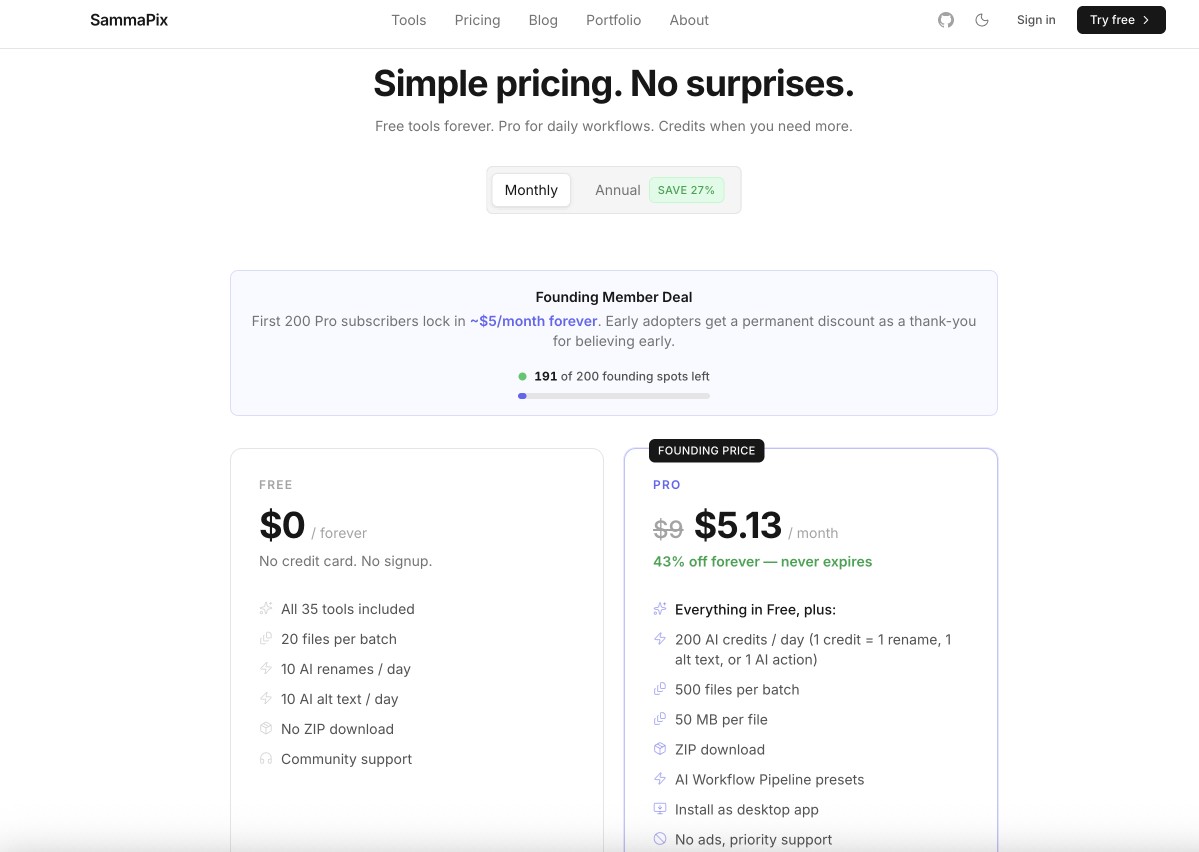
Pricing:
-
Plan at $0 forever (20 files per batch). Pro at $5.13/month (founding member rate, 500 files per batch).
Side-by-Side Comparison Table
Choosing between ten tools gets easier when you can see them side by side. The table below compares each alternative across the five factors that matter most for most workflows: who it is built for, whether it handles batch jobs, whether you can manually correct edges, where the processing happens, and what entry-level pricing looks like. Use it as a quick reference before committing to any tool.
|
Tool |
Best For |
Batch Processing |
Manual Correction |
Local or Cloud |
Starting Price |
|---|---|---|---|---|---|
|
Adobe Express |
Design-first creators and small businesses |
Paid plans only |
No dedicated brush |
Cloud |
$0 (limited) / $9.99/month |
|
Photoroom |
E-commerce product photos at scale |
Yes (500/month on Pro) |
No |
Cloud |
$7.50/month |
|
Canva Background Remover |
Existing Canva users in a design workflow |
No (one at a time) |
Yes (Erase and Restore brush) |
Cloud |
$15/month (Pro) |
|
Zawa |
Multi-task editing in one browser session |
Yes (online, up to 30 images) |
Yes (manual brush and selective cutout) |
Cloud |
$0 (daily limits) / $5.83/month |
|
Aiarty Image Matting |
Maximum edge precision and data privacy |
Yes (up to 3,000 images) |
Yes (manual edge refinement) |
Local (desktop) |
$49/year |
|
Clipdrop |
Developer and API-integrated workflows |
Yes (via API) |
No |
Cloud |
$0 (limited) / $7/month |
|
Erase.bg |
One-off removal with no account required |
No |
No |
Cloud |
$0 / $11.26 for 100 credits |
|
Fotor Background Remover |
Beginners who need basic design tools too |
Paid plans only |
No |
Cloud |
$0 (limited) / $3.99/month |
|
Pixelcut |
Mobile-first product photographers |
Yes (1,000/month on Pro) |
No |
Cloud |
$0 (limited) / $10/month |
|
SammaPix |
Privacy-first users, fully local processing |
Yes (20 files on plan, 500 on Pro) |
No |
Local (browser) |
$0 / $5.13/month |
Bonus tips: How to remove an image's background using Zawa?
If you want to try one of the remove.bg alternatives from this list, Zawa is worth starting with because it handles background removal, object removal, and watermark removal in a single session. Here is how the background remover works.
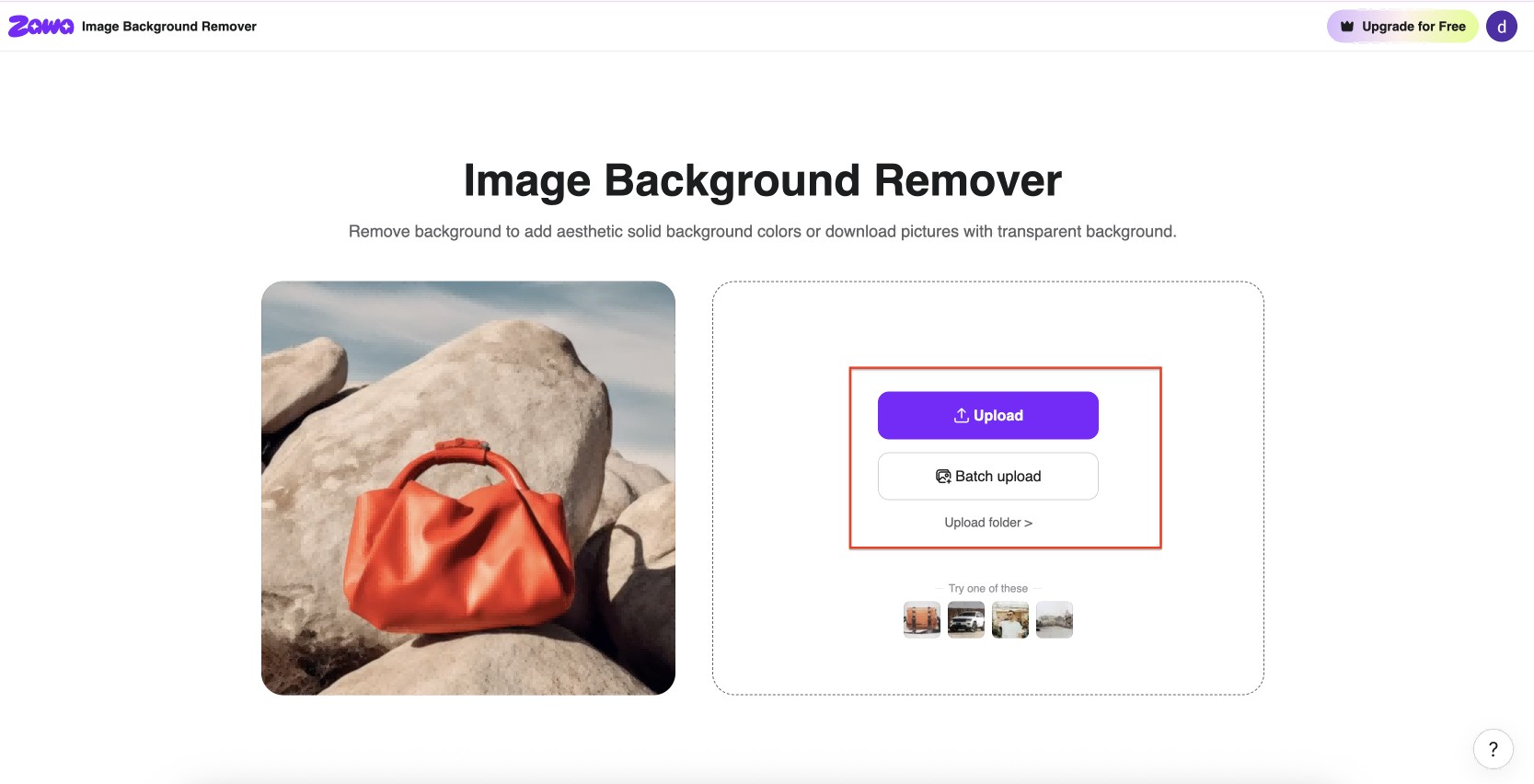
Step 1: Upload Your Image
Go to Zawa Image background Remover. Click Upload to add a single image, or use Batch upload to process multiple files at once.
Step 2: Auto Remove the Background
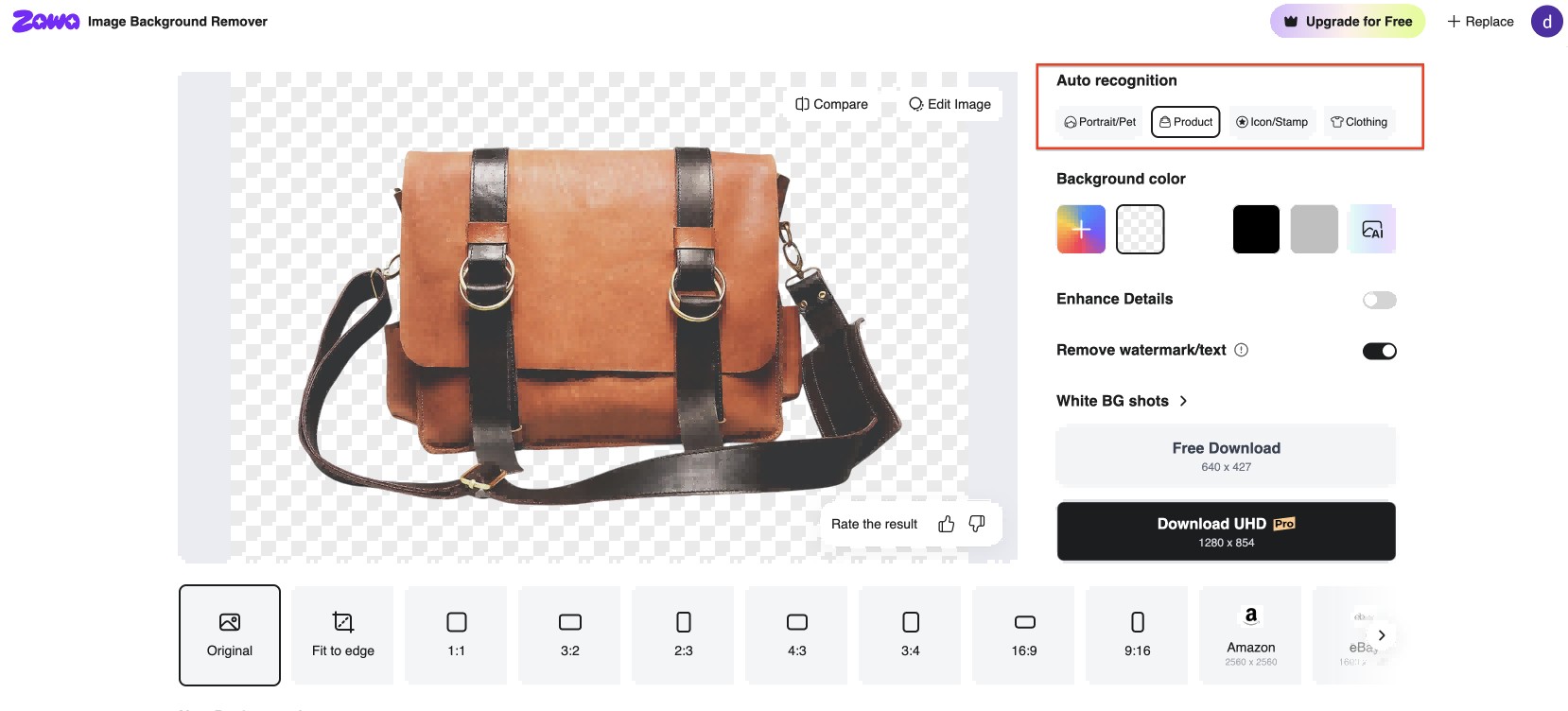
Zawa removes the background automatically on upload. On the right panel, select the Auto recognition category that best matches your image: Portrait/Pet, Product, Icon/Stamp, or Clothing. Switch between categories if the initial result needs improvement.
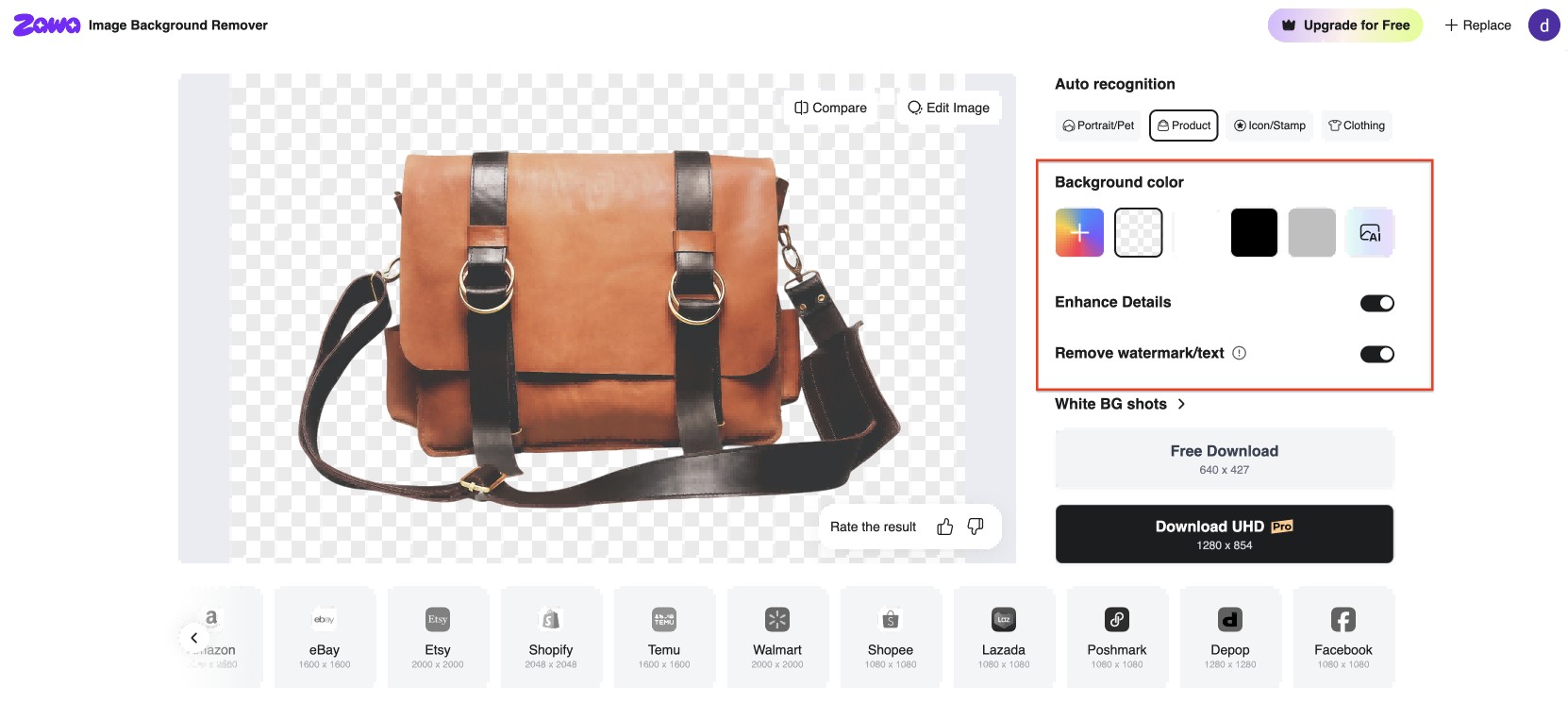
You can also change the output background color, toggle Enhance Details for sharper edges, and enable Remove watermark/text if needed.
Step 3: Refine Edges if Needed
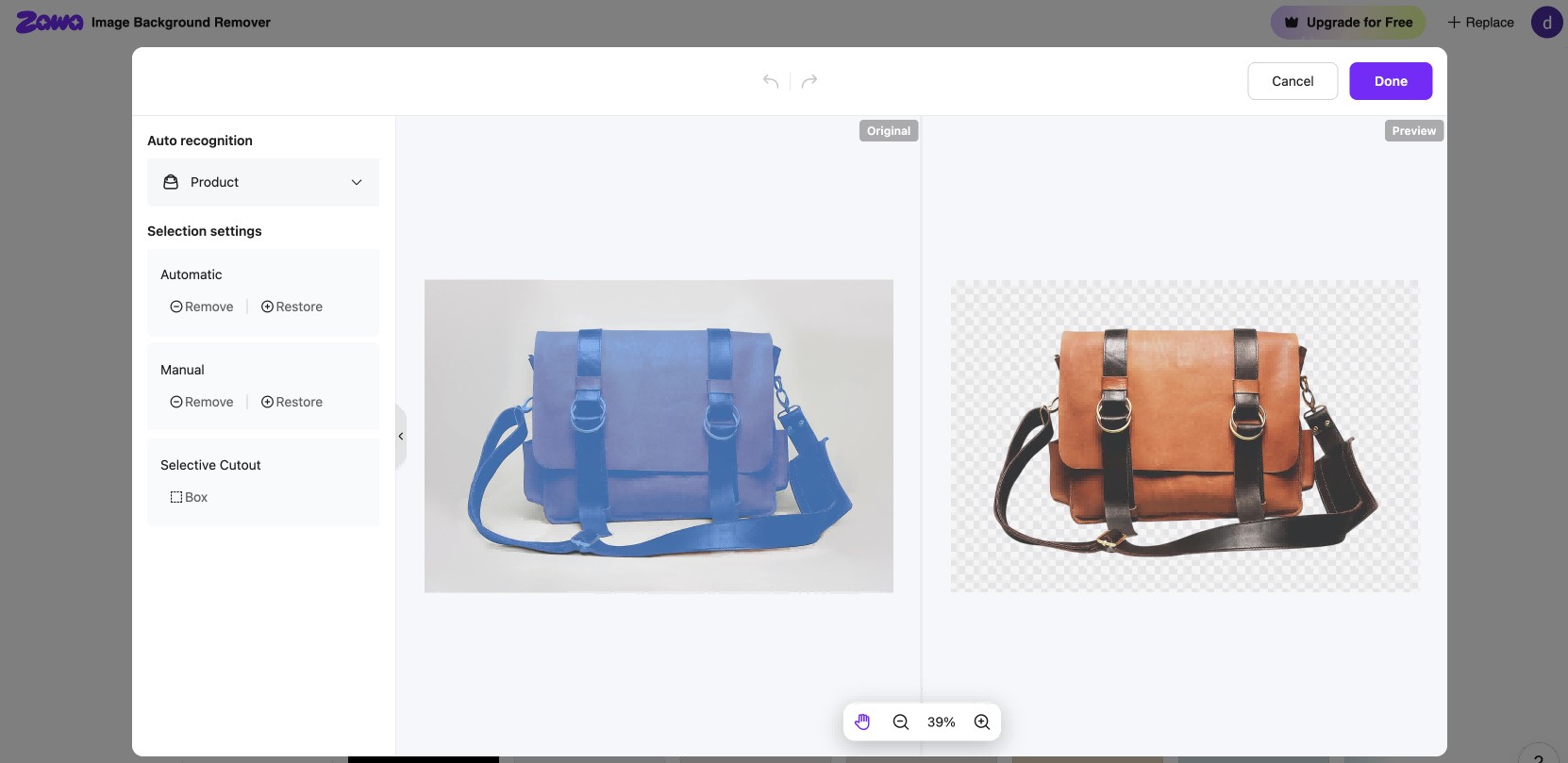
If the cutout needs edge work, click Edit Image. This opens a side-by-side panel showing Original and Preview. Use Automatic Remove or Restore to paint over broad areas, or switch to Manual for precise stroke-level control. A Selective Cutout Box tool isolates specific regions. Click Done when the result is clean.
Step 4: Download the Transparent PNG
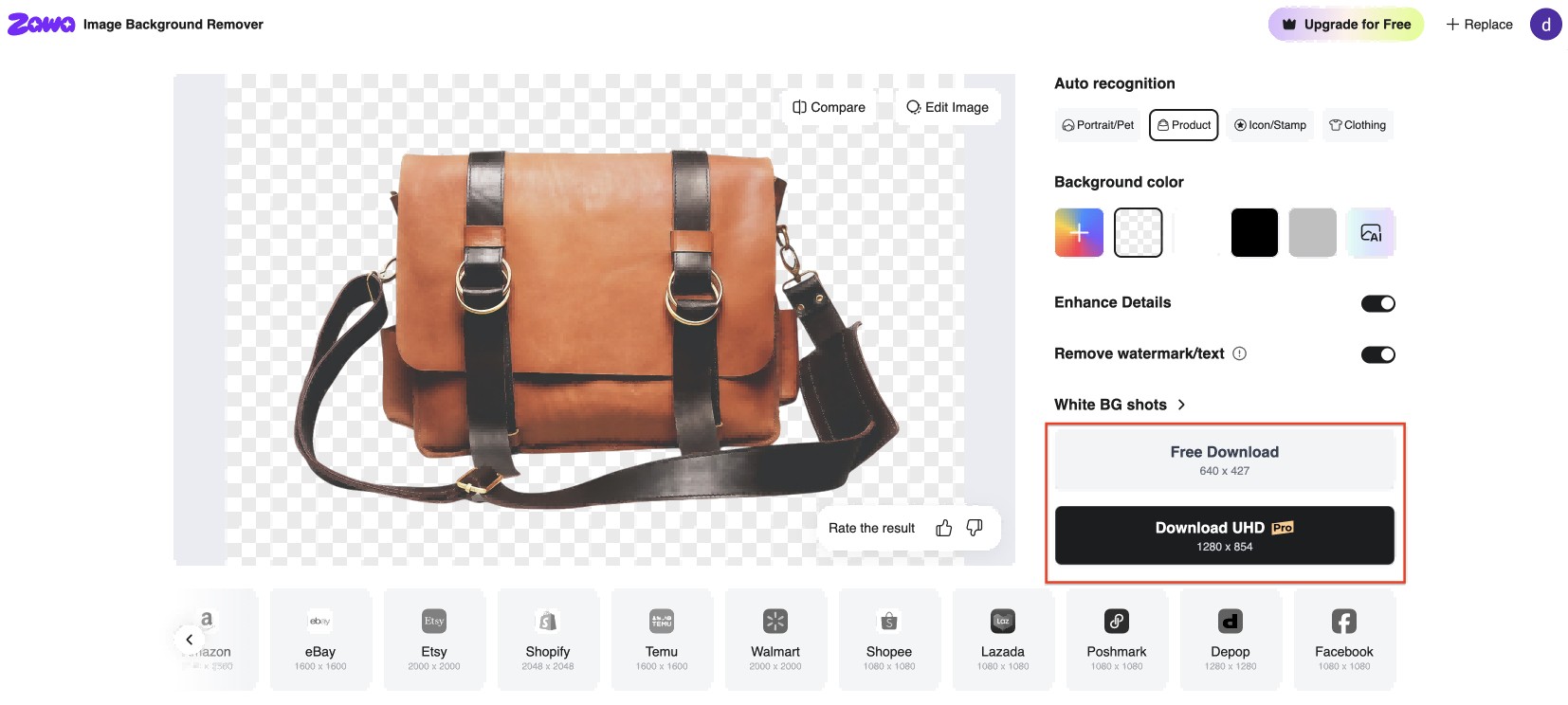
Click Download at the top right. Choose JPG or PNG. Aspect ratio presets at the bottom let you crop to standard formats including 1:1, 3:2, 16:9, 9:16, Amazon, and eBay before downloading.
How to Choose the Right Remove.bg Alternative for Your Use Case
The best tool depends on your volume, image types, privacy needs, and workflow. Here is a direct guide by use case.
Choose by Volume
-
1 to 10 images occasionally: Erase.bg or SammaPix. No account, no subscription, no friction.
-
10 to 100 images regularly: Canva, Adobe Express, Zawa, or Fotor. Subscriptions bring design tools alongside removal.
-
100 or more images or product catalogs: Photoroom, Pixelcut, or Aiarty. Batch processing is essential at this scale.
Choose by Edge Complexity
-
Clean product shots on simple backgrounds: any tool on this list handles these reliably.
-
Portraits with hair, fur, or fine detail: Aiarty for maximum accuracy on desktop; Zawa for browser-based precision with manual brush control.
-
Transparent or semi-transparent objects such as glass, lace, or smoke: Aiarty's specialized models produce the best results here.
Choose by Privacy Requirement
-
No privacy concern: cloud tools including remove.bg, Erase.bg, Photoroom, and Zawa are faster and more convenient.
-
Sensitive commercial content: Aiarty on desktop or SammaPix in the browser. Neither sends image data to a server.
Choose by Workflow
-
Design-first for social media or marketing: Adobe Express or Canva. Background removal feeds directly into design templates.
-
E-commerce product photos: Photoroom or Pixelcut. Purpose-built for product listing workflows.
-
Multi-task editing including background removal, object removal, and watermark removal: Zawa handles all three in one browser session without switching tools.
Conclusion
Remove.bg is a solid tool for what it does. The credit model is the real problem, not the product. If you process more than a few dozen images per month, the cost per image adds up in a way that most of the remove.bg alternatives on this list avoid entirely.
For most users, the right choice is one of three paths: Photoroom or Aiarty for high-volume or edge-precision work; Adobe Express or Canva if you need a design tool alongside removal; Zawa if you need background removal alongside other editing tasks without managing multiple tools. Erase.bg and SammaPix cover one-off jobs with no commitment required.
The best remove BG alternative is the one that fits the volume, image type, and workflow you actually have. Use the criteria above to find it rather than defaulting to the most familiar name.
FAQs
-
Why is remove.bg not working?
The most common causes are an unstable internet connection, a file format the tool does not support, or an image that is too small or compressed for the AI to detect a clear foreground subject. Remove.bg works best on images with a clear, high-contrast subject. If the background shares similar tones with the subject, the tool will struggle regardless of connection quality.
-
Does remove.bg save my images?
Remove.bg processes images on remote servers. According to their privacy policy, uploaded images are stored temporarily and deleted after a short period. If you are working with sensitive commercial or personal content and need processing that never uploads to a server, Aiarty (desktop) or SammaPix (local browser) are the only options on this list that guarantee local-only processing.
-
Which remove.bg alternative is best for complex edges like hair or fur?
Aiarty Image Matting produces the most accurate results on fine edges, with specialized AI models and manual refinement tools. For browser-based options, Zawa handles complex selections with its manual brush and generative inpainting.
-
How to bulk remove backgrounds from multiple images at once?
Photoroom, Pixelcut, and Aiarty all support batch processing as a core feature. Zawa supports online batch processing directly in the browser. Remove.bg requires the desktop app or API for batch removal, which adds setup steps that these alternatives avoid.
-
What are the ethical implications of using AI background removers like remove.bg?
The main considerations are consent and misuse. Removing a background from an image of a person without their consent and placing them in a different context raises real ethical questions, particularly in advertising, political content, or any context where the edited image could be mistaken for authentic. Most responsible uses involve your own product photography, personal images, or content you have explicit rights to edit. If the edit could mislead someone about where a person was or what they did, it is worth pausing before publishing.
You May Be Interested
Apowersoft Watermark Remover: Review, Pricing & Alternatives

10 Best Remove.bg Alternatives Tested & Ranked (2026)

Remove Fold of Scanned Image: Best AI Restoration Guide

Hidden Tricks to Remove Getty Watermarks Using AI & Photoshop (2026 Guide)
