10 Best YouTube Thumbnail Ideas That Increase Watch Time
Designing eye-catching YouTube thumbnails helps creators to stand out in a crowded platform. This article discusses the benefits, the best thumbnails for YouTube, examples, and the way to make appealing YouTube thumbnails.

A YouTube thumbnail can be the difference between a skipped video and a viral hit. That's why we have brought to you the 10 best YouTube thumbnail ideas. A thumbnail plays a key role in your video's visual identity. So, join us as we explore the benefits and the best YouTube thumbnail ideas that enhance engagement.
What is a YouTube thumbnail?
A YouTube thumbnail is a small preview image that represents your video on YouTube. It is a small preview image, typically sized at 1280 x 720 pixels with a 16:9 aspect ratio. It functions as the first visual impression viewers get before deciding whether to watch or skip your video. It serves as a visual cover for your video, appearing in search results, channel pages, and recommendations.
Now, let's look at the benefits of making attractive YouTube thumbnails:
-
Higher click-through rates: An attractive thumbnail quickly grabs viewers' attention, encouraging them to click the video. Bold elements and clear visuals make your content unique and stand out from competitors.
-
Increased video views: More clicks result in more views, helping your video gain momentum. Interactive thumbnails continue to attract new viewers even after publishing.
-
Better audience engagement: When the thumbnails match the content and spark curiosity, viewers stay interested. This leads to more clicks and likes, which enhances overall interaction.
-
Higher watch time: An eye-catching thumbnail sets the right expectations, which attracts the right audience. This increases the likelihood that viewers will watch your video for a longer duration.
-
Better video ranking on YouTube: Higher CTR and watch time signal to your algorithm that your content is high quality. Consequently, your videos rank higher and appear in the recommendations section.
10 best YouTube thumbnail ideas of 2026
-
Bold face reaction thumbnails
Use extreme facial expressions, such as shock, disbelief, or excitement to grab the attention quickly. These emotions create a sense of curiosity, making the viewers more likely to click. The face should be large and clearly visible to show full emotions. This style works perfectly for entertainment or reaction content.
Example: Mr. Beast's shocked reaction thumbnail
-
Before and after comparison thumbnails
Divide the thumbnail into two clear parts, showing "This VS That" or "Before VS After." This provides an instant comparison that tells a mini-story. In this way, the viewers understand the difference or transformation. This style is popular for experiments and tutorials.
Example: Before VS After weight loss comparisons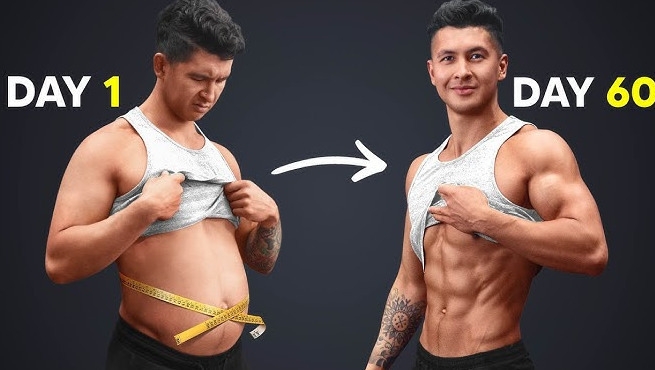
-
Zoomed-in object-focused thumbnails
Highlight a single subject in close-up to create suspense and curiosity. This makes the audience wonder about its importance in the particular video. The object should be quite detailed and visually appealing. It is widely used in tech or product-related content.
Example: Dior perfume close-up review
-
Curiosity gap question thumbnails
Use a statement or question that sparks curiosity among your viewers. This makes the viewers feel that they need to find the answer. The thumbnail design should support the main question. This style is quite effective for storytelling or educational videos.
Example: What happens if you don't sleep for 7 days?
-
Split emotion group thumbnails
Show multiple people with different emotional reactions in a single frame. This leads to drama and tells a visual story. It enables the viewers to understand that there is conflict and excitement. This is popular for challenge or reaction videos.
Example: Sidemen reaction video thumbnails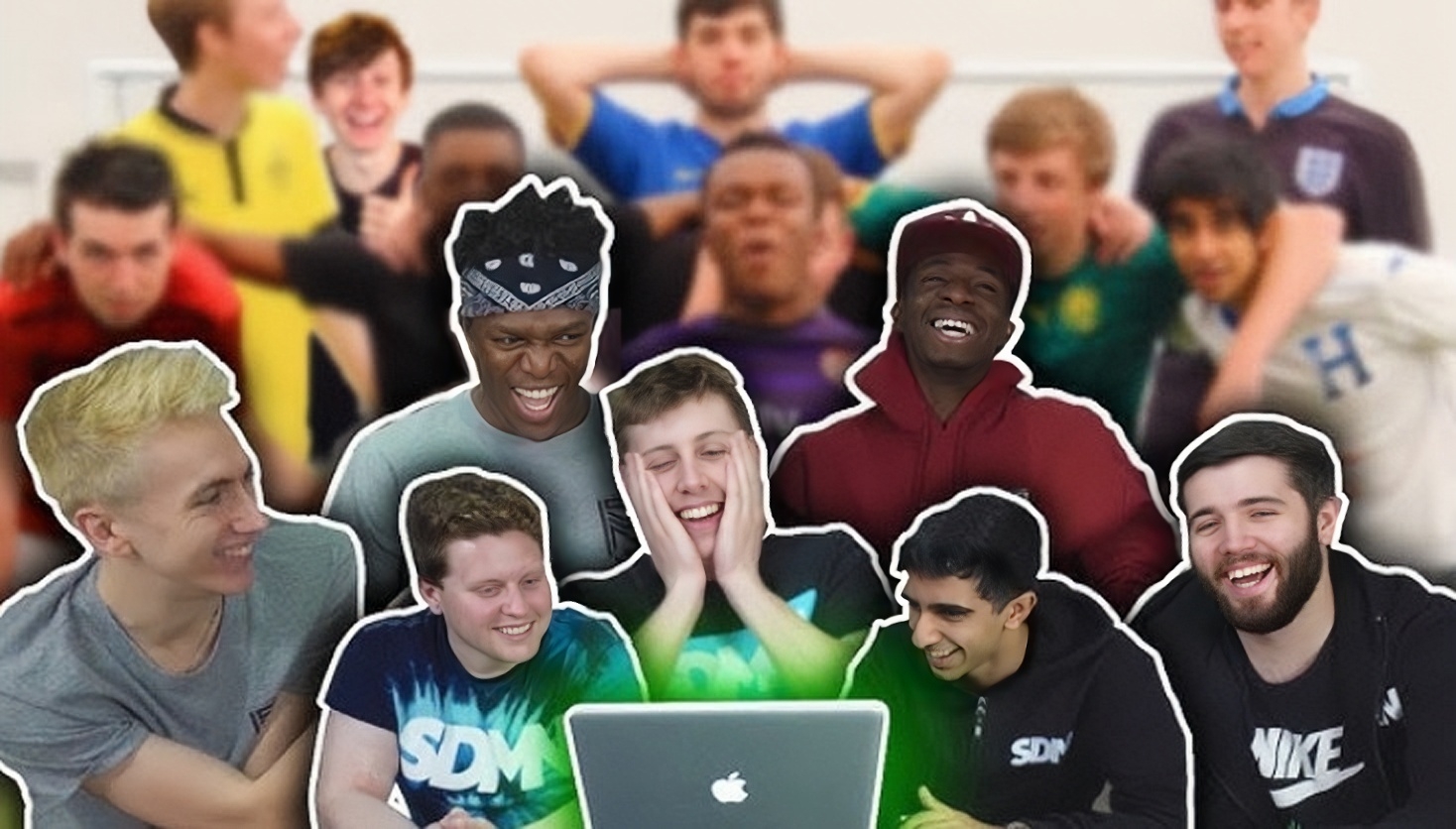
-
Dramatic storytelling scene thumbnails
Make a scene that looks like a moment from a movie or story. It builds curiosity about what will happen next in the video. To make the best YouTube thumbnail of this kind, lighting and composition should be intense and emotional. This style works perfectly for vlogs or real-life content.
Example: Survival camping in the forest overnight
-
Extreme contrast lighting thumbnails
Leverage the strong contrast between light and dark areas to create a cinematic look. In this way, the subject stands out more dramatically. It adds depth and emotional intensity to the thumbnail. It is widely used in cinematic storytelling channels.
Example: Drew Binsky cinematic travels
-
Meme-style viral thumbnails
Use funny, relatable meme expressions or exaggerated visuals. Humor quickly attracts attention, which improves shareability. This design should feel eye-catching yet casual. It works best for entertainment or commentary content.
Example: El Risitas laughing meme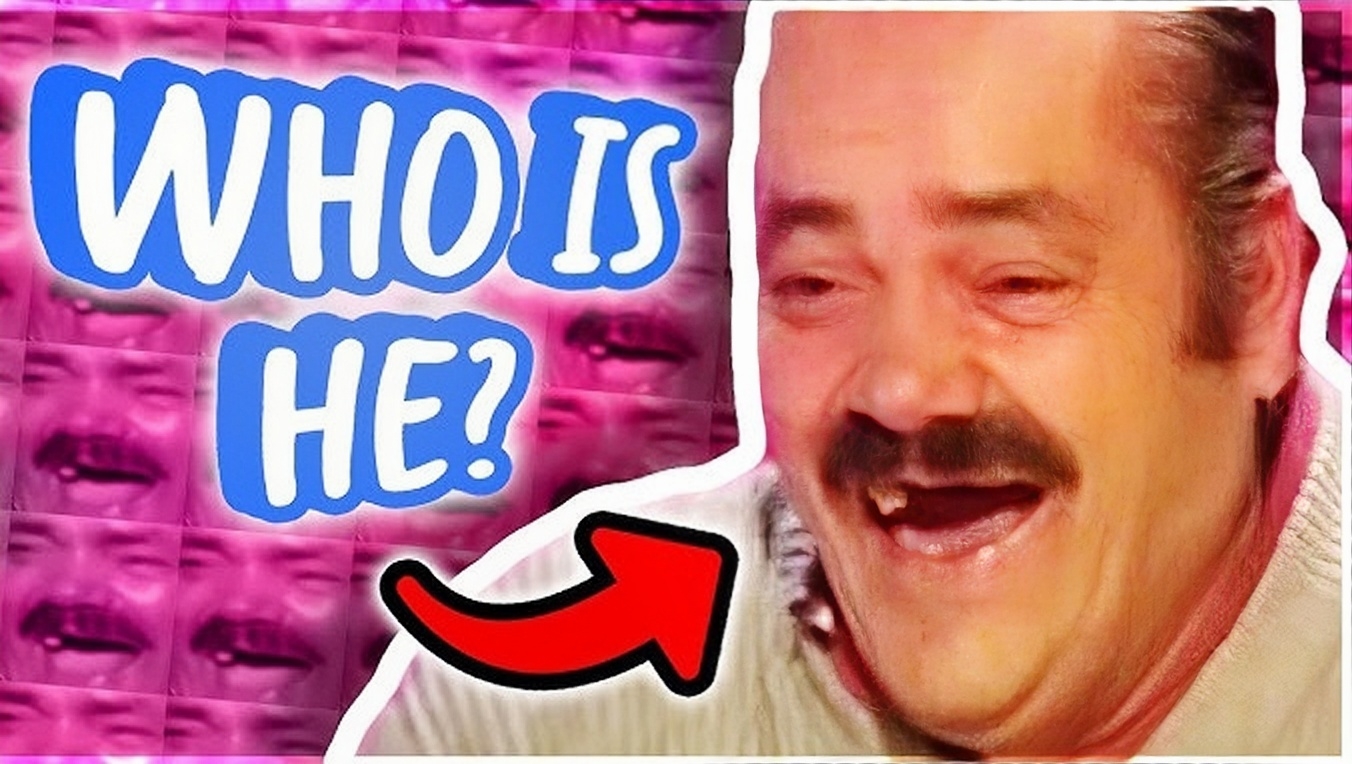
-
Cinematic movie-style thumbnails
Design thumbnails like a movie poster with dramatic composition and lighting. This gives your content a professional, high-quality feel. It instantly builds curiosity and emotional connection. It is perfect for travel, storytelling, or documentary-style videos.
Example: National Geographic travel documentary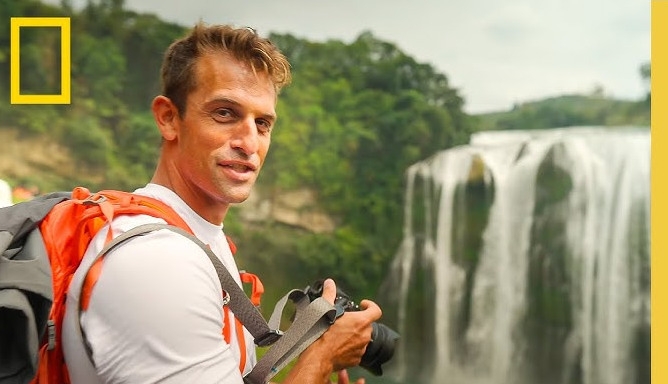
-
Story-driven collage thumbnails
Combine several small stories to tell a strong story in one image. Each element adds context, building curiosity about the complete video. Proper arrangement keeps the design organized, making it quite easy to understand. This style is ideal for documentaries, vlogs, and challenge content.
Example: I ate the same meals every day for 60 days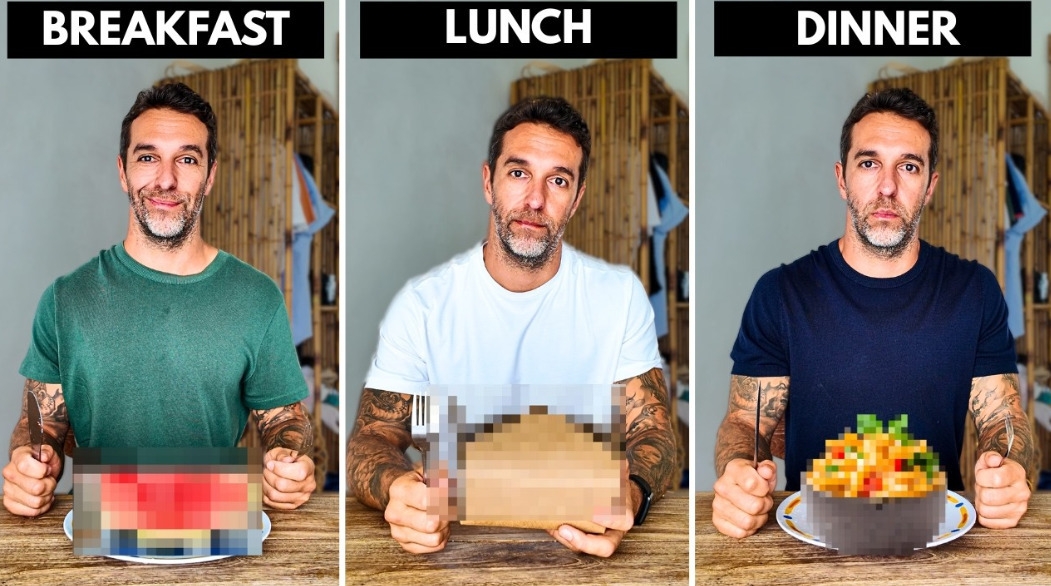
How to choose the right type of thumbnail for your video
-
Identify your video format: Different formats require different thumbnail styles, such as vlogs, tutorials, reviews, and reaction videos. Each format has its own visual expectations, which are instantly recognized by viewers. Choosing your thumbnail accordingly makes your content more familiar and clickable.
-
Highlight the main subject clearly: Focus on a single element rather than adding multiple details to the thumbnail. A clear thumbnail helps viewers understand what the video is about. Simplicity enhances visibility, particularly on smaller screens.
-
Choose between text-based or visual thumbnails: Decide whether your video requires bold text or strong imagery to communicate the idea. Some topics work better with expressive visuals, whereas others require short headlines. The right choice mainly depends on how quickly the message can be delivered.
-
Analyze what works in your niche: Look at the high-performing videos in your niche to understand the common YouTube thumbnail patterns. This allows you to align with your viewer's expectations while adding a unique touch. Adapting proven styles improves your chances of success.
-
Test and refine different styles: Experiment with different thumbnails to see what works best for your content. Track the performance and adjust the results over time. Continuous improvements help you make the best YouTube thumbnail for your needs.
YouTube thumbnail best design practices
-
Use high resolution and clear visuals: Always design thumbnails in high quality so they look sharp on all devices. Pixelated or blurry visuals reduce clicks and credibility. Clear visuals make your content more trustworthy and professional. Utilize Zawa's "Enhance" feature to improve image clarity and resolution.
-
Create strong contrast and bold colors: To make the best YouTube thumbnails, create a sharp contrast between the subject and background to stand out in crowded feeds. Bright and bold color combinations attract attention, improving visibility. You can use Zawa's "AI Agent" feature, powered by advanced AI models, to create bold text with text prompts.
-
Focus on a single subject: Avoid clutter by highlighting one key element in your thumbnail. A clear focal point helps viewers understand your video's message. Simplicity results in better performance and higher engagement. Use Zawa's "Eraser" tool to remove unwanted elements and distractions.
-
Add readable and impactful text: Use short, bold text that communicates the main idea clearly. Ensure that the font is quite large and easy to read, even on mobile screens. Well-placed text quickly boosts click-through rates. Zawa's "Add Text" feature lets you quickly create clear, eye-catching thumbnails.
-
Use clean and relevant backgrounds: A clean background keeps the focus on your subject and avoids confusion. You can also use thematic or creative backgrounds to match your content style, which improves the overall appeal of your thumbnail. Zawa's "BG Remove" and "BG Generator" features make it easy to customize the backgrounds.
Make the best YouTube thumbnails using Zawa
Zawa is a powerful AI-driven tool that simplifies content creation with smart automation. It is also an excellent tool for creating high-quality YouTube thumbnails, which grab attention immediately. It offers the "AI Agent" feature, which lets you create the best YouTube thumbnails with text prompts and reference images. It is powered by several AI models, like GPT Image 2 High, Nano Banana 2, and more. So, start using Zawa today to easily transform your YouTube thumbnails into click magnets.
Step 1: Access the "AI Agent" feature
To begin with, go to Zawa's official "AI Agent" page. Next, click the "+" option, then "Add image," and upload an image from your device to function as a reference.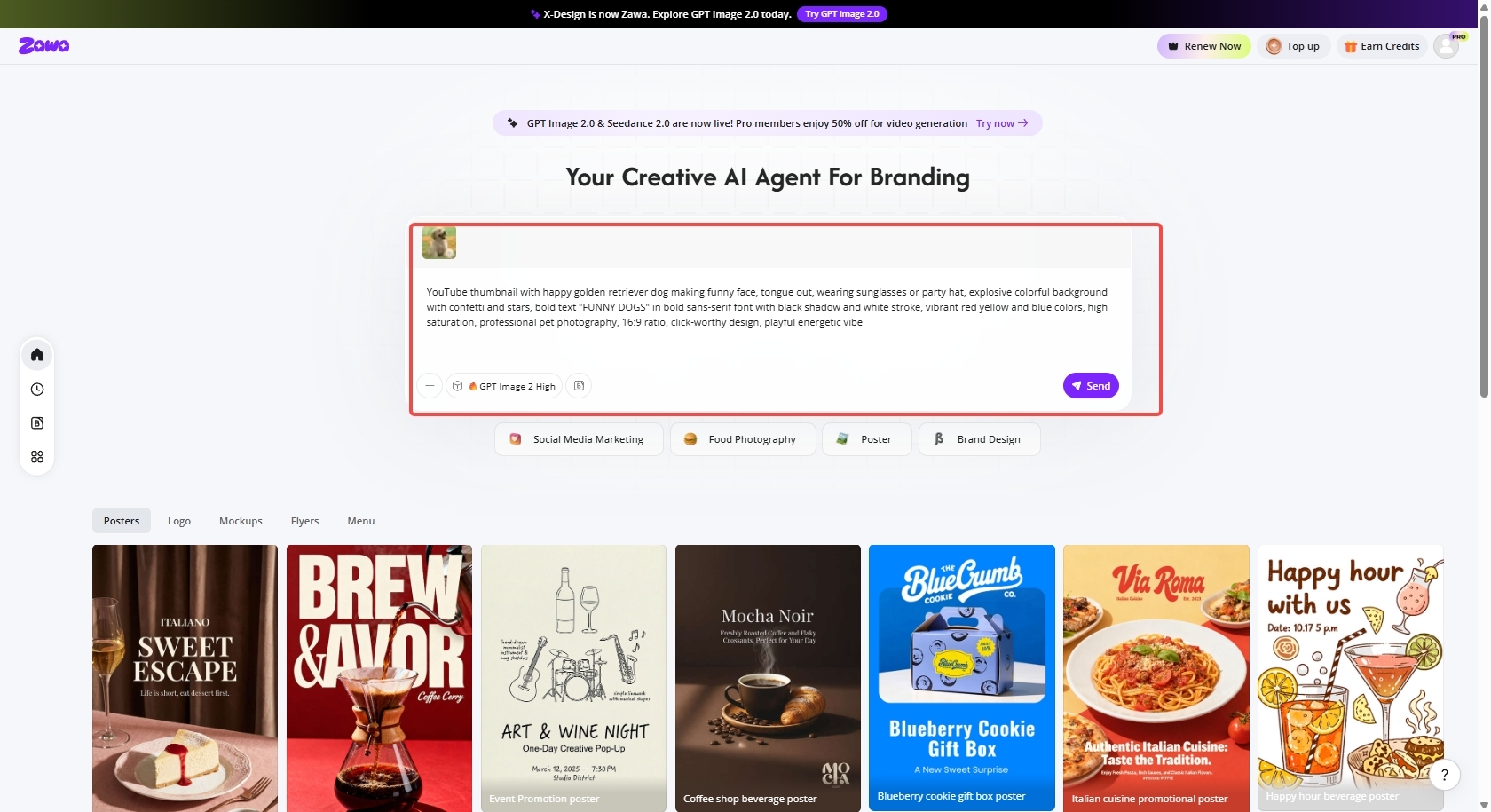
Step 2: Create the YouTube thumbnail
Choose the latest AI model, GPT Image 2 High, and give clear instructions for the YouTube thumbnail in the provided dialogue box. Hit the "Send" button to create the YouTube thumbnail.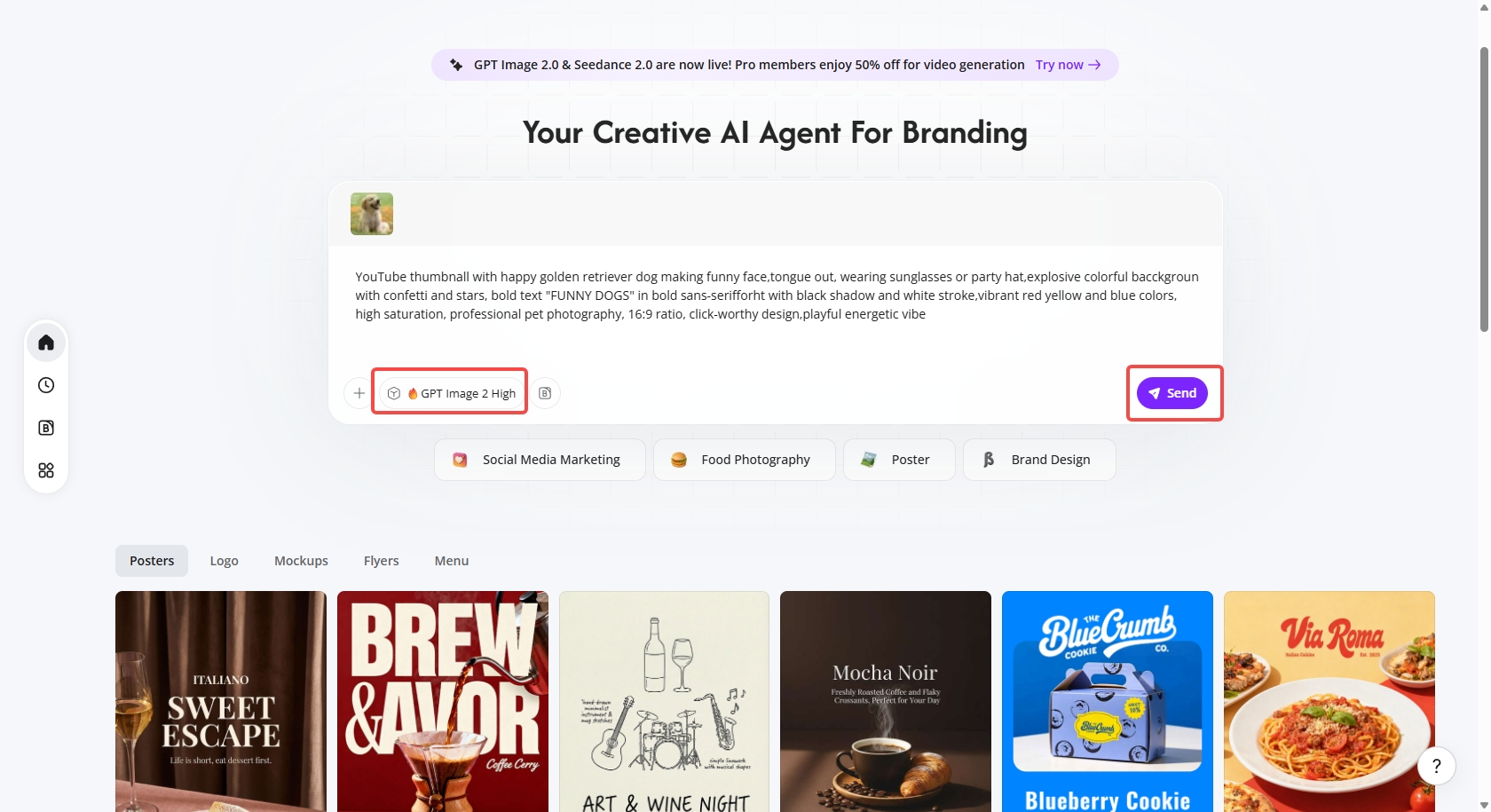
Step 3: Download the YouTube thumbnail
Wait for the thumbnail generation. It takes around 1 minute. Once generated, you can enhance the YouTube thumbnail with Zawa's editing features.
Finally, click the "Download" option in the top-right corner. Choose your desired format and resolution and hit the "Download" button to save the YouTube thumbnail to your device.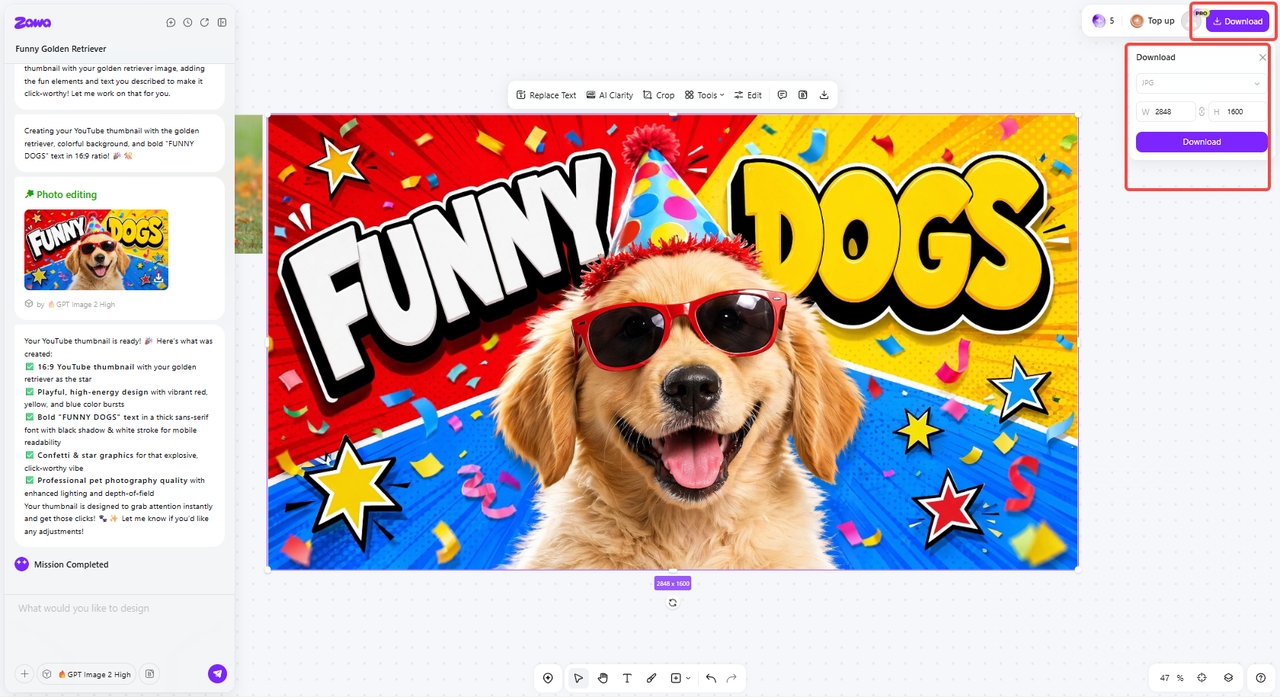
How to upload a new thumbnail - Steps explained
Step 1: Open YouTube Studio
First, open YouTube and click on the profile icon in the top-right corner of the screen. Then, select "YouTube Studio" from the drop-down menu to open your dashboard.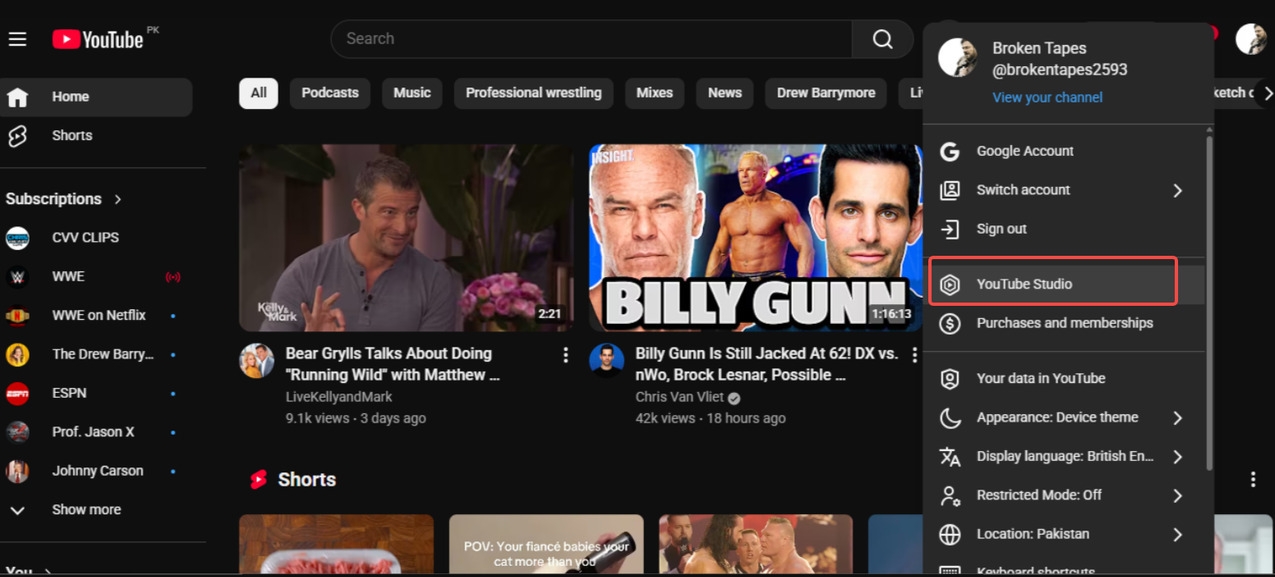
Step 2: Select your video
Click on the "Content" option from the left-hand menu and select the video you want to change the thumbnail for. This will open the video details page.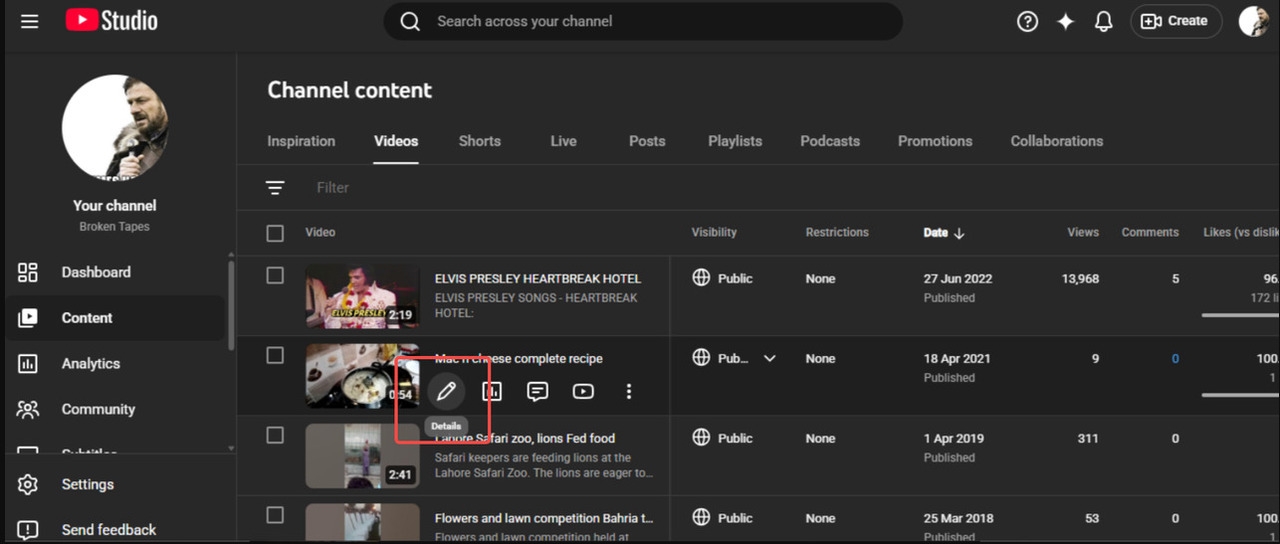
Step 3: Upload your new thumbnail
Scroll to the "Thumbnail" section and click on the "Upload file" option. Then, select a photo from your device and upload it.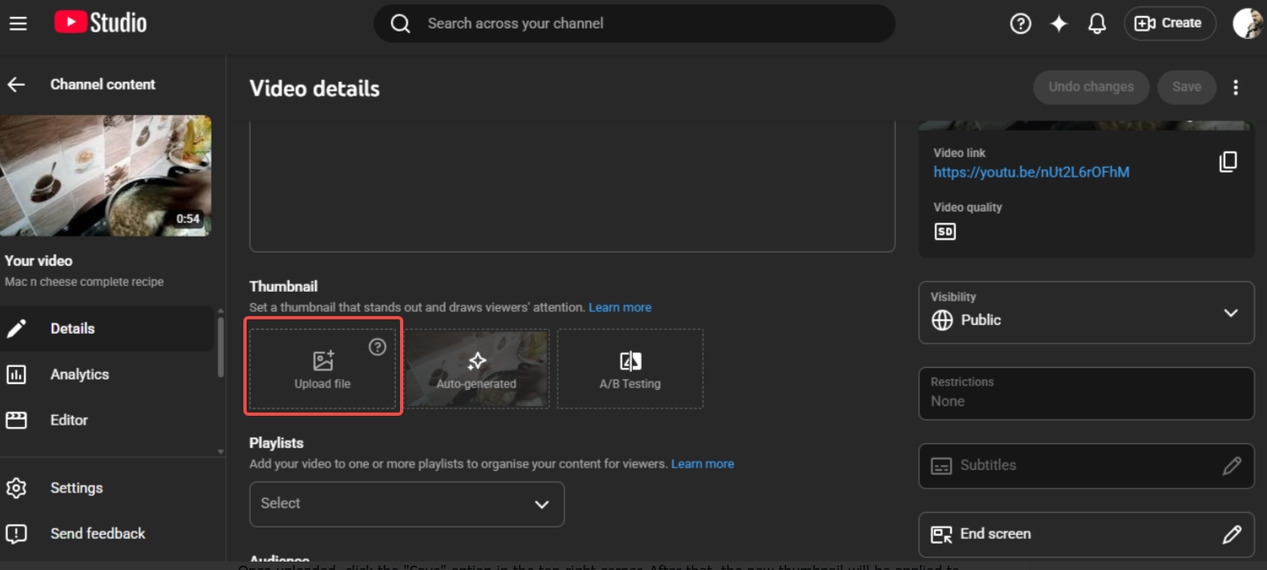
Step 4: Save changes
Once uploaded, click the "Save" option in the top-right corner. After that, the new thumbnail will be applied to your video.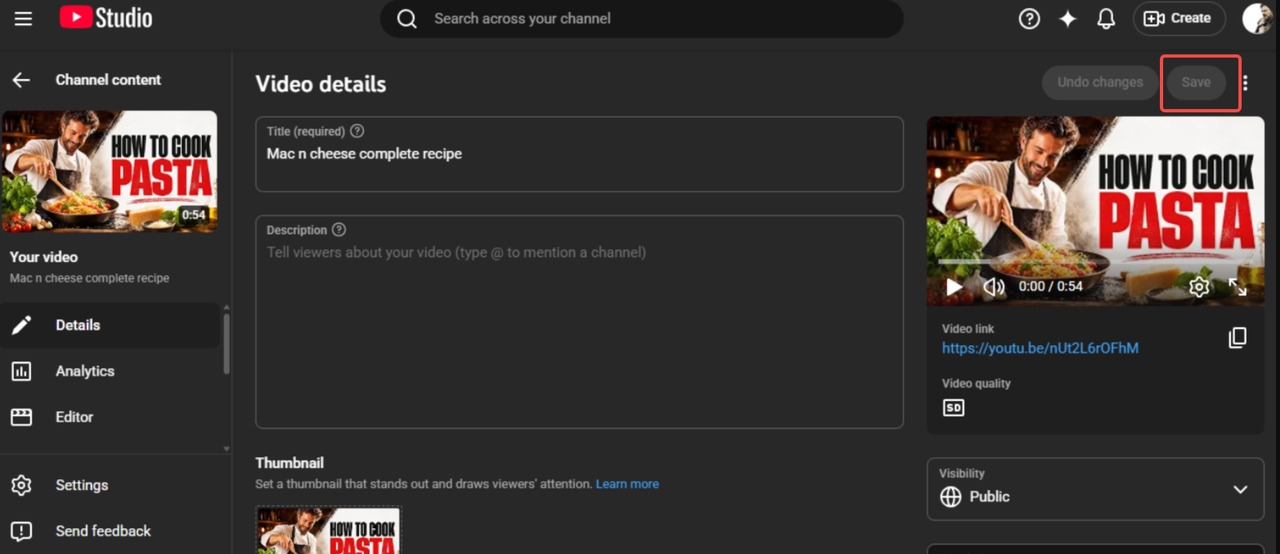
Conclusion
Creating the best YouTube thumbnail is vital for increasing clicks and engagement and boosting the video's overall performance. In this article, we discussed YouTube thumbnails, the top 10 ideas, and the best YouTube thumbnail design practices. By focusing on clarity, creativity, and contrast, you can create attractive YouTube thumbnails. If you wish to make YouTube thumbnails with AI, Zawa is one of the best AI-powered tools. Get started today and easily make your thumbnails eye-catching.
FAQs
Which elements make the best thumbnails for YouTube?
The best YouTube thumbnails should feature bold colors, a clear focal point, and strong contrast to grab attention quickly. They feature expressive faces or visuals that spark curiosity and drive clicks. Short, readable text helps viewers understand the video, even on smaller screens. You should also keep a consistent style to build recognition for your channel. You can use Zawa's "AI Agent" to easily combine all these factors and create high-quality YouTube thumbnails.
How can I make the best YouTube thumbnails with eye-catching text and colors?
To create eye-catching YouTube thumbnails, use contrasting colors so your subject stands out instantly. Add large, bold text that is easy to read and delivers the message quickly. To avoid clutter, you should keep the design clean while maintaining visual appeal. Focus on highlighting one key idea to make the viewers understand the video.
How often should I update my thumbnails?
You should update your thumbnails whenever your video's performance drops or the click-through rate is low. Regular testing of different thumbnail styles helps you to understand what resonates best with your viewers. Updating older thumbnails can also enhance their visibility. Keeping your visuals fresh keeps your content competitive and up to par. Zawa makes it easy to update your thumbnails with its AI-driven tools.
You May Be Interested

Best YouTube Logo Makers
The Best Times to Post Reels on Instagram for Every Creator

10 Best Selling Items on Etsy: What to Sell and How to Stand Out in 2025

30 Best Restaurant Logos We've Ever Seen and How to Create Yours
YouTube Thumbnail Wizard!

Free YouTube Profile Picture Maker