
Create Facebook Ads Like a Pro in 2026 (Simple Guide)
Master Facebook ads in 2026! Learn how to create and run ads step-by-step, ad formats, targeting tips, and how AI tools like Zawa help design high-converting ad creatives for better reach and sales.

Due to its convenience and doorstep delivery, virtual shopping has gained many consumers over the past few years. Online sellers just have to publish a product ad on social media platforms like Facebook, and millions of people click through to the website.
The traffic of customers depends on the quality of the ad uploaded. If you are an aspiring online business owner, go through this article and learn how to make a Facebook ad using useful tips and tools.
Why Advertise on Facebook?
There are many social media platforms that enable users to post their business ads. The following section discusses why Facebook is a more appropriate platform out of all apps:
-
Large Global Audience: Facebook has a huge reach of active users across the world, enabling companies to access billions of people irrespective of their location.
-
Advanced Audience Targeting Options: It offers advanced audience targeting options, enabling advertisers to target certain users according to interests.
-
Cost-effective Marketing: Advertising on this platform is also cost-effective regardless of the size of a business; it can utilize its advertising budget without spending huge amounts of money.
-
Better ROI: Advertisements on Facebook compare favorably to other types of advertising in terms of ROI.
-
Multiple Ad Formats: Facebook has several types of ads and enables businesses to make more engaging advertising campaigns.
Popular Facebook Ad Types for Marketing Success
The right Facebook Ad format will impact your Facebook ad performance and engagement rate. Go through this table to learn the intricacies of making Facebook ads:
| Ad Format | Recommended Size | Aspect Ratio | Max File Size | File Types | Tips |
|---|---|---|---|---|---|
| Feed (Image) | 1080 × 1080px | 1:01 | 30 MB | JPG, PNG | Use eye-catching visuals with minimal text for better engagement. |
| Feed (Video) | 1080 × 1080px | 1:1 or 4:5 | 4 GB | MP4, MOV, GIF | Grab attention within the first 3 seconds of the video. |
| Stories | 1080 × 1920px | 9:16 | 4 GB | JPG, PNG, MP4, MOV | Keep text short and place key visuals in the center of the screen. |
| Reels | 1080 × 1920px | 9:16 | 4 GB | MP4, MOV | Use trending sounds and fast-paced editing to increase visibility. |
| Carousel | 1080 × 1080px | 1:01 | 30 MB (image), 4 GB (video) | JPG, PNG, MP4, MOV | Showcase multiple products or tell a story across slides. |
| Marketplace | 1080 × 1080px | 1:01 | 30 MB | JPG, PNG | Use clear product images and pricing to attract buyers. |
| Right Column | 1200 × 1200px | 1:01 | 30 MB | JPG, PNG | Keep visuals simple since the ad space is smaller. |
| In-stream Video | 1080 × 1080px | 1:1 or 16:9 | 4 GB | MP4, MOV | Deliver your key message early because viewers can skip ads. |
| Messenger | 1080 × 1080px | 1:01 | 30 MB | JPG, PNG | Add a strong call-to-action that encourages direct responses. |
| Search Results | 1080 × 1080px | 1:01 | 30 MB | JPG, PNG | Use highly relevant images and keywords to match user intent. |
| Collection | 1080 × 1080px | 1:01 | 4 GB | JPG, PNG, MP4, MOV | Highlight featured products to encourage browsing and purchases. |
How to Make Facebook Ads (Step-by-Step)
Making an advertisement post on social media is an essential task that has to be done with care. The following guide walks you through ad creation on Facebook:
Step 1: Create a Facebook Business Account
See how you can create a Facebook Ads account by following the steps below:
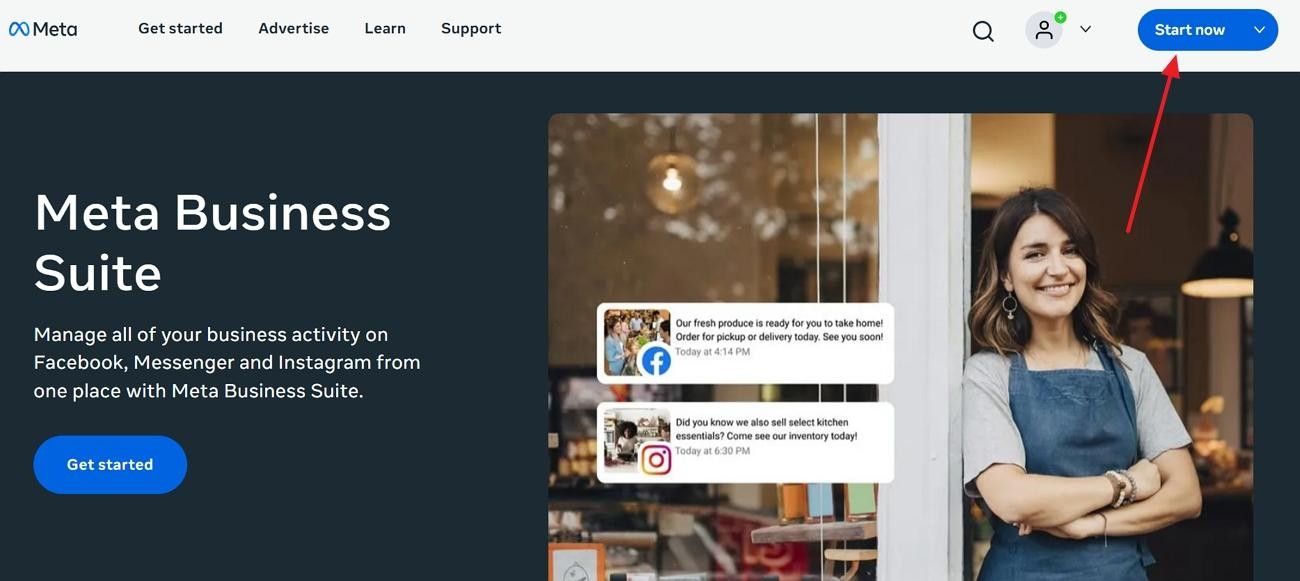
Initiate with Meta Business Suite
On the Meta Business Suite website, click the “Start Now” button on the top right to begin.
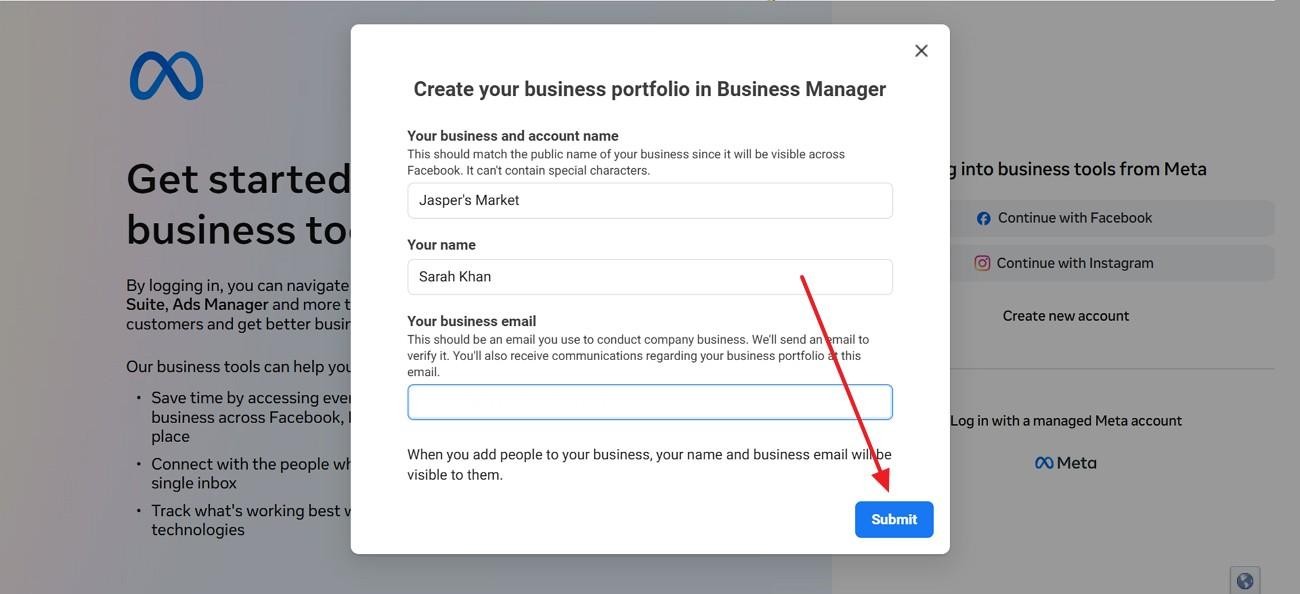
Enter Business Portfolio Information
After you have signed up, create your business portfolio and click the “Submit” button to continue.
Step 2: Set Up Tracking (Meta Pixel & Conversions API)
For performance optimization, it is important to set up tracking on Facebook ads. Go through this guide and learn how this can be done on Meta:
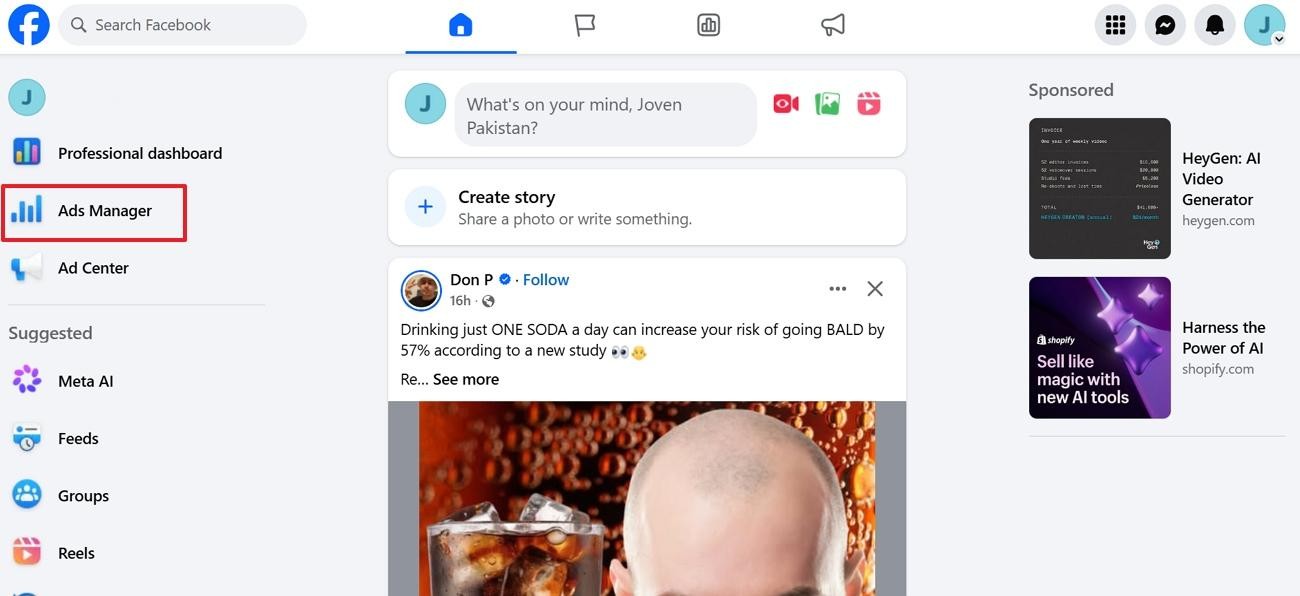
Access the Facebook Ads Manager
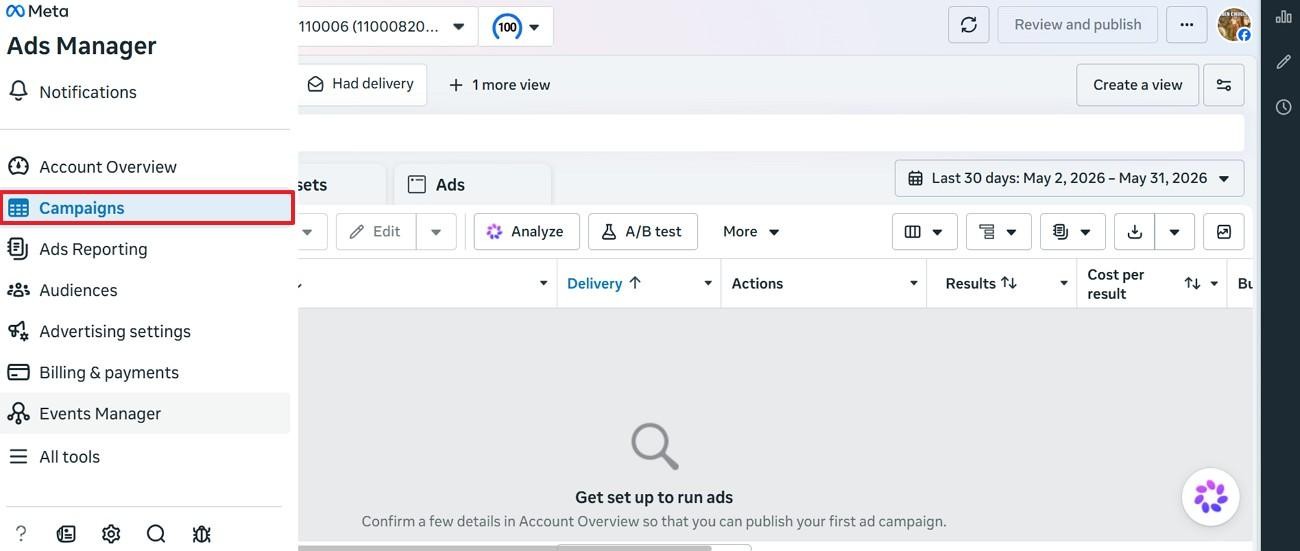
In your Facebook business account, enter the “Ads Manager” tab from the left.
Enter the Event Campaigns
From the Ads Manager page, select the “Campaigns” option from the left sidebar to proceed.
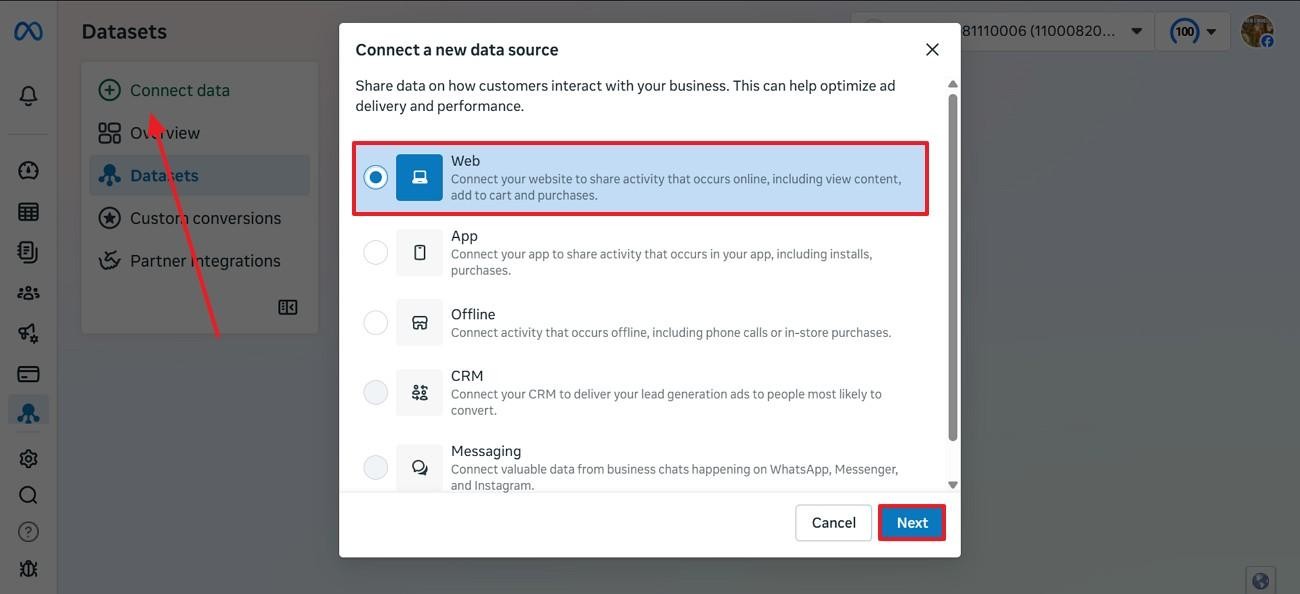
Connect a New Data Source
Now, click the “Connect Data” option and select the “Web” option if you want to connect the profile with your e-commerce website.
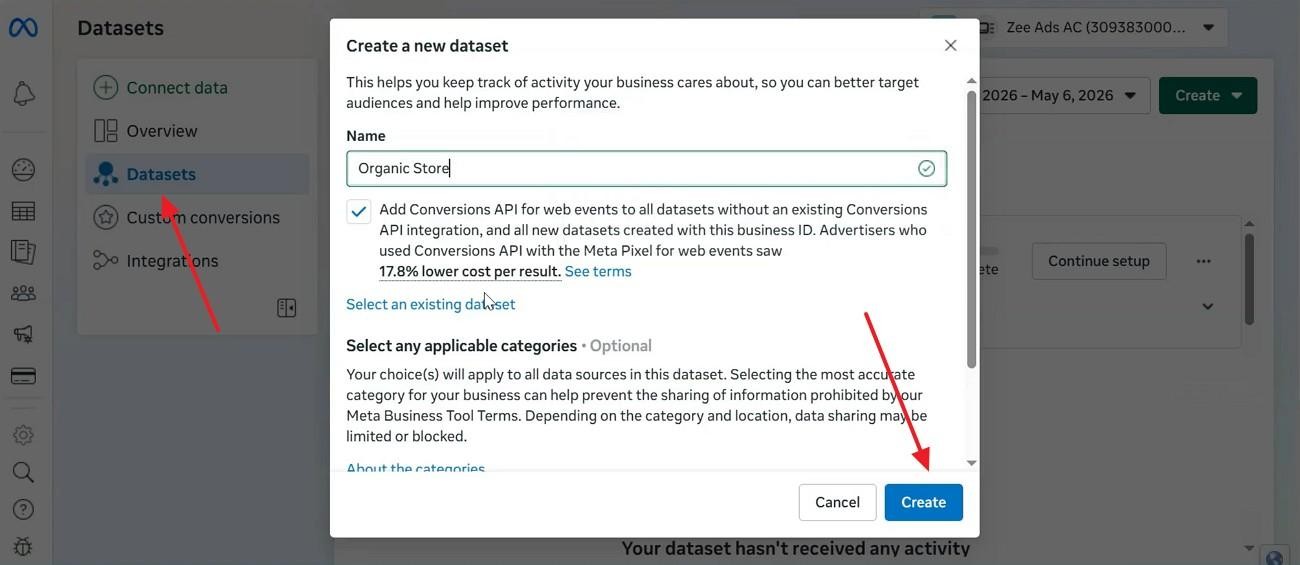
Create a New Dataset
Afterward, select “Datasets” and enter the required information about your business. Once done, click the “Create” button to make a new dataset.
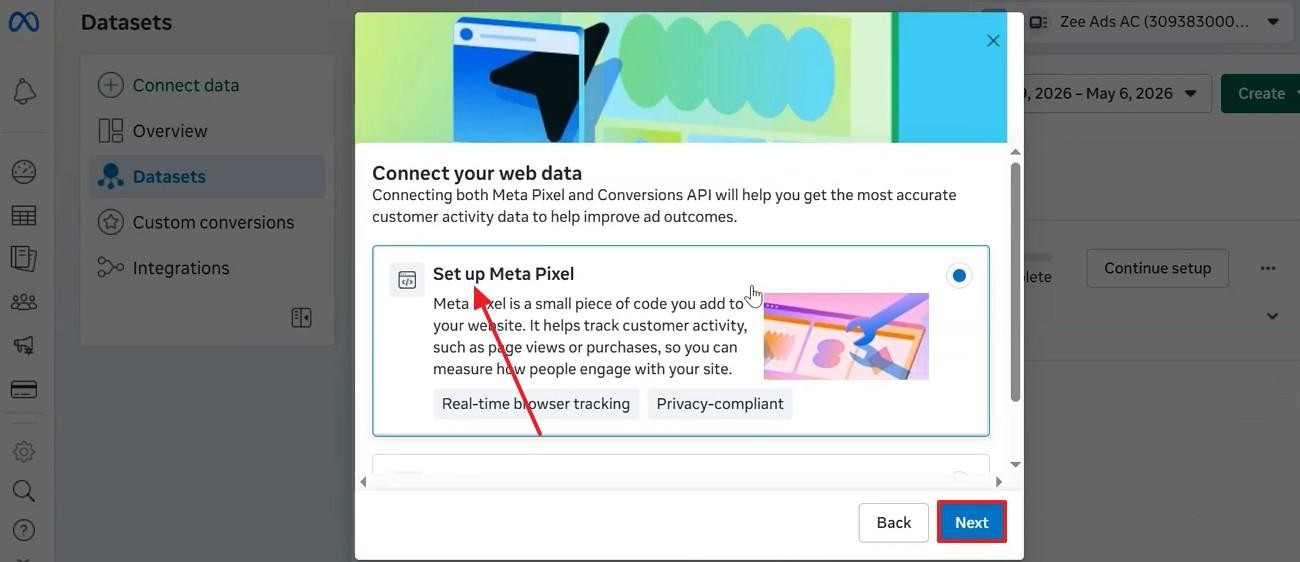
Set Up Meta Pixel
As you are directed to a new window, select the “Set Up Meta Pixel” radio button and click “Next” to proceed with the process.
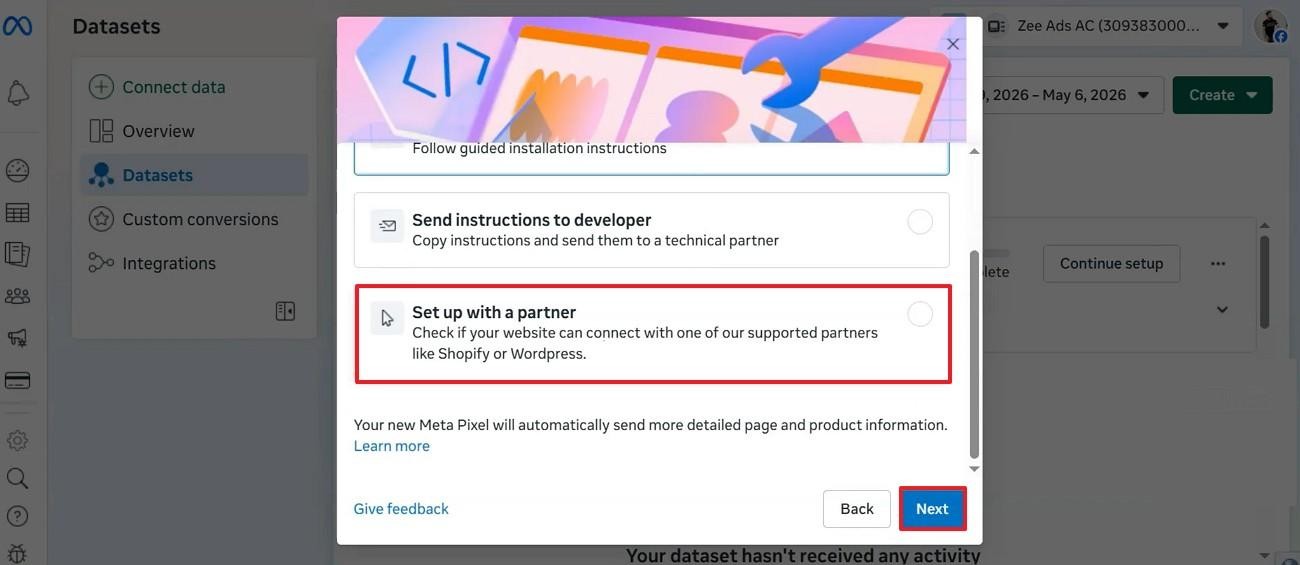
Set Up with a Partner
Using the following window, pick the “Set Up with a Partner” option and click “Next” to continue.
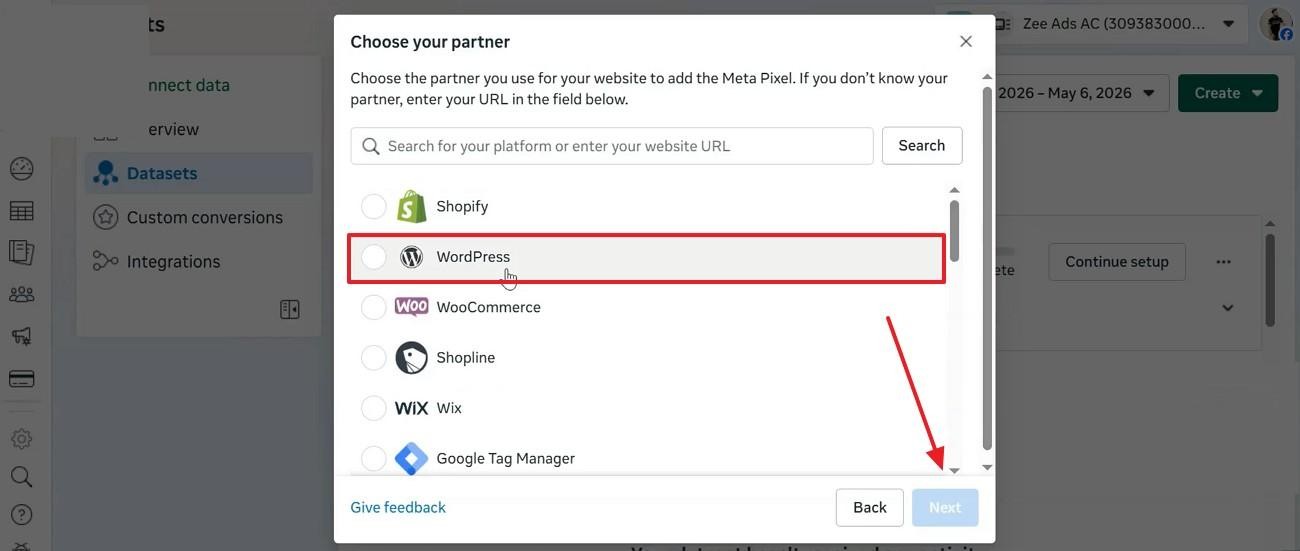
Select the Website
In the window with the list of partners, select the desired selling partner and click “Next”.
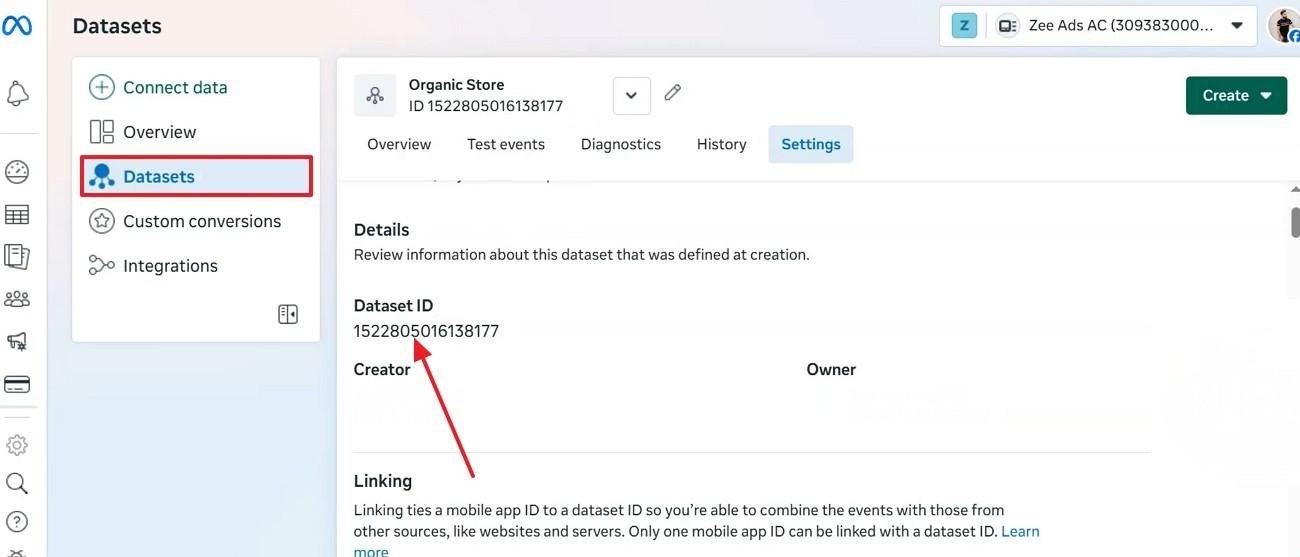
Copy the Dataset ID
Once you have entered all the information, copy the “Dataset ID” from the “Datasets” tab and switch to your partner selling platform.
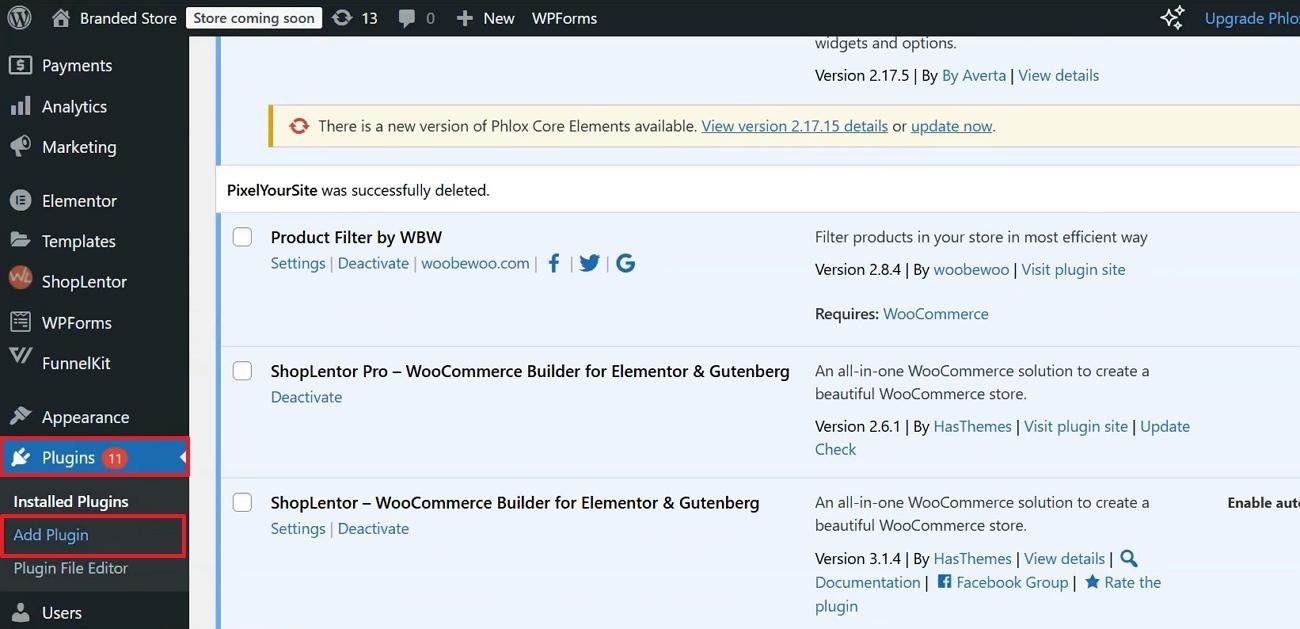
Add a Plugin on Your Website
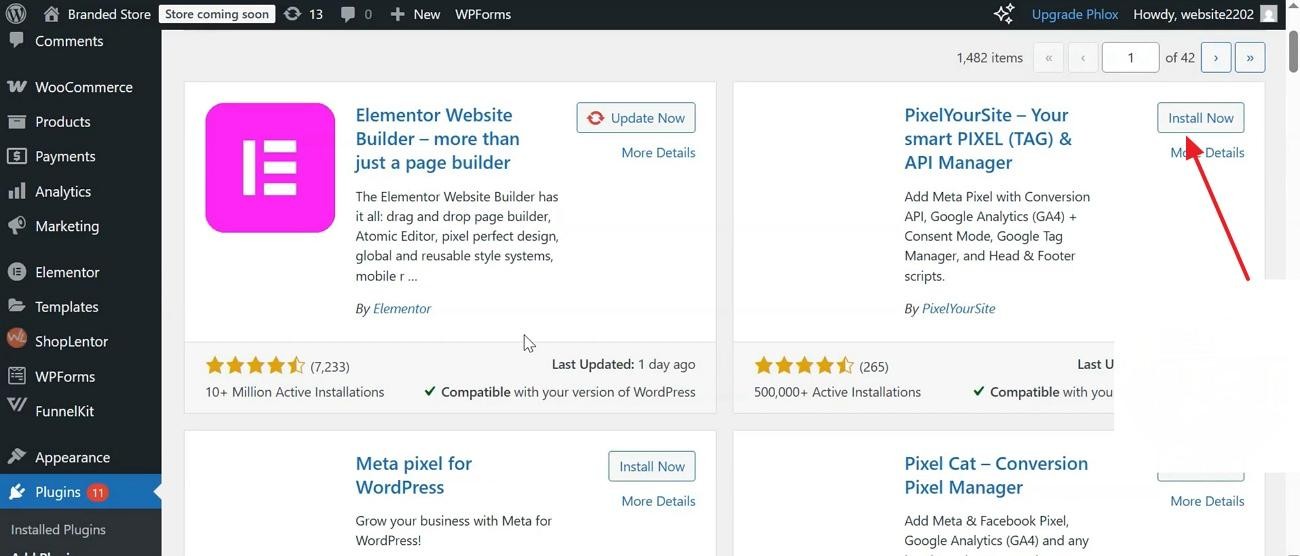
If you are using WordPress, enter the left panel to extend the “Plugins” option. In the extended menu, click the “Add Plugin” option and refer to the plugin store.
Install the Plugin
As you spot the “PixelYourSite” plugin in the store, click “Install Now” to acquire it.
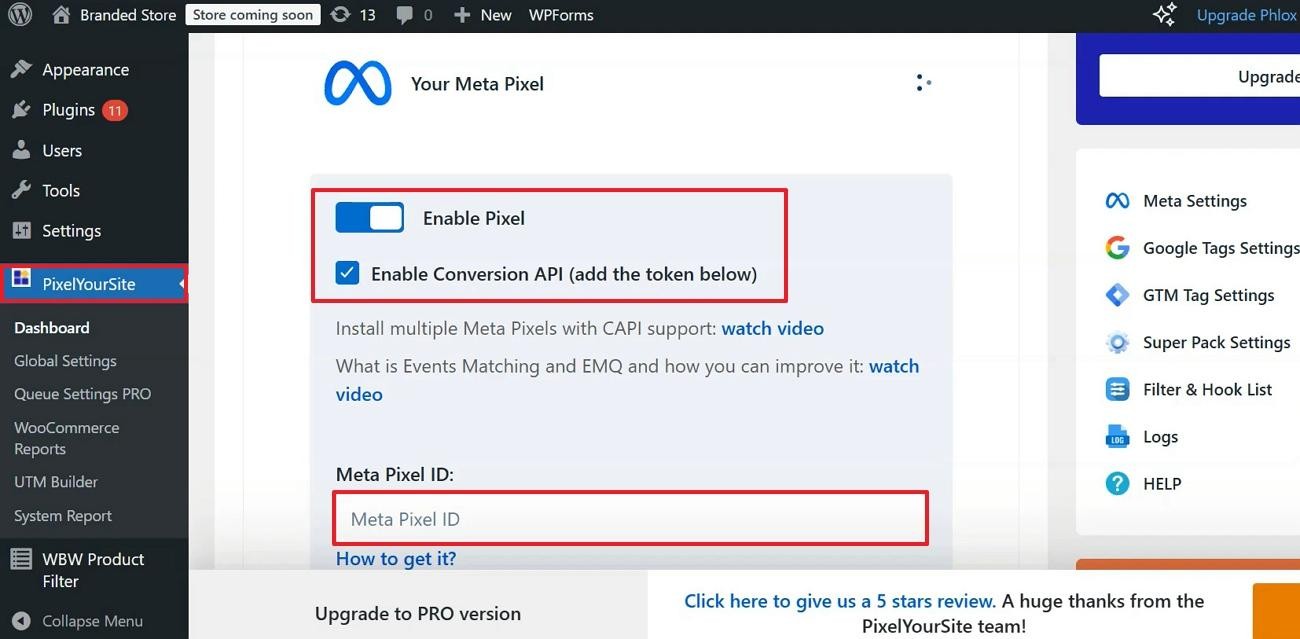
Enable Pixel
As the plugin is added to your list, open its page from the left panel and access the right side of the page. Toggle between the “Enable Pixel” button and check the “Enable Conversion API” box. Now, paste the dataset ID you copied earlier in the “Meta Pixel ID” field.
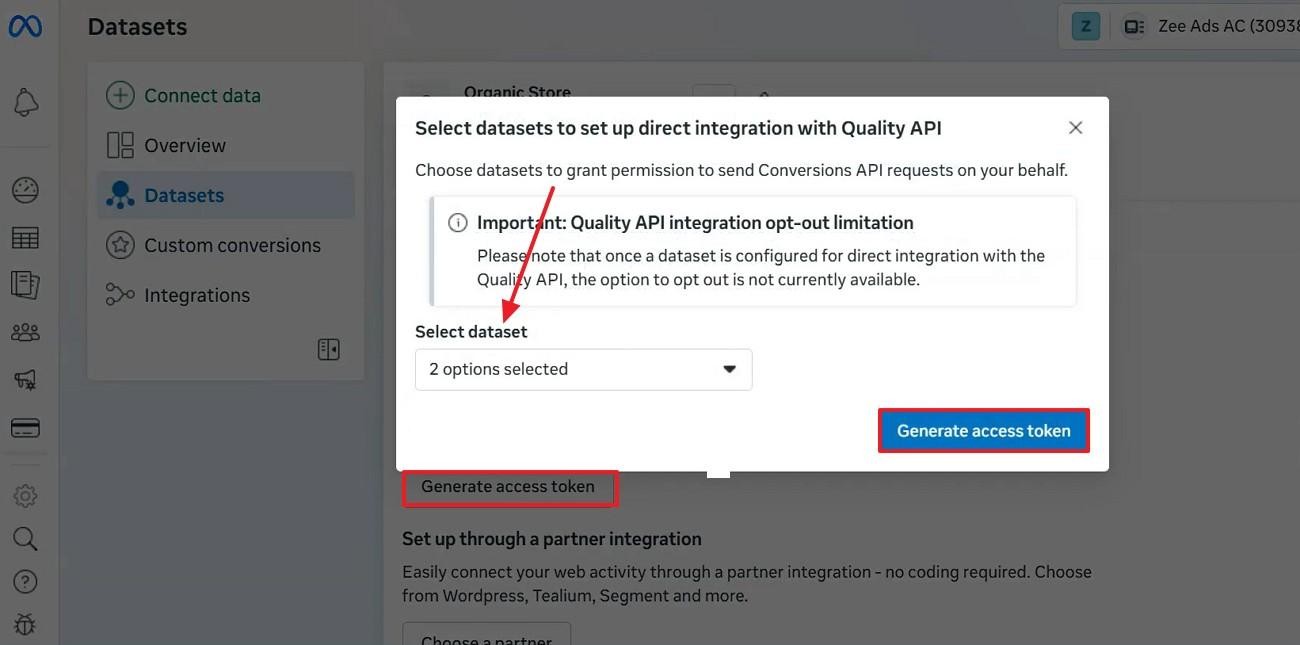
Generate Access Token
From the Meta website, click the “Generate Access Token” option and “Select Dataset” from the relevant menu. Once done, click the “Generate Access Token” option and head back to the WordPress website.
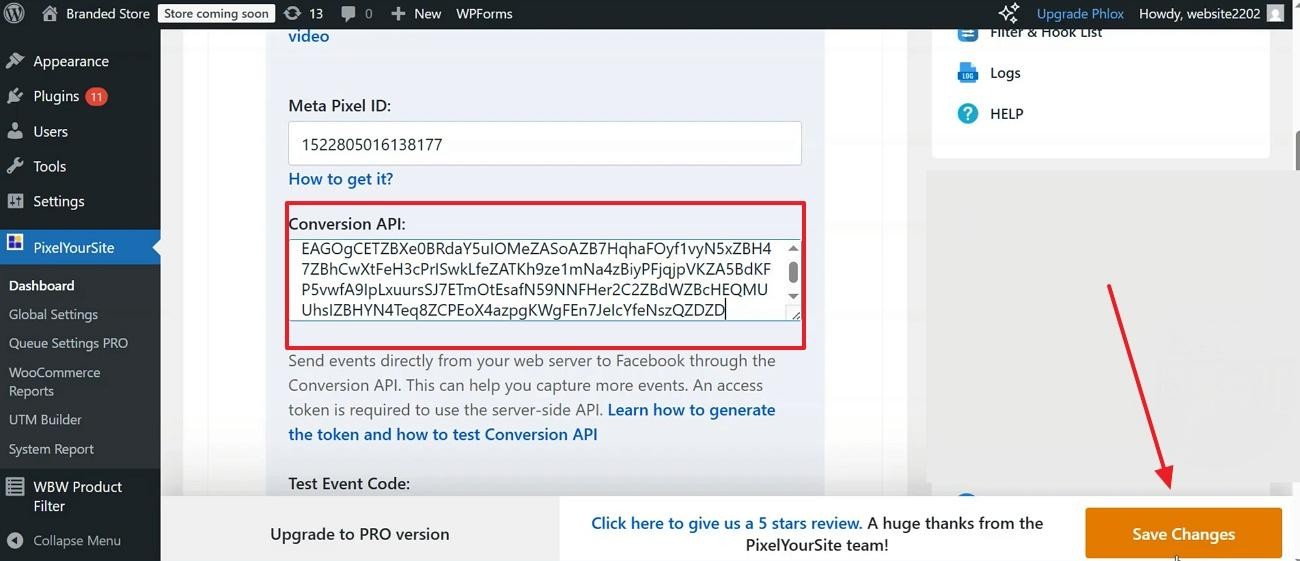
Paste Meta Pixel ID and Conversion API
Now, enter the “Conversion API” field and paste the generated access token. Once done, click the “Save Changes" button to apply these settings.
Step 3: Open Ads Manager
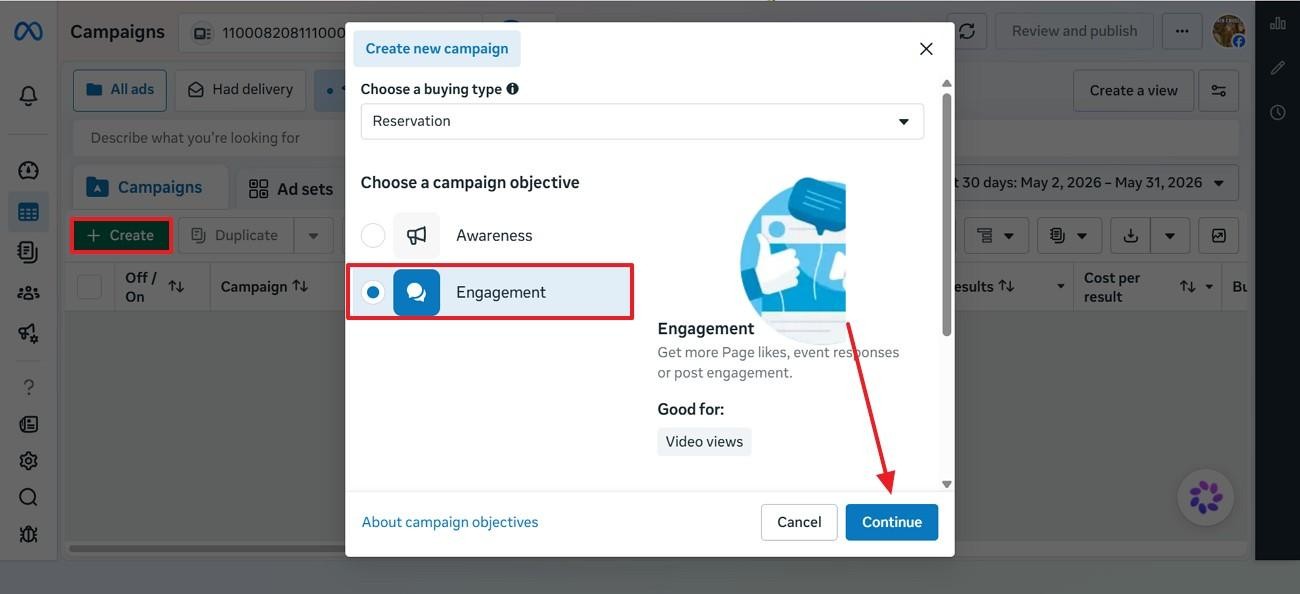
Next, open Ads Manager and click “Create” to select the campaign objective to “Continue”.
Step 4: Define Your Target Audience and the Budget
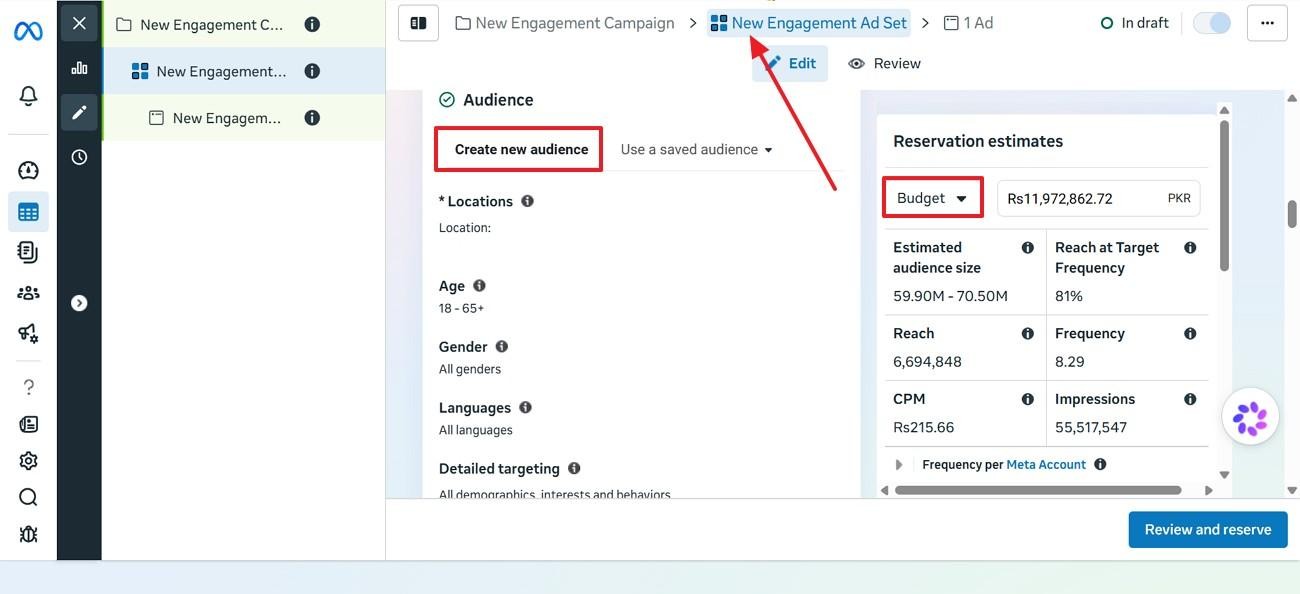
Being in the “New Engagement Ad Set” tab, scroll to find the “Create New Audience” menu. Within this menu, set your target audience by location, age, gender, and more. Now, expand the “Budget” menu on the right and select a package.
Step 5: Select Ad Placements
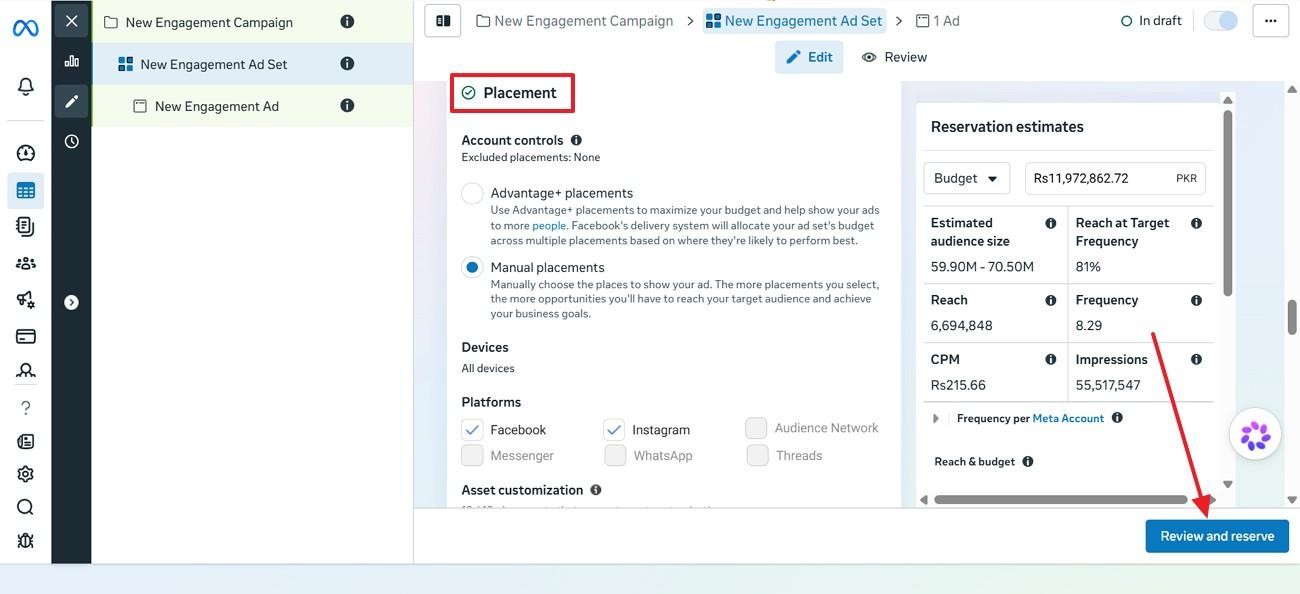
Next, scroll through the page and access the “Placement” section. Here, set the control to Manual Placements and pick the platforms you want to publish the ad on. At the end, click the “Review and Reserve” button at the bottom right to enter the “New Engagement Ad” tab.
Step 6: Design Your Ad Creative
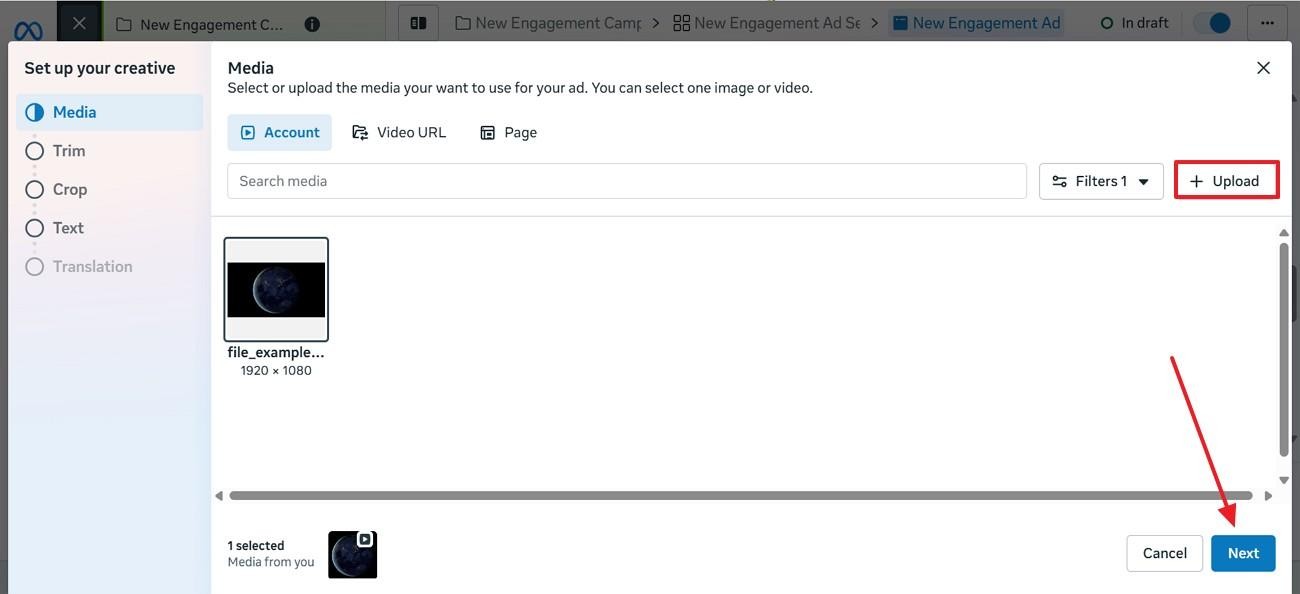
As you click the “Upload” option, access the Media window to “Upload” the post from your device.
Step 7: Publish Your Ad
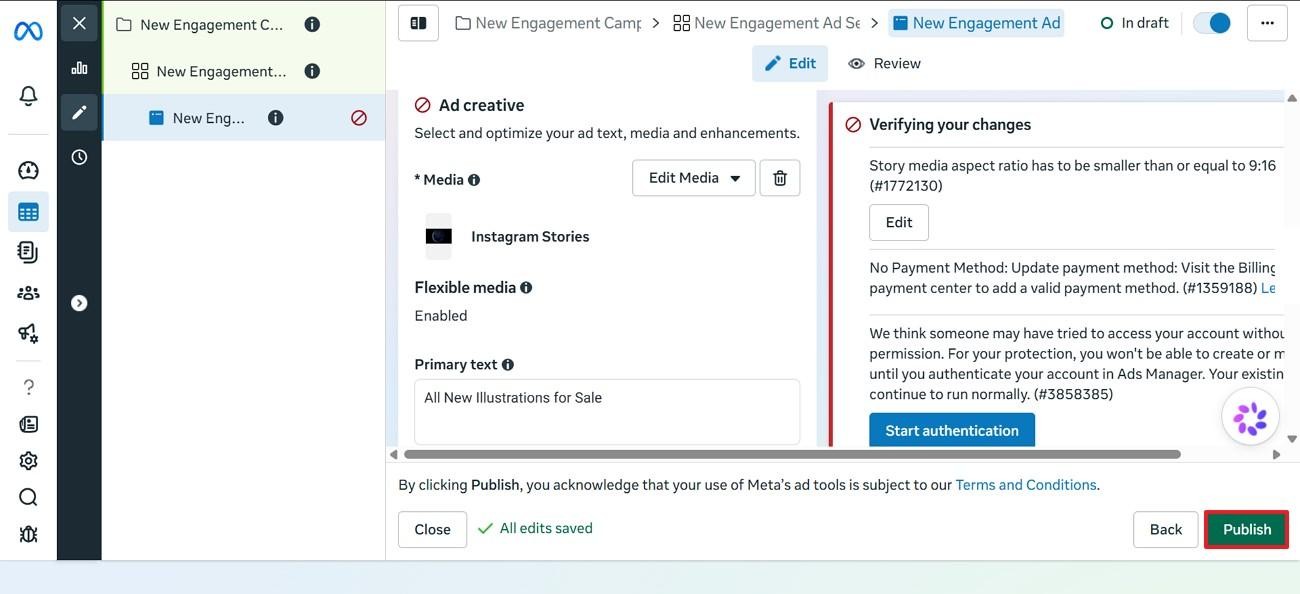
Once you have entered the ad caption and edited the media, exit the Media window. Now, review the ad information you input and click the “Publish” button to publish the ad.
Step 8: Monitor Performance and Optimize
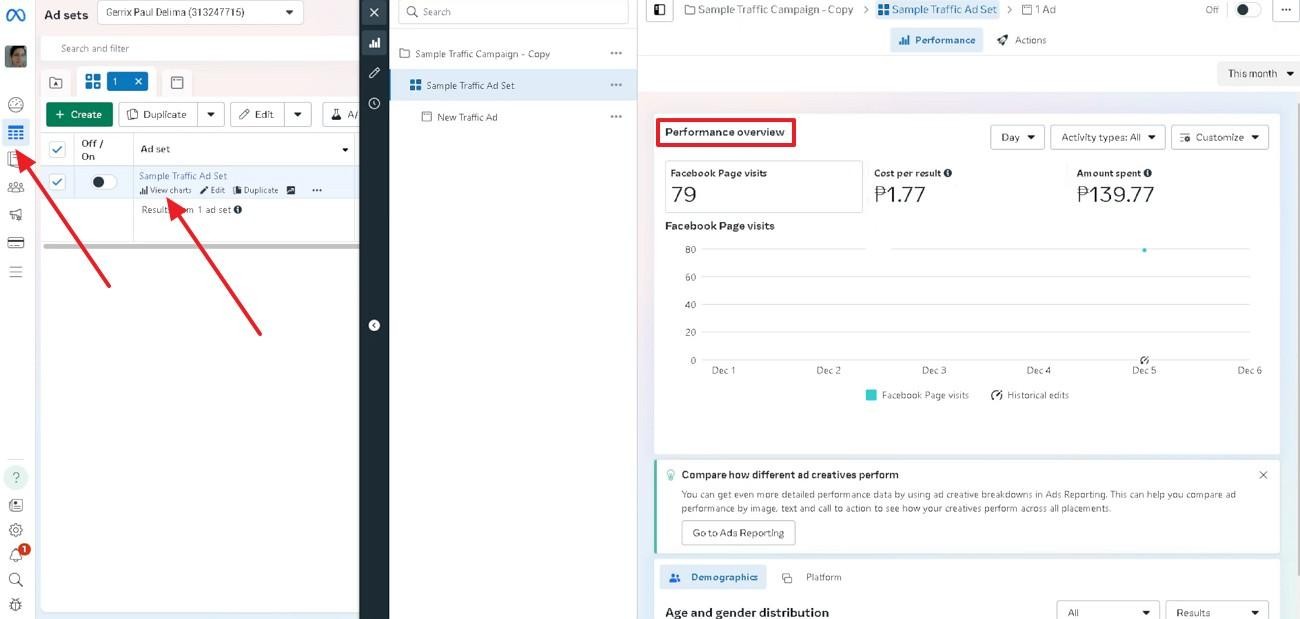
After the ad is live, enter Meta Ads Manager and select the “Campaigns” section from the left. Now, find the intended ad and click the respective “View Charts” option to view its performance in the right section.
How to Create High-Performing Facebook Ad Creatives?
Making an ad is the backbone of how well your business will do. If you are new to the concept, use Zawa and let it create the ad for you. This Facebook ad maker lets you upload up to 5 product images to make a comprehensive post.
Users can select the aspect ratio of the ad and make it platform-optimized for better productivity. Moreover, you can generate up to 20 product ads per task and pick the results that suit your needs.
Key Features
-
AI Facebook Ad Creation: Generate high-converting Facebook ad visuals from simple text prompts in seconds.
-
Multiple Ad Design Styles: Create Facebook ads in modern, minimalist, cartoon, cinematic, 3D, or branded visual styles.
-
Built-In Ad Editing Tools: Edit layouts, text, colors, visuals, and add detail to images directly before exporting high-resolution Facebook ad creatives.
-
Branding: Zawa allows you to upload your brand's logo and provide it with the colors that are used in your logo to follow your branding.
-
Ad Inspiration: This platform showcases the ads others have created to help you with inspiration.
-
AI Photo Editor: It is a built-in photo editor that enables you to manipulate the ad photo before uploading it.
How to Use Zawa to Make a Facebook Ad
Zawa’s ad-maker provides comprehensive ad outcomes that make the videos ready to share. Use the following guide, and find out how to use this tool to create a Facebook ad:
Step 1. Enter the Prompt for Generating the Ad
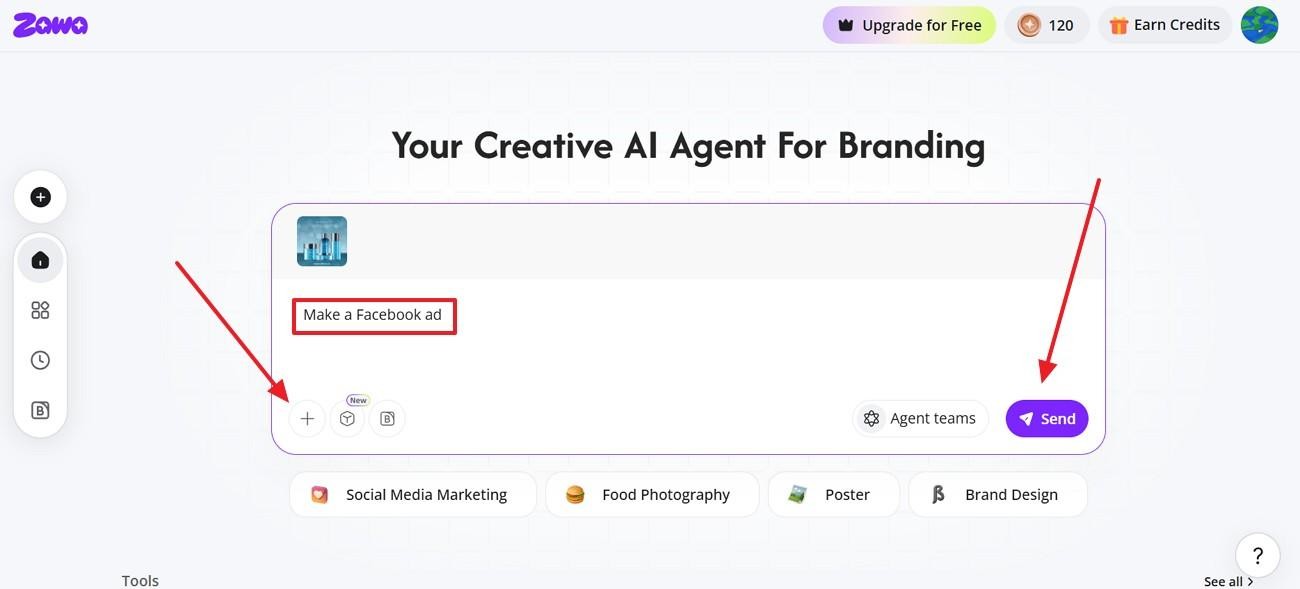
To start the process, access the Zawa AI Agent page and give the prompt for generating a Facebook ad. Now, click the “Upload” button to give reference product images from your device.
Step 2. Specify the Text on the Ad
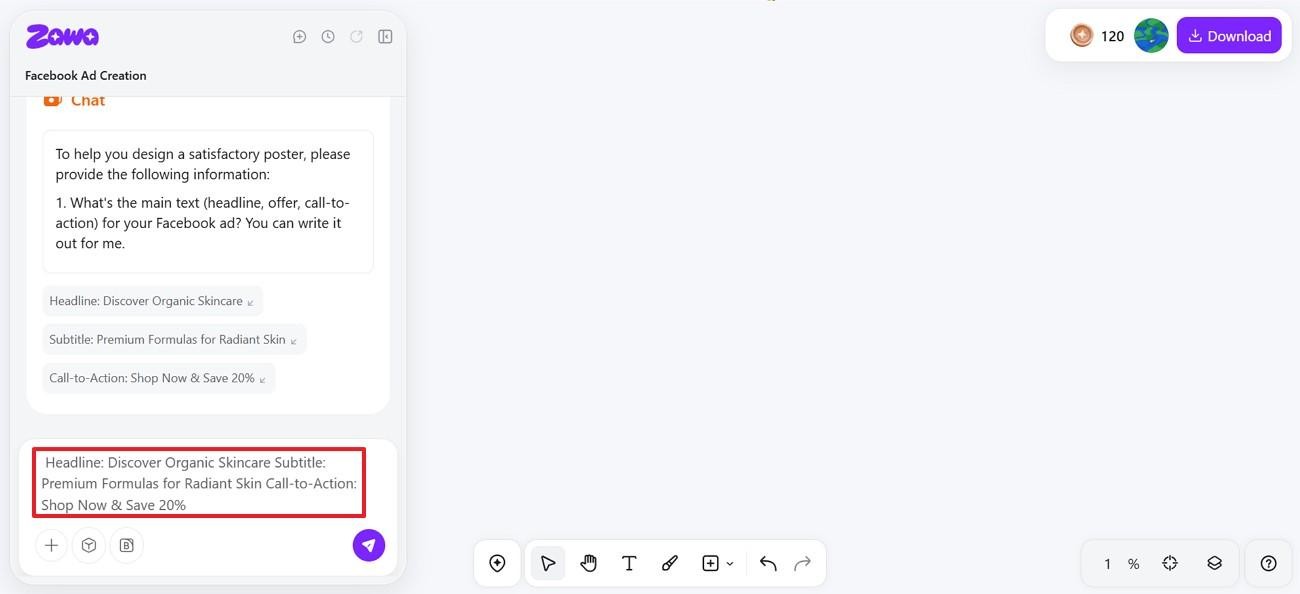
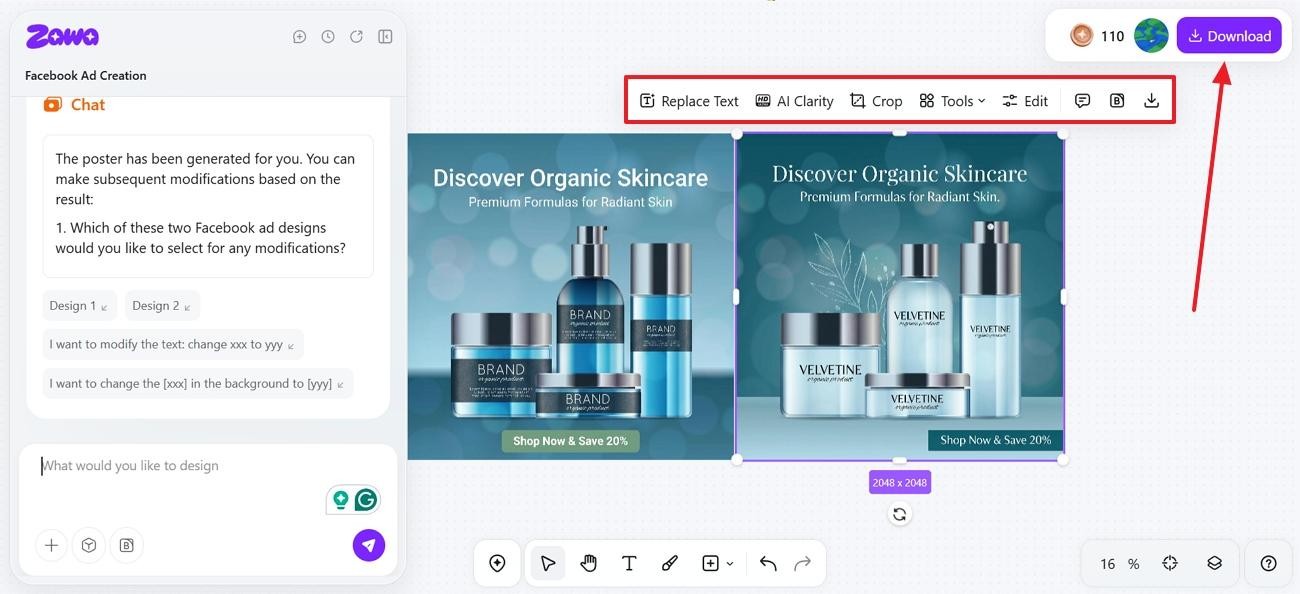
As you are directed to the next page, use the AI agent to give it the details on the text you need for the product image. After the product image is generated on the right, choose the suitable result. Now, use the toolbar above the image to make changes to it if needed.
Step 3. Refine the Ad and Download it
Once the advertisement post is ready. Download it using the top right corner of the page.
How Much Does it Cost to Create a Facebook Ad?
Before you create an FB ad, you must know the money that needs to be invested in it. This table displays the average price a click can cost an ad per industry in 2026:
| Industry | Average CPC (USD) |
|---|---|
| Shopping/Gifts/Collectibles | $0.30 – $0.50 |
| Sports & Recreation | $0.40 – $0.70 |
| Arts & Entertainment | $0.45 – $0.80 |
| Travel | $0.50 – $0.90 |
| Food & Restaurants | $0.70 – $1.20 |
| Beauty & Personal Care | $0.70 – $1.30 |
| Health & Fitness | $0.80 – $1.50 |
| Education & Courses | $0.80 – $1.60 |
| Real Estate | $0.90 – $2.00 |
| Business Services (B2B) | $1.00 – $2.20 |
| E-commerce (general) | $0.80 – $1.80 |
| SaaS/Software | $1.50 – $3.00 |
| Finance & Insurance | $1.50 – $4.00 |
| Legal Services | $2.00 – $5.00+ |
6 Best Practices for Facebook Ads
There are some rules you'll need to think about before making a Facebook ad. Below are the considerations that will help your ad be a success online:
-
Set up Strong Headlines: Build effective attention-grabbers that catch users' attention the first time they see them.
-
Keep the Visuals Clean: Use only simple, meaningful images and videos to increase engagement.
-
One Ad - One Message: Each ad should feature a single call to action or offer.
-
Make Use of High-Quality Creatives: Optimize performance with clear images and business videos.
-
Use a powerful CTA: Use distinct, clear calls to action like Buy Now, Learn More, Sign Up, etc.
-
Run A/B Tests: Make sure that you perform A/B Tests on creatives, headlines, and audience comparisons because you want to maximize your performance.
Conclusion
In essence, posting an ad of your product on social media is vital to gathering online traffic. This article explored how to make a Facebook ad and use Zawa to put together a decent advertisement post. Its AI agent can be used to make and refine the post , making it social media-ready.
FAQs
-
Can small businesses use Facebook ads effectively?
Meta Platforms ads can be effectively used for small business growth if they target the right audience and test simple and clear ad creatives.
-
Is $10 a day enough for Facebook ads?
You can test ads and identify winning ads for $10 a day without scaling.
-
How many views for $1 dollar on Facebook?
Depending on the target, competition, and ad quality, $1 will yield an average of 500-2000 impressions.
-
How much does it cost to do an ad on Facebook?
The price of Facebook ads depends on the industry and targeting and can range from approximately $0.30 to $5 per click.
-
What are common FB ads mistakes to avoid?
Common errors are confusing messages and not testing multiple creatives, which Zawa can help improve by structuring and optimizing ad performance.
You May Be Interested
140+ Facebook Bio Ideas: Short, Professional, Unique, and More
How to Use an AI Ad Copy Generator to Create High-Converting Ads

Facebook Ad Size: Complete Guide to Dimensions, Formats & Specs
Facebook Cover Photo Size Guide - Specs, Upload, and Design Process
Facebook Marketing Strategy: A Guide to Turn Clicks Into Customers
