
Best Times to Post on LinkedIn to Boost Your Visibility Fast
Timing plays a crucial role in LinkedIn performance. Join us as we tell you the benefits, best time to post on LinkedIn, expert tips, and the best AI-powered tool, Zawa, to enhance LinkedIn engagement and boost your performance.


The best time to post on LinkedIn varies based on your audience and goals. Right timing helps your LinkedIn audience see your posts when they are active online. Posting at the right time helps your content reach people when they are most likely to engage.
Good posts attract more views, comments, and connections from people you want around. This guide shows the best times, tips, and strategies to boost LinkedIn success.
Why Timing Matters in LinkedIn Posts?
Timing affects how many people see your post in their LinkedIn feed. LinkedIn users check the platform during specific hours when they take breaks from work. Posts published during peak activity hours receive more likes and comments. Early engagement signals to the algorithm of LinkedIn to show your content to a wider audience. The right uploading timing turns your post into a conversation rather than something people scroll past.

Best Times to Post on LinkedIn in 2026
Your audience activity changes based on their industry and weekly schedule patterns. Professional groups browse LinkedIn during different hours throughout each day. The tables below organize the best posting times by varying factors:
By Weekday
While LinkedIn engagement is generally strongest from Tuesday to Thursday, professionals remain active on the platform throughout the week. Posting during the recommended time windows below can help improve visibility and engagement, although the best results may vary depending on your audience and industry. Use these time slots as a practical starting point for planning your weekly LinkedIn content.
|
Day |
Best Time to Post |
Best Content Type |
|---|---|---|
|
Monday |
10 PM, 5 PM, and 9 PM |
Carousels, industry news |
|
Tuesday |
4 PM, 5 PM, and 10 PM |
Videos, thought leadership |
|
Wednesday |
4 PM, 3 PM, and 5 PM |
Videos, thought leadership |
|
Thursday |
5 PM, 7 PM, and 9 PM |
Videos, thought leadership |
|
Friday |
3 PM, 4 PM, and 5 PM |
Inspirational posts |
|
Saturday |
9 AM, 6 PM, and 10 PM |
Polls, personal stories |
|
Sunday |
10 PM, 9 PM, and 6 AM |
Polls, personal stories |
-
Best time to post on LinkedIn on Monday
Monday engagement builds gradually as professionals return to work and organize their priorities for the week. Late afternoon and evening hours perform well when users catch up on industry updates and browse content after meetings and tasks.
-
Best time to post on LinkedIn on Tuesday
Tuesday is often one of the strongest days for LinkedIn engagement. Professionals are fully focused on work, making it an ideal time to share thought leadership, industry insights, and educational content that encourages discussion.
-
Best time to post on LinkedIn on Wednesday
Wednesday maintains high engagement levels as users actively network and consume professional content. Midweek audiences are more likely to interact with valuable posts, making it a great day for videos, expert opinions, and business updates.
-
Best Time to Post on LinkedIn on Thursday
Thursday often performs well because professionals remain active and are more likely to engage later in the day.Evening hours attract active users who review content after completing their work assignments. Nighttime activity rises when people reflect on weekly achievements before Friday arrives.
-
Best Time to Post on LinkedIn on Friday
The best time to post on LinkedIn on Friday targets the afternoon window perfectly. Users scroll through feeds as they finish tasks and enter a relaxed mood. Late afternoon engagement peaks when professionals look for inspiration before the weekend begins.
-
Best Time to Post on LinkedIn on Saturday
Weekends bring different browsing patterns as users check LinkedIn at their own pace. Morning activity captures early risers who prefer consuming content with their coffee quietly. Evening slots work when people casually browse social platforms during their free time.
-
Best Time to Post on LinkedIn on Sunday
Sunday engagement comes from professionals planning their upcoming week and seeking career inspiration. Late-night posts perform well when users mentally prepare for Monday morning ahead. Early morning catches dedicated professionals who start their day reviewing industry trends regularly.
By Industry
Different industries attract audiences with unique work schedules and browsing habits. Decision-makers, healthcare professionals, and marketers often use LinkedIn at different times throughout the day. Understanding industry-specific activity patterns helps you publish content when your target audience is most likely to engage.
| Industry | Best Windows | Reason |
|---|---|---|
| Technology & SaaS | 8 - 9 AM, Tue - Thu | Early decision-maker check-ins |
| Financial Services | 11 AM - 2 PM, Wed - Fri | Lunch and pre-market close |
| Healthcare | 7 - 8 AM, 12 - 1 PM | Lunch breaks |
| Marketing and Media | 10 AM - 3 PM, Tue - Wed | Noon creative sessions |
By Audience Type
Posting times should also align with the people you want to reach. Executives, managers, job seekers, and sales professionals all have different routines and online behaviors. Tailoring your publishing schedule to your audience type can improve visibility, engagement, and the overall effectiveness of your LinkedIn content.
| Audience | Active Hours | Behavior |
|---|---|---|
| C-Suite Executives | 6 - 8 AM | Quick scroll before meetings |
| Mid-Level Managers | 12 - 1 PM, 5 - 6 PM | Lunch and post-work browse |
| Job Seekers | 9 - 11 AM, evenings | Active during non-work hours |
| Sales Professionals | 10 AM - 2 PM | Between client calls |
Worst Times to Post on LinkedIn
Posting during low-traffic hours reduces your initial engagement and limits algorithm reach. Knowing the best time to post LinkedIn content helps you avoid these dead zones. Now, let's review the specific time periods that consistently underperform on the platform:
| Time Period | Why Engagement Drops |
|---|---|
| Weekends (Saturday & Sunday) | Professionals disconnect from work content |
| Late Night | Users shift to personal activities |
| Early Mornings | Most professionals stay offline |
| Afternoons on Wednesday | Slump and meeting schedules |
How to Find the Best Posting Time for Your Audience
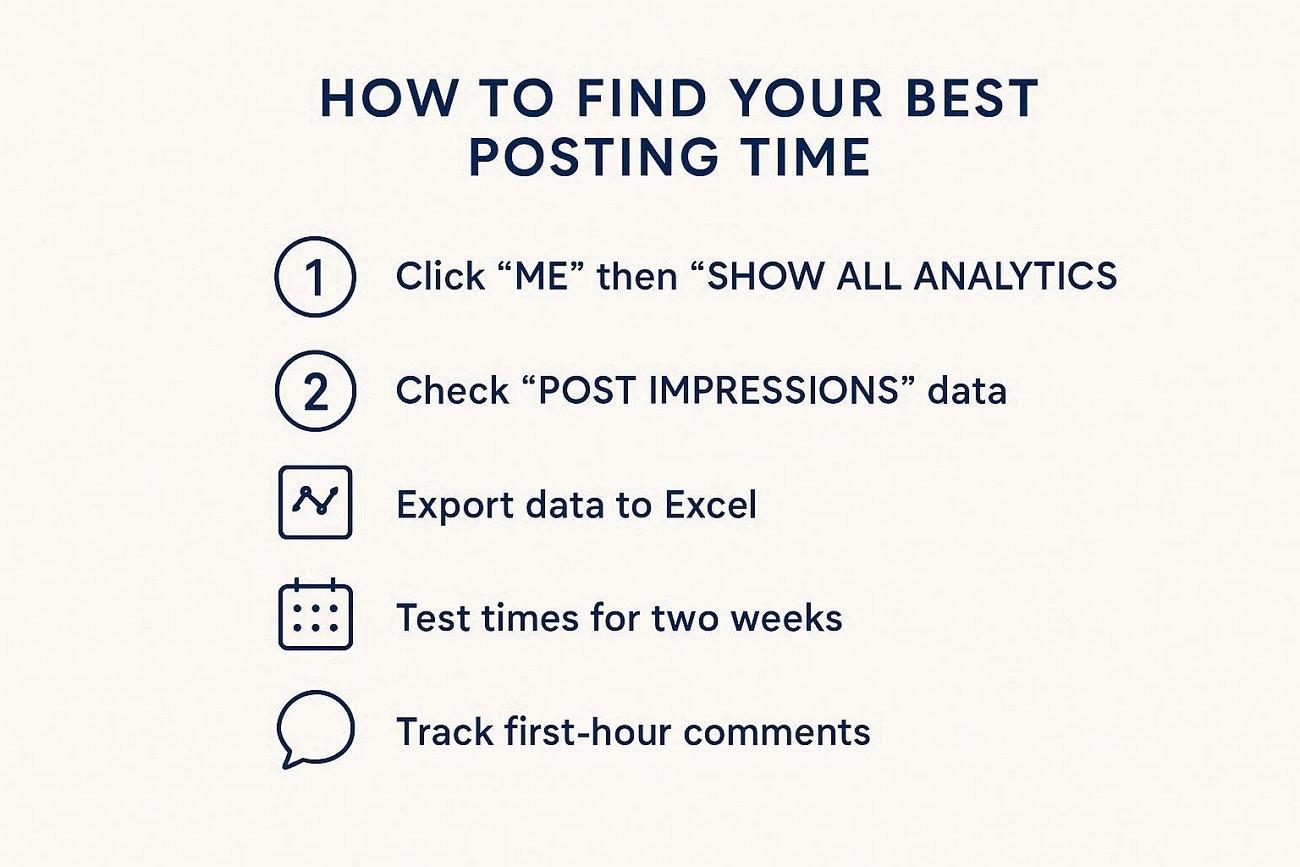
General timing guidelines provide a starting point, yet your specific audience behaves differently. LinkedIn's native analytics reveal when your followers actually scroll through their feeds daily. Testing different hours and tracking results helps you discover your unique posting window.
-
Access your analytics dashboard by clicking "Me" and the “Show all analytics” option.
-
Review “Post Impressions” to identify which posting times drove the most views.
-
Export your data to Excel and analyze engagement patterns across different hours.
-
Test posting at different times for two weeks and compare performance results.
-
Focus on hours when your top posts received comments within the first hour.
LinkedIn Posting Strategy Tips
Best days to post on LinkedIn matter, but strategy determines your long-term success. These strategies help you maintain consistent growth and audience engagement daily:
-
Content Format: Rotate carousels, videos, and text posts to test what your audience responds to best.
-
Engagement Signals: Get comments in the first hour to boost your post's reach.
-
Visuals: Use HD images and carousels to stop users from scrolling past content.
-
Post Regularly: Share posts 2-5 times each week so your audience expects your content.
Tools That Help Improve LinkedIn Performance
The right tools save time and help you track what is working. They handle boring tasks so you can focus on making good content.
Scheduling Tools
Buffer and Hootsuite let you plan LinkedIn posts weeks in advance automatically. They publish content at optimal times even when you're offline or unavailable.
Analytics Tools
Native analytics show post engagement rates and follower growth patterns. Other tools like Sprout Social provide deeper audience insights and competitor comparisons.
Content Creation Tools
Design tools help you create carousels, graphics, and branded templates without experience. AI-powered platforms speed up visual editing and turn basic images into content.
Choosing the right visual editing tool makes your posts stand out instantly. Professional graphics grab attention faster than plain text. Next, we will introduce Zawa, an AI tool that creates polished LinkedIn visuals.
Create Eye-catching LinkedIn Posts with Zawa
For creating professional LinkedIn visuals quickly, Zawa offers advanced AI-powered editing features. The platform upscales low-resolution images to crisp 4K quality, ready for printing purposes. It also offers AI editing tools for refining product and brand visuals.
Users can download images in transparent PNG format after removing backgrounds from photos. Zawa packs powerful generative AI tools that transform ordinary photos into standout content. Once you know the best day and time to post on LinkedIn, quality visuals matter.
Key Features
-
Fast, Professional-Quality Output: Generate polished, LinkedIn-ready visuals in seconds.
-
Built for Social Media: Preset dimensions and aspect ratios are optimized for LinkedIn, Instagram, and other major platforms, eliminating the need for manual resizing.
-
Multi-Image Uploads: Upload multiple reference images at once, allowing the AI to better understand your brand, products, and content context for more accurate results.
-
All-in-One AI Editing Tools: Beyond carousel creation, Zawa also supports image enhancement, image extender, watermark removal, background removal, and other AI-powered editing features.
So, start creating scalable LinkedIn posts with Zawa's AI Social Media Post Generator.
How to Create LinkedIn Posts with Zawa
After you know the best time of day to post on LinkedIn, creating quality content is an important aspect to learn. Follow the steps below to design professional posts that grab attention:
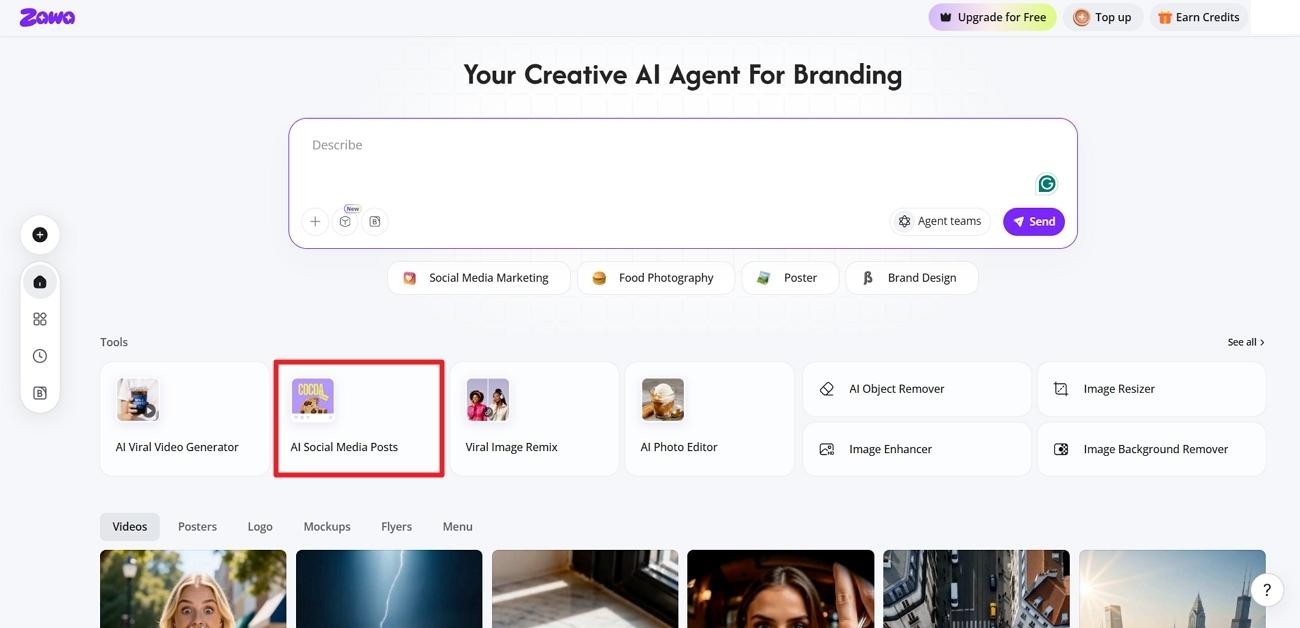
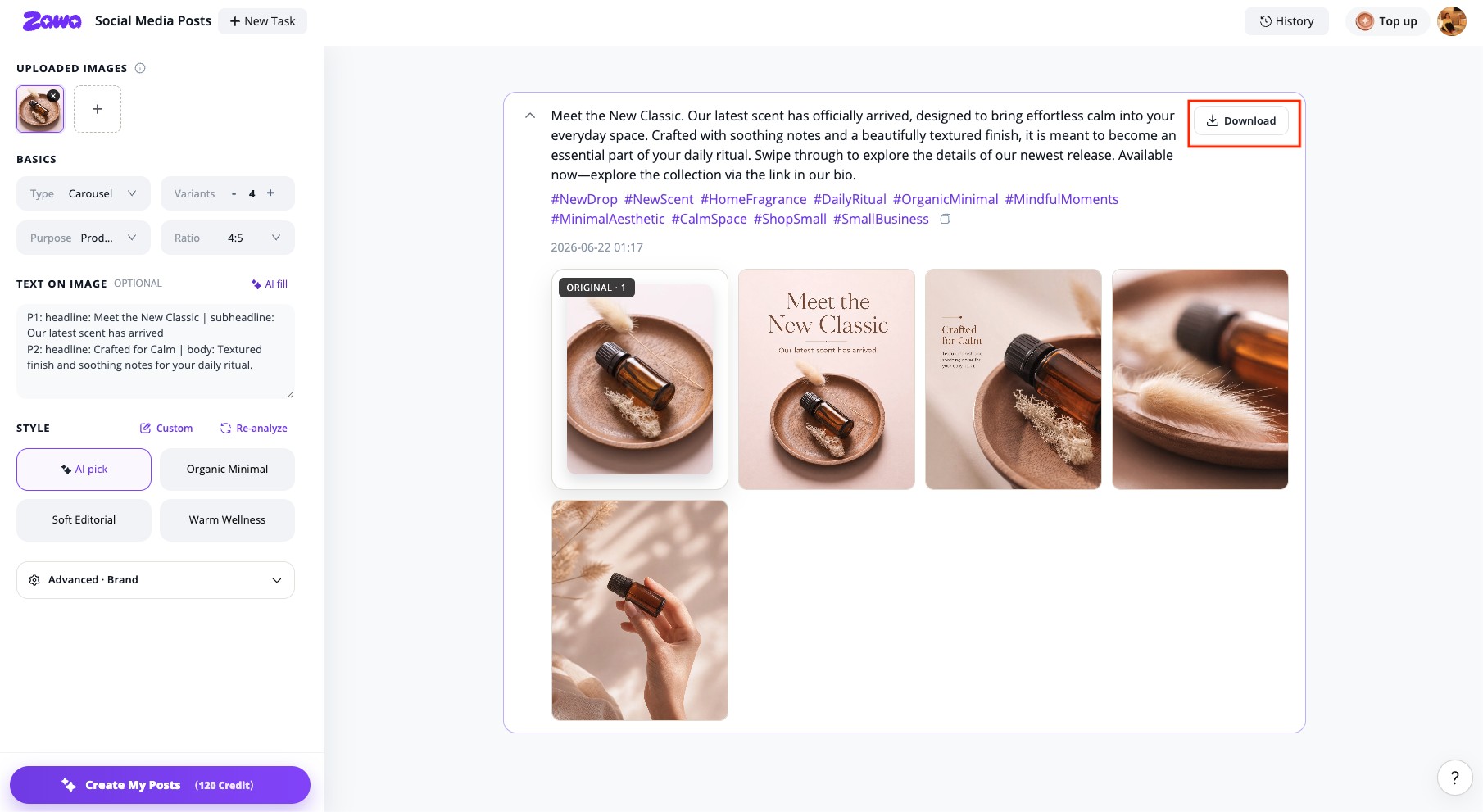
Step 1. Access The AI Social Media Post Generator
On the main interface, press the “AI Social Media Posts” option to enter the tool.
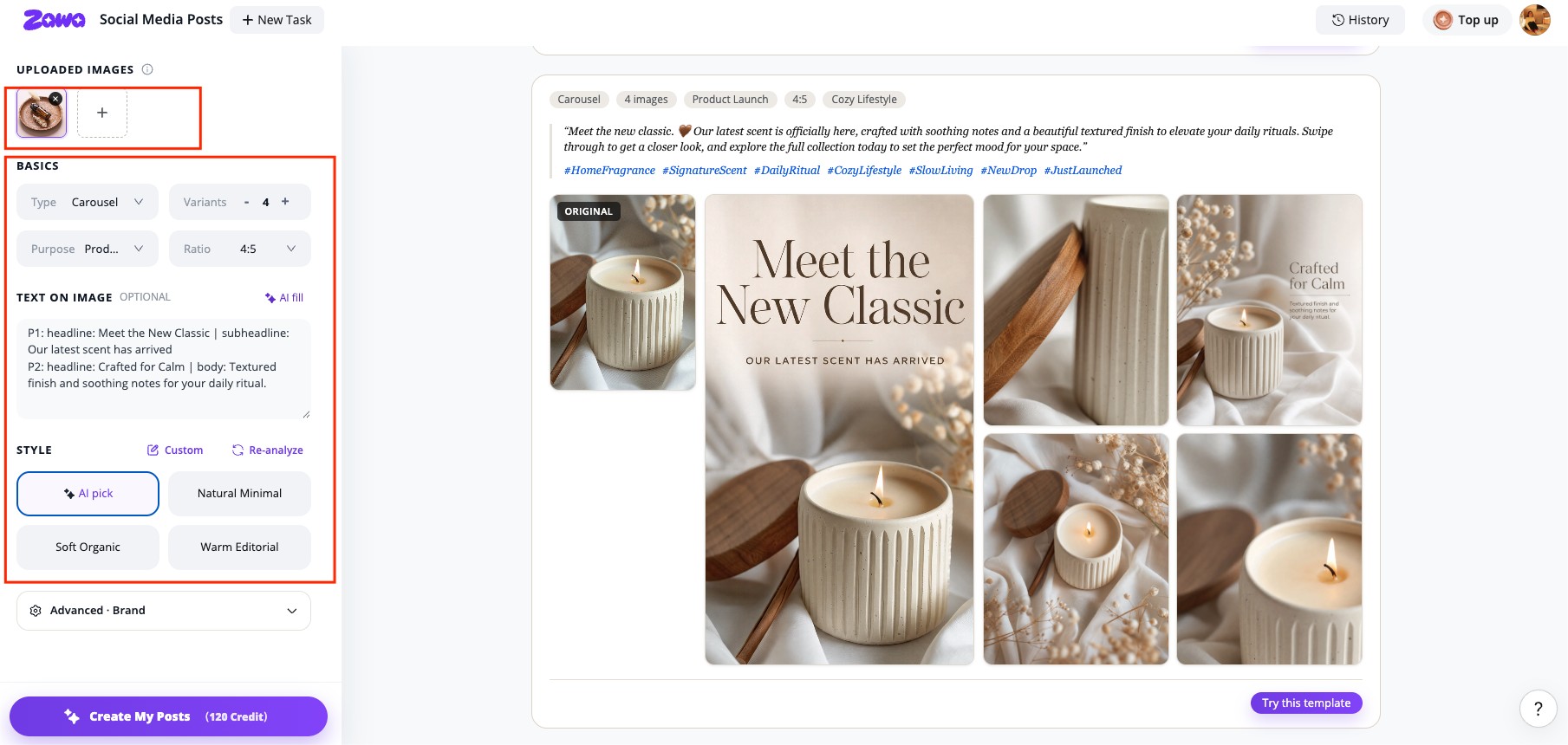
Step 2. Upload Reference Images
Next, upload the reference images of the product or anything your carousel will be about. Choose the “Carousel” type, select the number of variations, and pick the purpose and right orientation. Afterward, write the text on images or click the “AI Fill” option to generate text. Once done, select the “Style” of the carousel.
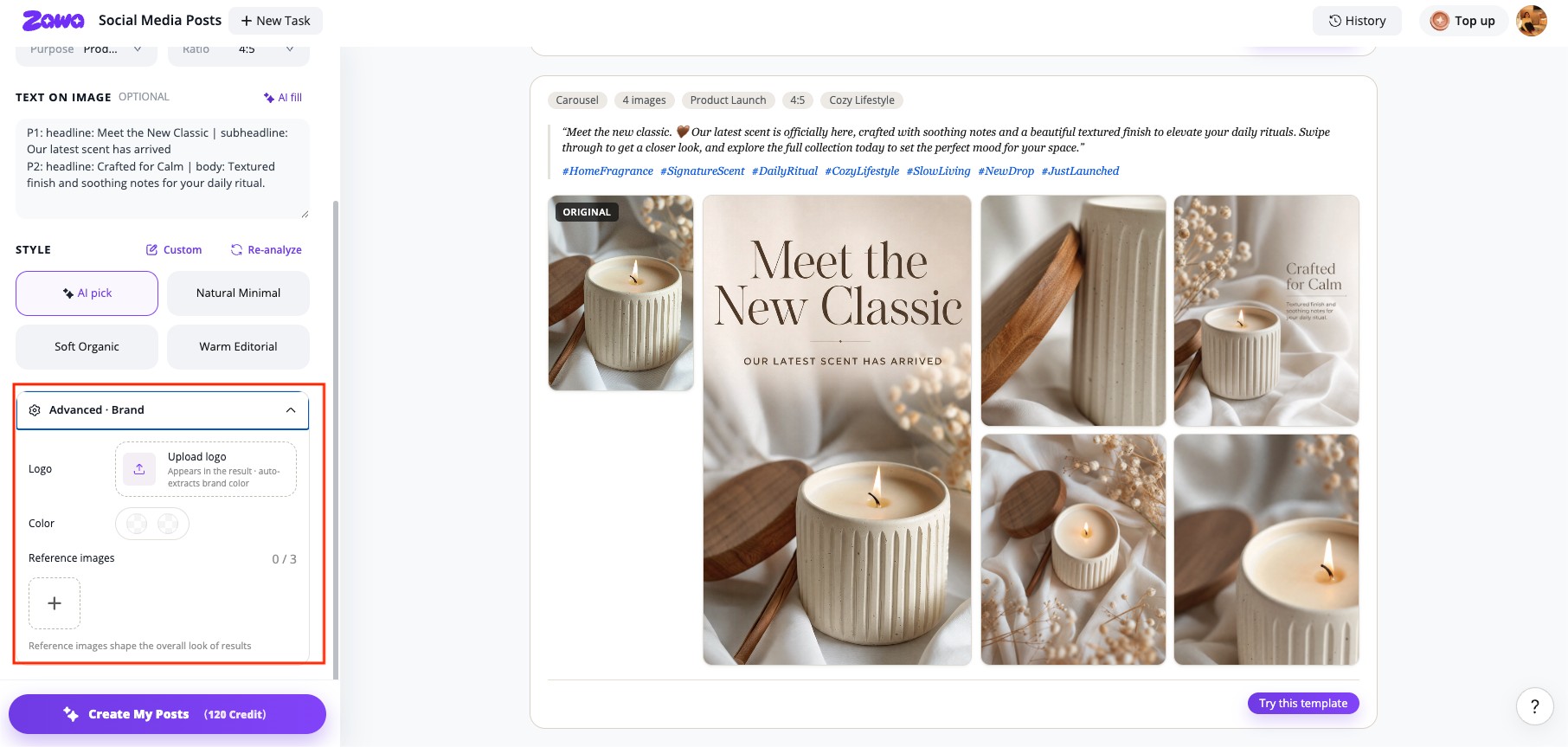
Step 3. Add Your Brand
Optionally, upload your brand logo under the “Advanced Brand” section and choose the color palette. Once done, press the “Create My Posts” button.
Step 4. Download The LinkedIn Post
After the image is finalized, click the “Download” button.
Conclusion
In conclusion, exploring the best time to post on LinkedIn gives you a chance to look unique. Right timing, combined with high-quality visuals, increases your reach and attracts the right audience on LinkedIn. Following expert tips and maintaining consistency turns your LinkedIn presence into a growth channel. You can try Zawa to create stunning posts that grab attention and drive engagement.
FAQs
-
What type of content performs best on LinkedIn?
Carousel posts generate the highest engagement rates at 6.60%, followed by video content. Visual quality matters greatly, so tools like Zawa help create professional graphics that stand out.
-
How often should I post on LinkedIn for the best results?
Posting 2 to 5 times per week delivers the best results for individuals and brands. Zawa speeds up content creation to help you maintain consistent posting without sacrificing quality easily.
-
When is the best time to post on LinkedIn based on audience activity?
Tuesday through Thursday, between 10 AM and 5 PM, drives the highest engagement. Late afternoon hours now perform better than morning times.
You May Be Interested
LinkedIn Ad Specs 2026: Complete Guide for All Ad Formats

Top LinkedIn Banner Ideas for Professional Growth

LinkedIn Carousels Explained - Examples, Tips, and Top Design Tool
How to Post a Carousel on Facebook: The Right Ways in 2026
How to Make Money on Instagram Reels in 2026

How to Photograph Clothing for E-commerce and Creative Use

140+ Facebook Bio Ideas: Short, Professional, Unique, and More
