How to Add Link to Instagram Post - Key Methods for Beginners
How to add a link to an Instagram post, explained with simple techniques to increase traffic and conversions. Plus, improve your content visuals using Zawa, a creative platform that helps design professional posts in minutes.

Add link to an Instagram post is essential for driving traffic, engagement, and conversions from your content. You need to understand the correct process, as Instagram limits clickable links in many areas. Knowing where and how links work helps you avoid mistakes and maximize results. This article clearly explains methods, placements, and best practices.
Why does Instagram limit clickable links?
Instagram does not support links to keep users from using other platforms. This enhances the duration of the session, interaction, and content. A few external links can help decrease spam, phishing, and misleading redirects. The platform focuses on quality content, improves the user experience, and upholds credibility indicators. The low connection rates prompt creators to focus on sponsored content and advertising rather than external traffic. Instagram, in turn, enhances monetization and manages user experience and quality. The standardization of this plan allows linking behavior between features and making moderation easier.
Where Instagram allows clickable links
-
Instagram bio: Add links to other profiles that can be clicked and do personal branding. This is the most stable because users are likely to add websites, portfolios, or landing pages here.
-
Instagram Stories: Once you have met the requirements, you can add clickable stickers. Such associations drive traffic to temporary content, thereby boosting interaction and conversions.
-
Instagram ads: Instagram advertisements include call-to-action buttons that users can click to reach an external destination. They are extensively employed in campaigns, conversions, and the clear, quantifiable tracking of marketing performance.
-
Instagram DMs: Allow people to add links that can be clicked within the context of a one-on-one dialogue. It allows exchanging resources, websites, or content suggestions in a more personal and immediate manner.
-
Instagram shopping posts: Posts with product tags that users can click to go to product pages. These links ease the buying process by bridging the gap between content and e-commerce features and the checkout process.
-
Instagram guides: Instagram Guides enable clickable links for posts, products, or places when curating. They can be used to make recommendations, but the connection possibilities are even less than the capabilities.
Where links are not clickable
-
Post captions: Theyare plain-text URLs that cannot be clicked. Readers have to be keen to copy and paste the links into their browsers to access the content.
-
Comments: The comments are not clickable, which reduces spam, but makes navigation challenging. Users are required to paste URLs in comments, which interrupts the experience and decreases engagement.
-
Hashtags: Hashtags are searchable links, although the external URLs they link to are not accessible. This ensures that users do not simply leave the platform to search for content.
-
Image overlay: The text on the images cannot be links that viewers can click. Displayed URLs must be manually entered by the user, which tends to decrease accuracy and click-through rates.
How to add link in Instagram post - 2 common ways
To add links to Instagram content, you need to be familiar with the platform's limitations and tools. Although posts do not support clickable URLs, there are viable ways to direct users to other pages.
Way 1: How to add a link to an Instagram post using captions
Adding a link to an Instagram post involves including a URL in the post caption that the user can copy and paste to open it in a browser. These links are not clickable. Since feed posts are not deleted after 24 hours, you can gain more reach, visibility, and discoverability. To include a link in captions to the Instagram post, it is necessary to do the following steps:
Step 1: Open Instagram and create a post
To begin with, open the Instagram application and press the "+" button in the upper-left corner of the main screen. Then, select the "Post" tab at the bottom-centered menu.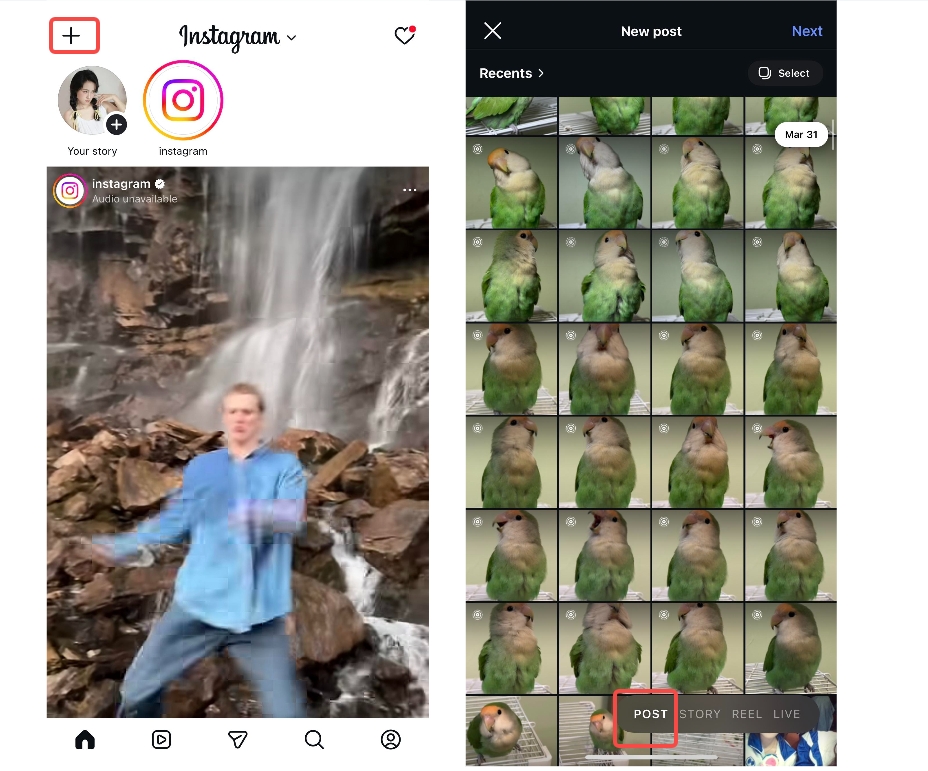
Step 2: Choose or capture the photo and edit
Clicking the "Post" tab takes you to the interface where you can take a photo or choose one from your device. Now select the photo you want to use in your post, then click the "Next" tab in the top-right corner. This will take you to the editing interface. Here you can edit your post's text, filters, overlays, music, etc. Once done, click the "Next" tab in the bottom-right corner.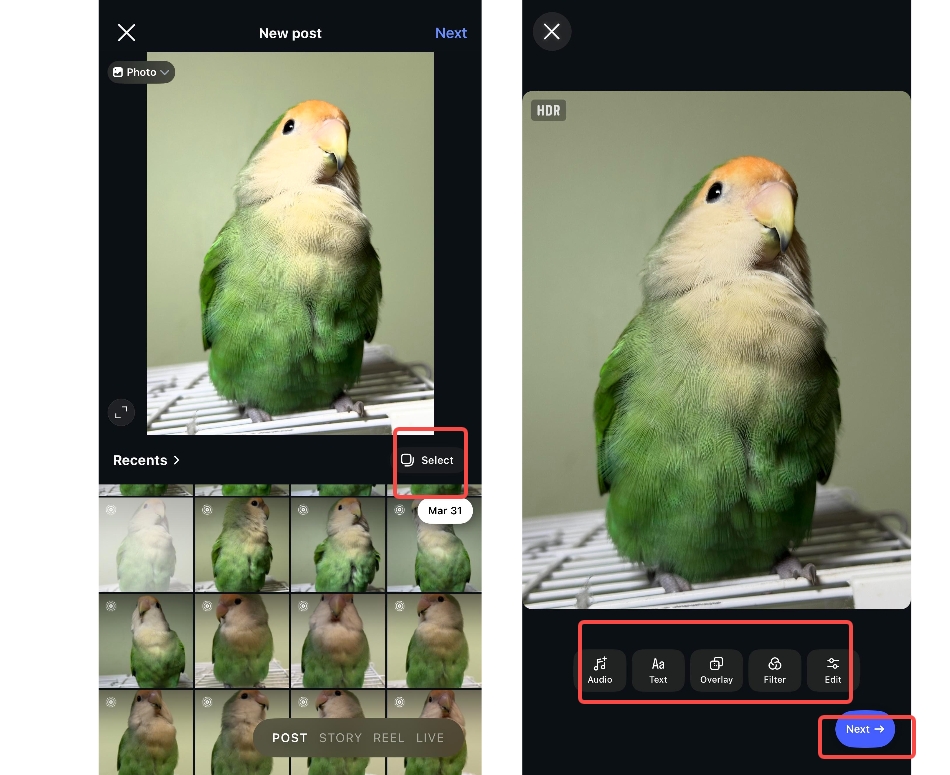
Step 3: Add a link in the caption and share the post
On the next interface, add the URL or link that you want to add to your post. Next, click on the "Share" tab at the bottom. Tap on it to finish posting on Instagram with a link in the caption.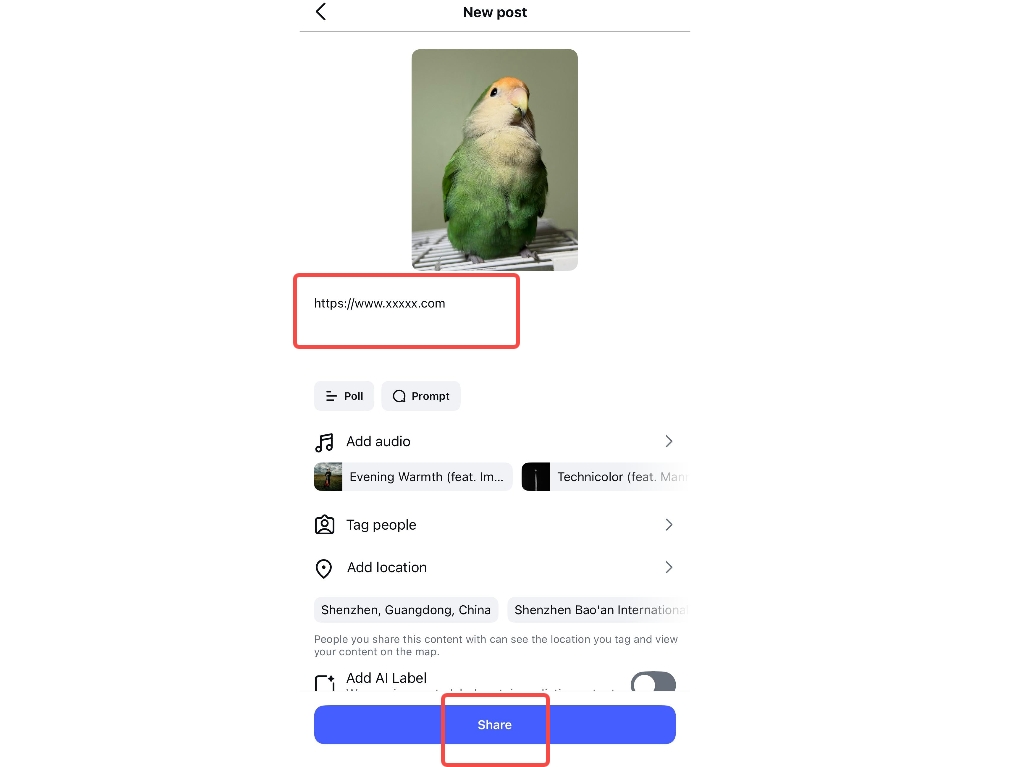
Way 2: How to add a link to an Instagram post using stickers
They are clickable links provided by the Story sticker tool that let users tap to open external pages immediately. The advantages are high engagement, easy access, and high conversion potential, whereas the disadvantages consist of low 24-hour visibility and reach relative to permanent posts. To add a link to the Instagram post with the help of stickers, do the following steps:
Step 1: Open Instagram and choose Story
At first, open the Instagram app and, from the main interface, tap the "+" tab in the top-left corner. Next, click on the "Story" tab from the bottom-centered menu.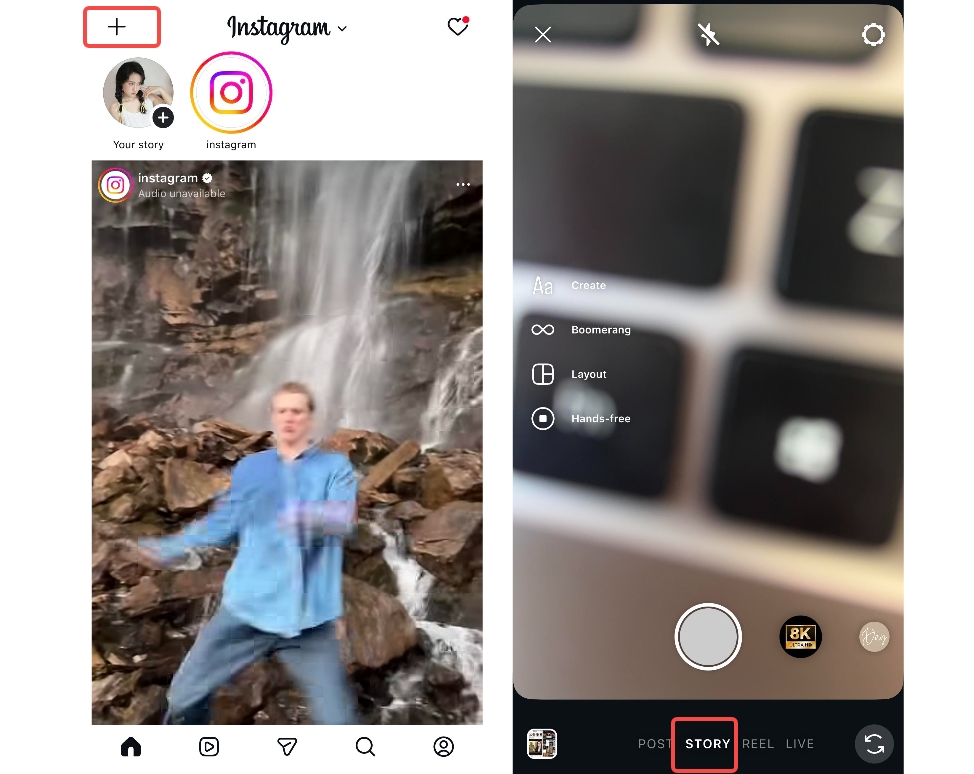
Step 2: Choose from mobile or capture the Story
Now you need to choose the video file that you want to post as a Story. You can also capture video with your camera if you don't have a video. After capturing or selecting the video, click the "Next" icon in the bottom-right corner.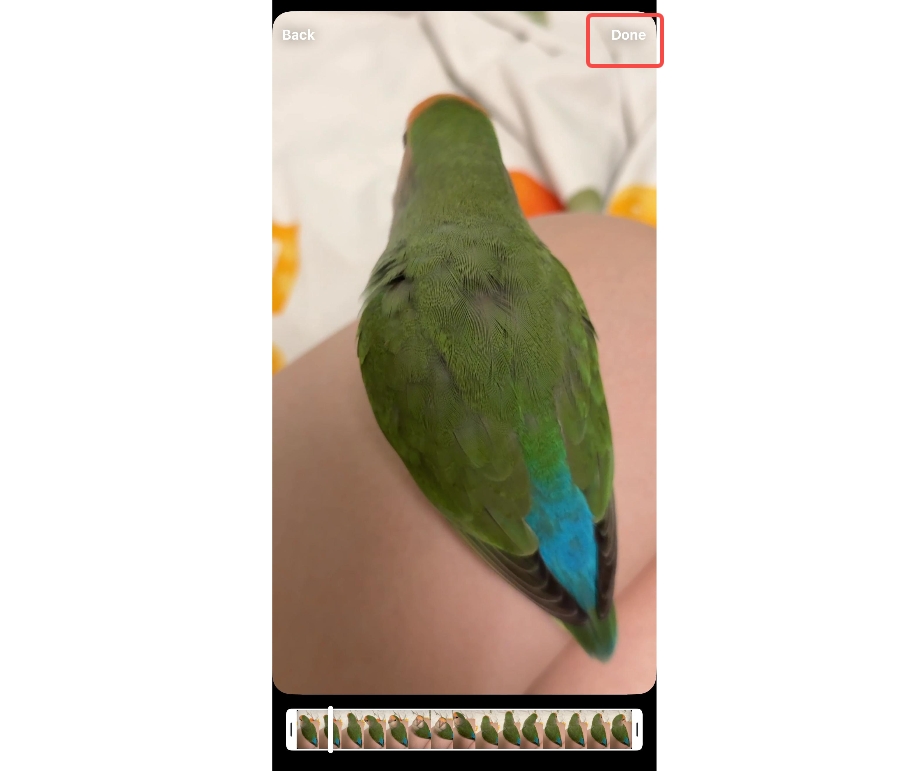
Step 3: Open the stickers tab and add a link
After adding a video, click the "Stickers" tab, then click the "Link" tab from the menu, which opens up in the upward direction. Now paste the URL in the "URL" section and write down the sticker text right under the menu.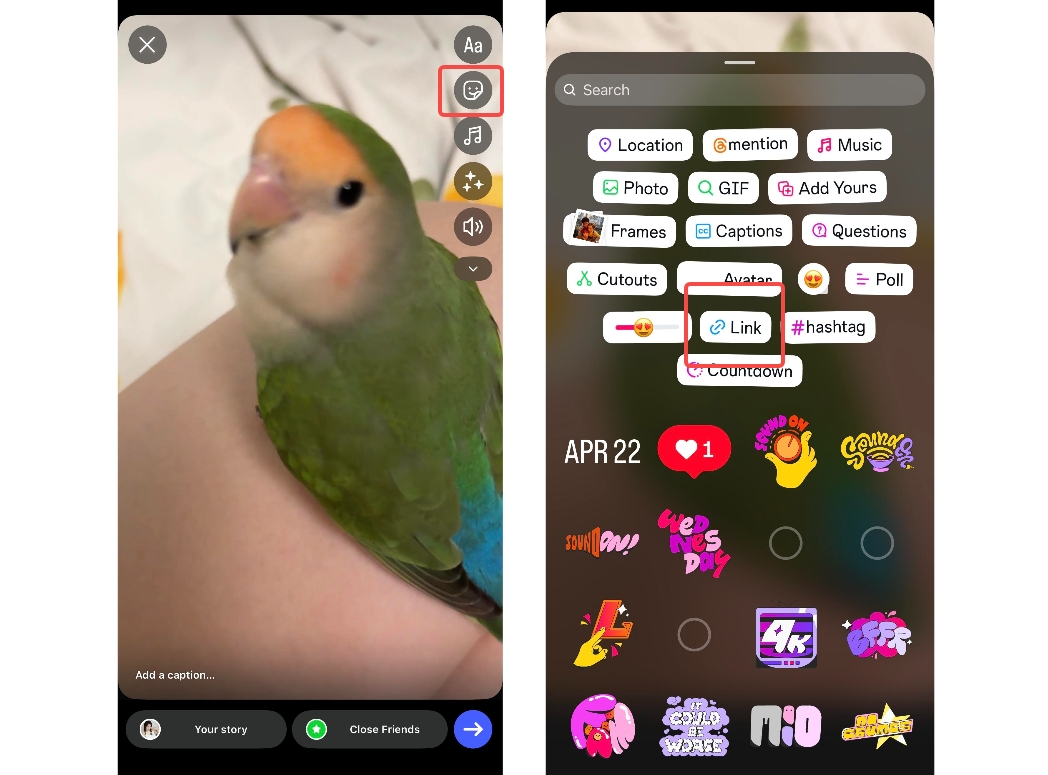
Step 4: Share your Story with a link
Next, click on the "Share" tab at the bottom. This will ask you to share on your Story, share only with close friends, or share as a message. Select the "Your Story" option and click on the "Share" tab to finish posting on Instagram with a link in the Story.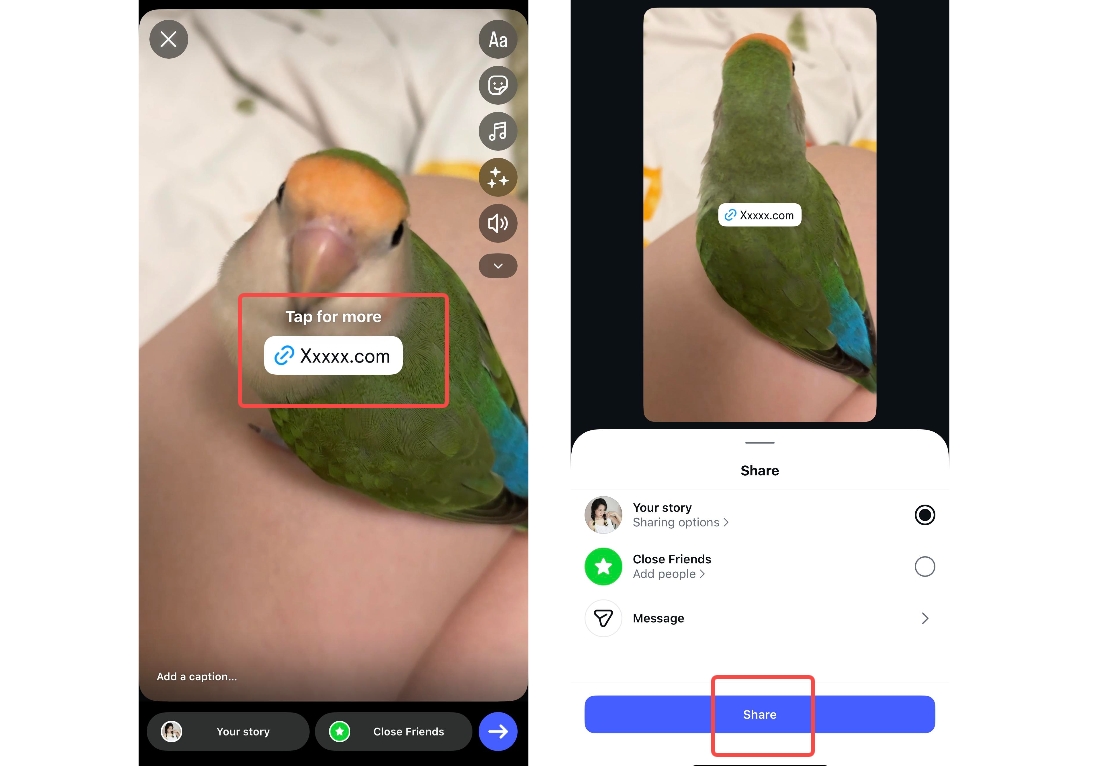
Alternative ways to add links to Instagram
-
Method 1: Add a link in the Instagram bio
An Instagram bio link lets you add a single clickable URL to the profile page instantly and easily. The method offers simple traffic access but limits you to a single link. You can update links anytime to promote products or landing pages from websites effectively and quickly.
-
Method 2: Add a link using Instagram ads
Instagram advertisements include links that can be clicked and instantly redirect to another site or application. Paid promotions are more effective, but you need a budget and an adequate campaign plan. It is appropriate when companies are interested in targeted traffic with performance metrics.
-
Method 3: Add a link using Instagram shopping posts
Instagram Shopping posts help companies to mark products with direct purchasing links in the application. Customers can browse products and access product pages without leaving the Instagram app. It enhances sales but needs approval and a well-grounded e-commerce integration process.
-
Method 4: Add a link through Instagram direct messages
Direct Messages enable you to send links privately to users who are interested in what you have to offer, in real time. It fosters trust but requires a manual, human-to-human interaction style. You can make offers, guides, or resources directly to warm audiences in real time and efficiently.
-
Method 5: Add a link in Instagram comments
Instagram allows you to leave comments, and they are more noticeable and accessible because you can add links. Note that you cannot click on most links in the comments. You have to be sparing with it so it doesn't come across as spammy or unrealistic on the internet.
Best practices for sharing links on Instagram
-
Use strong CTAs
Strong CTAs should prompt Instagram users to take action today. Bright call-to-actions, such as "Click the link in bio," quickly enhance interactions and conversions. Direct CTAs make the process clearer and help you drive more clicks.
-
Keep URLs clean and trackable
Clean, trackable URLs are the insights of the day that will increase the effectiveness of Instagram marketing. Shrunken links are professional and can make posts appear much more trustworthy to users. UTM parameters will enable you to follow the success of the campaign per various sources with precision.
-
Align content with the destination
Align the content with the destination pages to ensure users' expectations are met at all times. Page matching after the post minimizes bounces and builds trust quickly. False clicks undermine trust and may reduce conversions.
-
Use visual direction cues
Make it obvious by concentrating on your Instagram connection. Stickers and arrows help users easily find where to click in posts. Instant user interaction and readability are improved with overlays like LINK IN BIO.
-
Maintain posting consistency
Be consistent in your posting to build trust with your audience and enhance long-term conversions. Repetitive link reminders remind the audience to take action more frequently. Habit behavior through consistency, of course, enhances long-term performance in terms of clicks.
-
Optimize timing
The time of posting should be optimized to reach the audience at the most active time on the internet. Accurately determine the optimal time to grow by using Instagram Insights analytics. Use scheduling and analytics tools like Meta Business Suite, Hootsuite, or Buffer to plan posts strategically. Posting at the right time boosts exposure and can greatly enhance the overall campaign outcomes.
Design personalized Instagram posts with Zawa
Zawa AI's social media post generator is a tool that will help you create appealing images and text. Produce high-performing posts in less time with a workflow that is simple to use and optimized to meet creator and brand needs. Create professional layouts and ideas without needing complicated editing tools or design expertise. Zawa recommends customized posts based on your audience to better reach them. Start using Zawa today to increase reach and engagement and expand your Instagram presence successfully.
Step 1: Access Zawa and upload image
First, you need to visit the Zawa AI social media post generator. Next, "Upload" the image for which you want to create social media images.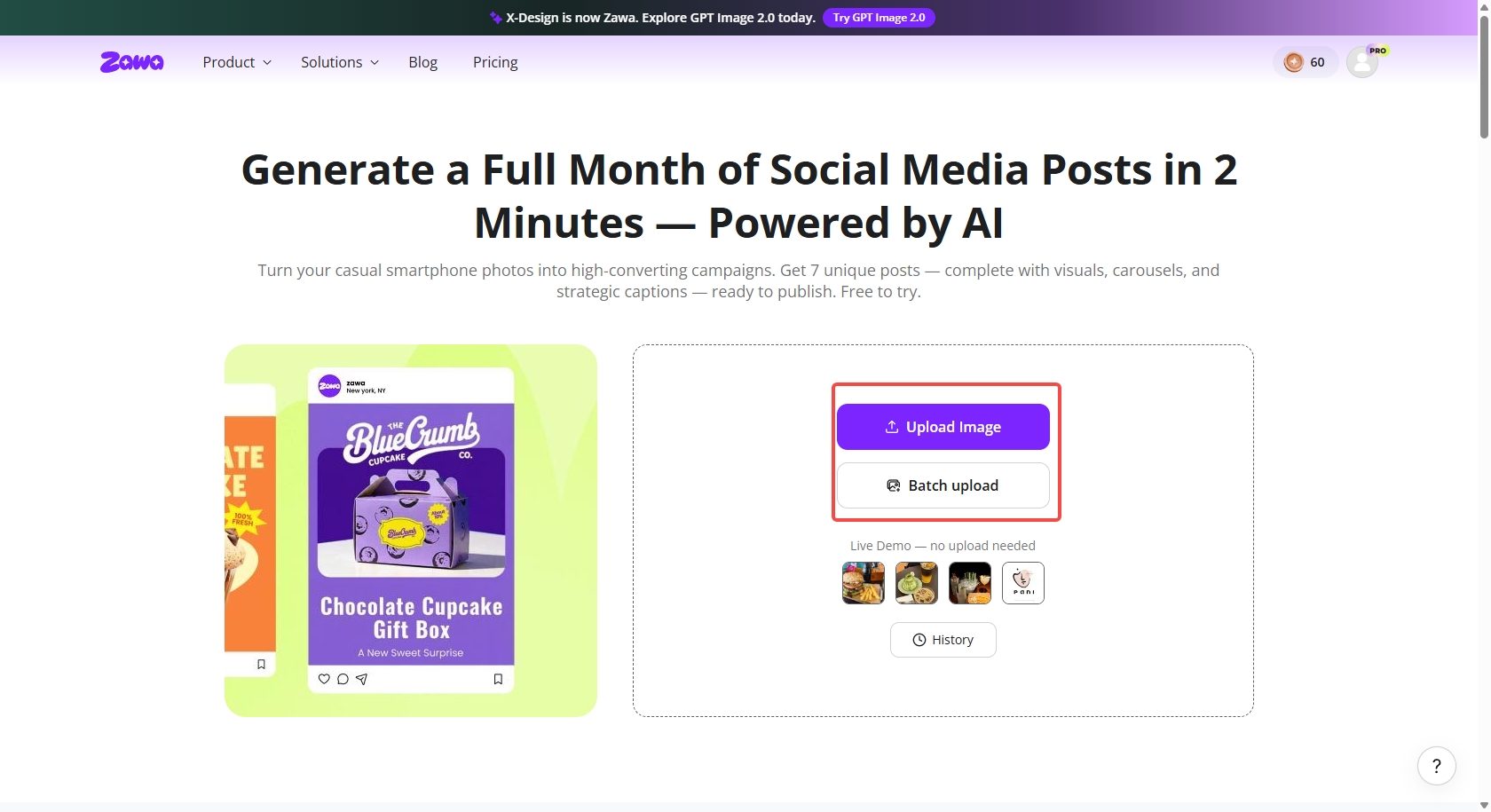
Once you have uploaded the image, click on the "Generate Posts". The tool will then analyze your image in-depth.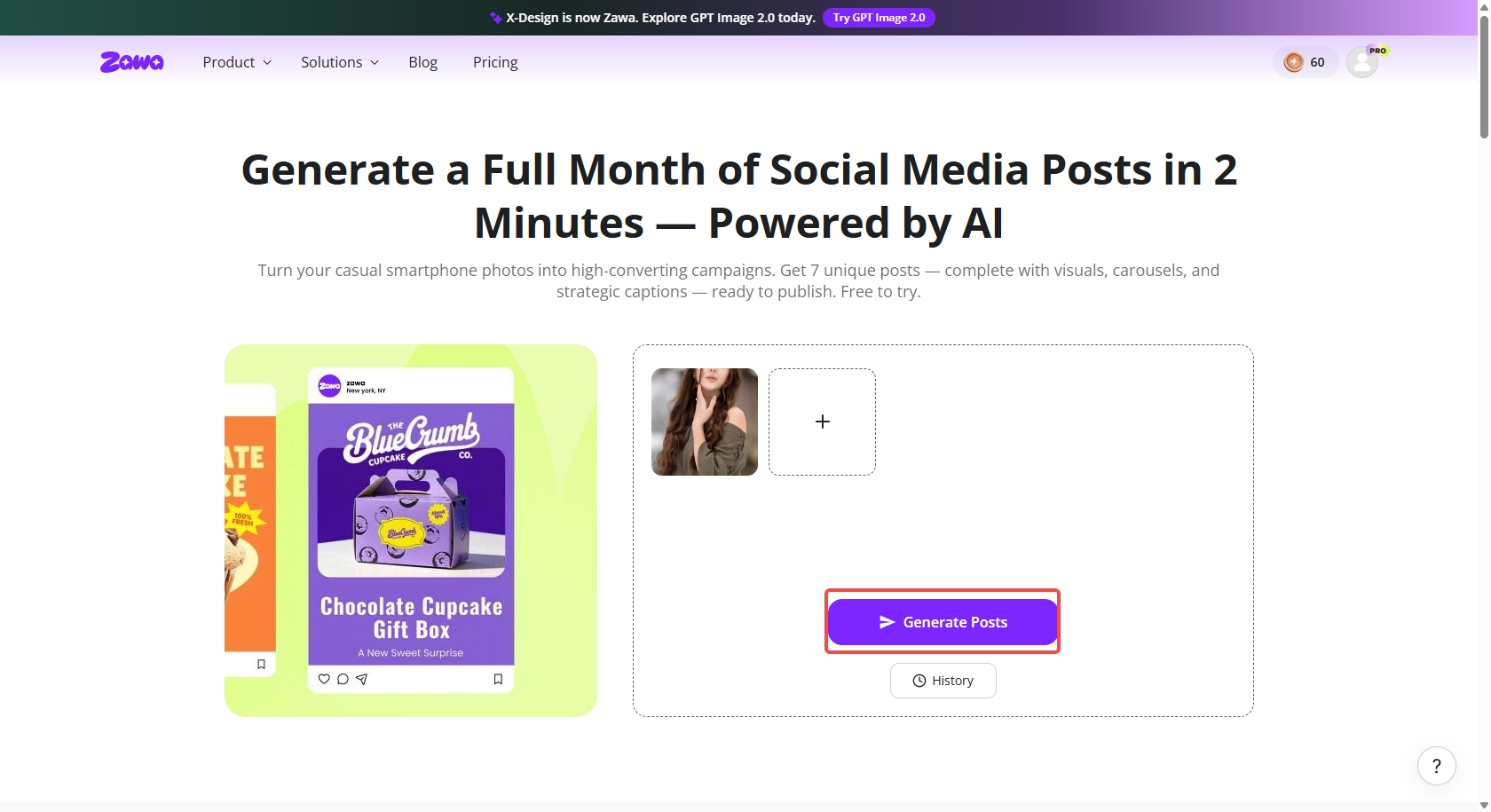
Step 2: Preview/edit brand strategy and create posts
Zawa will create a brand strategy depicting planning strategy, content purpose, and caption tone. You can view or custom-edit these to apply the same or a different strategy. The AI social media post generator will allow you to choose the custom "Primary" and "Secondary" brand colors to use in your posts. Once you have viewed and edited the brand strategy, click on the "Create My Posts" tab.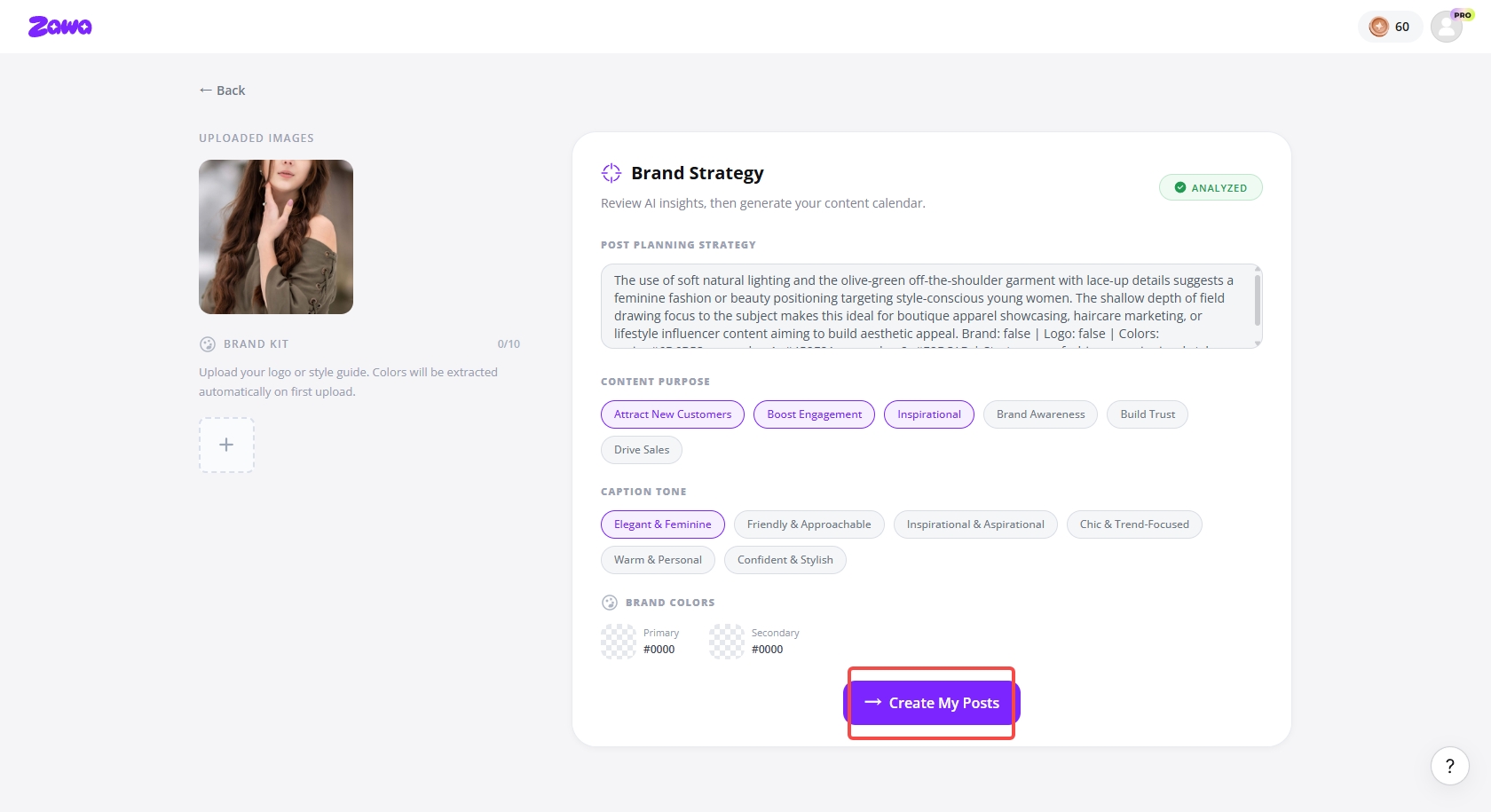
Step 3:Download/Publish the post images
Zawa allows you to connect your Instagram or Facebook accounts to publish the generated posts directly. This way, you don't need to deal with the extra hassle. Zawa also lets you download each image separately or all at once via the "Download All" tab in the top-right corner.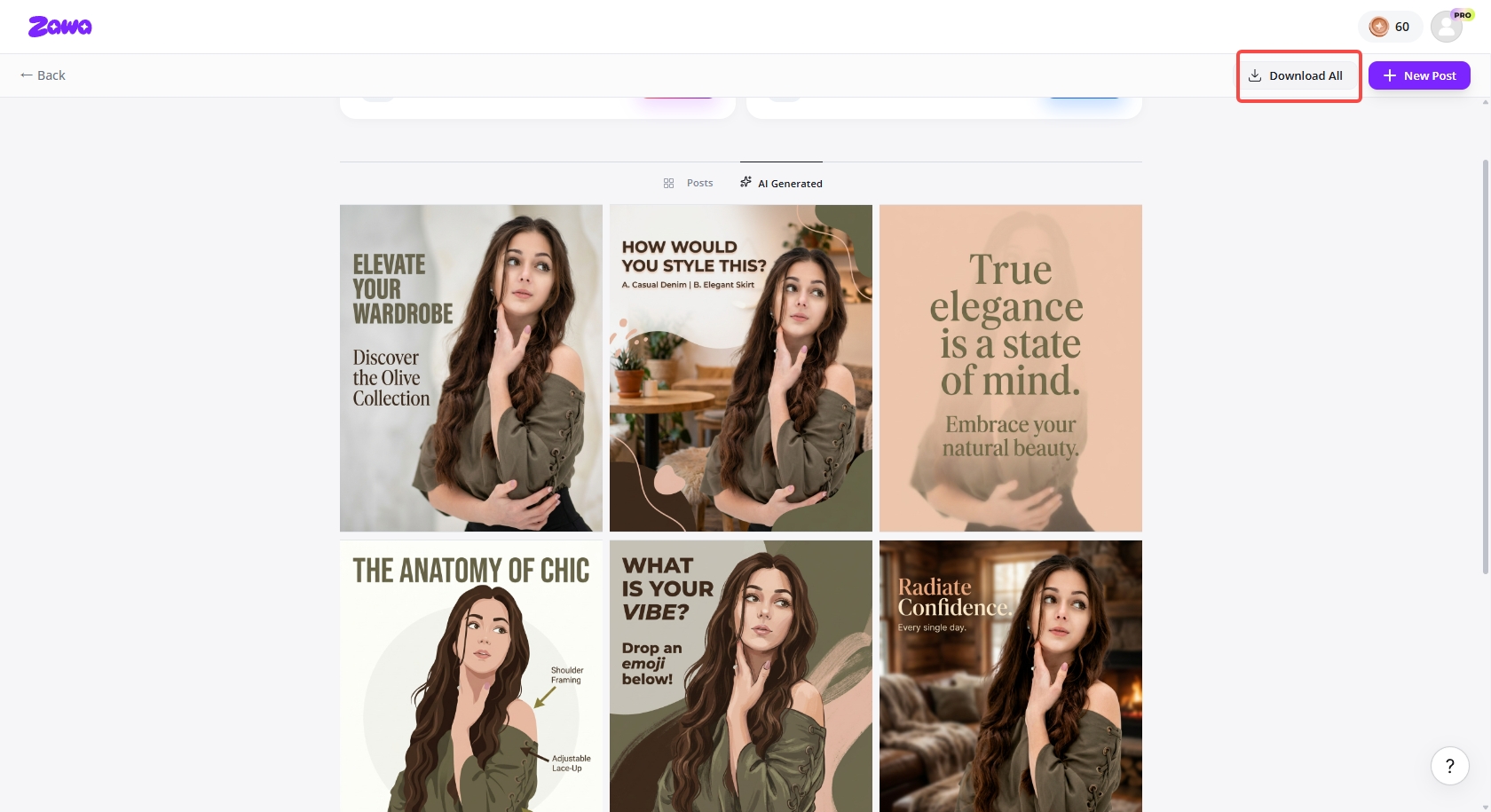
Common mistakes to avoid when adding links to an Instagram post
-
Raw links without context: Posting raw links on Instagram confuses users and significantly reduces overall engagement. Always provide a short explanation so users clearly understand why they should click.
-
Inappropriate landing pages: Directing users to irrelevant pages will quickly increase bounce rate and user frustration. Make sure links are relevant to the captions' intent and always deliver on the promise of value to visitors.
-
Too many URLs in captions: It's easy to include too many URLs in captions, which can make the post appear spammy and unprofessional. Limit yourself to a single link to keep it readable and to enhance overall interest.
-
Mobile optimization problems: The lack of mobile optimization leads to a poor user experience on Instagram, in particular. Test links on smartphones to make sure that navigation is easy and that links load quickly.
-
No link tracking: Not tracking link performance does not allow a good comprehension of audience behavior over time. Measure clicks using analytics tools to guide the effective decision-making of future Instagram strategy.
Conclusion
Learning how to add a link to an Instagram post enhances traffic, engagement, and conversions by leveraging a strong place strategy and understanding the platform. Knowing what is possible and what is not will help creators share links without breaking Instagram rules or limiting content visibility. The simplified workflows also enhance the quality of design, helping achieve consistent posting success. Also, resolve workflow issues with Zawa, which lets you effortlessly create, edit, and optimize Instagram posts to achieve greater reach and consistency. Create professional content faster and improve outcomes with a compelling call to action to expand your presence.
FAQs
How do you add a link to an Instagram post for business traffic?
To drive business traffic, you cannot add clickable links to regular Instagram posts. Rather, you lead users with bio links, captions, and story highlights in a way that works. With the Zawa AI social media post generator, you can produce optimized images that drive traffic and conversions safely.
How to link a website to an Instagram post for more clicks?
You can place your website link in your Instagram bio to increase engagement and click-throughs. Use captions with a clear call to action that encourages users to visit the profile link. Zawa helps design post visuals and captions that improve click-through rates efficiently for growth.
How to add a link to an Instagram post without violating Instagram rules?
Instagram does not allow any links in regular feed post captions. Only bio links, stickers, or approved promotional tools can be used to remain in compliance. Zawa will guarantee that your Instagram designs are policy-compliant and will never miss any opportunity to engage safely and build user trust.
Is adding a business link to an Instagram post legal?
It is not a crime to add business links on Instagram, provided the purpose is to run actual promotions. The companies should adhere to the platforms' policies and prevent misleading or spammy linking.
You May Be Interested

Best YouTube Logo Makers
The Best Times to Post Reels on Instagram for Every Creator

10 Best Selling Items on Etsy: What to Sell and How to Stand Out in 2025

30 Best Restaurant Logos We've Ever Seen and How to Create Yours

Resize Image for Instagram
100+ Good Quotes for Instagram Bio (Copy & Paste Ideas)

100+ Instagram Bio Ideas for Moms: Make Your Profile Attractive