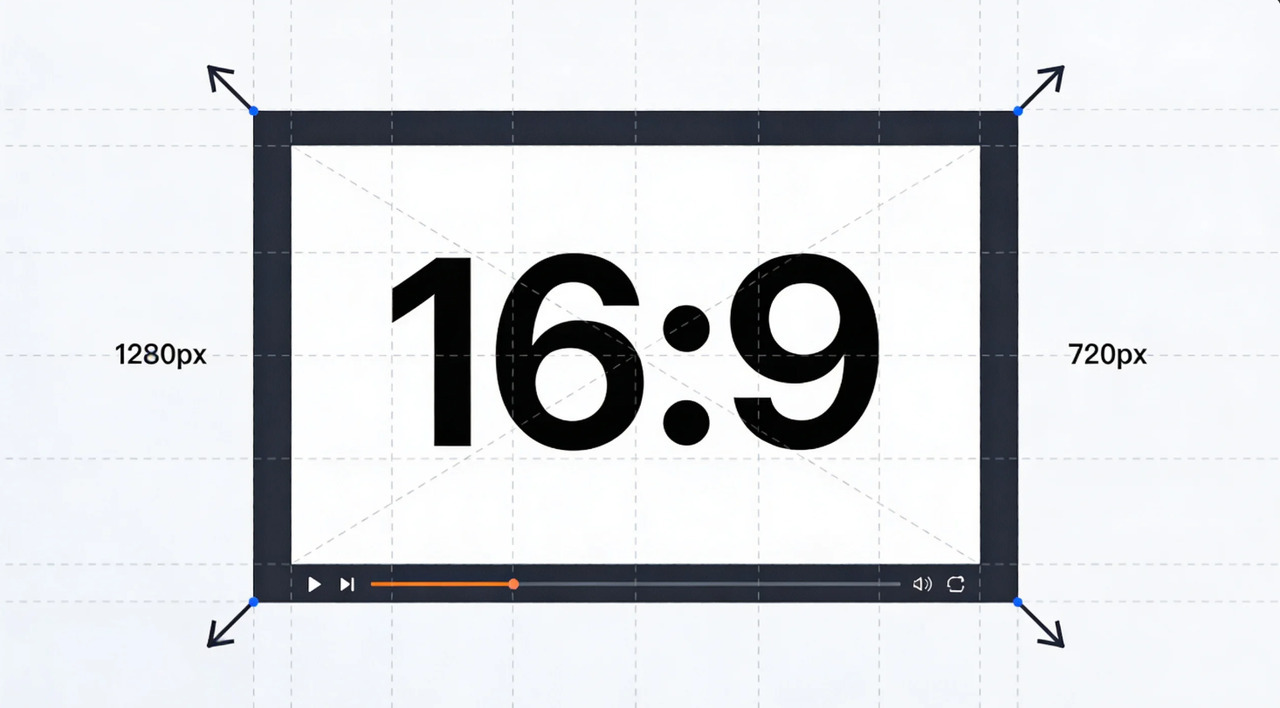
New Instagram Grid Size for Appealing Designs in 2026
Learn how to use the new Instagram grid size to create a scroll-stopping appearance. Get to know how to optimize learning, layout, and engagement tricks. Learn how a clever app makes it so easy to make a new Instagram grid.

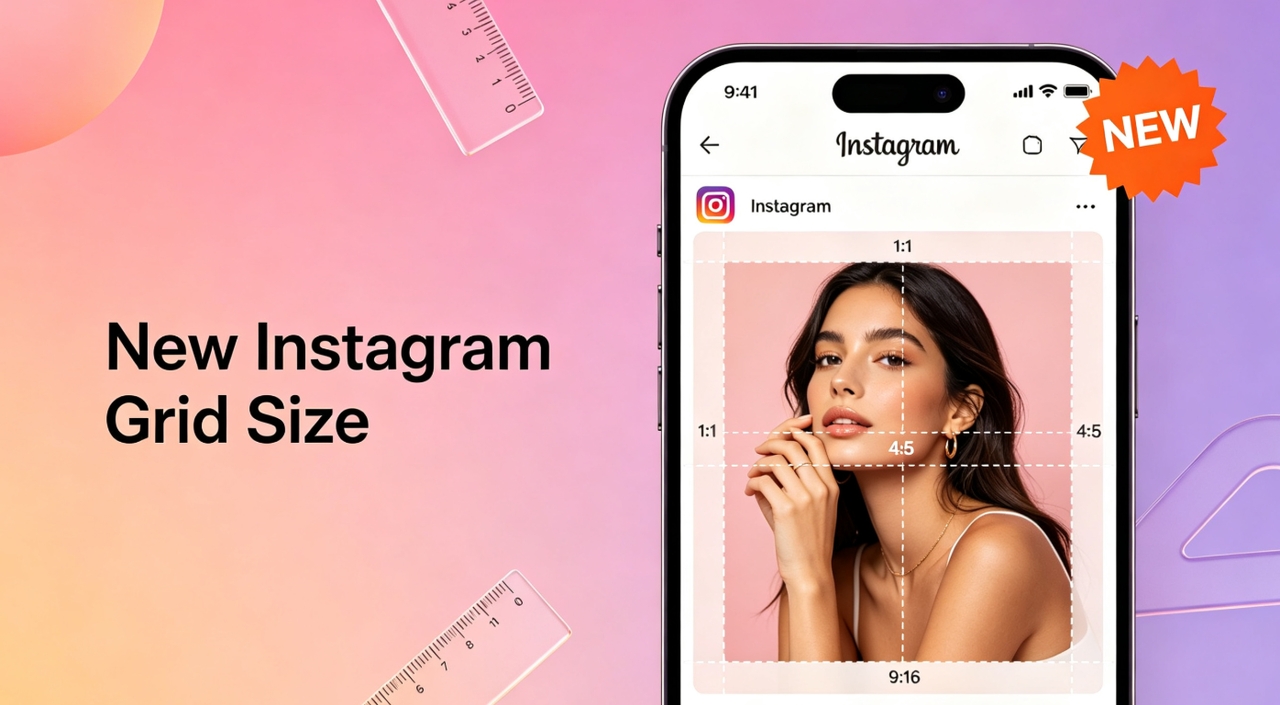
Instagram's new grid size is influencing the appearance of your profile and the immediate audience interaction. An optimized grid helps you display a stronger image, enhance uniformity, and develop a contemporary brand. You will know how to edit with correct Instagram dimensions, including exact post size, crop zones, and safe padding to prevent content cutoff here. Maintain text safe margins so logos and stickers stay visible on all devices. Use proper export settings, like high-resolution square formats, to ensure consistent quality and a clean, professional Instagram grid appearance in 2026.
What is the new Instagram grid size in 2026?
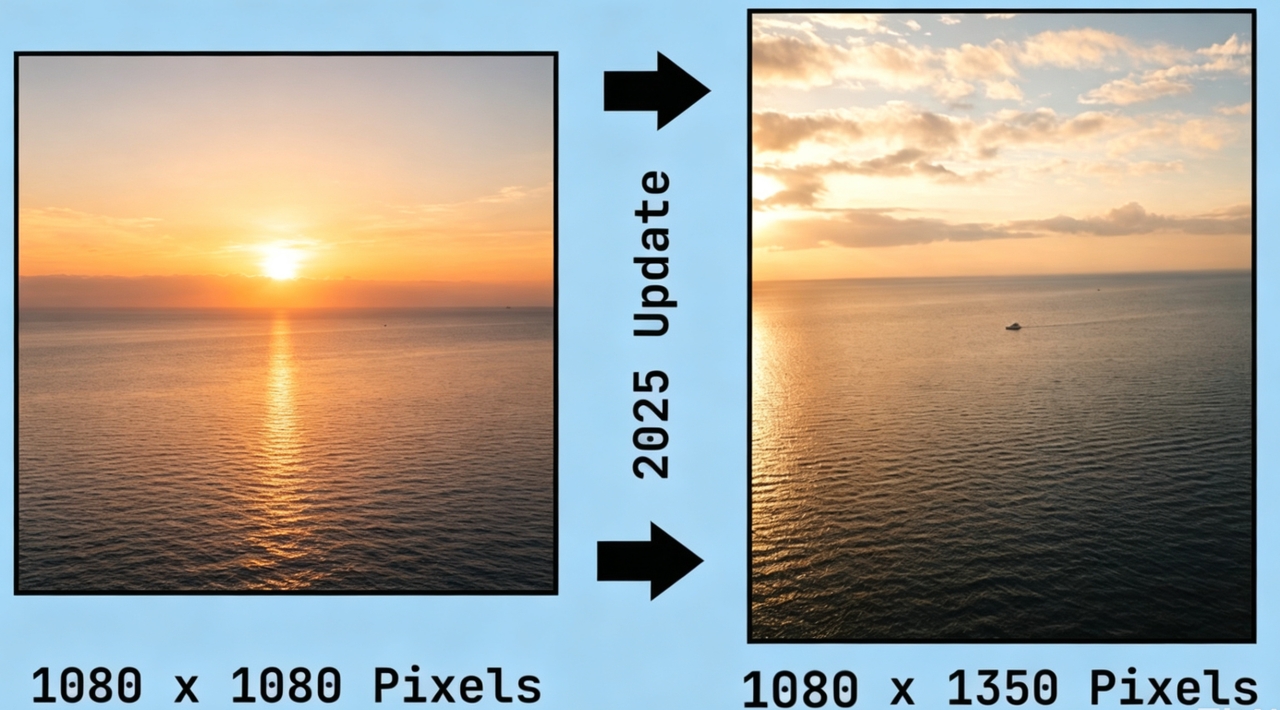
Instagram's 2026 grid update shifts priorities toward vertical content and viewing behavior. The traditional grid was a square format with 1080×1080 pixels. It guaranteed uniformity, straightforward cropping, and balanced designs between profiles. But square previews limit taller images and reduce the space available to tell stories to creators. The new system uses 4:5 posts, 1080 by 1350 pixels. The profile grids have been updated to show a 3:4 preview crop to improve vertical alignment. This update benefits Reels and Stories, making them a smooth experience.
Key Instagram grid sizing details
-
Exact dimensions: Design posts at 1080 × 1350 pixels (4:5 ratio) for optimal feed display.
-
Crop zone: Profile grid previews may crop content into a 1:1 preview area, trimming some top and bottom portions.
-
Padding suggestion: Leave 60–100 pixels of internal padding around important design elements to prevent accidental cropping.
-
Text safe margin: Keep text, logos, stickers, and key visuals centered within the safe zone so they remain visible in both feed and profile previews.
-
Export recommendation: Export images in high-quality JPG or PNG at 1080 × 1350 pixels to maintain clarity and sharpness on Instagram.
Key changes at a glance: New size VS Old size
Instagram's grid format has been designed to accommodate taller, more interactive content. The following comparison outlines some of the main differences between the old and new layouts.
|
Feature |
Old Grid |
New Grid |
|---|---|---|
|
Aspect Ratio |
1:1 |
4:5/3:4 |
|
Display Height |
Short |
Taller |
|
Mobile Optimization |
Medium |
High |
|
Grid Aesthetic |
Square layout |
Vertical layout |
|
Content Visibility |
Limited |
Expanded |
Impact of the new grid format on Instagram content
The next-generation Instagram grid format redefines how content appears and performs on profiles. Vertical content will prevail as users are increasingly exposed to full-screen visual content every day. Increased screen space improves post visibility and makes images more understandable and interesting overall. Enhanced mobile optimization improves scrolling behavior and makes navigation through feeds easier. Creator-oriented enhancements and algorithm-based content prioritization create greater opportunities for engagement and visibility. Creators now rely more on practical Instagram design constraints, such as caption-safe areas, thumbnail cutoff points, and center-focused composition, especially when designing carousel covers to maintain grid consistency. Generally, Instagram has made a more interesting platform.
How to post an Instagram grid with a new size
You can use the following methods to post the Instagram grid in a new size:
Using the Adjust Preview feature
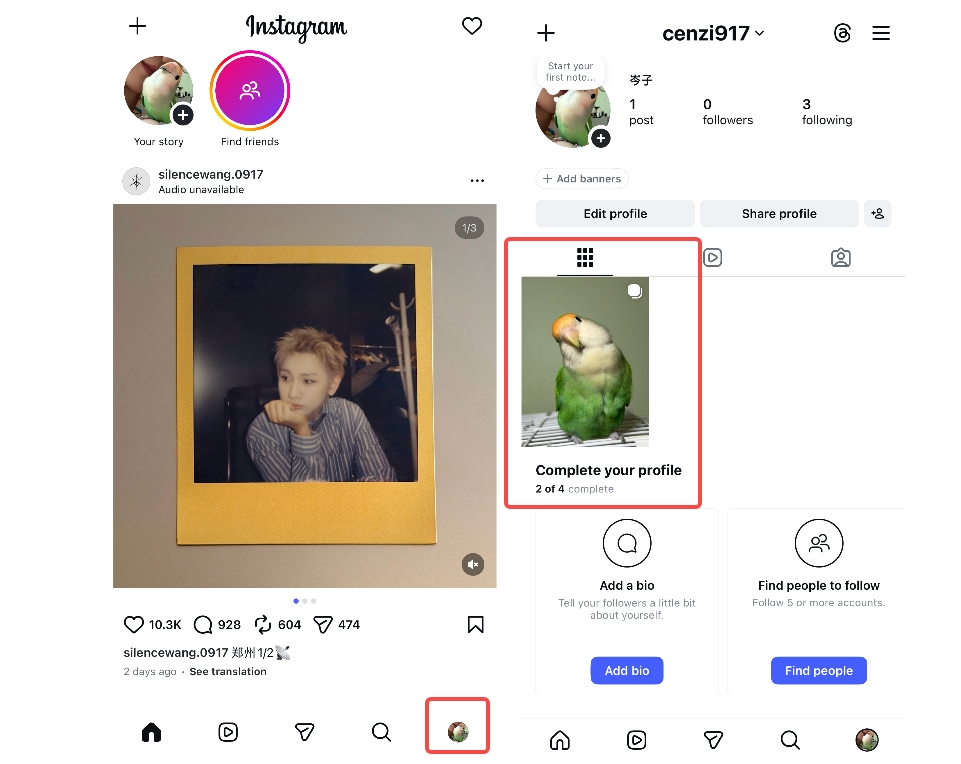
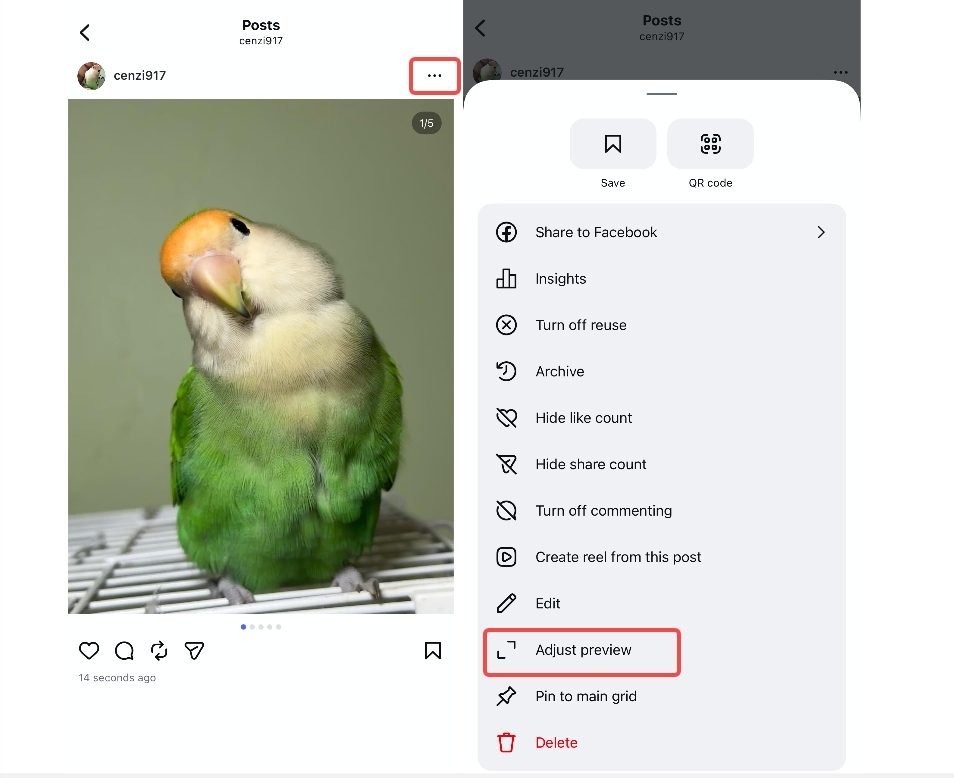
Step 1: Open Instagram and go to your profile
First, open the Instagram app on your mobile. Next, click the "Profile" icon in the bottom-left corner. Now select any post from your profile.
Step 2: Select the post and access Adjust preview
After selecting the post, click on the "three-dots" present right above the post image. This will open the post's settings. Now, click on the "Adjust preview" tab to access more options.
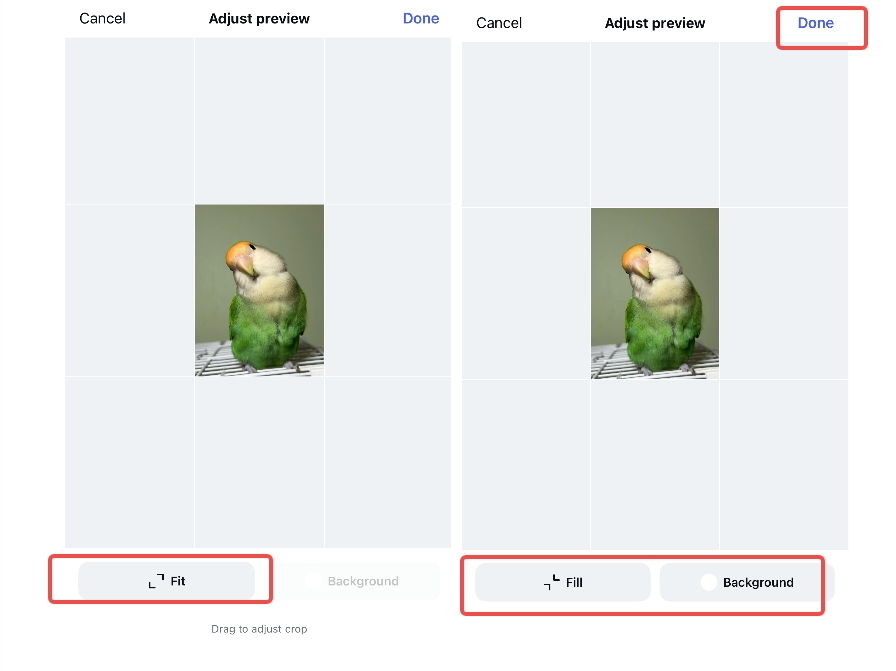
Step 3: Adjust preview and apply
In step three, tap on the "Fit" tab. This will help you apply a 1:1 aspect ratio using 1080 × 1080 pixel dimensions consistently across all your grid posts. Clicking the "Fit" tab again changes it to "Fill", which applies a 3:4 aspect ratio or 1080 by 1350 pixels. Finally, click on the "Tick" icon to apply changes. You can also change the background to a custom one if you need.
Posting directly to the grid
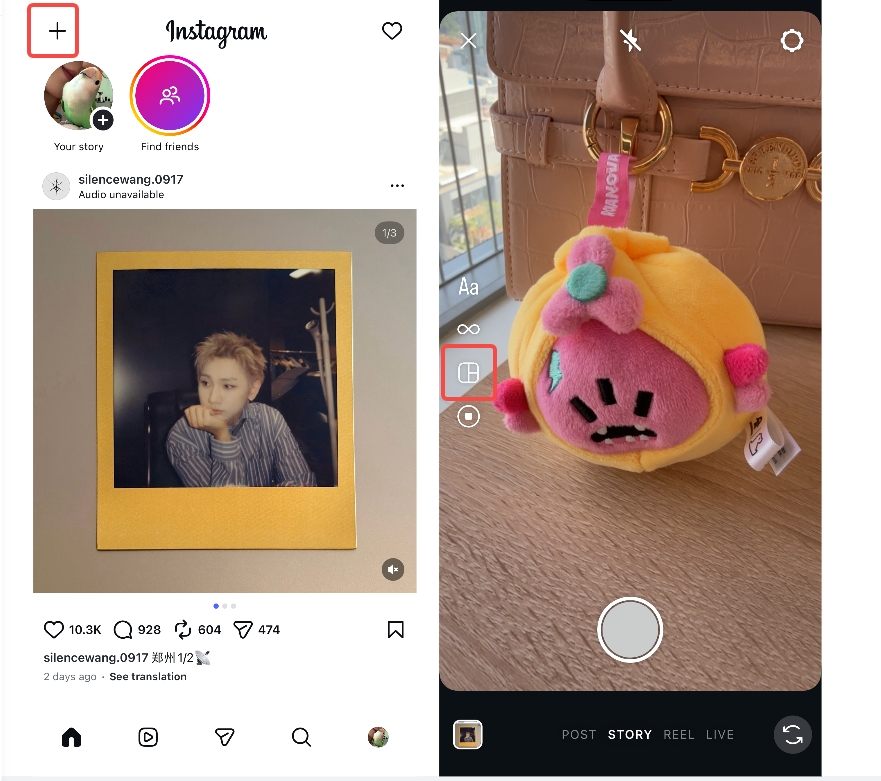
Step 1: Open Instagram and access the layout option
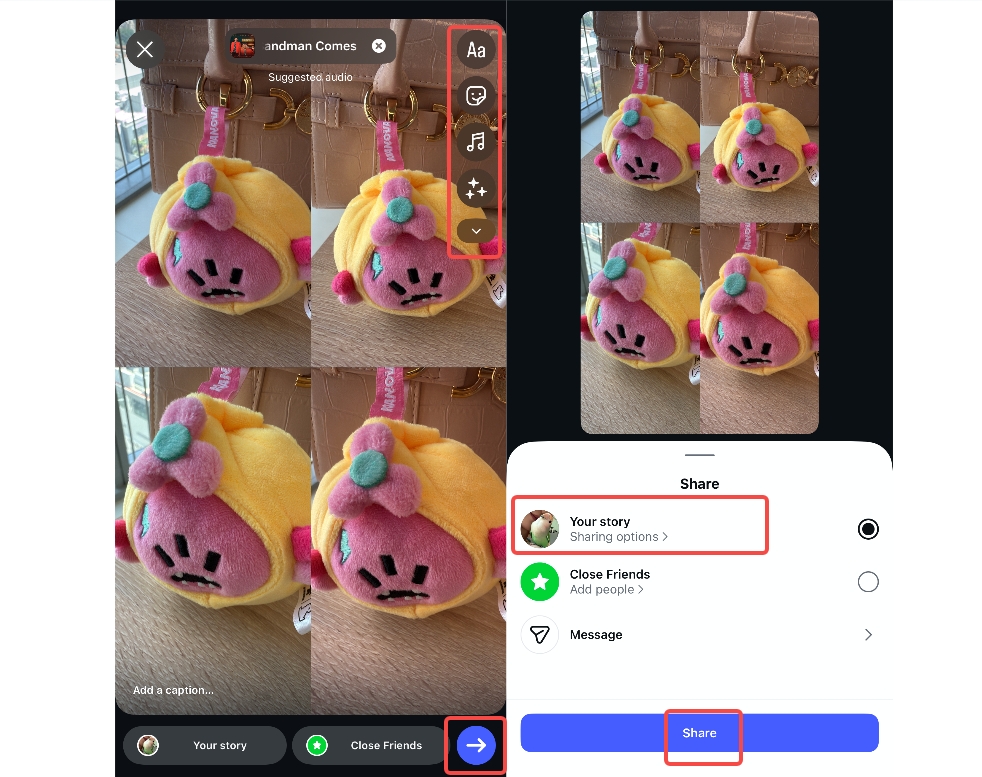
Begin by opening the Instagram app, then click the "+" icon present in the top-right corner of the main interface. Next, click on the"STORY" tab from the bottom-centered menu. Later, choose the grid layout from the left-centered vertical menu, as depicted in the image below.
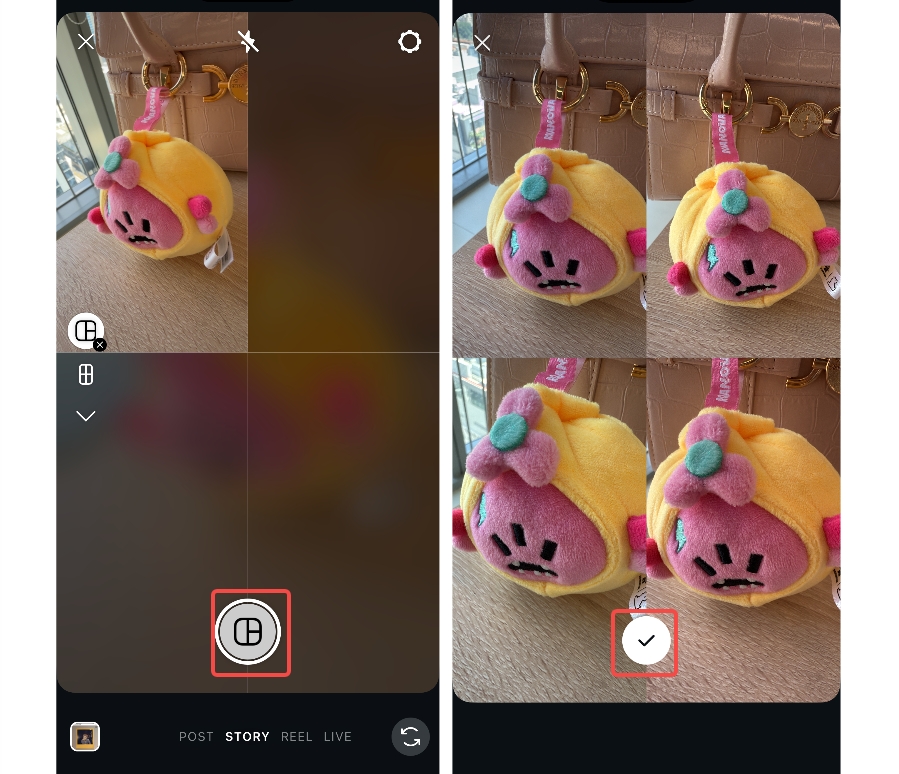
Step 2: Choose a layout and add content to your grid
Select the layout type. You can choose the layout format. After selecting the layout, either capture an image for each grid using the bottom-center camera icon, or upload one from the gallery using the option in the bottom-left corner. Once all content is uploaded, click on the tick icon as shown in the image below.
Step 3: Edit or share your grid Story
In the end, edit your Instagram story grid the way you like. You can add text, filters, effects, stickers, background music, etc. Once done, click on the "Next" tab present in the bottom right corner and select the "Your story" option. Next, click the "Share" tab to finish sharing the story on your Instagram.
How to optimize images to adapt to the new grid safe zone
Optimize images for new grid-safe areas by focusing on centered composition and balanced layouts. Grids Use safe areas of 1080 x 1080 pixels when 1:1. Maintain important points in the middle, and do not put text close to edges to be read. Use a 4:5 ratio and 1080 x 1350 resolution to improve visibility. This size is better with feed compatibility, enables cropping, and has a standard mobile preview. Design with square and vertical compatibility across various Instagram display scenarios. Always be clear in all the cropping situations.
Tips to create Instagram content with the new grid size
-
Hook optimization: Create a first frame that is attention-grabbing using a new grid size. For example, a bold headline, a close-up product shot, and high-contrast colors arranged in a clean 3-column layout. Preview layouts with Zawa and ensure thumbnails are perfect to improve engagement rates today.
-
Grid consistency: Maintain the same spacing and visual rhythm across all posts. Maintain consistent spacing and visual rhythm across posts by keeping margins, alignment, and text placement uniform. For example, if one row uses centered images with equal white space and aligned captions, the next rows should follow the same layout to avoid uneven gaps or inconsistent positioning.
-
Safe zone design: Have important elements in the middle of the new Instagram cropping. Keep text, stickers, and other overlay elements within the central safe area to avoid them being cut off in previews. Zawa ensures that previews show the cropping areas, so creators do not lose important details.
-
Carousel storytelling:Series posts to take viewers through organized visual stories. For example, a step-by-step product showcase, a behind-the-scenes brand journey, or a visual guide spread across multiple slides.
-
Analytics-driven adjustments: Measures of study engagement following implementation of the new grid format. Track study engagement after implementing the new grid format using tools like website analytics, heatmaps, or user behavior reports. Optimize the strategy over time using insights and audience behavior patterns.
Common mistakes to avoid when posting on the Instagram grid
-
Incorrect image slicing
Poorly cut images disrupt the Instagram grid layout and overall aesthetic. Cutting without measurements causes posts on tiles to distort, and a lot of trouble. Always create grid images at the right resolution and post well-thought-out images.
-
Ignoring preview alignment across tiles
Overlapping preview alignment disrupts the visual flow on the Instagram grid, undermining the design's coherence. The mismatched tiles not only diminish aesthetics but also significantly distort the viewer's perception. It is always advisable to preview the grid layout before publishing full sets of carousels. Carefully check.
-
Improper sequence of posting
A wrong posting order disrupts the narrative flow of the Instagram tile grid. When tiles are out of order, the user loses context and can get completely lost. Post the plan sequentially, then schedule grid content uploads in advance.
-
Errors of safe zone cropping
Failure to think of profile grid cropping can result in the omission of important design elements. Safe zone errors cause significant images to be chopped off in profile view without warning. Always preview the crop before finalizing the Instagram grid post, paying attention to details.
-
Mixed aspect ratio use
A combination of various aspect ratios interferes with the harmony and consistency of the Instagram grid. Lack of uniformity in dimensions creates a disproportionate look in profile tiles and disrupts the balance of the entire layout. Keep ratios uniform to ensure a clean, visually appealing grid.
Conclusion
Modifying the new Instagram grid size changes the look and functionality of profiles. It focuses on vertical content, an enhanced mobile experience, and visual storytelling in posts. Being aware of the correct size and secure space will keep you on a clean, professional grid layout. Any minor mistakes in size or positioning can significantly reduce the attractiveness and power of branding. To stay ahead of the crowd, however, it is preferable to work with tools such as Zawa, which will enable you to adjust the preview while keeping the same grid structure. Start creating a new-sized Instagram grid now!
FAQs
Is Instagram Grid 3:4 or 4:5?
Instagram grid is now mostly compatible with 4:5 products, with 3:4 previews appearing recently. This makes vertical content on profiles taller and more interesting immediately. Square previews are still available, but are no longer the default display format.
How to change the IG grid back to square?
Each post preview can be changed individually in the Instagram profile settings menu. Tap the Adjust Preview and fit mode again on the square display. This does not alter the size of the uploaded image visually, but rather restores its original square appearance.
Why did Instagram change the grid size?
Instagram shifted to a more vertical layout and aligned with current mobile viewing preferences. Users are increasingly interacting with taller immersive posts in their social media feeds. The update enhances the space in stories and coincides with the development of the Reels format.
Can we change the grid size on Instagram?
The Instagram grid size cannot be fully altered at the moment because the system is set to a fixed size. But the preview can be controlled manually by the fit or fill options. This enables a flexible show without necessarily changing the size of the post to the eye.
What size is the new Instagram grid?
The new Instagram grid has a 4:5 ratio and a 1080-by-1350 resolution. The profile previews use 3:4 cropping to enhance a vertical presentation layout. This improves mobile viewing and makes the content more visually interesting overall.
How does the new Instagram grid post size affect profile aesthetics?
The new grid enhances the visual hierarchy by giving clear preference to vertical content. Profiles are now more dynamic, and taller posts are taking up more screen space. This generates better branding and much more interaction among Instagram profiles.
What changes came with the new Instagram grid size 2025 update?
The 2025 update was a vertical-first design with a better grid alignment system. The posts were raised higher, which helped tell stories and provided a more immersive visual presentation format. It also optimized mobile and modified the default grid preview behavior.
You May Be Interested
100+ Good Quotes for Instagram Bio (Copy & Paste Ideas)

100+ Instagram Bio Ideas for Moms: Make Your Profile Attractive

Most Liked Instagram Post Guide - Insights, Top Posts, and Process

How to Craft the Perfect Instagram Bio in 2026: Tips, Mistakes & Tools
How to Get into Real Estate Photography

How to Create Aesthetic Instagram Posts That Stand Out in 2026

Etsy Image Size Guide For Sellers Who Are Just Starting Out