
Pixelcut Image Upscaler Tested: Can You Get Better Results in 2026?
Does Pixelcut Image Upscaler really work? Read our 2026 guide on its features, pros, and cons. Plus, discover Zawa as the best alternative for high-res reconstruction.


Blurry product photos can weaken even a strong visual campaign. In 2026, creators expect upscaling tools to feel faster and cleaner. That is why many users now test Pixelcut Image Upscaler. They want sharper results without stiff or overprocessed image quality. Poor image quality can also affect trust, clicks, and conversions.
This review checks how the tool performs with real needs. It explores how well the tool handles detail, texture, and final download quality. Moreover, it compares whether a stronger alternative can deliver better high-resolution output for professional use across demanding visual projects.
What is Pixelcut Image Upscaler?
Pixelcut Image Upscaler works like a quick repair desk for images. Instead of rebuilding a design from scratch, it up-scales weak visuals. The tool uses AI to sharpen edges and recover detail. In 2026, Pixelcut also appeared online under the Pixa branding. Its workspace connects upscaling with background removal and quick edits.
ThePixelCut AI image upscaler is useful for everyday fixes. Therefore, it suits sellers, creators, and marketers needing faster cleanup. However, larger visuals may need deeper detail recovery.
Top Features of Pixelcut AI Upscaler
To judge its real value, first look at the features offered. Each one shapes how easily Pixelcut handles everyday image improvement.
-
2x–4x AI Upscaling: Images can scale higher while important edges stay clean and readable. It suits product shots, portraits, and graphics needing quick online improvement.
-
AI Detail Reconstruction: The tool studies missing texture areas and rebuilds clearer visual depth. Small patterns, fabric lines, and facial details can look more defined.
-
No Sign-Up Required: Users can open the tool and start editing without account setup. This helps quick tasks feel lighter, especially during urgent image work.
-
No Watermark Output: Final downloads stay clean without visible branding across the enhanced image. That makes results easier to use for listings, posts, and presentations.
-
Integrated Design Tools: Upscaling connects with background removal, erasing, and other quick edits. Creators can polish visuals further without switching between separate platforms.
Pros and Cons of Pixelcut Image Upscaler
ThePixelcut image upscalerworks well for simple, fast improvements. Still, its strengths and limits become clearer through comparison below:
| Aspect | Pros | Cons |
|---|---|---|
| Ease of Use | Fast browser access helps beginners enhance images quickly. | Advanced settings may feel limited for detailed editing needs. |
| Output Quality | Basic upscaling improves small visuals for everyday use. | Complex textures can still appear soft after enhancement. |
| Downloads | Clean downloads support posts, listings, and presentations. | Free use may feel limited for frequent editing tasks. |
| Editing Support | Extra tools help users polish images in one workspace. | Professional output control feels lighter than advanced tools. |
| Accessibility | Mobile access supports quick edits during busy workdays. | Stronger upscale quality may require paid access. |
Step-by-Step Guide to Pixelcut Upscale Images
Here is the practical process for using Pixelcut upscale features. Follow these steps to improve image size, clarity, and detail with Pixelcut:
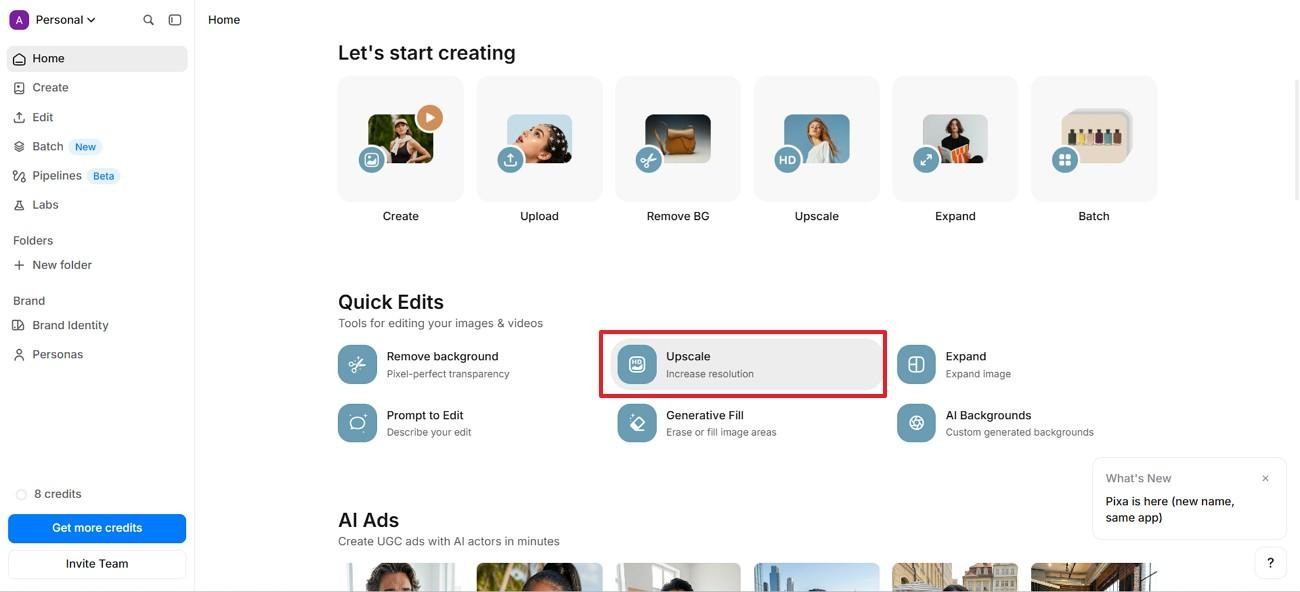
Step 1. First, go to the Pixa dashboard and find "Quick Edits." Then, select "Upscale" to begin increasing image resolution.
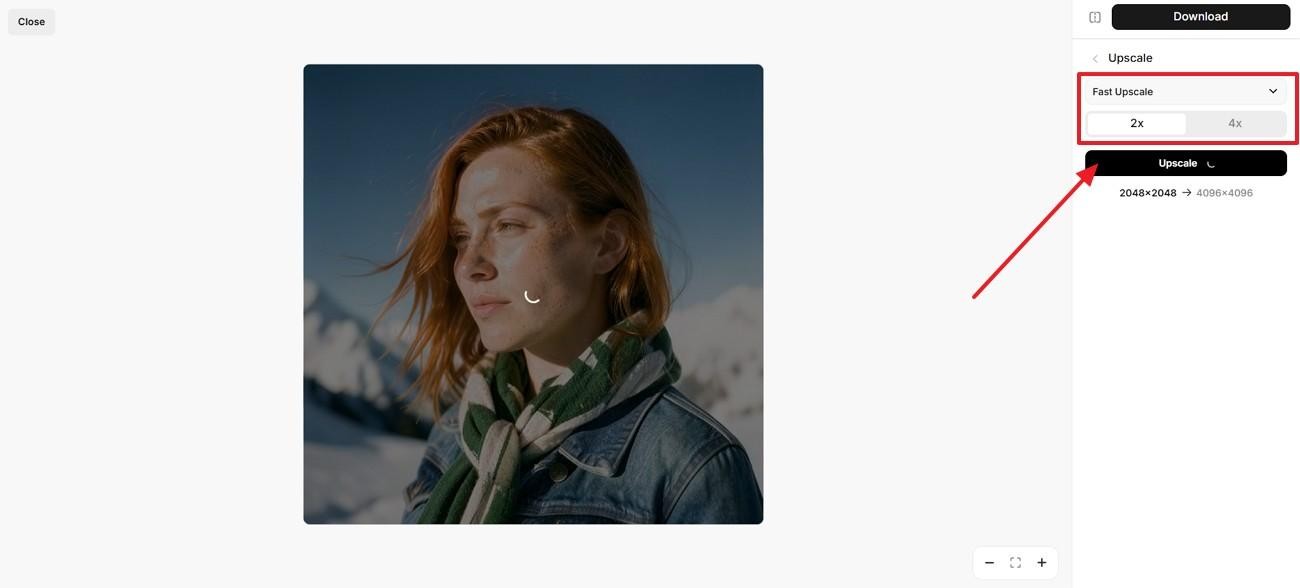
Step 2. Next, choose "Fast Upscale" from the right-side panel. After that, select 2x or 4x and press "Upscale."
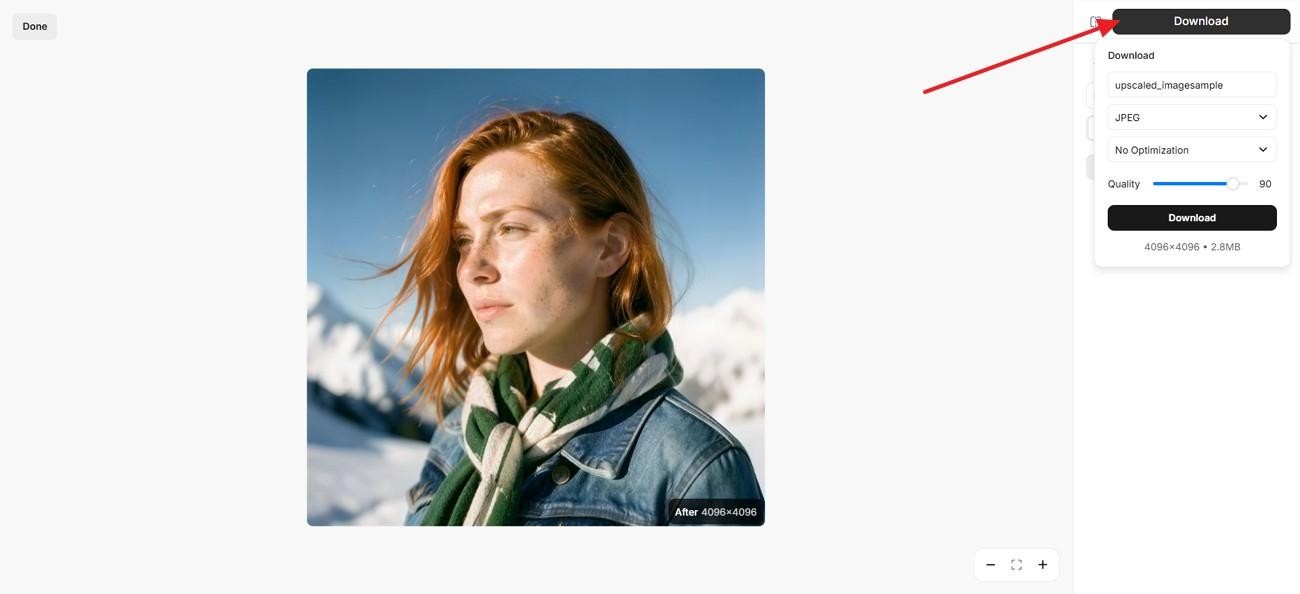
Step 3. Once processing finishes, access the "Download" panel from the top. Finally, choose the format, adjust the quality, and download your image.
Real World Test: Pixelcut Image Upscaler in Action
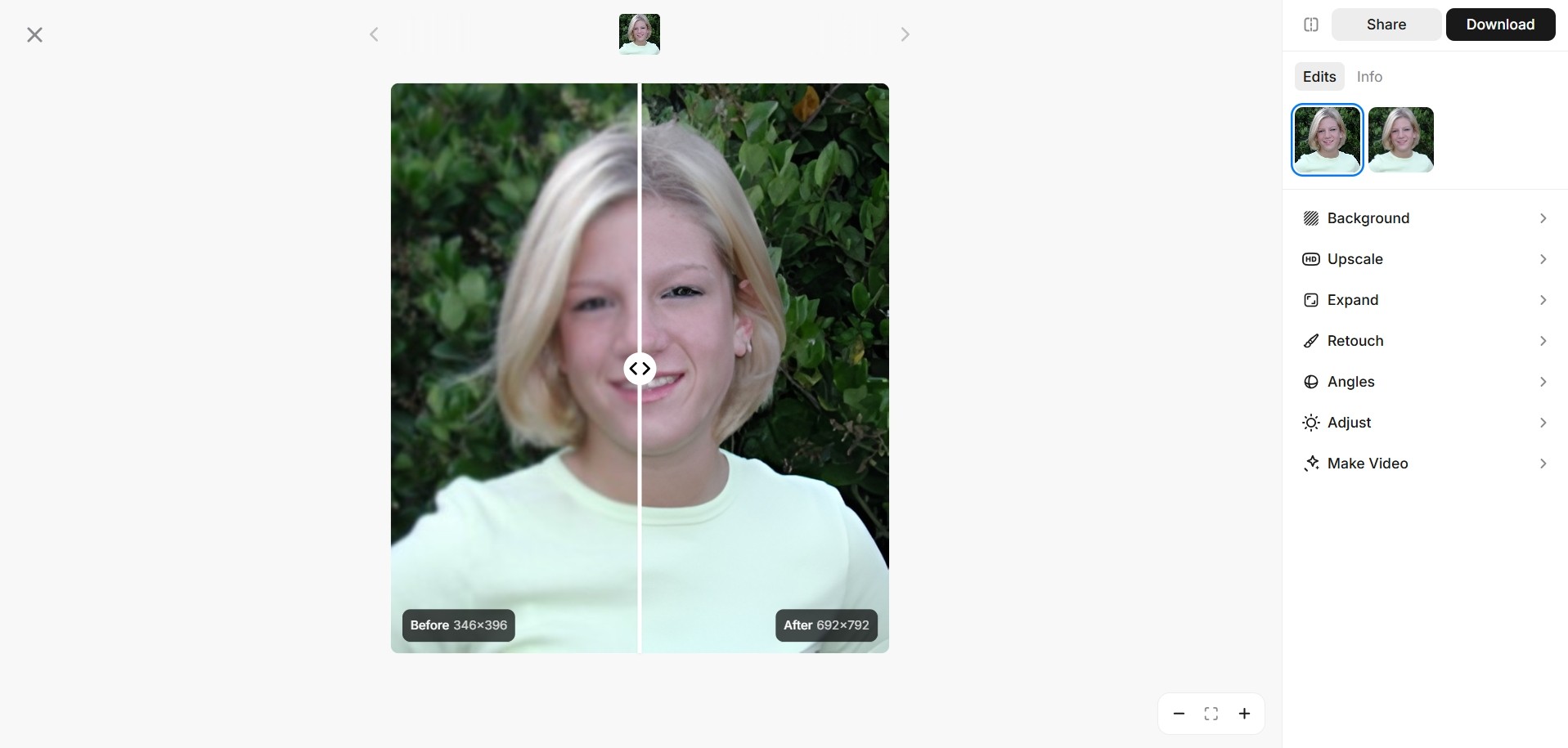
On a portrait, this upscaler noticeably increased overall sharpness and clarity around the hair edges and clothing outlines. It handled the background foliage surprisingly well, adding cleaner separations between leaves without introducing heavy noise.
However, some fine details (such as eyes) still look slightly soft when zoomed in, revealing that the original blur cannot be fully recovered by upscaling. It works good for moderate enlargements for web or social use, but still lags behind high‑resolution photos for close inspection.
Zawa: The Best 2026 Alternative for Pixelcut Image Upscaler
Pixelcut works well for quick enhancement, but its simple workflow can feel limited when users need stronger control over scale, output size, and detailed sharpness. Product images, portraits, or larger content visuals may need more flexible enlargement than a basic upscaling flow can provide.
Zawa fills this gap with 2x, 4x, and 8x scaling, along with custom dimensions from 64px to 8000px. It accepts JPG, JPEG, PNG, and HEIC formats, making it practical for clearer, larger, and more controlled image outputs.
Why Zawa AI Outperforms Pixelcut
Zawa AI image upscaler focuses on cleaner enlargement, sharper recovery, and flexible output control. The features below explain why it works well for demanding image projects:
-
True 8K Reconstruction: Zawa can push images up to 8x for larger outputs. Details stay more usable when photos move into bigger formats.
-
Advanced AI Denoising: Rough grain becomes softer without washing away important subject edges. Older photos and compressed images look cleaner after processing.
-
Sharper Product Images: Product photos gain clearer edges, surfaces, and visible details. Listings look more professional when small textures appear cleaner.
-
One-Click Auto-Enhance: The tool improves sharpness, tone, and balance in one pass. It works well when quick edits still need polish.
-
Custom Size Control: Users can set the width and height for the exact project needs. That helps when visuals must fit banners, stores, or blogs.
Step-By-Step Guide to Zawa AI Image Upscaler
Before testing use cases, it helps to see how Zawa works in practice. The steps below show the image upscaling flow from start to finish:
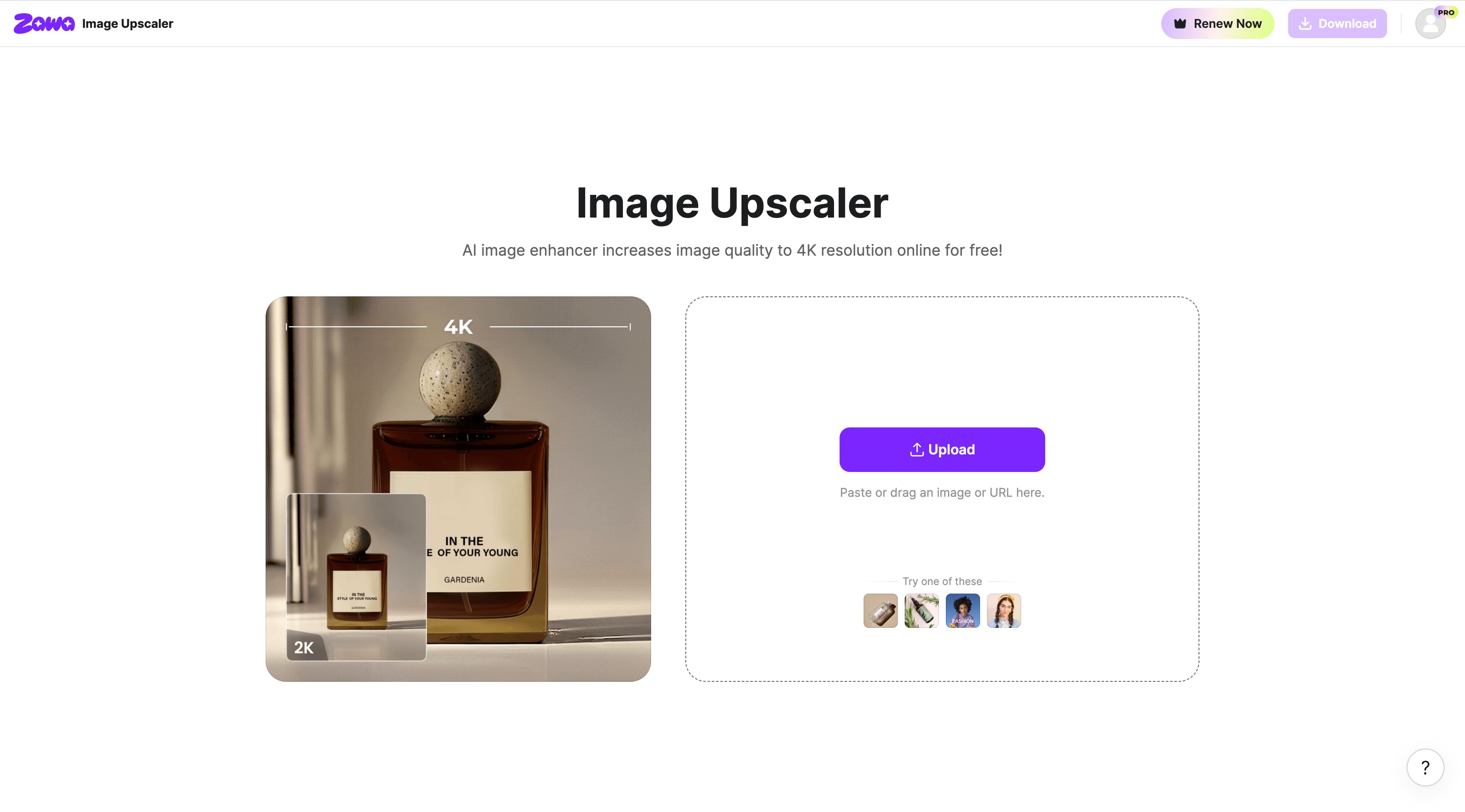
Step 1. Import the Image
Launch the Zawa Image Upscaler tool. Click the "Upload" button to add your image file. Moreover, you can also drag, paste, or use an image URL to proceed.
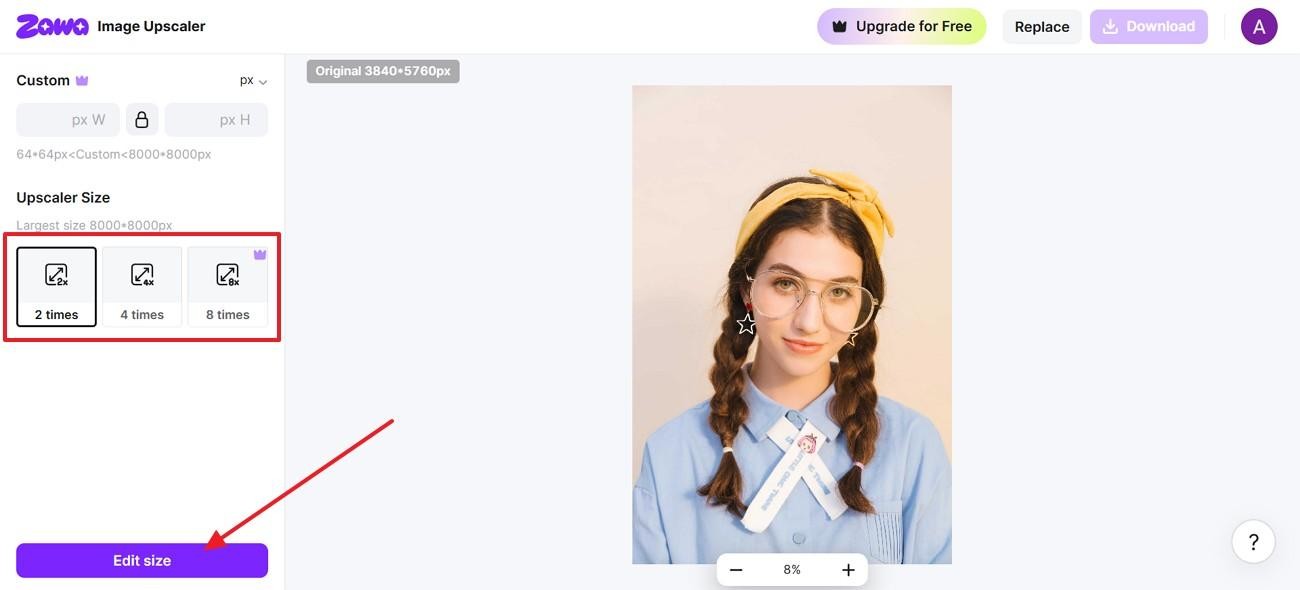
Step 2. Set the Upscale Factor
Once the image appears, choose the "Upscaler size" from 2x, 4x, or 8x. Afterward, press "Edit size" to initiate the upscaling process.
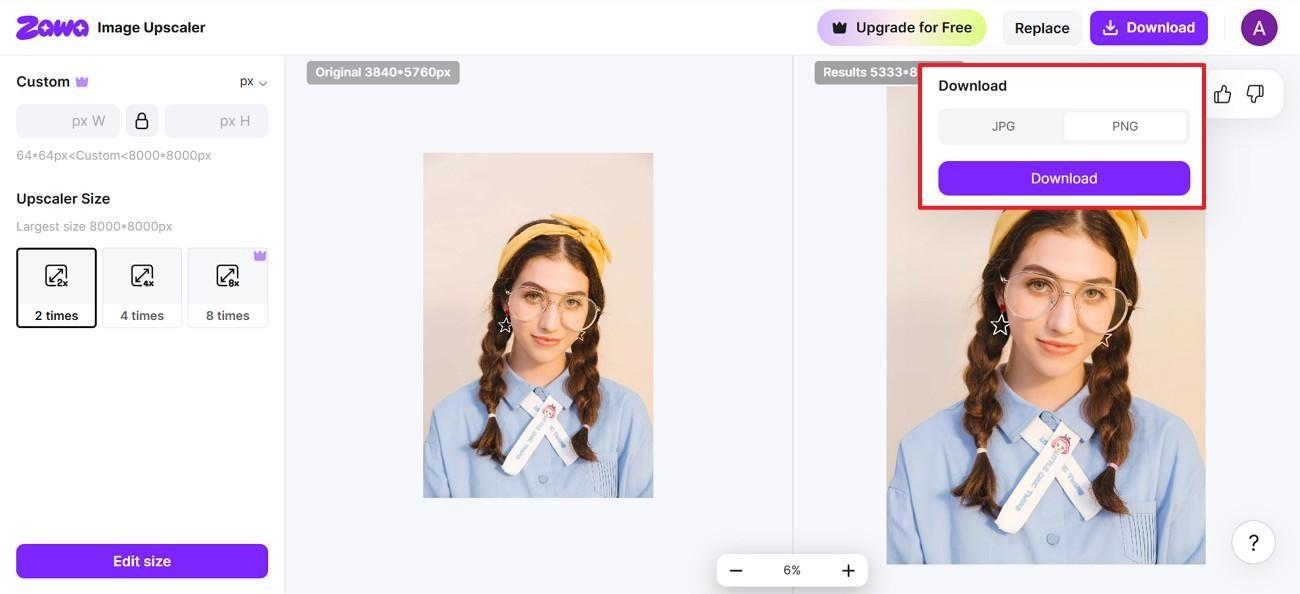
Step 3. Choose Export Format and Download
Finally, navigate to the "Download" option after processing finishes. After that, choose "JPG or PNG" from the drop-down menu, then save the enhanced image.
Best Use Cases of Zawa AI Image Upscaler
Some images only need a small lift to become usable again. These Zawa use cases show where better clarity matters most:
-
Photo Unblurring: Soft photos regain sharper edges and clearer subject focus. Even quick snapshots can look cleaner after focused enhancement.
-
Old Photo Restoration: Faded pictures recover better contrast, texture, and visible detail. Family memories become easier to save, print, or share.
-
E-commerce Product Images: Product shots look sharper, cleaner, and more listing-ready. Thus, better detail helps buyers notice materials, shapes, and finishes.
-
Social Media Content: Posts, reels, and stories gain a clearer visual finish. Stronger image quality helps content stand out faster.
-
Portrait Enhancement: Faces appear sharper while skin tones stay more natural. As a result, profile photos and personal edits feel cleaner and more polished.
Conclusion
To conclude, the Pixelcut AI upscaler is useful for quick edits, clean downloads, and simple image improvements. However, creators needing larger results, better texture recovery, and flexible export control may want more. Therefore, Zawa fits that gap naturally with 8x scaling, custom sizing, and practical format options for sharper professional visuals in 2026.
FAQs
-
Is Pixelcut AI free to use?
Pixelcut AI offers free access for basic edits and quick image upscaling tasks online. However, some advanced options may require paid access or account-based credits for heavier use. By contrast, Zawa offers a free trial that lets you experience these premium AI features without an immediate commitment.
-
Is Pixelcut AI worth it?
Pixelcut AI is worth trying when images need a quick, simple cleanup before publishing online. For deeper recovery, professional users may prefer tools with stronger scaling control and output.
-
Is Pixelcut a safe app?
Pixelcut appears safe for general editing when users avoid sensitive private uploads online today. The Pixelcut image upscaler should still be used with careful file choices every time.
-
Can AI improve low-quality images?
Yes, AI can sharpen edges, increase resolution, and recover visible image detail in photos. Still, extremely damaged pictures may need manual editing after automatic enhancement for better results.
-
What is the best picture upscaler?
The best picture upscaler depends on image quality, size, and the final purpose for users. Zawa suits professional results better with 8x scaling and flexible export formats in 2026.
You May Be Interested
Try the 10 Best Image Upscalers for Your Photos in 2025
How to Make a Picture Less Blurry and Restore Sharpness
5 Free AI Random Image Generators—Generate Unique Images Instantly Online

4 Solutions to Add a Background in Photos
How Big Is a Wallet-Size Photo? Complete Size Guide
