
How Many Frames per Second (FPS) Can the Human Eye See? The Real Answer (2026)
There is no single FPS limit for the human eye. The number most people cite is wrong. This guide explains how human vision actually processes motion, what the research says, and why the answer changes depending on what you are watching.


The answer most people have heard, 24 fps or sometimes 30, is wrong. Or at least incomplete. The human eye does not process the world in discrete frames at all. It captures a continuous stream of light and motion, and the visual system can detect differences at rates well above 200 fps under specific conditions.
The real question about how many fps can the human eye see is not about a hard ceiling. It is about what makes a higher frame rate feel better. This guide covers the actual science. It explains what current research says. And it maps all of that to practical frame rate decisions for video, gaming, and content creation.
The Frame Rate Myth: Where the '24 fps Limit' Came From
The claim that the human eye cannot see above 24 or 30 fps gets repeated often enough that most people take it as fact. It is not. Understanding where it came from clarifies why no single number answers the question.
Why 24 FPS Became the Default
24 fps became the cinema standard in the late 1920s when sound film required a consistent playback speed. It was the minimum rate that allowed clear audio synchronization while keeping film stock costs manageable. At 24 fps with natural motion blur from a physical camera shutter, the brain reads the footage as smooth continuous motion. Not because 24 is a perceptual limit, but because motion blur fills the visual gap between frames.
Early television engineers noticed that flickering light appeared continuous at around 50 to 60 Hz, which happened to match local electrical grid frequencies of 50 Hz in Europe and 60 Hz in North America. These observations shaped the first broadcast standards. Both 24 fps for cinema and 50 to 60 Hz for television were engineering minimums built around cost, technology, and convenience. They were not biological measurements.
The Problem with Comparing Eyes to Cameras
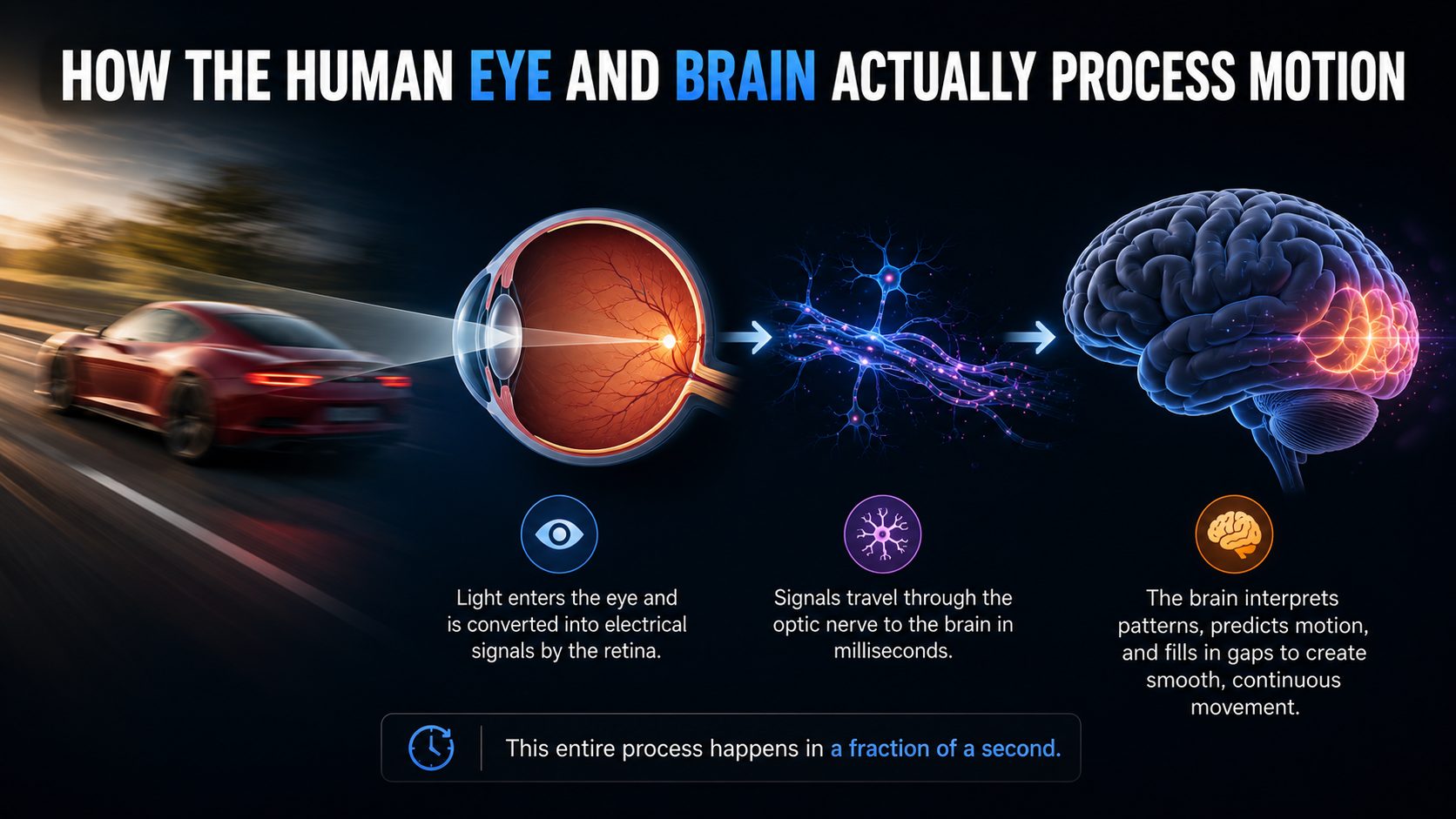
A digital camera captures a fixed number of discrete frames per second with a measurable shutter interval between them. The human eye has no equivalent shutter. It captures a continuous stream of light and feeds it to a visual processing system that operates differently depending on what kind of information it is handling.
Asking what the framerate of the human eye is like asking how many sentences per minute the brain reads. The question applies a discrete measurement to a continuous biological process. The visual system does not work in frames. It has separate processing speeds for flicker detection, motion tracking, and image recognition, each of which operates at a different rate and each of which responds differently to conditions like brightness, movement, and attention.
How the Human Eye and Brain Actually Process Motion
The fps for human eye perception is not one number because the visual system uses different mechanisms for different tasks. Three of them are directly relevant to the frame rate question.
Flicker Fusion Threshold
The flicker fusion threshold is the frequency at which a flickering light source starts to look steady and continuous. This is the closest thing to a measurable fps limit for the human eye, and current research places it between 50 and 90 Hz under typical indoor viewing conditions. A 2025 PLOS ONE study confirmed the threshold can reach 120 Hz, and the threshold climbs higher in very bright environments where photoreceptors respond faster.
A landmark 2024 study published in PLOS ONE by researchers at Trinity College Dublin found a between-participant difference of roughly 30 Hz in flicker fusion thresholds across healthy adults of the same age group. This confirms that human eye frames per second perception is not a fixed number. It varies substantially between individuals, and it shifts within the same person based on fatigue, brightness, and the location of the stimulus on the retina. Peripheral vision is more sensitive to flicker than central foveal vision.
This is the physiological basis for setting television refresh rates at 50 or 60 Hz. But flicker fusion is not the same as motion perception. It measures whether a steady light looks steady, not whether movement between frames looks smooth.
Motion Perception and Smooth Tracking
Motion perception is the ability to track a moving object and detect judder, blur, or stutter between frames. It is a separate process from flicker detection and operates at higher speeds. Research indicates that trained observers can detect differences in motion smoothness at rates well above 100 fps. Some studies under controlled conditions place this threshold above 200 fps. This is why the frame rate of the human eye cannot be summed up with one number.
This explains a common observation from gaming: people who have played at 120 fps consistently report that 60 fps feels noticeably different on the same display. Both rates are above the flicker fusion threshold, so the difference is not about flicker. It is about motion tracking and the brain's ability to detect smoother trajectories between frames.
Rapid Image Recognition
A widely cited USAF study showed fighter pilots could recognize an image flashed for just 1/220th of a second, equivalent to roughly 220 fps exposure time. This measures brief image recognition, not continuous motion perception. It is a different visual capability that demonstrates the visual system can register information at extremely high rates in specific conditions.
What this does not mean is that 220 fps is the practical limit for comfortable video viewing. Brief image recognition and sustained motion perception engage different parts of the visual system. But the finding does confirm that what frame rate can the human eye see is context-dependent, and that the ceiling is far higher than 24 or 30 fps in the right circumstances.
Cinematic Standard vs Real-World Perception: Why 24 FPS Is Not Always Enough
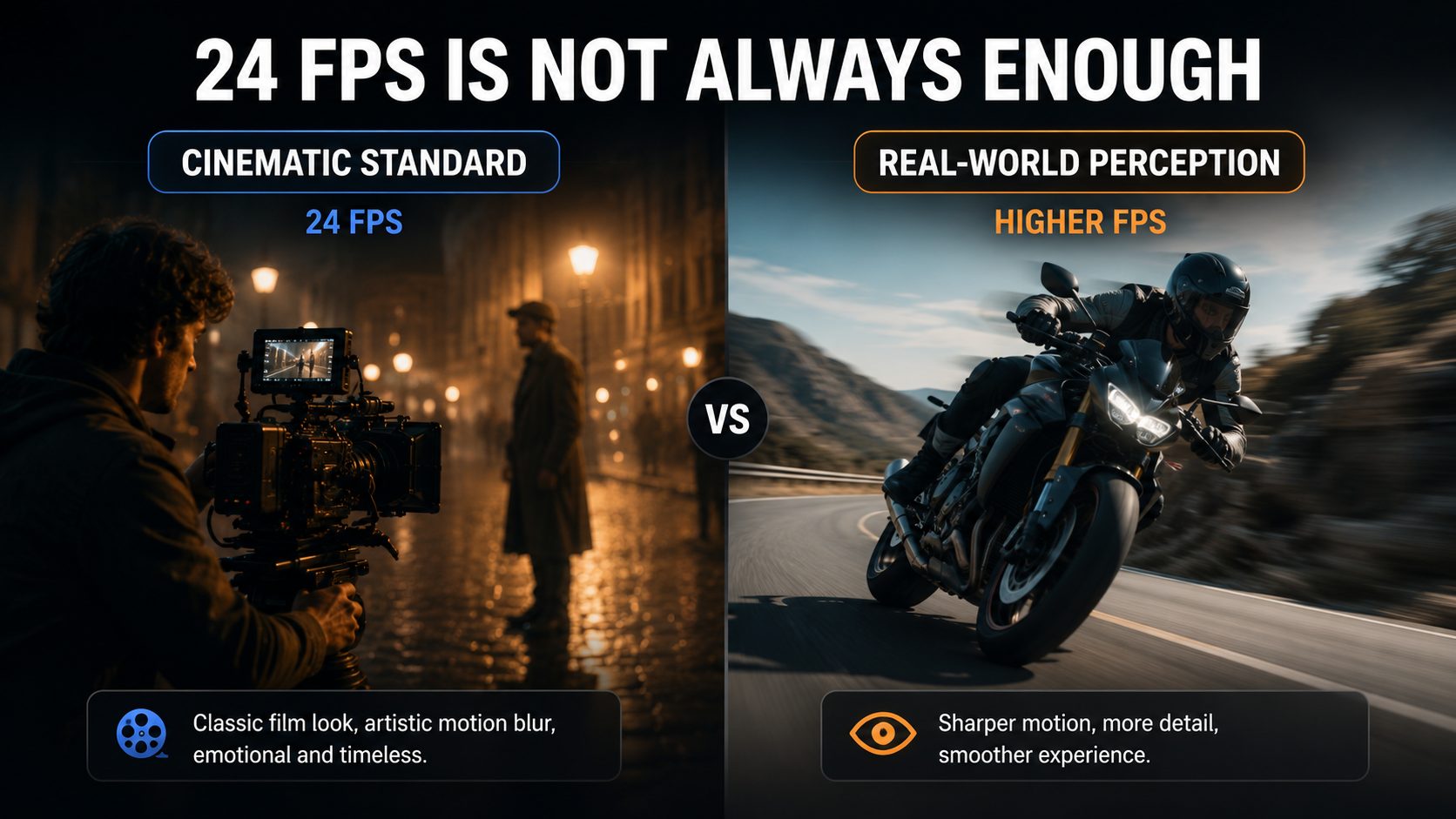
24 fps works for cinema but fails in gaming and other contexts. Understanding why reveals the conditions where frame rate actually makes a visible difference.
Why 24 FPS Works for Film
Physical film cameras produce natural motion blur because the shutter stays open for a portion of each frame. The 180-degree shutter rule sets shutter speed at twice the frame rate, so 24 fps uses a 1/48s shutter. That motion blur bridges the gap between frames. The brain reads blurred movement as continuous rather than as 24 separate snapshots.
Cinema audiences have decades of exposure to this look. The slightly blurred motion signature of 24 fps reads as cinematic rather than choppy. Modern TVs that use motion smoothing interpolate extra frames between the original 24 fps frames, and some viewers find the resulting higher frame rate output looks unnatural, the soap opera effect, precisely because it removes the motion blur signature associated with cinema.
Why 24 FPS Fails in Gaming
Games render each frame as a perfectly sharp, still image with no natural motion blur between frames. At 24 fps with sharp frames, the gaps are visible as judder and stutter. The brain receives 24 distinct snapshots rather than a blurred continuous signal. A game at 24 fps looks like a slideshow compared to the same game at 60 fps. A film at 24 fps looks fine because the blur bridges the gaps.
This explains why what framerate do humans see as smooth differs completely between a film audience and a gamer. The film viewer is satisfied at 24 fps. The gamer is uncomfortable below 60 fps on most titles. The content type determines what the visual system needs to see smoothness, not a fixed biological fps ceiling.
The High Frame Rate Film Experiment
Peter Jackson released The Hobbit: An Unexpected Journey at 48 fps in 2012, the first major studio release shot and projected at twice the cinema standard. Many viewers described it as looking too real, like live television rather than a film. The reaction showed that frame rate perception is partly conditioned. Audiences had learned to associate the 24 fps motion blur cadence with cinematic storytelling. The higher frame rate removed those learned visual cues.
Despite the mixed reception, 48 fps and higher HFR formats have been used in IMAX releases and virtual reality where the higher smoothness outweighs the unfamiliar aesthetic. In VR specifically, higher frame rates are not optional. They prevent motion sickness.
How Many FPS Do We Actually Benefit From? A Tier-by-Tier Breakdown
The benefit of each frame rate depends on content type, display hardware, and viewing context. The table below maps the practical picture.
|
Frame Rate |
Content Type |
Who Notices the Benefit |
Practical Notes |
|---|---|---|---|
|
24 fps |
Film, narrative streaming |
All viewers (via motion blur) |
Works due to natural shutter blur; choppy in gaming |
|
30 fps |
TV, social media, vlogs |
Most viewers vs 24 fps on fast motion |
Default on most smartphones |
|
60 fps |
Gaming, sports, action video |
Clearly visible vs 30 fps for most people |
Standard target for PS5, Xbox Series X |
|
120 fps |
Competitive gaming, VR |
Competitive gamers, VR users |
Input lag halved vs 60 fps; VR comfort minimum |
|
240 fps+ |
Esports, slow-motion capture |
Primarily competitive gamers |
4 ms input-to-display lag; subtle vs 120 fps for casual viewers |
24 fps
The cinematic standard for film and streaming narrative content. Works because physical camera shutters produce natural motion blur that fills the gap between frames. Noticeably choppy on computer-rendered content or gaming footage without artificial motion blur applied. Used by Hollywood, most Netflix and streaming originals, and cinematic YouTube content.
30 fps
The NTSC television standard for North America, Japan, and South America. Smoother than 24 fps and carries the recognizable look of broadcast television. The default recording mode on most smartphones. Used by live TV, YouTube tutorials and vlogs, social media content, and gaming stream capture.
60 fps
A clearly visible improvement over 30 fps for most viewers on any modern display. Fast-moving subjects stay sharp with minimal motion blur. The standard target for PC gaming and current-generation console gaming on PS5 and Xbox Series X. Most people who have seen both 30 fps and 60 fps side by side on fast-moving content can identify the difference without being told which is which.
120 fps and Above
The benefit of 120 fps over 60 fps is smaller than the 30-to-60 jump and is most visible in competitive gaming, VR, and large-screen contexts. At 120 fps, a controller input reaches the screen twice as fast as at 60 fps, which is a measurable functional advantage in reaction-time-sensitive multiplayer games. For VR, 90 fps is the minimum recommended rate for comfort on most headsets; 120 fps is the current high-end target.
At 240 fps and above, the perceptual difference over 120 fps is subtle for most viewers in non-competitive contexts. Input-to-display lag drops to approximately 4 ms, which matters in professional esports. For casual gaming, film, or video content, the jump from 120 fps to 240 fps is the least noticeable of all the tier upgrades.
Why Frame Rate Matters in Specific Scenarios
The framerate human eye perceives as adequate depends entirely on what is being watched and how. Here is how each use case maps to frame rate requirements.
Video Editing and Creative Content
Editing 24 fps footage on a 24 fps timeline is native and requires no conversion. Editing 60 fps footage on a 24 fps timeline produces smooth slow-motion playback at 2.5x. Shoot at 120 fps. Place that footage on a 24 fps timeline. It plays back at 5x slow motion. Mixing frame rates on a single timeline breaks sync. Set the timeline frame rate before you start cutting.
Gaming
60 fps is where gameplay stops feeling choppy for most people. Below that, camera movement stutters. Fast action looks jerky. 120 fps provides a meaningful input response improvement for competitive gaming: the time between a controller input and its appearance on screen is roughly halved compared to 60 fps. At 240 fps on a 240 Hz display, input-to-display lag drops to approximately 4 ms, which is a functional advantage in fast-reaction multiplayer games. For single-player story games, 60 fps is generally the point where further increases are noticeable but not critical.
Sports and Action Footage
Sports broadcasting in most markets uses 60 fps in NTSC regions and 50 fps in PAL regions. The higher frame rate keeps fast-moving objects, a ball, a sprinting athlete, a tennis serve, sharp and readable rather than smeared. Slow-motion sports footage is shot at 120 to 240 fps and played back at 24 fps; a 240 fps clip produces 10x slow motion. Action cameras and flagship smartphones now support 120 fps at 1080p or 4K as standard for sports content creation.
Security and Investigation
Security cameras typically record at 15 to 30 fps to balance storage consumption with usable footage quality. At 15 fps, fast-moving subjects produce visible stutter between frames. A person walking quickly through a frame at 15 fps may appear in only two or three frames before they are out of shot. At 30 fps, the same clip provides twice as many reference points per second, which directly affects the ability to identify individuals or read license plates from the recording. For forensic and traffic enforcement contexts, 60 fps provides even more precise timing between events.
How to Upgrade Low-FPS Videos to Smooth 30 FPS with Zawa AI Video Enhancer
Low frame rate footage from older recordings, security cameras, screen captures, or compressed video plays back with visible judder on modern displays. Standard frame interpolation fills the gap by blending adjacent frames together. On slow-moving content this is adequate, but on fast-moving subjects the blend produces ghosting and smearing where the subject occupies different positions in the two source frames.
AI frame interpolation is a different approach. Before looking at specific tools, it is worth understanding why standard blending fails on fast content. Bicubic blending averages pixel values between frames. When a subject moves significantly between frames, the averaged output produces a double-image artifact, a ghost of the subject at both positions. This is visible as a smear on hands, wheels, birds in flight, or any fast-moving edge.
Zawa Video Enhancer uses a neural network that analyzes the motion trajectory between existing frames and predicts what a plausible intermediate frame would contain. Rather than averaging pixel positions, it tracks where moving subjects are heading and synthesizes a frame that reflects that movement. The result on 15 fps security footage upgraded to 30 fps is cleaner subject tracking and fewer ghosting artifacts than standard blending produces on the same source. The tool runs in the browser — free to try with new-user credits, no desktop installation required.
Standard vs AI Frame Interpolation
Standard blending interpolation averages pixel values between adjacent frames. On slow content it produces smooth results. On fast movement it creates soft, ghosting artifacts where subject positions differ significantly between frames. AI frame interpolation analyzes motion vectors between frames and synthesizes plausible intermediate frames based on predicted subject movement. The result reduces ghosting and produces sharper in-between frames on content with fast edges, making the frame rate upgrade look natural rather than blended.
Step-by-Step: Using Zawa Video Enhancer
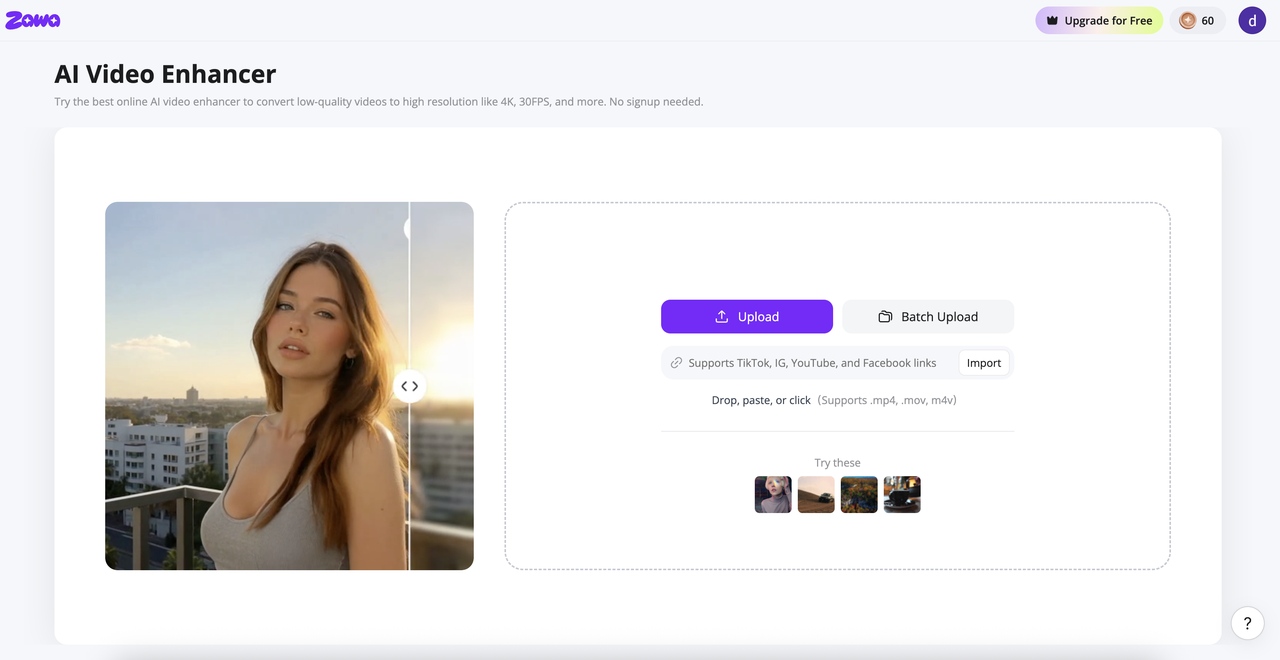
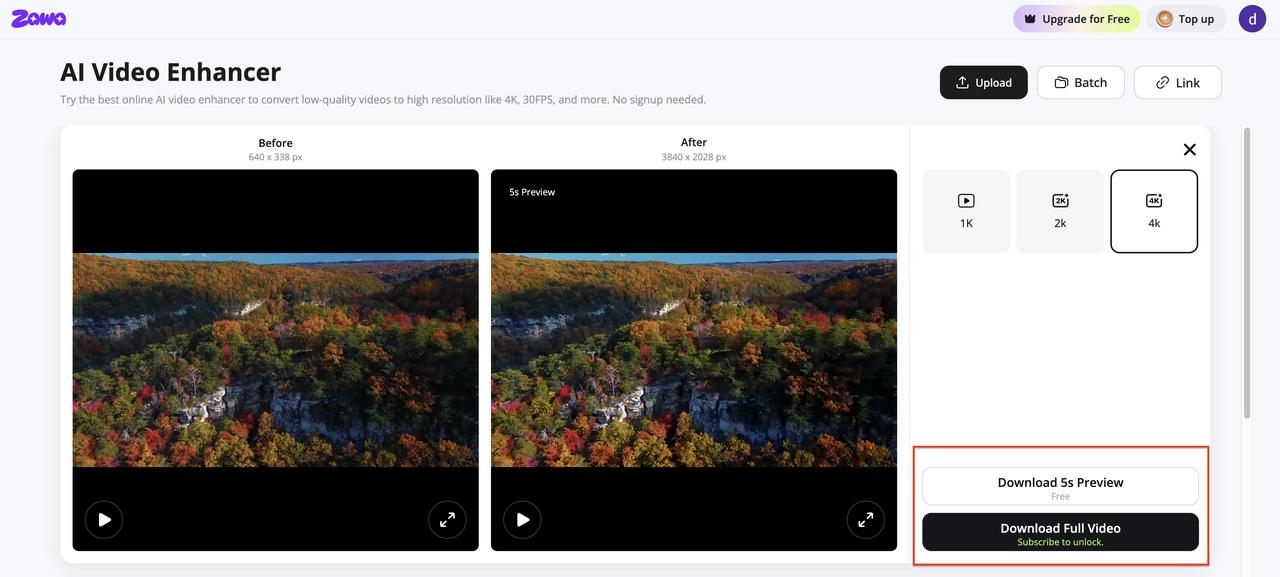
Step 1: Open zawa video enhancer and upload your low frame rate video
Drop your video into the upload zone or paste a link. MP4, MOV, M4V, AVI or 3PT are accepted. The tool runs in the browser with no installation required. Local files and linked sources both work.
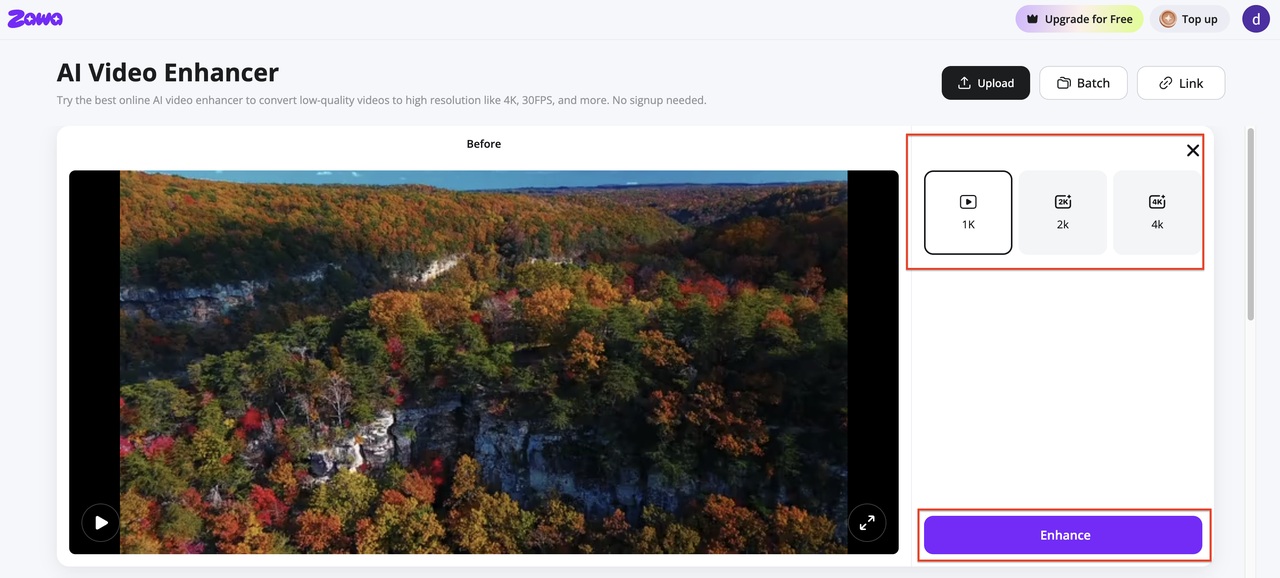
Step 2: Select your target frame rate and run the enhancement
In the output panel, select your target resolution — 1K, 2K, or 4K. Hit Enhance. The tool processes each frame and generates interpolated frames where needed, outputting at a smooth 30FPS. Hit Enhance. The AI model looks at each frame transition and generates new frames between them. It does not blend. It predicts.
Step 3: Preview the result and download the enhanced video
Processing finishes and split-view loads. Scrub through sections with fast movement to check that interpolation handled them cleanly. Download the output when the result meets the requirement.
Conclusion
There is no single number that answers how many fps the human eye sees. The visual system has no shutter. It has no frame rate. It runs three separate processes: flicker detection, motion tracking, and image recognition. Each works at a different speed. Each changes based on conditions.
The 2024 Trinity College Dublin study put the individual variation at up to 30 Hz. That means what feels smooth to one person may feel choppy to another, even at the same fps. The content type changes the answer too. Film gets away with 24 fps because the blur fills the gaps. Games need 60 fps because there is no blur. VR needs 90 fps or the viewer feels sick. The practical implication: 24 fps works for film because motion blur bridges the gaps. Gaming needs 60 fps as a baseline because there is no blur. VR needs 90 fps or higher to avoid sickness. Competitive multiplayer benefits from 120 fps and above for measurable input response gains.
For existing low-fps footage that needs to work on modern displays, AI frame interpolation from Zawa Video Enhancer produces smoother results than standard blending. This is most visible on fast-moving content, where blending leaves ghosting artifacts that AI prediction avoids.
FAQs
How many frames per second does the human eye see?
No fixed number exists. The eye does not work in frames. It receives a continuous stream of light. Flicker fusion, the point where a flickering light looks steady, typically lands between 50 and 90 Hz for most people. A 2024 PLOS ONE study found up to 30 Hz of variation between individuals. For motion tracking, the threshold is much higher. Research shows the brain picks up differences at rates above 200 fps under the right conditions. The real answer depends on the task, the lighting, and the person.
Can humans see the difference between 60 fps and 120 fps?
Yes, but it depends on what you are doing. In gaming, the jump from 60 to 120 fps shows up in fast scenes. Input response is faster. Things feel sharper. For regular video or film, the difference is subtle. Most casual viewers do not notice it unless they are sitting close to a large screen. In VR, 120 fps removes judder that 60 fps still shows. The benefit is real but only in the right context.
Why do movies use 24 fps if humans can see more?
24 fps became the cinema standard in 1927 as the minimum rate for synchronized sound on physical film. Physical camera shutters produce natural motion blur that bridges the gaps between frames, and audiences have decades of conditioning associating that look with cinema. It is a practical and aesthetic standard, not a biological ceiling. Old recordings and security footage lack that natural blur. For those, tools like Zawa Video Enhancer can insert generated frames to bring choppy sub-24fps clips up to smooth 30fps playback.
What frame rate is best for gaming?
60 fps is the baseline. Below that, most games feel choppy. 120 fps cuts input lag roughly in half. That matters in competitive games where reacting fast wins rounds. 240 fps is primarily beneficial in esports and fast-reaction games where 4 ms input-to-display lag is a functional advantage. For single-player story games, 60 fps is generally the point where further increases are visible but not critical to the experience.
What framerate do humans see in daily life?
Real life has no frame rate. The visual system perceives a continuous stream of light with no equivalent to a shutter or frame interval. Frames per second only applies to recorded or digital media. Real life has no frame count. The eye adjusts to motion and light in real time, with no shutter and no interval between images.
You May Be Interested
Veo 4 Could Change AI Video From Clip Generation to Scene Direction

10 Best AI Video Enhancers to Upscale Your Videos

15 Best AI Video Generators in 2025

What Is Frame Rate? FPS Explained for Video & Gaming

What is a PNG and How to Convert It?
