Media.io Video Enhancer Review: What You Need to Know Before Using It
Full Media.io Video Enhancer review covering AI upscaling, real test performance, speed, limitations, and free vs paid version. Also explore Zawa AI Video Enhancer as a smarter alternative in 2026.


A user started editing a video that they shot a while back with their phone. The final footage looks blurry and full of noise. They try a few fixes, but nothing really brings it back to life. This is when tools like Media.io Video Enhancer start getting attention.
The tool lets users upscale and enhance videos with just a few clicks. In this Media.io Video Enhancer review, we will discuss everything you need to know about this video editor.
What is Media.io Video Enhancer?
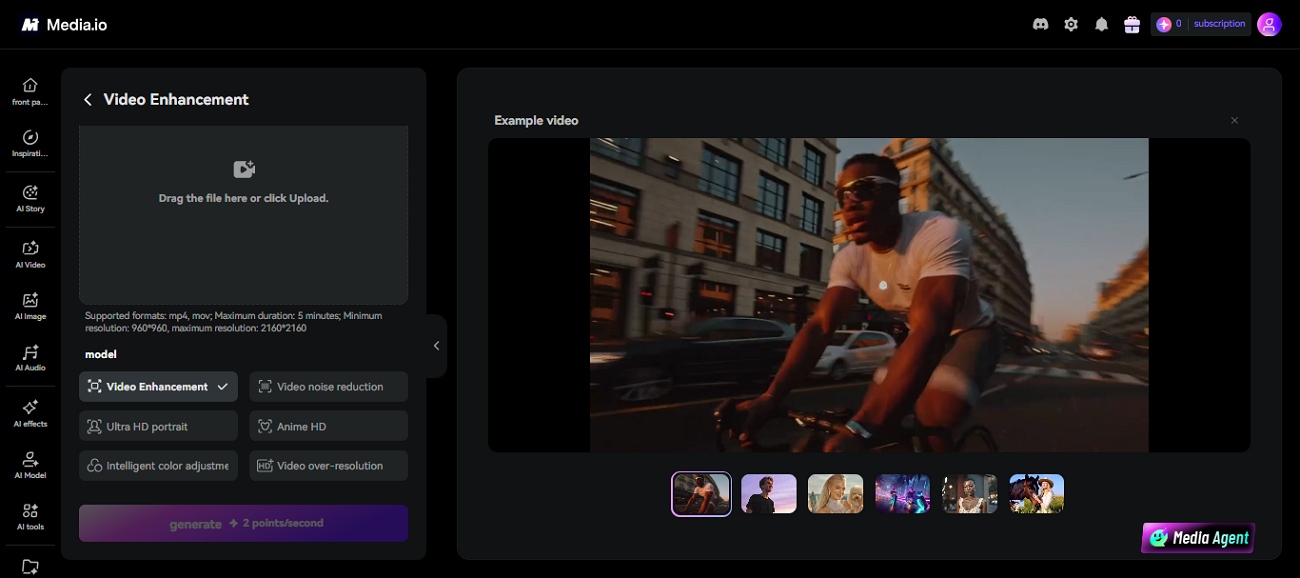
It is a cloud-based tool that uses advanced technology to improve the quality of videos without requiring advanced editing skills. Users can upload their footage directly through a web browser and process videos without installing heavy software.
The tool is primarily designed to sharpen blurry footage and upscale videos to higher resolutions. Content creators and social media users often use Media.io Video Enhancer to improve videos before sharing them.
5 Core Features of Media.io Video Enhancer
Many tools offer video editing features, but only a few offer high-quality results. Mentioned below are some of the key features of Media.io AI video upscaler that make this tool stand out:
AI Video Upscaling to HD and 4K
One of the most useful features of this tool is its ability to upscale videos to higher resolutions such as HD and 4K. The tool analyzes the footage and adds detail where possible to create a sharper look. This can be especially helpful for older clips or videos that need to look better on larger screens.
Video Sharpening and Deblurring Tools
The platform includes sharpening and deblurring tools that work to improve edges and fine details throughout a video. This feature can help make subjects appear clearer and easier to see without requiring manual editing skills.
Noise Reduction and Cleanup Features
Videos recorded in low light often contain visible grain and digital noise that can distract viewers. The noise reduction feature helps clean up these imperfections by smoothing unwanted artifacts. It can also reduce compression-related issues that commonly appear in videos downloaded multiple times.
Online Processing Without Software Install
Media.io video enhancer tool runs entirely through a web browser, unlike traditional video editing programs. You can upload a video and process the file without installing any software on your computer. This makes it convenient for users who want quick results.
Strengths and Limitations of Media.io Video Enhancer
Understanding Media io video upscaler’s strengths and limitations will give you a clearer picture of where it excels and where it falls short. Provided below are some of the pros and drawbacks of this tool:
Pros of the Media.io Platform
-
The interface is simple and beginner-friendly for people who do not have technical knowledge.
-
There is no need to download or install software, as everything runs in a web browser.
-
Small video clips are usually processed quickly to get results in no time.
-
It works across different operating systems and devices when editing videos.
Cons of the Media.io platform
-
The free version has restrictions that limit testing and overall usability.
-
Enhanced previews are available, but downloads usually require a paid subscription.
-
Large files and longer videos may take more time to process.
-
A stable internet connection is necessary for uploads and processing.
Free vs Paid Version Limitations: What You Get
Media.io video enhancer provides both free and paid options. The differences between them can significantly affect what you can do with your videos. Users can understand exactly what each version includes and where the biggest limitations exist:
Free Plan Restrictions
-
Videos exported from the free plan often include a watermark. This can reduce their professional appearance and usability.
-
The free version restricts uploads to smaller files and short clips. This makes it unsuitable for longer or high-quality video projects.
Paid Plan Benefits
-
Higher Resolution Output: The paid plan allows you to export videos in better quality, like 4K and HD.
-
Faster Processing Speed: Paid users get priority processing for videos. This reduces waiting time and speeds up the overall enhancement workflow.
-
No Watermark: Videos downloaded under the paid plan are clean and professional without any branding or watermark.
-
Unlock Full-Length Downloads: You can process and download longer videos without the strict file size limitations.
Value Comparison For Creators
| Plan | Pricing |
|---|---|
| Standard | $7.99/month |
| Premium | $13.99/month |
-
Free Plan: Suitable for basic testing and quick previews. However, limited features and exports make it unsuitable for professional video work.
-
Standard Plan: A more affordable option for casual creators who need better quality exports and fewer restrictions.
-
Premium Plan: Best for professional use that needs high-resolution output. It also offers watermark-free downloads and faster processing.
How to Use Media.io Video Enhancer: Step-by-Step Process
The platform is designed to be simple and beginner-friendly. Here’s a clear step-by-step process to help you enhance your videos using this tool:
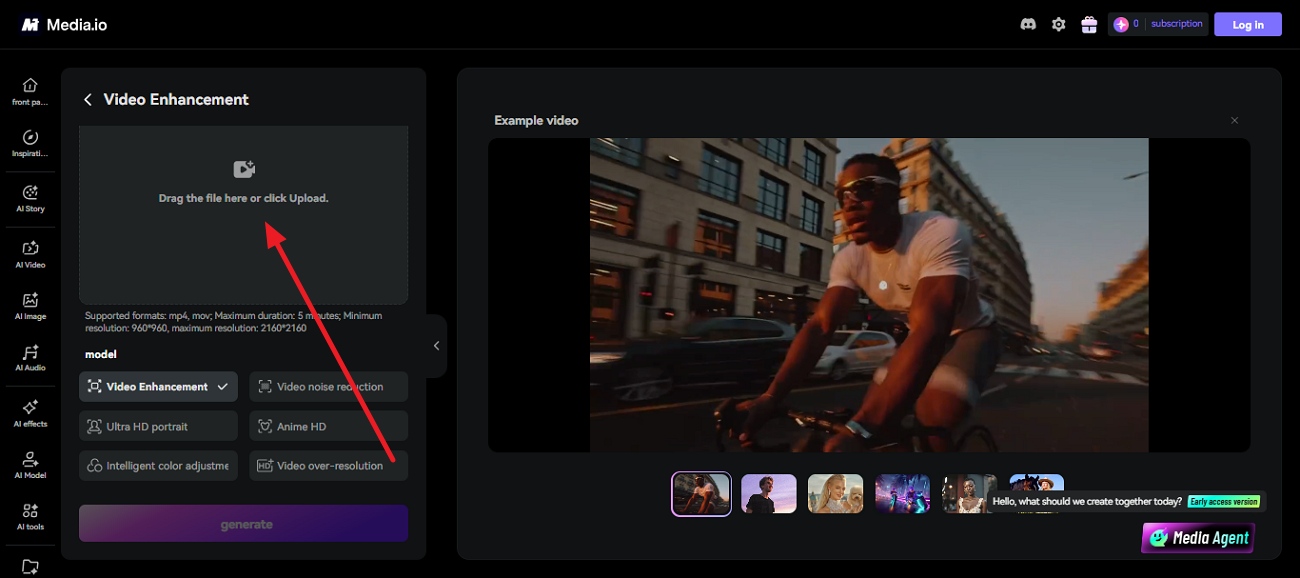
Step 1. Upload Your Video
Begin by accessing the tool on your browser and selecting the “Upload” option to upload your video for upscaling.
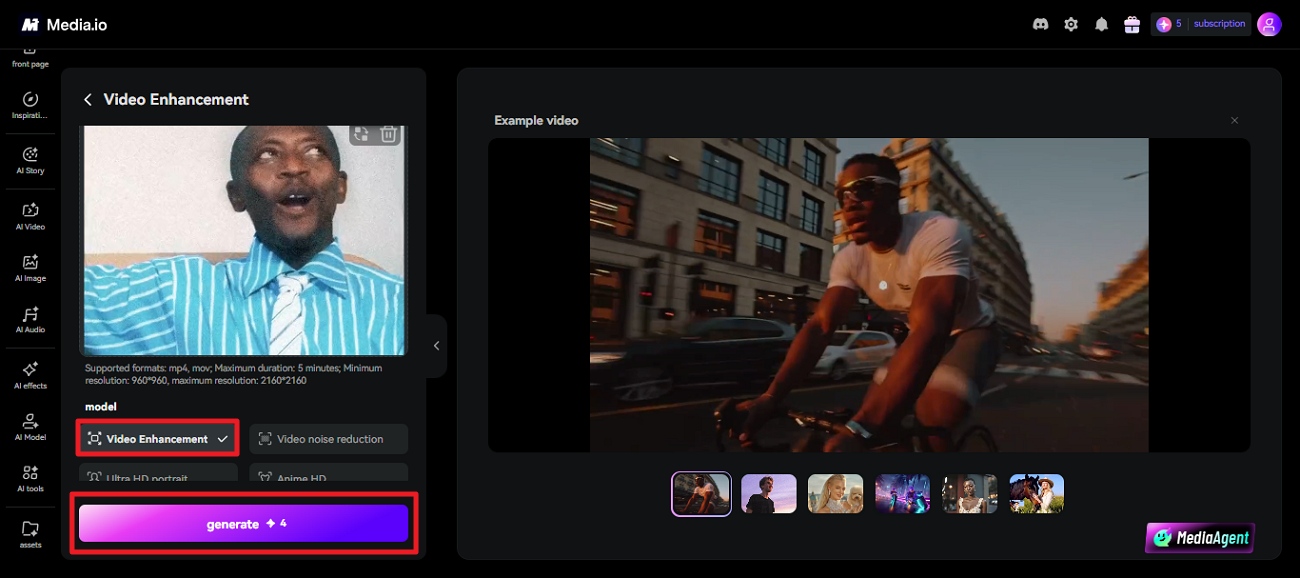
Step 2. Choose Enhancements & Generate
Once the video is uploaded, select the enhancement model from the options provided on the left. Once done, press the “Generate” button to execute the process.
Step 3. Preview and Download
After the video is enhanced, preview it within the tool’s interface. Once done, press the “Download” button to save the results to your device.
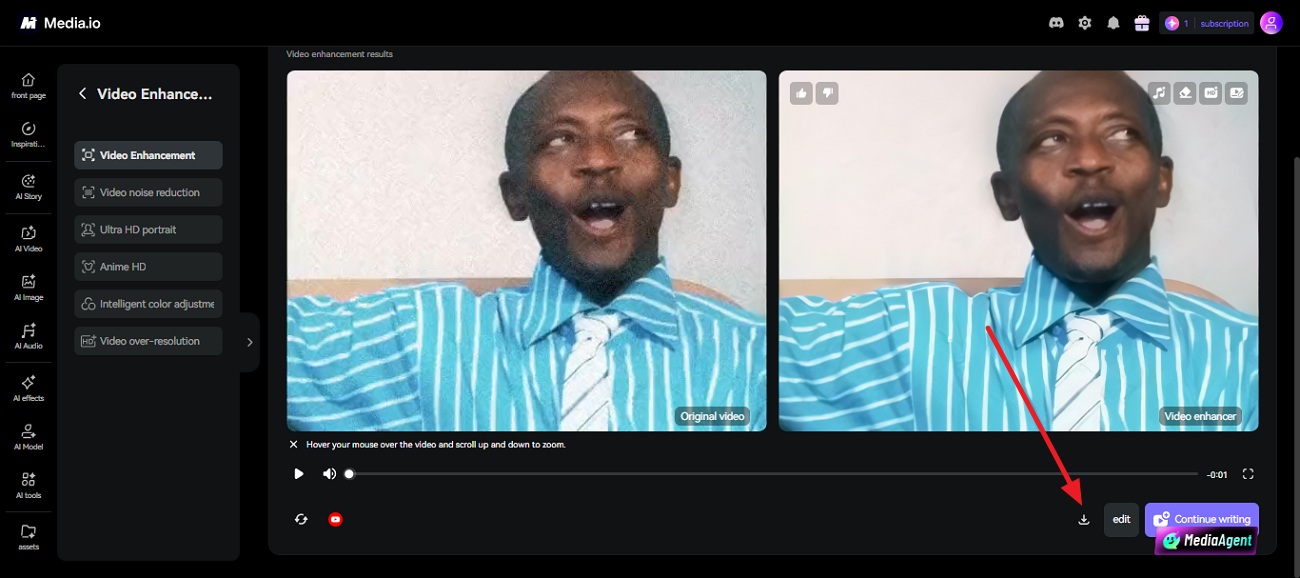
Real Test Results and Performance Review
To evaluate Media.io, a 720p, 60-second clip with visible motion blur was uploaded using the free plan. The goal was to check sharpness improvement, processing time, and download quality.The goal was to check both visual improvement and overall usability during the enhancement process.
Real Test Result (Before vs, After)
Before: The video appeared soft with noticeable motion blur. Faces and background objects lacked clear definition.
After: The video showed clear improvement in sharpness and brightness. However, some fine textures appeared slightly over-smoothed.

Performance Review
The tool performed smoothly for short clips with an easy upload and preview process. Processing time remained reasonable for small files, but longer videos required more time and stability. Alternatives are required for users needing more advanced control and higher-quality restoration.
Beyond the Basics: Better AI Video Enhancer for Pro Quality
Tools like Media.io Video Enhancer are great for quick fixes and casual use. However, creators who need more consistent output often look for more advanced solutions. One such option is Zawa Video Enhancer. It is an online tool that delivers stronger restoration results for both everyday users and professional content creators. The tool focuses on improving video clarity and upgrading low-quality footage.
What makes Zawa stand out is its balance between simplicity and advanced enhancement quality. It not only improves resolution but also focuses on preserving natural textures. The platform is also designed to handle different types of videos without requiring technical expertise.
Zawa Video Enhancer Features
The following features show how the tool goes beyond basic enhancement and focuses on delivering more refined results. Let us have a look at the core features of Zawa:
-
One-Click Video Enhancement to HD and 4K Resolution
Zawa can upgrade low-quality videos into sharp HD or 4K output. It improves overall clarity while keeping the process simple and beginner-friendly.
-
Smart AI Sharpening for Clearer Details
This feature enhances edges and fine visual elements to make footage look more defined. It helps turn blurry or soft videos into clearer content.
-
Automatic Noise and Grain Removal
Zawa automatically removes unwanted grain and compression noise. The result is a cleaner and smoother visual output without manual adjustments.
-
AI Frame-by-Frame Reconstruction
Rebuilds lost detail and removes compression artifacts like blocking and MPEG noise, rather than stretching existing pixels.
-
Three-in-One Enhancement
Denoising, sharpening, and compression artifact removal in a single pass, no multi-tool workflow needed.
-
1K / 2K / 4K Output Options
Choose the resolution that fits your platform and use case.
-
Bulk & Link Upload
Process up to 30 videos at once, or paste a TikTok, Instagram, or YouTube link directly without downloading the file.
A Quick Guide to Using Zawa AI Video Enhancer
After learning about this Media io video upscaler alternative in detail, let us have a look at the step-by-step guide on how to use it:
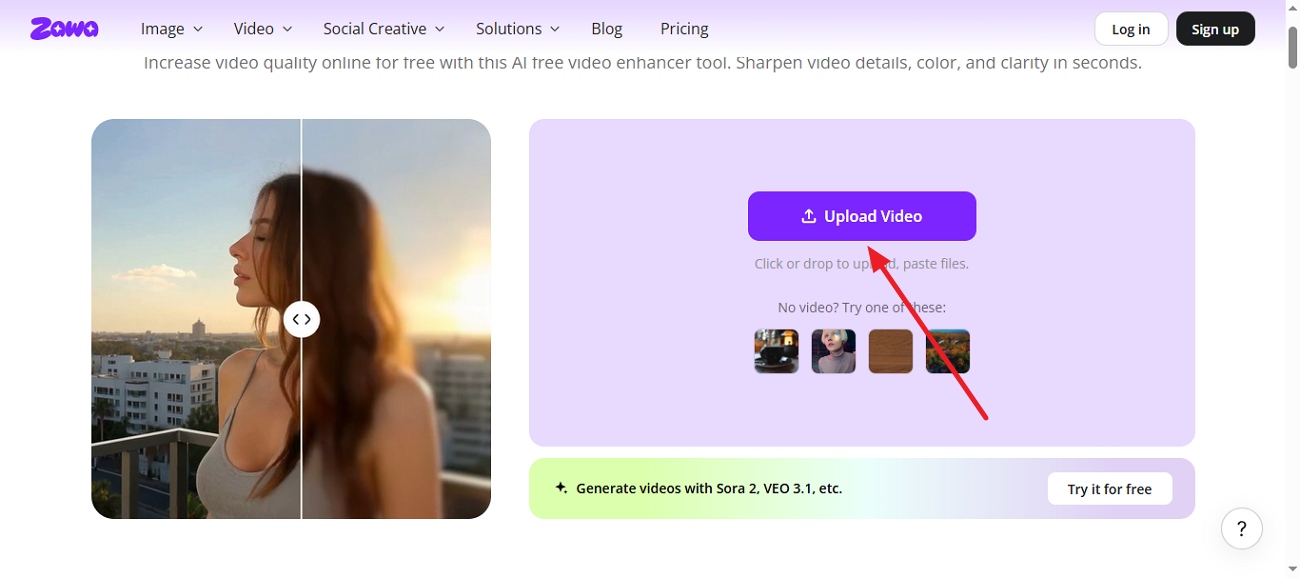
Step 1. Upload a Video or Add a Link
Go to zawa, click Upload Video to add your file directly, in bulk, or paste a TikTok, Instagram, or YouTube link.
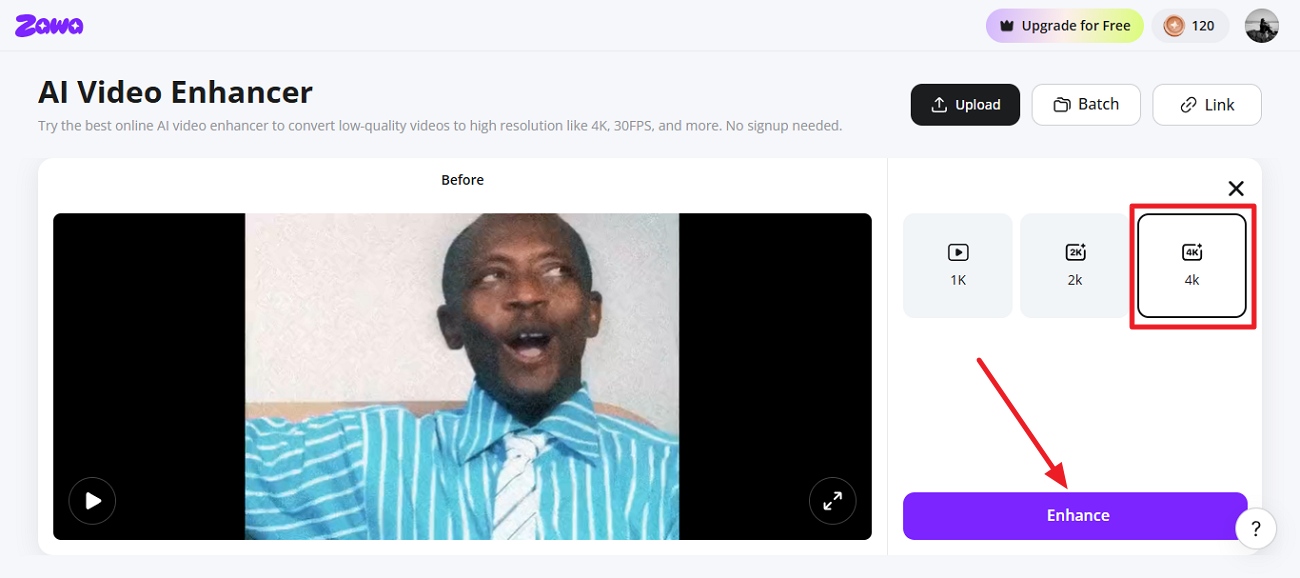
Step 2. Pick a Resolution and Enhance
Next, choose the resolution from the options provided and press the “Enhance” button located on the right.
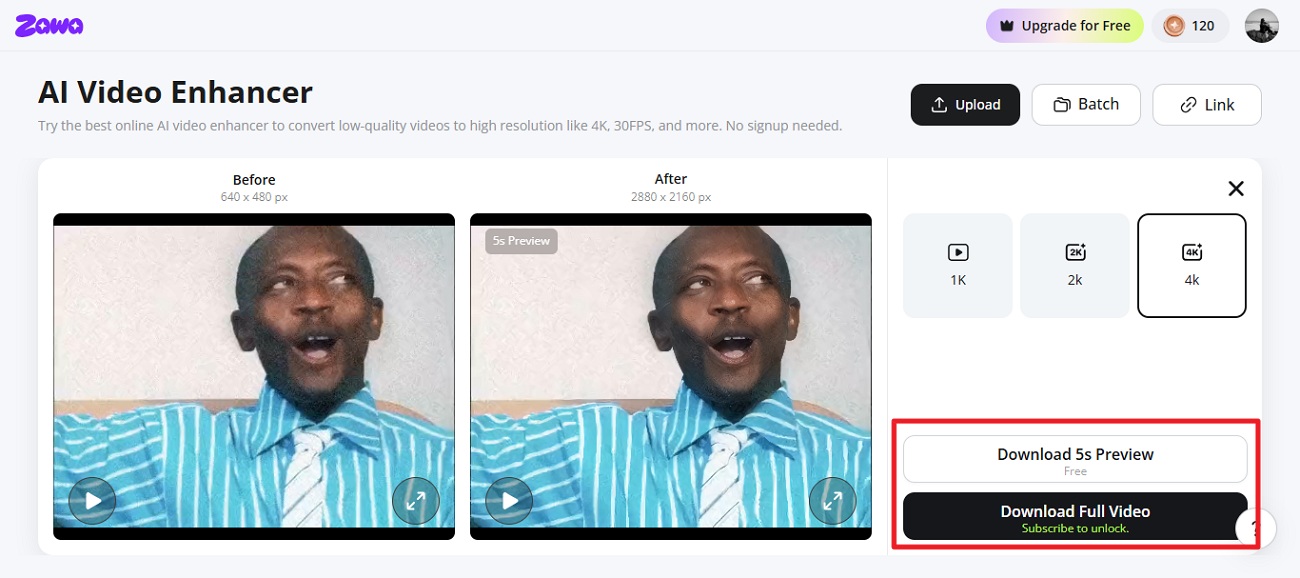
Step 3. Compare and Download Video
Once the results are generated, compare the before and after results in the preview windows. Press the “Download” button once you are satisfied with the final output.
More than just a video enhancement tool, Zawa is a comprehensive AI-powered content creation platform. Users can upload an image and instantly turn it into engaging promotional videos or social media-ready content. By combining content generation and editing features in one place, Zawa helps simplify and accelerate the entire creative process.
Conclusion
To conclude, this article provided a detailed Media.io video enhancer review for users looking for a video enhancer. The live results showed that the tool enhanced video quality but lacked speed and clarity. One such tool that can be used as an alternative is the Zawa video enhancer. This advanced tool allows users to upscale videos up to 4K quality with free access.
Frequently Asked Questions
-
Is Media.io AI video upscaler free to use?
Media.io offers limited free access, but some AI upscaling features and higher export settings may require a paid plan. However, Zawa offers an AI Vide Enhancer that initially lets you upscale videos for free.
-
Can Media.io convert low resolution to 4K?
Media.io can upscale low-resolution videos to higher resolutions, including 4K, depending on the source quality and subscription plan. For users looking for AI-powered enhancement and restoration, Zawa can also be considered for improving video clarity up to 4K.
-
Can I use Media.io on my mobile phone?
Media.io can be accessed on mobile devices through a browser, although the experience may vary depending on the device and features used. If you prefer a dedicated mobile solution, the Zawa mobile app can be an alternative for enhancing and upscaling videos on the go.
-
Is Media.io video enhancer safe to use?
This platform is generally considered safe to use for video enhancement and file processing. As with any online facility, it is recommended to review its privacy policy before uploading sensitive or personal content.
-
What is the best alternative to Media.io Video Enhancer?
The best alternative depends on your needs, such as AI enhancement quality, ease of use, or mobile support. Zawa can be a strong option for users seeking AI-powered video upscaling, restoration, and enhancement features.
You May Be Interested

10 Best AI Video Enhancers to Upscale Your Videos

15 Best AI Video Generators in 2025
10 Best AI Video Enhancers to Upscale Your Videos

10 Best AI Photo Enhancers to Try in 2026

Gemini Images Too Blurry? Here’s How to Make Them Crystal Clear in Seconds
How to Resize an Image Without Losing Quality: A Beginner’s Guide