
PicWish Unblur Image Tool: Full Review & Top AI Alternative 2026
Does PicWish unblur image tool work for you? Read our 2026 review to explore its features and discover Zawa as a powerful alternative for even sharper results.


Blurry photos are common in daily work and personal use. A shaky hand, low light, poor focus, or old scan can make a good image hard to use. That is why tools like the PicWish unblur imagefeature are popular. They help casual users, sellers, creators, and small business owners.
This review looks at PicWish's unblur tool in a practical way. It covers features, free and paid options, and real performance limits. You will also see user feedback and key use cases. Lastly, we compare Zawa as a 2026 alternative for stronger enhancement and upscaling.
What Is PicWish Unblur Image Tool?
A blurry photo does not always need full manual editing. Sometimes, smart sharpening and cleaner visual detail are enough to make it usable again. The PicWish AI Photo Editor is designed for that kind of quick repair, especially for soft portraits, product shots, and old photos.
The workflow also feels simple for non-editors and busy teams. Images can be uploaded, dragged, pasted, or added through direct URLs. After upload, the AI sharpens blur, improves clarity, and supports upscaling. However, the final result still depends on the original file's remaining detail. Mild blur usually improves better than fully damaged or heavily distorted images.
Why PicWish Photo Unblur Stands Out - Key Features
PicWish stands out because it keeps photo repair quick and low-effort. Instead of asking users to adjust layers or technical controls, it handles most corrections automatically. To understand its value better, let's look at the key features that make PicWish unblur useful for fast visual fixes:
-
Instant Blur Fix: Upload a soft image, and PicWish sharpens it automatically. This works well for quick posts, listings, and casual photos.
-
Sharper Portrait Details: Faces often need more care than backgrounds or objects. PicWish helps refine eyes, hairlines, and facial edges clearly.
-
Cleaner Low-Light Photos: Grain and haze can make images look weak. The enhancer reduces visual noise while improving photo clarity.
-
Old Memory Repair: Faded family pictures can regain color, contrast, and visible detail. However, badly torn or missing areas may need deeper restoration.
-
Batch-Friendly Editing: Online batch processing supports up to 30 images together. For sellers, this makes repeated product photo cleanup much faster.
PicWish Photo Unblur: Free vs Paid Features
After checking the main features, pricing is the next practical point. PicWish photo unblur is easy to test for quick edits, but limits can appear once downloads, HD quality, or regular use become important. Review the table below to compare PicWish's free vs paid features:
| Area | Free Plan | Paid Plan |
|---|---|---|
| AI Unblur Tool | Basic unblur for quick photo fixes | Stronger access for regular image enhancement |
| Image Quality Output | Limited non-HD downloads per day | Daily HD downloads for supported online tools |
| Watermark | 5 daily unblur downloads without watermark | More exports with fewer usage restrictions |
| Processing Speed | Standard processing for light edits | Better suited for frequent editing workflows |
| Batch Processing | Online batch editing up to 30 images | More practical for regular batch photo cleanup |
| Detail Enhancement | Basic sharpening for faces and objects | Better access to advanced enhancement results |
How to Use PicWish Photo Unblur (Step-by-Step)
Once you understand the feature limits, the next step is testing the tool yourself. The PicWish unblur image process is simple because everything happens online, from image upload to final download. Follow the steps below to check how well it improves your blurry photo:
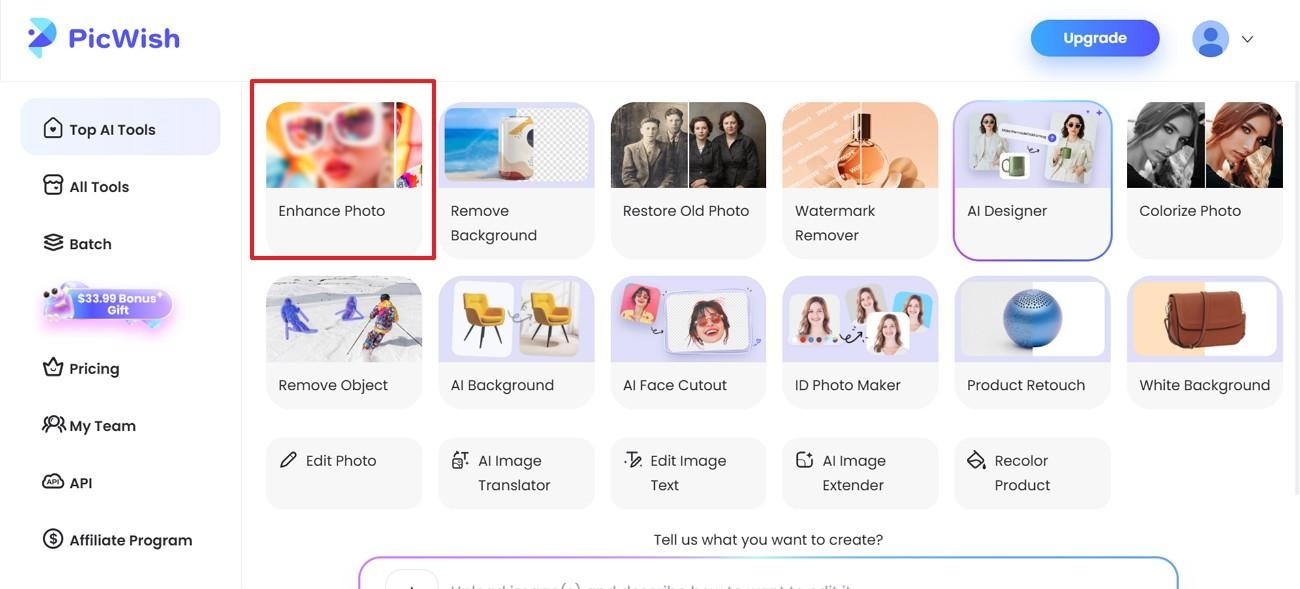
Step 1. Start from PicWish Create, then choose "Enhance Photo" under Top AI Tools. This opens the AI Photo Enhancer page for clarity repair.
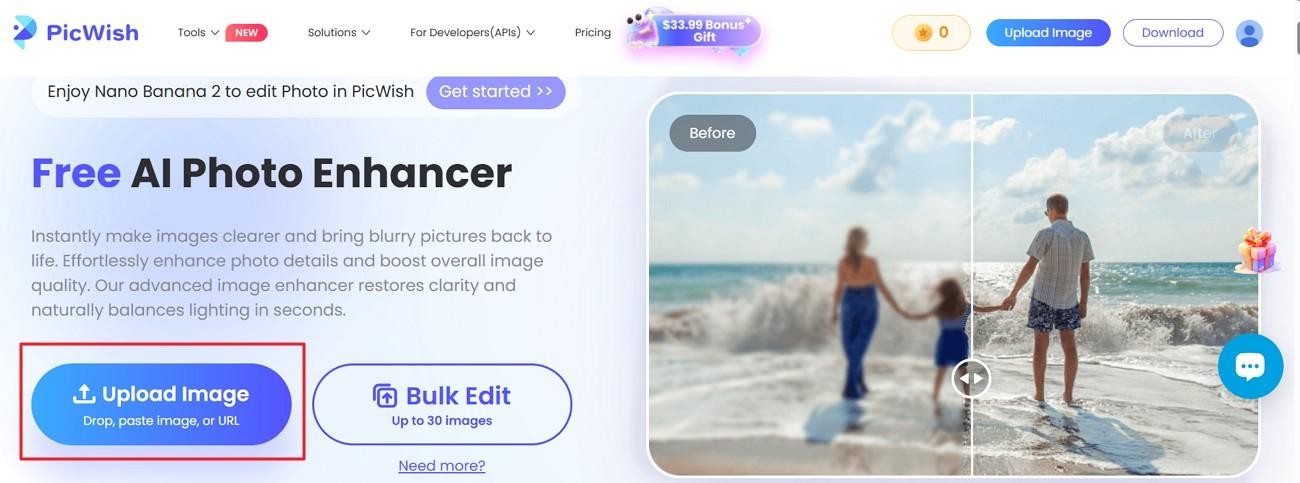
Step 2. After that, choose "Upload Image" to add your blurry photo file. You can also drop, paste, or use a URL.
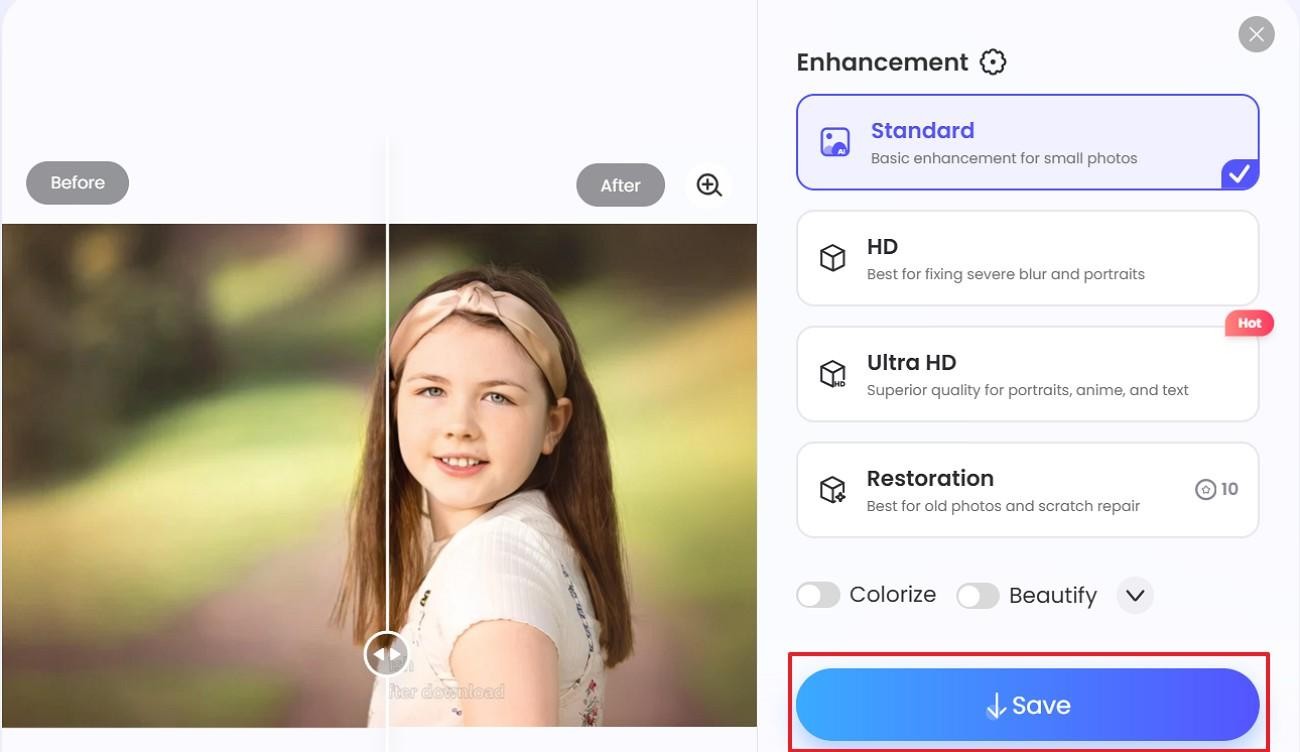
Step 3. After processing, choose "Standard" for small photos and basic clarity. Moreover, select "HD" for severe blur or portraits, "Ultra HD" for sharper portraits, anime, or text, and "Restoration" for old photos or scratch repair. Then preview the result and press "Save" to download the result.
Reality Behind PicWish Photo Unblur Technology
PicWish photo unblur works best when an image still contains some usable detail. It can improve soft focus, light blur, weak edges, and mild grain, so portraits, products, and old scans often look clearer. However, heavy motion blur, missing faces, deep scratches, or unreadable text may still limit final results. To make the strengths and limits clearer, review the table below:
| Image Type/Case | Where PicWish Works Well | Where It May Fall Short |
|---|---|---|
| Portrait Photos | Sharpens eyes, hairlines, and facial edges for a cleaner look | Very blurred faces may look soft or slightly artificial |
| Product Images | Improves outlines, textures, and listing clarity | Fine text or tiny product details may stay unclear |
| Old Photos | Restores some faded detail and improves visible clarity | Heavy scratches, torn areas, and lost parts remain difficult |
| Low-Light Photos | Reduces grain and makes images look cleaner | Severe noise can still affect the detail quality |
| Text Images | Mild blur may become easier to read after enhancement | Small or heavily blurred text may stay uneven |
| Heavy Motion Blur | Can improve very light movement blur slightly | Strong motion blur usually cannot be fully corrected |
Real User Reviews from Trustpilot & G2
Positive Reviews
-
"Very easy to be used with great results. I was amazed especially about the Picwish Unblur results, i have used this option to improve some very blurry pictures.It did not change any thing extra and make my picture look natural as well. I tried several other software but the results were not good so i can say picwish is the best"-span daniel
-
"I have been looking for a good photo restoration website and PicWish is the best I have found. The results and colourisation were simply stunning. The price was good with an option for pay as go rather than a subscription." – Robert Smith
Negative Reviews
-
"There are no significant issues with PicWish just some slow and time-consuming processing issues. We need to wait for a few minutes till the rendering and final image are produced for the user."– AYUSH S.
-
"After uploading a document and downloading it, the quality only gets worse. It's a bit misleading for users because I entered an enhancer. The thing is, in the free version, export is only available in a specific resolution, so the uploaded document can't actually become any sharper since the free version's resolution is very low quality." - John
Zawa: The Best 2026 Alternative for PicWish Photo Unblur
Not every blurry photo needs the same kind of repair. A PicWish unblur imageresult may look fine for quick use, but some visuals need more depth, cleaner edges, and stronger resolution. That is where Zawa offers a more advanced route.
For product shots, portraits, or brand visuals, final quality matters more than a basic sharpened look. Zawa AI image enhancer supports HD and Ultra HD enhancement, helping images appear clearer, larger, and more polished without a complicated editing process.
Why Zawa AI Reconstruction Beats Simple Sharpening
Some photos need deeper repair than ordinary sharpening tools can usually provide. The following features show why Zawa handles image reconstruction more effectively:
-
Higher Upscaling Power: Zawa supports 2x, 4x, and 8x upscaling for sharper, larger outputs easily. That range helps low-resolution images scale further without depending on simple sharpening.
-
Better Detail Preservation: Instead of flattening texture, Zawa keeps edges, surfaces, and patterns clearer. As a result, portraits and products look refined rather than overly smooth.
-
Cleaner AI Output: Its image enhancer targets blur, noise, pixelation, and weak image quality. So the output feels cleaner, more natural, and less affected by artifacts.
-
One-Click Automation: The enhancement process starts quickly after upload, without requiring manual technical adjustments. That simplicity makes routine photo repair easier for beginners and busy users.
-
Faster Processing Speed: Zawa uses powerful cloud-based servers to process images through a short online workflow designed for quick enhancement. Even higher-resolution files move through editing without creating a complicated repair process.
-
Free Access to Premium AI: Zawa offers a free trial of its advanced AI features. You can test its full reconstruction power before ever needing a paid plan.
Quick Guide: Get High-Res Results with Zawa AI Image Enhancer
With features covered, let's explore the steps below to see how Zawa AI Image Enhancer works:
Step 1. Access the Image Enhancer Tool
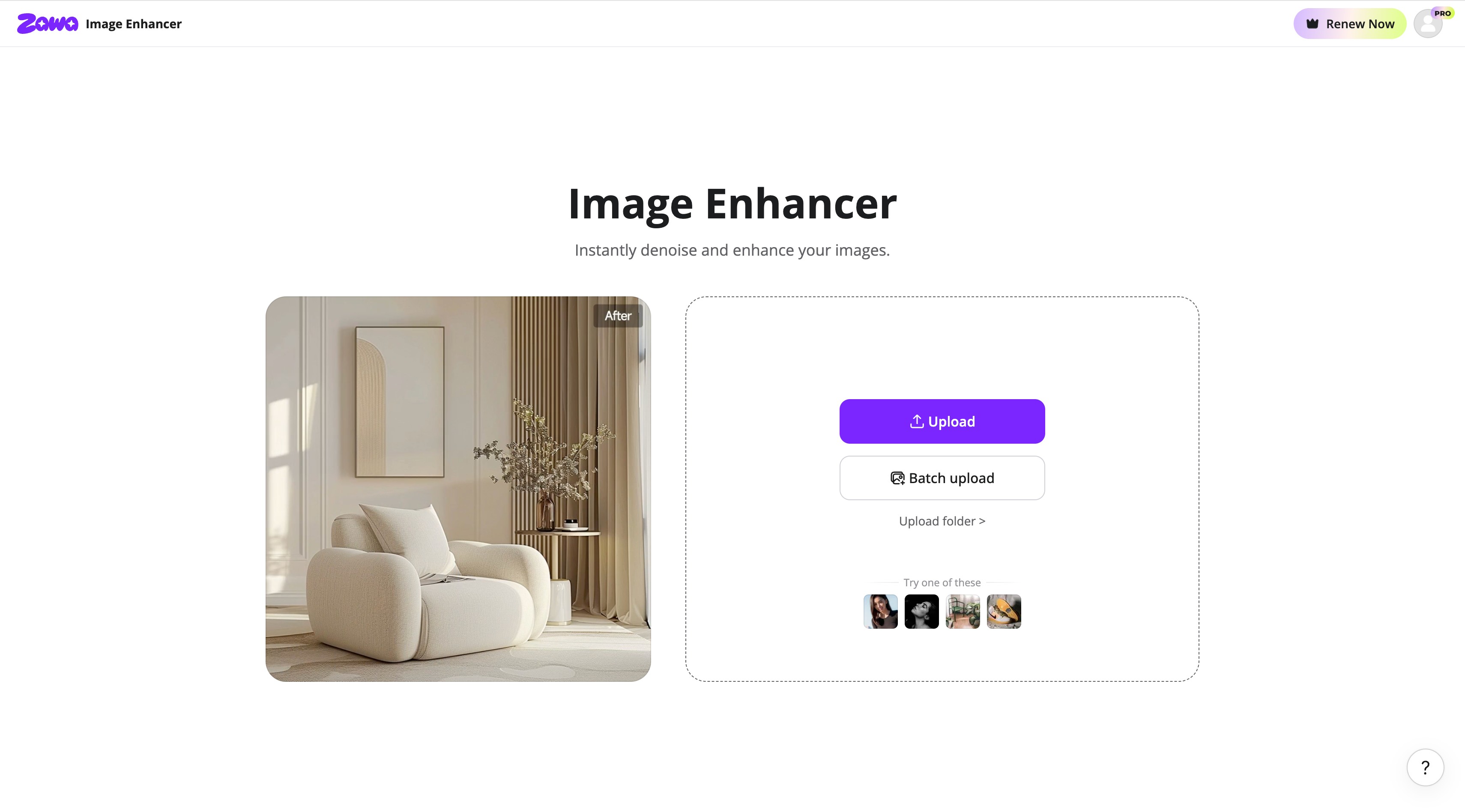
Launch the Zawa Image Enhancer tool. Upload the blurry images by clicking on the "Upload" button.
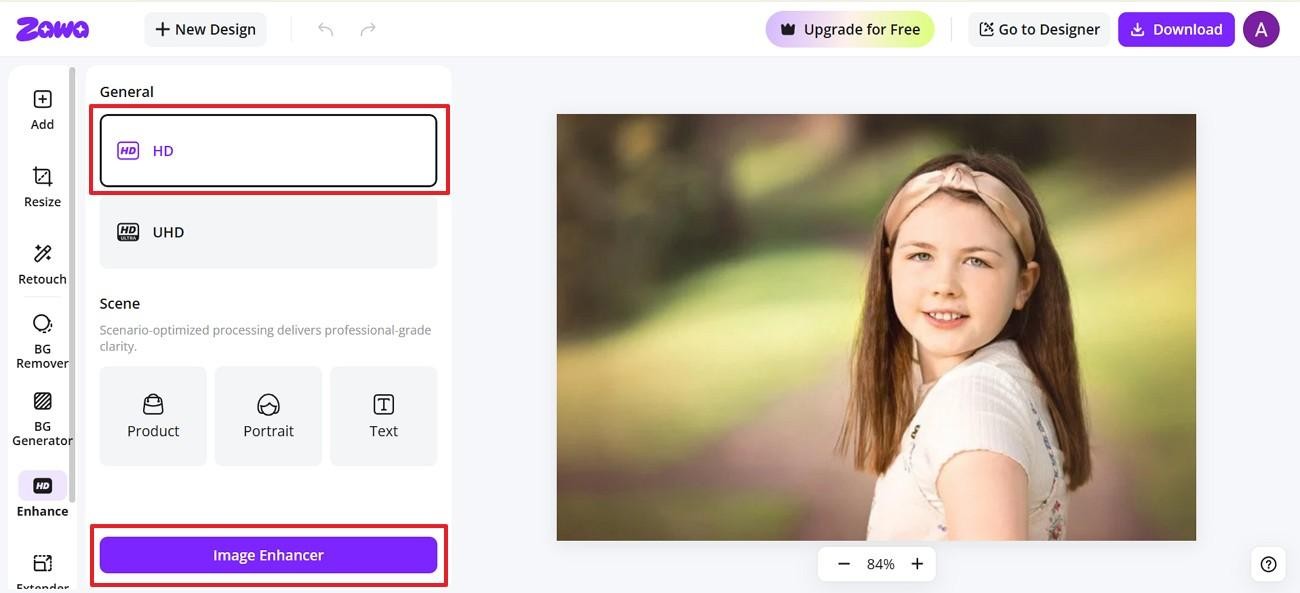
Step 2. Choose Quality and Scene Type
After upload, choose "HD" or "UHD" based on quality needs. Then choose "Product," "Portrait," or "Text" before clicking "Image Enhancer."
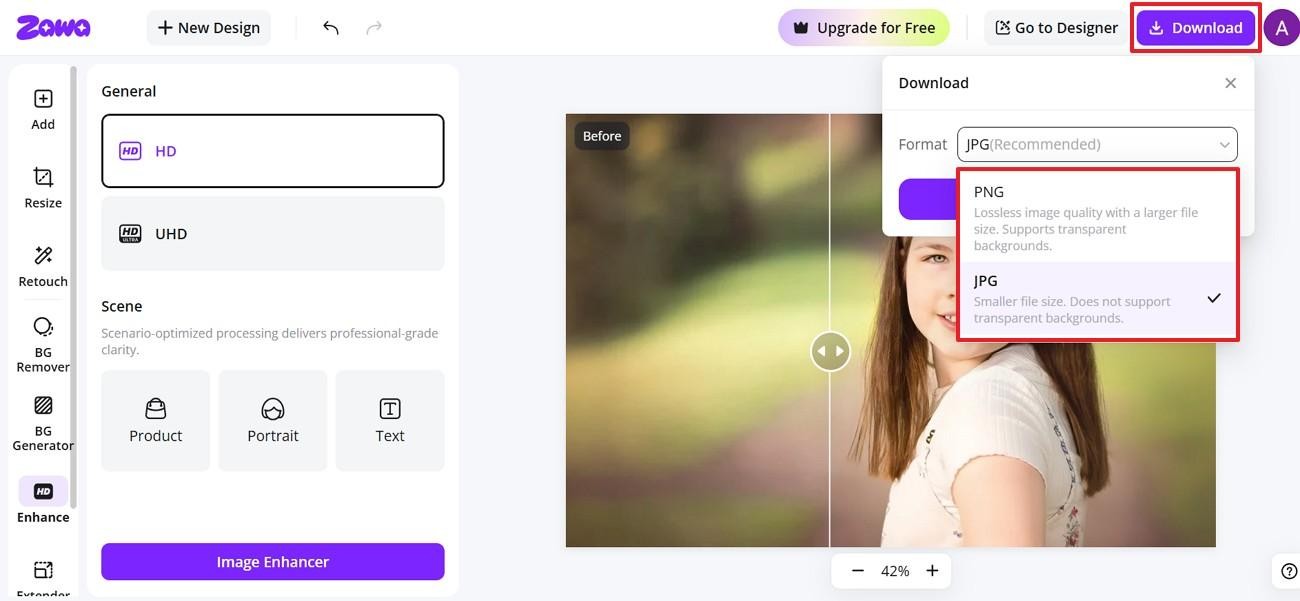
Step 3. Download the Enhanced Image
Once the preview looks clear, click "Download" in the top corner. Afterward, choose JPG for smaller files or PNG for quality.
Conclusion
To conclude, PicWish is helpful for quick blur repair, simple uploads, and everyday photo cleanup. ThePicWish unblur tool works best when portraits, products, or old scans still hold visible detail. However, stronger restoration needs better upscaling, cleaner texture control, and sharper exports. For users wanting polished, high-resolution results in 2026, Zawa is a smart alternative to try.
FAQs
-
Is PicWish photo unblur free to use?
Yes, free PicWish photo unblur access works, though daily download limits still apply. When heavier edits need cleaner detail, Zawa can deliver sharper, high-resolution results consistently. Zawa also offers a free trial to experience its advanced AI features.
-
Does PicWish improve image resolution?
Resolution can improve because PicWish sharpens blur and restores clearer visible details online. For larger outputs, Zawa offers stronger upscaling control and cleaner final quality.
-
Is PicWish available on mobile?
Yes, PicWish is available on mobile for quick photo editing tasks and fixes. Zawa supports a mobile app for users managing visuals while traveling or working.
-
Is PicWish safe?
PicWish unblur appears safe for general edits, but avoid uploading sensitive personal images online.
-
Can old photos be unblurred?
Yes, old photos can be improved when faces and details remain visible clearly. Zawa may help when restoration requires cleaner textures and better final quality.
You May Be Interested
Try the 10 Best Image Upscalers for Your Photos in 2025
How to Make a Picture Less Blurry and Restore Sharpness

5 Free AI Random Image Generators—Generate Unique Images Instantly Online

4 Solutions to Add a Background in Photos
How Big Is a Wallet-Size Photo? Complete Size Guide
