How to Download TikTok Videos Without Watermark: Best Methods for 2026
Discover quick and easy ways to save watermark-free TikTok videos for offline viewing or content creation.


TikTok adds a moving watermark to every posted clip. It protects creator credit, but it can also crowd the frame. When the clip belongs to you or a client has cleared it, you may need a plain version for edits, ads, or reuse.
This guide explains how to download TikTok videos without a watermark in ways that fit real use. You will see when drafts or pre-posting saves help, when browser tools make sense, and when Zawa AI is worth using. It covers cases where the watermark should stay visible.
Important Details on TikTok's Built-In Watermarks
TikTok adds watermarks for credit, so it is worth knowing when to keep them and when to remove them.
Why Does Every Downloaded TikTok Video Have a Watermark?
TikTok puts its logo and username on saved videos so people can trace the clip back to the creator. If you are learning how to download TikTok videos without a watermark, still use only your own or approved content.
Does TikTok Add Watermarks to My Own Videos?
Mostly, yes. Once you post the clip and save it back from TikTok, the logo and username come with it. The safer move is to keep the version on your phone before posting.
Will Removing a Watermark Affect Video Quality?
Sometimes, yes. A bad remover may blur the spot or cut the frame. Use the clearest video file you have before trying any tool.
Is It Safe to Download TikTok Videos Without Watermarks?
It is fine for videos you own or have permission to reuse. Problems start when someone removes the mark from another creator’s clip and reposts it as their own.
Common Ways to Download TikTok Videos Without Watermarks
Depending on whether the video is yours or already published, different download methods make more sense. Start with the official options first, then use online or AI tools when the video is already posted.
Download Your Own TikTok Before Publishing
Edit the video first, then save the finished file on your phone. After that, upload it to TikTok. This small habit gives you one plain copy without the logo, username, or moving mark added later. Keep that file somewhere easy to find. A folder in your gallery, Drive, or Dropbox works fine when you need the same clip for ads, Reels, Shorts, or client revisions.
Use TikTok Drafts to Save Original Videos
If you make the clip inside TikTok, leave it in drafts before posting. Review it there and save a copy if the app gives you that option. Drafts are useful when you are still testing captions, sounds, cuts, or timing. Once the video goes public, the downloaded version normally comes with TikTok’s mark.
Skip the App: Download TikTok Videos Online
Already posted the clip? A browser tool can still help. Here is how to download TikTok videos without a watermark when you only have the video link.
WatermarkRemover.io
The tool suits TikTok clips where the logo or username keeps shifting across the frame. Upload the video, and it can remove the logo, username, timestamps, or simple text overlays without cutting the frame. It also supports batch processing when several clips need cleanup.
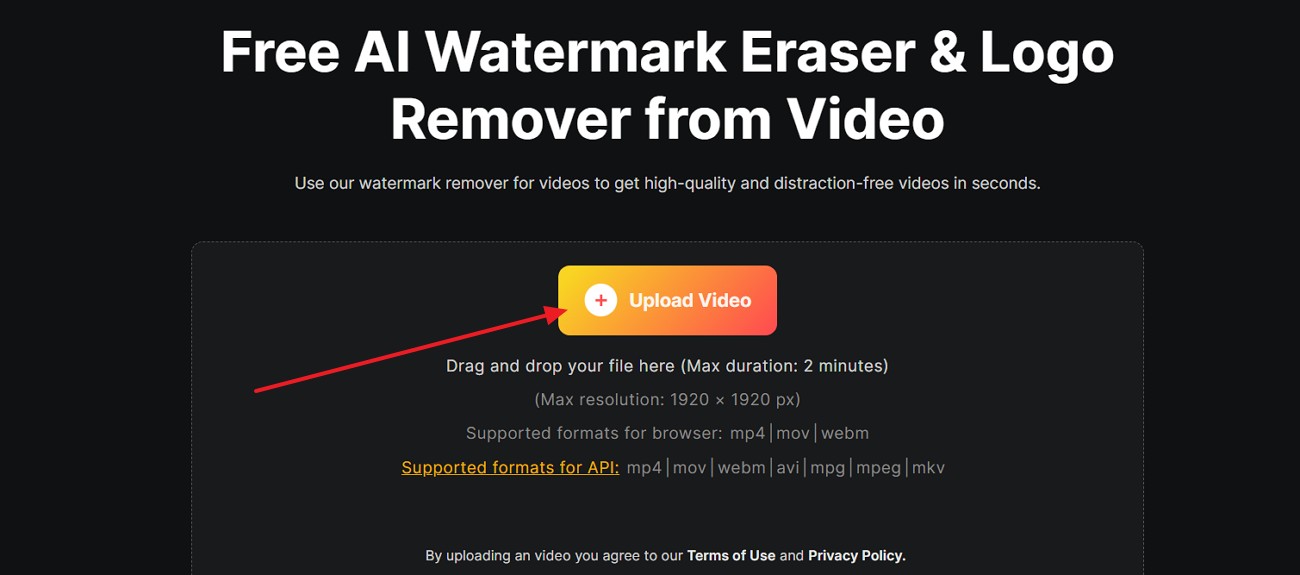
Step 1. Access the video watermark remover and click “Upload Video.” You can also drag and drop the file into the upload box.
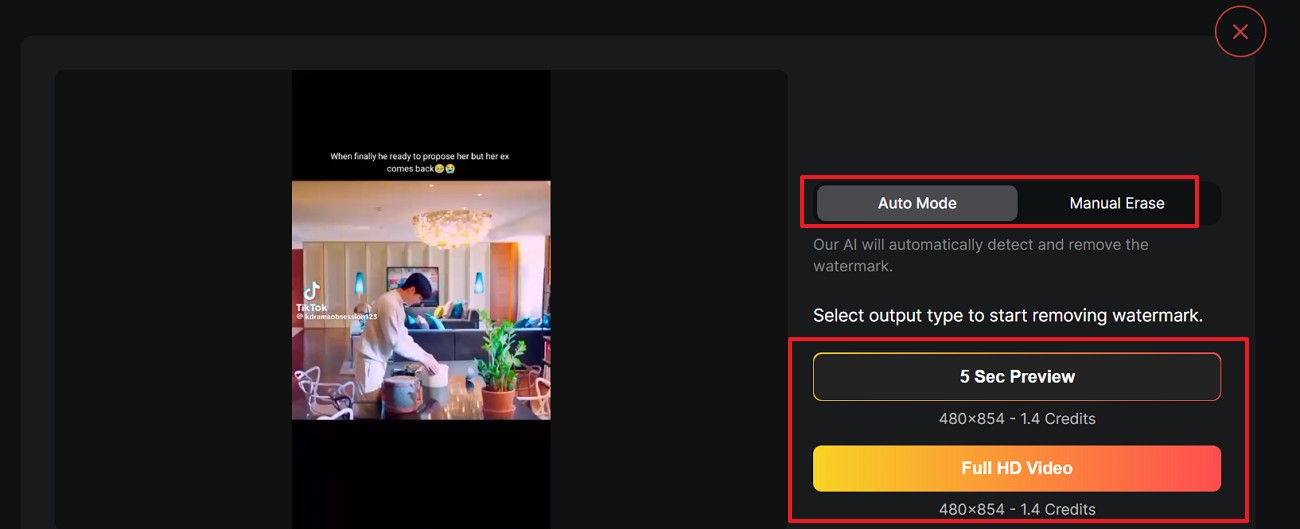
Step 2. After uploading, select “Auto Mode” for automatic watermark removal or “Manual Erase” if needed. Then choose “5 Sec Preview” to check the result first or select “Full HD Video” to process the complete video.
Cons
-
Complex motion may leave faint repair traces behind.
-
Metadata can still show the video’s TikTok origin.
RobinReach
RobinReach fits public TikTok links when checkinghow to download TikTok videos without a watermark quickly. It keeps audio, works across phone or desktop browsers, needs no signup, and fits creators planning to resize or repost clips later. Let’s move to the steps mentioned below to see how it works:
Step 1. Open the tool, copy the "TikTok Video Link", and paste it into the URL box.
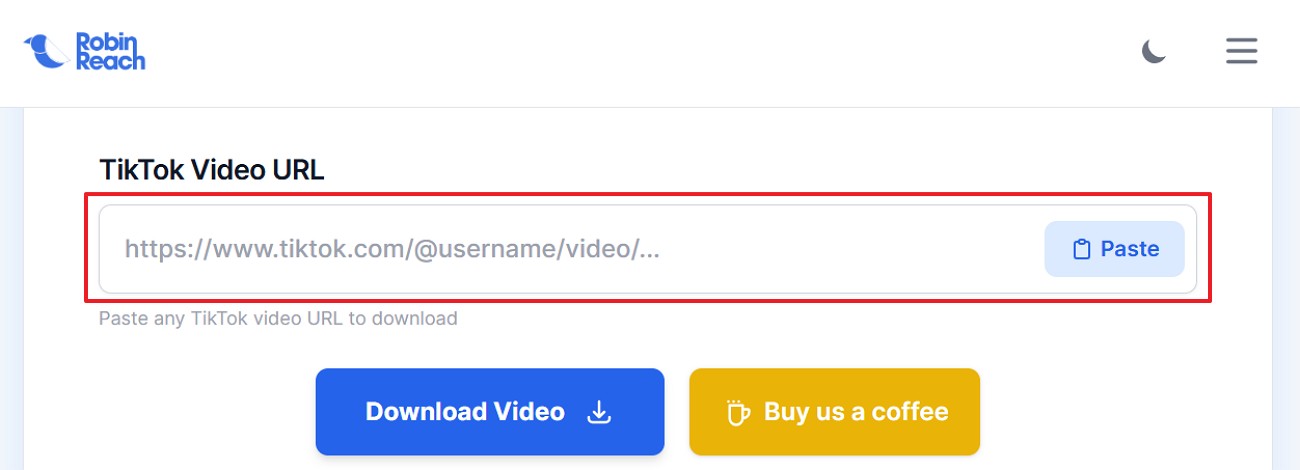
Step 2. Next, press the “Download Video” button and wait for the file to process.

Cons
-
Private TikTok videos cannot be saved through links.
-
It offers downloading, not deeper watermark repair options.
Vmake AI
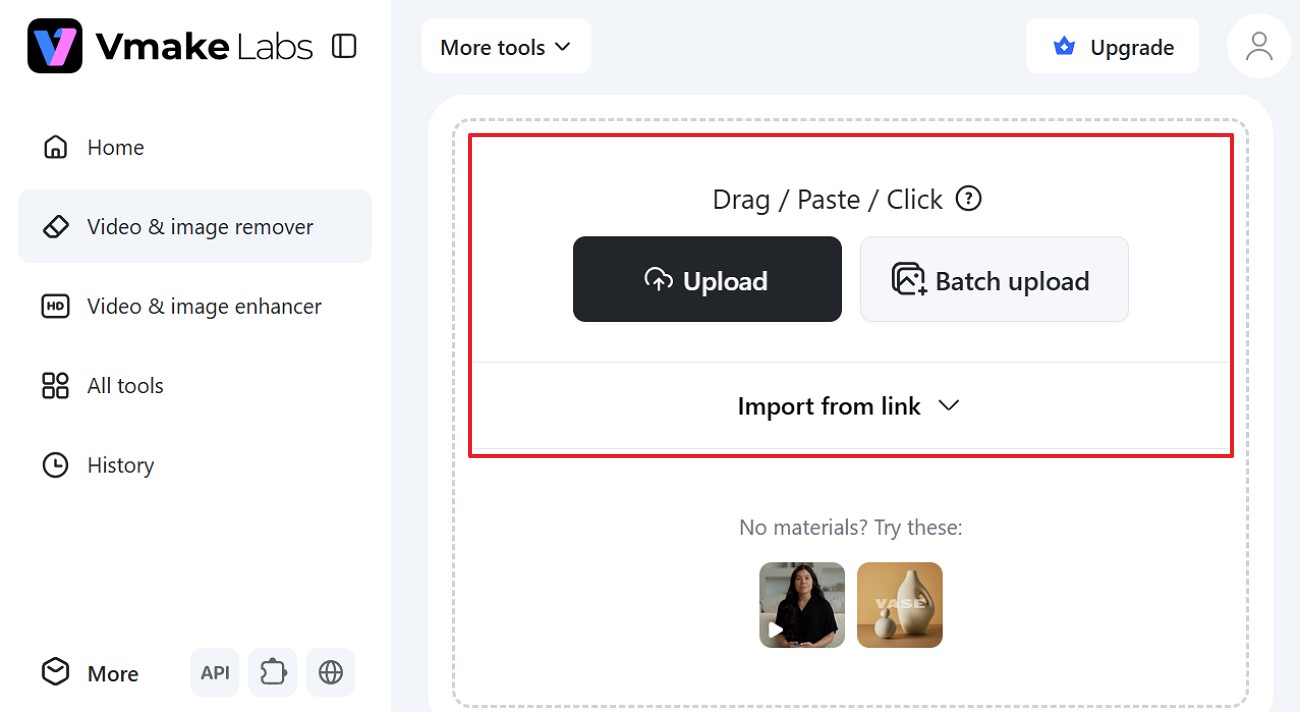
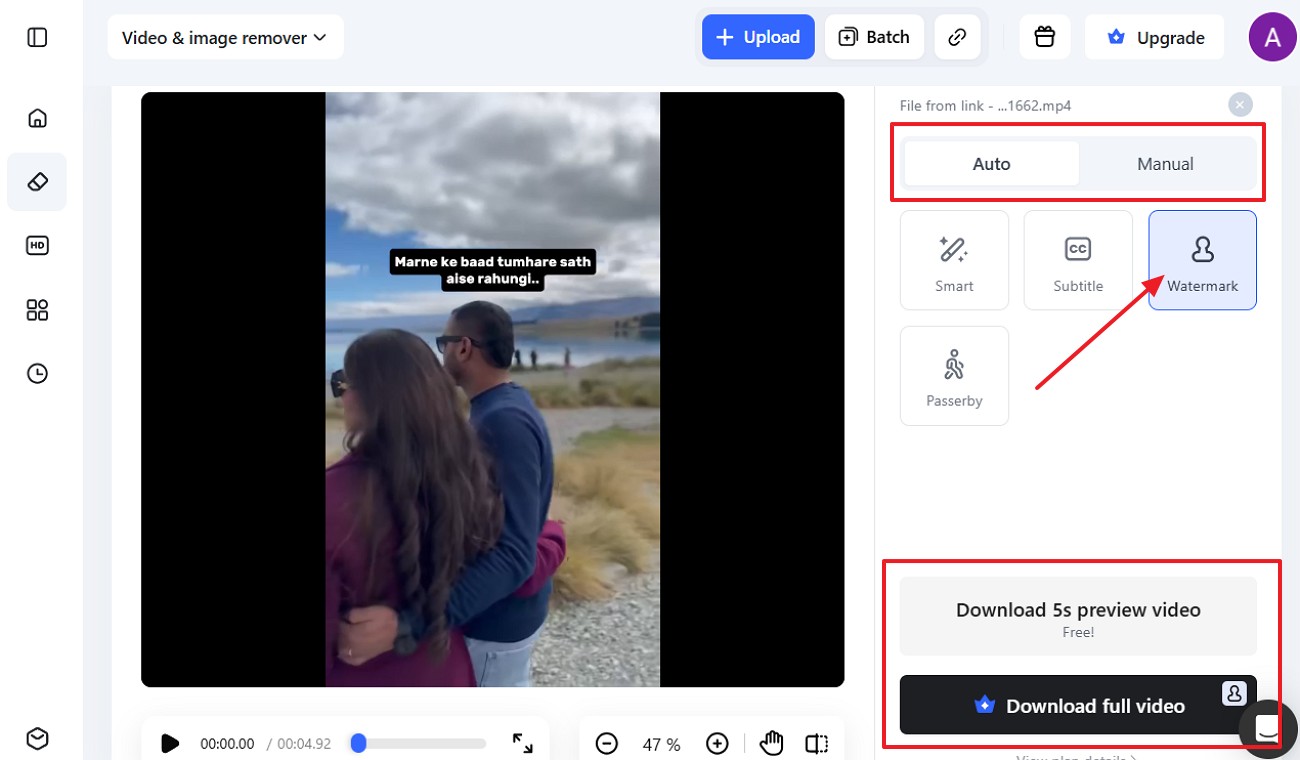
For heavier cleanup, this option follows moving marks frame by frame and can also clear captions, chat overlays, or other text clutter. Users may upload files in batches or paste a URL, then preview five seconds before exporting at full quality. Adhere to the following steps to know how Vmark AI works:
Step 1. Open Vmake’s remover and select “Upload.” You can also use Batch upload or import the video from a link.
Step 2. Once the clip loads, choose “Auto” or “Manual,” select “Watermark,” then download the 5-second preview or full video.
Cons
-
Full HD export may need credits after preview.
-
Heavy overlays can take longer to clean properly.
Download Video Sora 2 No Watermark Using Zawa AI
Sometimes downloading is not enough. If the video already has a moving logo, cropped edges, or low quality, creators need a cleaner workflow. Zawa is useful here because it focuses on video creation and AI-powered editing rather than just saving links.
For creators who search for “download video Sora 2 no watermark,” the better way is often to create or process a clean version inside Zawa instead of relying on a watermarked repost.
Remove TikTok Watermarks with AI Detection
TikTok’s mark does not always sit in one corner. Zawa can scan the clip, find the logo or username area, and process that part directly, so the frame does not need rough cropping.
Restore Hidden Backgrounds Automatically
A watermark may pass over skin, products, captions, walls, or moving objects. Instead of leaving a blurred patch, Zawa helps fill the covered area, so the cleaned section looks closer to the surrounding video.
Keep Original HD Video Quality
A clean video still needs to look sharp after export. Zawa keeps the process inside one online workflow, which helps reduce extra downloads, repeated compression, and unnecessary manual edits before the final file.
Process Videos Online Without Editing Skills
Some users only want to clean a clip, not learn editing software. Zawa keeps the process short. Upload the clip, select watermark removal, review the preview, and download it from the browser.
Handle Multiple TikTok Videos Faster
One TikTok clip is easy to check. A whole batch can take much longer than expected. In Zawa, several videos can be handled in one place, then checked before the cleaner versions are saved.
Simplify Your Content Creation Workflow
After watermark removal, many videos still need captions, hooks, product scenes, or new formats. Zawa gives creators a wider workspace, so one cleaned clip can move into a fuller content plan.
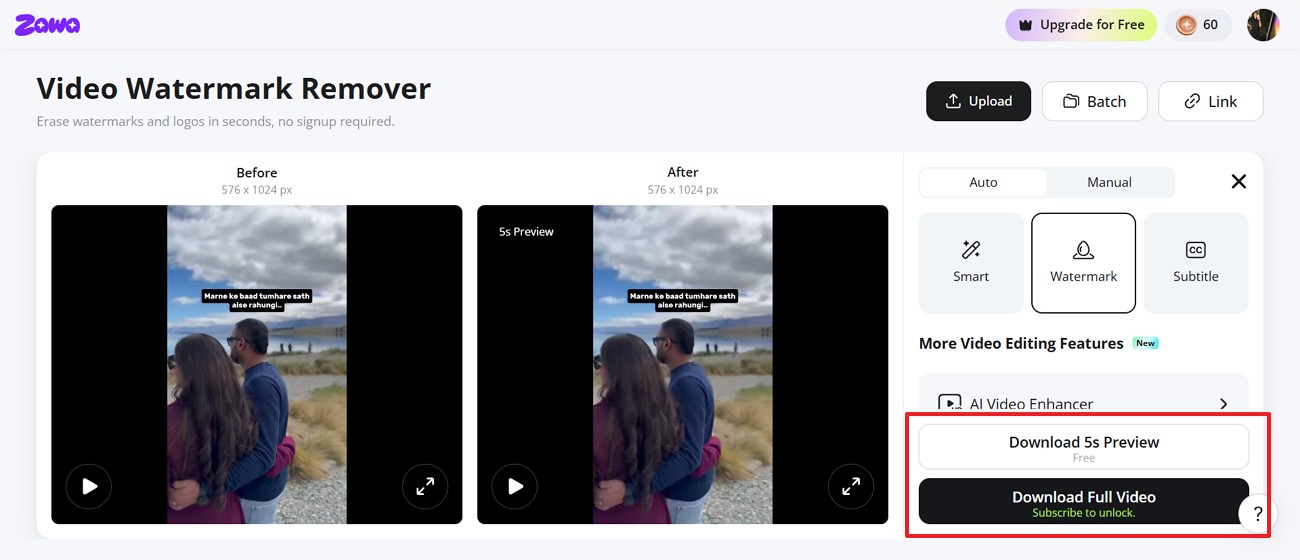
Real Test: Does Zawa Remove TikTok Watermarks Cleanly?
Now that you know how Zawa supports how to download TikTok videos without a watermark, move to the steps below and see how the process works.
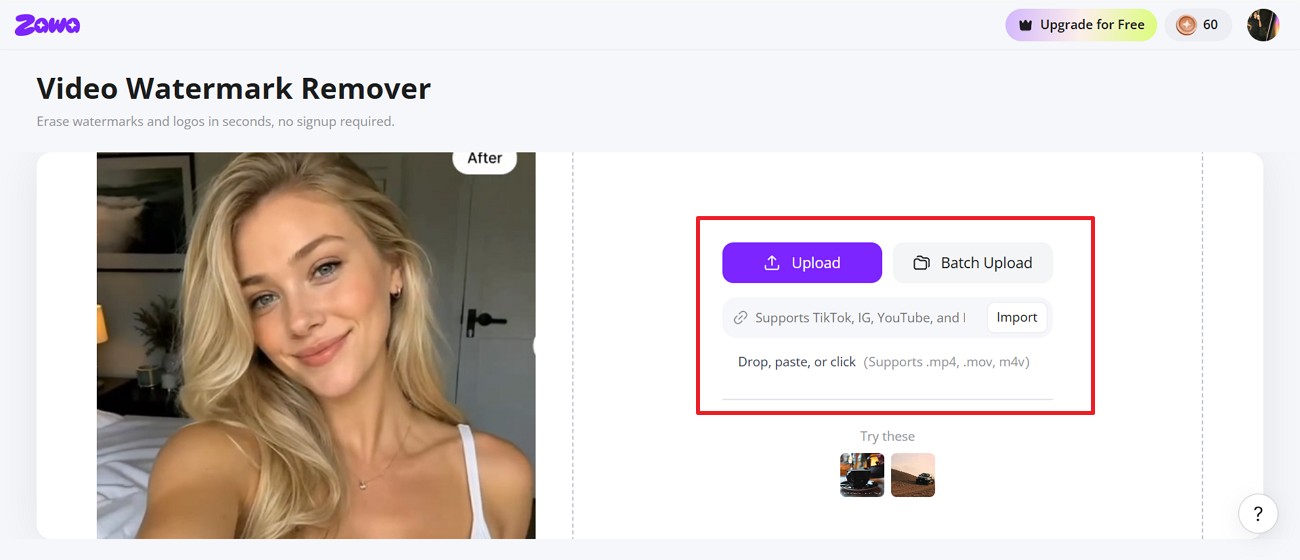
Step 1. Upload the Video
In Zawa Video Watermark Remover, click “Upload.” You can also use “Batch Upload” for more files or “Import” a link to the video.
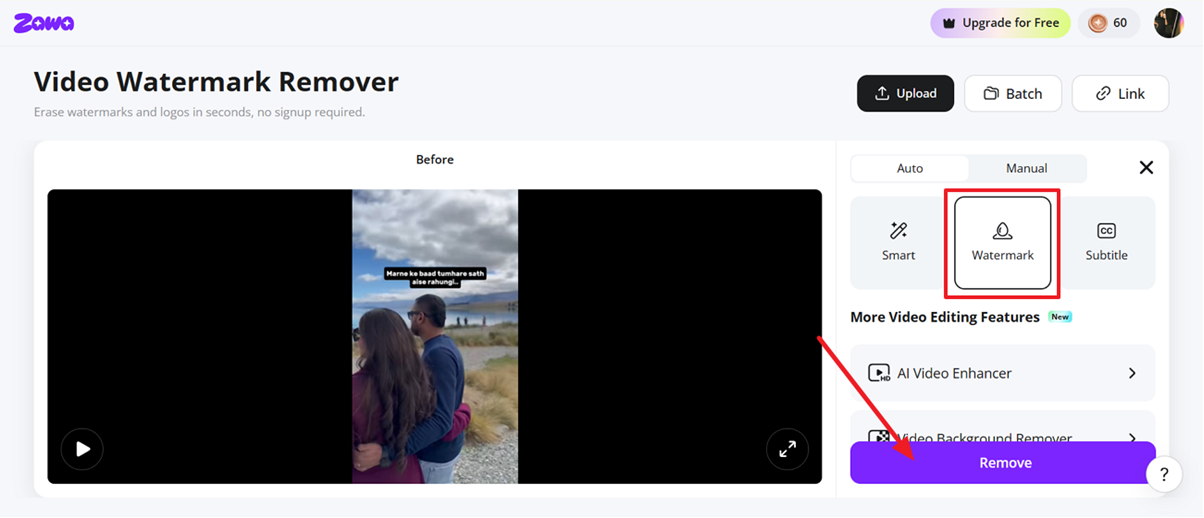
Step 2. Select Watermark Removal
When the video appears on the screen, set the mode to “Auto” or “Manual.” Mark “Watermark” on the side panel and press “Remove.”
Step 3. Download the Result
Check the before-and-after preview on the screen. Then press “Download 5s Preview” or choose “Download Full Video” for the complete cleaned file.
Zawa vs. Other TikTok Watermark Removers
There is no single answer to how to download TikTok videos without a watermark; a public link and a saved clip need different tools. The table below shows where basic downloaders work and where Zawa gives more control:
| Feature | Online TikTok Downloaders | Zawa |
|---|---|---|
| Best Use | Public TikTok links | Saved videos and creator workflows |
| Watermark Handling | Downloads a clean version when available | Processes visible watermark areas |
| Editing Skills Needed | Very low | Very low |
| Quality Control | Depends on the source link | Preview-based output check |
| Good for Brands | Limited | Better for product and campaign videos |
| Extra Creative Options | Usually none | Supports broader video creation workflow |
Which Tool Is Best for Creators?
A public TikTok link does not always need a full editing tool. In that case, a downloader is often enough to save the video. Zawa makes more sense after the file is already on your device, especially if the watermark crosses face, products, or text that should stay untouched.
When to Keep the Watermark
Learninghow to download TikTok videos without a watermark is useful, but only for the right clip. If the post is not yours, leave the TikTok name on it.
-
Another Creator’s Clip: Do not remove the mark from someone else’s TikTok. Their username tells viewers where the video came from.
-
Repost With Approval: Permission to share does not mean the credit should disappear. Keep the TikTok name visible, so the creator still gets noticed.
-
Team Review: For internal review, a marked copy is usually enough at the first stage. Teams can judge the idea before asking for a clean version later.
-
Unclear Ownership: If ownership feels unclear, do not turn the clip into a plain file. That change can make someone else’s work look like your asset online.
-
TikTok Context: Some TikTok formats need the logo to make sense to viewers watching. Duets, stitches, reactions, and trend examples often rely on visible attribution too.
Conclusion
To conclude, keep a clean TikTok copy before posting whenever possible. If the clip is already live, a downloader may work for public links, but visible marks need better cleanup. For users trying to download video Sora 2 without a watermark, Zawa is a practical option to clean the clip and reuse it later.
Frequently Asked Questions
-
How can I save TikTok videos before posting them?
Edit the video as usual. Before you press Post, save the finished version from your phone or editor. Store that file somewhere easy, so you avoid TikTok’s marked copy later.
-
Do watermark-free downloads keep the original quality?
Not always. A clean-looking download can still lose detail if the TikTok file was already compressed. When checking how to download TikTok videos without a watermark, start with the sharpest available upload.
-
Why do some downloaded TikTok videos lose audio?
Audio can disappear when the sound is restricted, copyrighted, muted, or unavailable in your region. Some downloaders may also save only the video track, so preview the file before reuse.
-
Can creators see who downloads their TikTok videos?
TikTok does not show creators a regular public download list. They may still control who can download through privacy settings, so check the app before using someone else’s video.
-
Which devices support watermark-free TikTok downloads?
Most watermark-free TikTok downloaders run in a normal browser. You can use an iPhone, Android phone, Windows laptop, Mac, or tablet; just paste the public TikTok link and save the file.
You May Be Interested

How to Remove Watermark in Photoshop (7 Methods)

The Ultimate Guide to Remove Shutterstock Watermarks from Images

Hidden Tricks to Remove Getty Watermarks Using AI & Photoshop (2026 Guide)

How to Remove the Kling AI Watermark