720p vs 1080p: Key Differences, Use Cases & Which to Choose (2026)
720p and 1080p share the same 16:9 aspect ratio but differ by 2.25x in total pixel count. This guide covers both resolutions, compares them head to head across real use cases, and shows how to upscale 720p footage to 1080p quality using AI.


Both 720p and 1080p are widescreen HD formats. They share a 16:9 aspect ratio and both carry the 'HD' label in one form or another. The gap between them comes down to pixel count. 720p is 1,280 x 720, which equals 921,600 pixels. 1080p is 1,920 x 1,080, which equals 2,073,600 pixels. That is 2.25 times more pixels packed into the same 16:9 frame.
Whether that difference is noticeable in real use depends on screen size, viewing distance, bandwidth, and what the footage is being used for. This guide covers both resolutions, compares the 1080p vs 720p gap directly, and explains when each one makes sense.
What Is 720p Resolution?
720p was the original HD standard. It brought widescreen high definition to broadcast television and early streaming before 1080p became affordable enough to replace it. It is still in active use today, though mostly at the budget end of hardware and on bandwidth-limited connections.
Technical Definition
720p is 1,280 x 720 pixels, totaling 921,600 pixels per frame. The aspect ratio is 16:9. It is also called HD or HD Ready. The 'p' stands for progressive scan, which means all lines of each frame are drawn in sequence. This produces smoother motion than interlaced formats, which drew alternating lines. Progressive scan is why 720p looks cleaner in motion than older interlaced HD standards, despite the lower pixel count.
Common Use Cases
720p still shows up in older cable and satellite broadcasts, budget streaming on limited connections, entry-level security cameras for short-range indoor coverage, and video conferencing when bandwidth is constrained. On smartphones, 720p at roughly 245 PPI on a 6-inch screen is sharp by practical standards. Most people watching video on a phone screen in a casual context will not notice the difference between 720p and 1080p.
Drone and action camera users sometimes drop to 720p when storage and file size are the priority on long shoots. The smaller file size extends usable recording time on the same card.
When 720p Is Sufficient
Screens under 32 inches at normal viewing distances keep individual 720p pixels below the visible threshold for most viewers. Mobile devices are the clearest case. Bandwidth-constrained streaming is another: 720p at 30fps needs roughly 2.5 Mbps, while 1080p needs 5 Mbps. On mobile data or slow broadband, that difference determines whether playback buffers or runs clean.
Advantages and Disadvantages of 720p
|
720p |
1080p |
Notes |
|
|---|---|---|---|
|
Pro |
Lower bandwidth and storage demand |
Pro |
2.25x more pixels; sharper on larger screens |
|
Pro |
Sharp on phones and small screens at 245 PPI |
Pro |
FHD standard on most devices sold in 2026 |
|
Pro |
Works on limited connections from 2.5 Mbps |
Pro |
Supports 120Hz+ refresh rates for gaming |
|
Con |
Soft on screens 32 inches and above |
Con |
Larger files and higher bandwidth needed |
|
Con |
Limited to 60Hz; no high refresh rate gaming |
Con |
Overkill for very small screens or slow connections |
|
Con |
Below current delivery standard for most platforms |
Con |
Higher GPU load than 720p for real-time rendering |
What Is 1080p Resolution?
1080p is the current mainstream standard. It is the resolution most TVs, monitors, laptops, and smartphones are sold with in 2026. If a device is labeled FHD or Full HD, it is 1080p. If it is labeled HD Ready, check the spec sheet. That label often means 720p input only.
Technical Definition
1080p is 1,920 x 1,080 pixels, totaling 2,073,600 pixels per frame. Same 16:9 aspect ratio as 720p, but 2.25 times the pixel count. Also called FHD or Full HD. It is the standard resolution for Blu-ray disc playback, most streaming platforms at their standard quality tier, and broadcast HD in most markets. The progressive scan format is the same as 720p.
Common Use Cases
1080p is the default for TV viewing, PC monitors, laptop screens, gaming, and video production in 2026. Netflix, YouTube, and most major streaming platforms use 1080p as the standard quality tier for capable connections. Blu-ray delivers at 1080p. The Steam Hardware Survey figures for 2025 to 2026 show roughly 60 percent of PC gamers still running at 1080p. No other single resolution comes close to that share.
For content creation, 1080p is the minimum acceptable delivery resolution across most platforms. Video conferencing on standard broadband connections defaults to 1080p on most platforms when the connection supports it.
The FHD Label Explained
FHD stands for Full High Definition. HD without the 'Full' refers to 720p. The distinction matters when buying screens. A monitor or TV labeled HD Ready may only accept 720p input. Anything labeled Full HD or FHD is 1080p. By 2026, that label is the floor on almost every non-budget display sold. HD-only panels are now rare outside the lowest price tiers and some projector categories. HD-only panels are now rare outside the lowest price tiers and some projector categories.
What's the Difference Between 720p vs 1080p?
The table below puts the key specs side by side. All figures use standard H.264 encoding and 30fps as the baseline for file size and bandwidth comparisons.
|
Spec |
720p (HD) |
1080p (Full HD) |
Notes |
|---|---|---|---|
|
Resolution |
1,280 x 720 |
1,920 x 1,080 |
Both 16:9 widescreen |
|
Total Pixels |
921,600 |
2,073,600 |
1080p = 2.25x more |
|
PPI (32-inch TV) |
~46 PPI |
~69 PPI |
Difference visible at this size |
|
PPI (6-inch phone) |
~245 PPI |
~367 PPI |
Both sharp at phone size |
|
Streaming BW (30fps) |
~2.5 Mbps |
~5 Mbps |
1080p requires 2x bandwidth |
|
File size (H.264) |
Smaller baseline |
~2.25x larger |
Same bitrate and duration |
|
Common name |
HD / HD Ready |
FHD / Full HD |
Check spec sheets for HD Ready labels |
|
Refresh rate support |
Up to 60Hz typical |
Up to 144Hz+ common |
Matters for gaming |
|
GPU demand (gaming) |
Lower |
~2.25x higher pixel load |
Relevant for older hardware |
|
Current status |
Legacy / budget tier |
Mainstream minimum (2026) |
/ |
Pixel Count and Sharpness
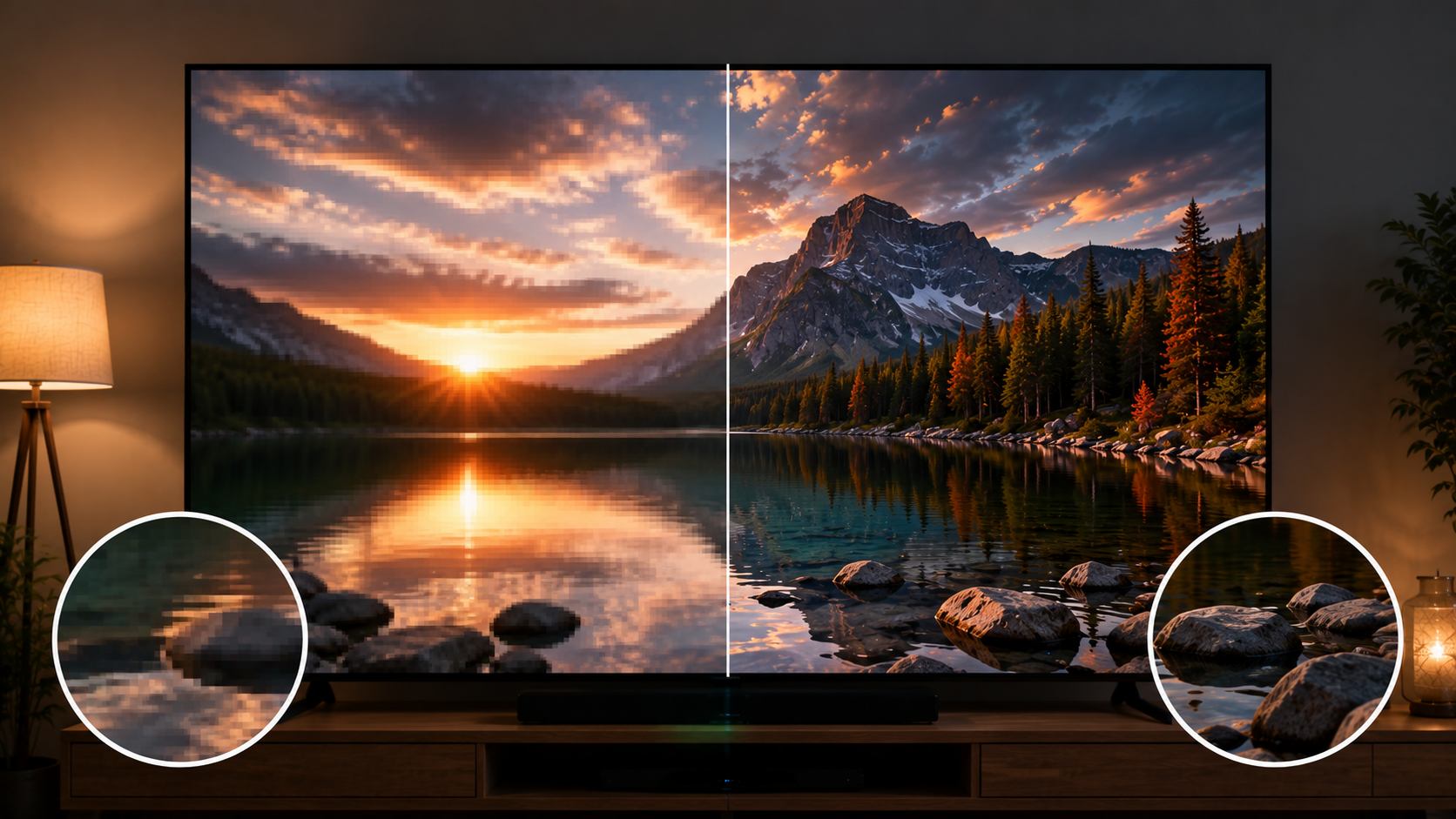
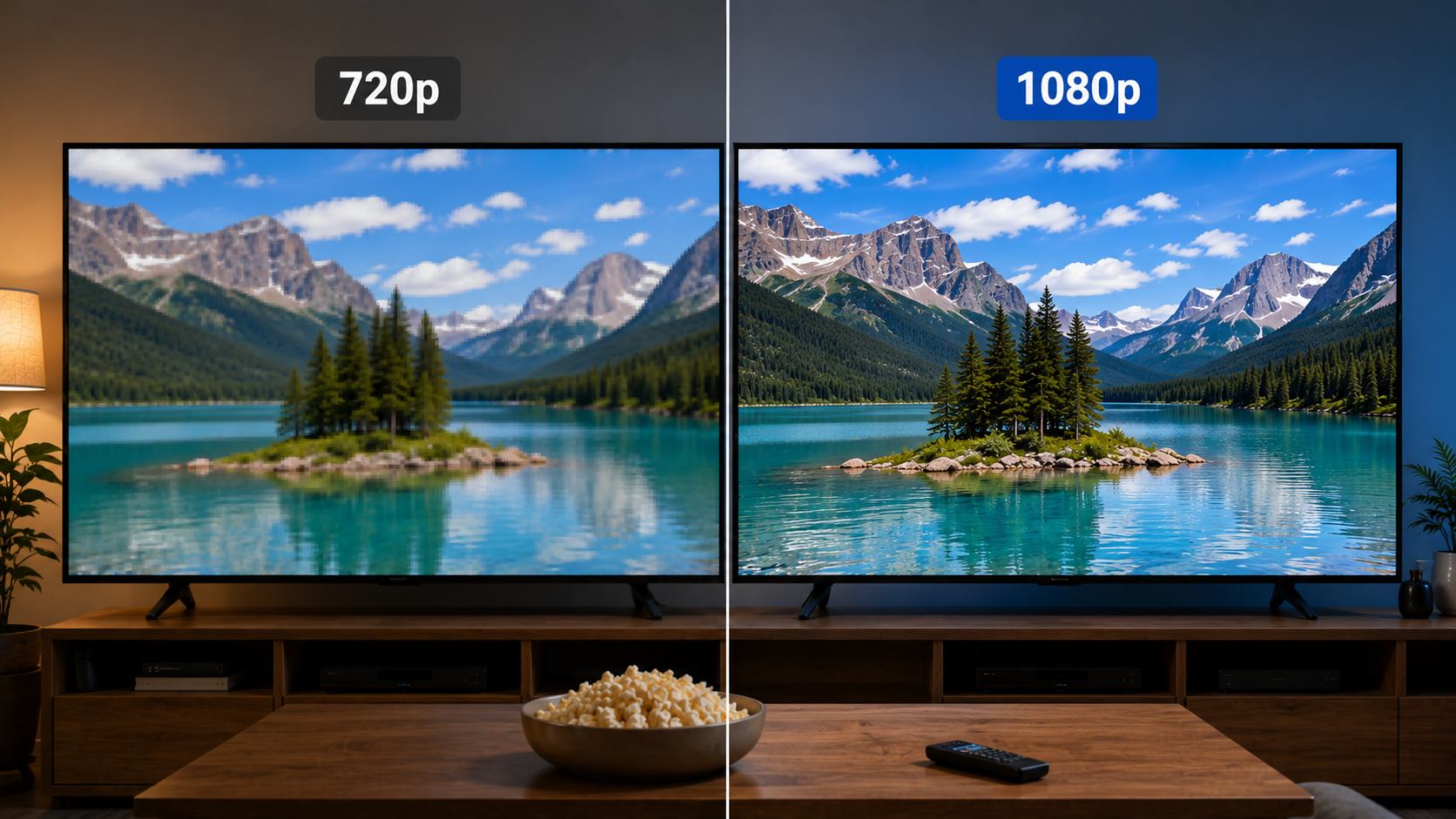
The 2.25x pixel difference between 720p and 1080p shows up most clearly on screens 32 inches and above at normal viewing distances. On a 32-inch TV, 720p produces around 46 PPI and 1080p produces around 69 PPI. That gap is visible in text sharpness, fine detail in on-screen graphics, and edge definition on fast-moving subjects.
On screens under 24 inches or at viewing distances beyond 10 feet, the gap shrinks to the point where most people cannot reliably tell them apart without a direct side-by-side comparison. Where 1080p holds its advantage regardless of screen size is in fine detail content: small text overlays, logos, fabric texture, and detailed backgrounds where 720p runs out of pixels to represent them cleanly.
Bandwidth and File Size
The video resolution 720p vs 1080p gap has a direct cost in data. Streaming 720p at 30fps takes roughly 2.5 Mbps. Streaming 1080p at 30fps takes roughly 5 Mbps, and 1080p at 60fps climbs to 8 to 10 Mbps. For stored files, 1080p H.264 footage produces approximately 2.25 times larger files than equivalent 720p at the same bitrate and duration. Over a large content library, that difference adds up quickly.
Refresh Rate and Motion
Both formats support 30fps and 60fps as standard delivery rates. The refresh rate difference between them is where gaming separates the two clearly. 1080p monitors commonly support 120Hz and 144Hz. 720p panels are typically limited to 60Hz. For gaming and fast-motion content, 1080p at 120Hz produces visibly smoother motion than 720p at 60Hz. For film and TV content at 24fps or 30fps, the refresh rate ceiling rarely matters.
Hardware and Cost
1080p displays are now the mainstream minimum. Walk into any electronics store in 2026 and it is hard to find a new monitor or TV that is not FHD. 720p panels still show up in the cheapest monitors, some entry-level projectors, and secondary screen situations. On the GPU side, 1080p pushes roughly 2.25 times the pixel workload of 720p. On older hardware or integrated graphics, that difference shows up in frame rate. Dropping to 720p in a demanding game can recover a meaningful fps bump on machines that are GPU-limited.
720p vs 1080p: Which One Should You Choose?
There is no single right answer here. Ask ten people using different screens and connections and you will get ten different situations where one or the other makes more sense.
For Streaming and Online Video
Above 5 Mbps on a broadband connection, 1080p is the obvious pick for any screen larger than a laptop. The visual difference is real, and every major platform handles it without issues. Creators putting work on YouTube should be at 1080p. The platform does not treat 720p and 1080p the same way at the encoding stage, and 1080p uploads tend to come out cleaner after compression. The platform applies heavier compression to 720p in some scenarios, and 1080p uploads generally receive better bitrate allocation.
720p still makes sense on mobile data, congested shared connections, or when watching on a phone screen where the pixel density difference disappears at normal mobile viewing sizes.
For Gaming
1080p at 60fps is the practical baseline for current-generation gaming. 720p is associated with older consoles and budget hardware, and the texture and detail quality difference in modern games is clearly visible on a 24-inch monitor. At 93 PPI, 1080p on a 24-inch screen is a comfortable baseline. At 61 PPI, 720p on the same screen shows softer textures and less definition in fine game assets.
For competitive multiplayer players in 2026, 1080p at 144Hz is the dominant setup. The next meaningful upgrade from that baseline is stepping to 1440p, not improving within the 720p vs 1080p comparison. That step is about frame rates and resolution balance, not just pixel count.
For Security Cameras
720p is workable for indoor monitoring at short range, under 3 to 4 meters, where face identification is not required. Beyond that, faces and license plates become difficult to read reliably. 1080p is recommended for any coverage area where identification capability matters. It covers more distance, holds more detail in the corners of wide-angle frames, and supports useful digital zoom in recorded footage. Most residential and small business security systems now treat 1080p as the entry-level standard.
For Video Production
720p is below the current delivery standard for most platforms in 2026. Uploading 720p to YouTube, Vimeo, or delivering to a client at 720p reads as outdated quality. 1080p is the minimum acceptable delivery resolution for professional work.
Recording at 1080p when your target delivery is 720p gives you crop and reframe room in post. Recording at 4K and delivering at 1080p is now the common workflow for creators who want maximum flexibility, since 4K footage holds up to aggressive cropping and stabilization without the export dropping below 1080p quality.
How to Upscale 720p to 1080p with Zawa Video Enhancer
Existing 720p footage does not have to stay at 720p for display or delivery. The standard method, display-side upscaling, stretches each 720p pixel across 2.25 display pixels using interpolation. The result is larger but not sharper. New detail cannot be invented from missing pixel data by averaging surrounding values.
AI-based upscaling works differently. Before looking at tools like Zawa, it is worth understanding why standard upscaling falls short. Bicubic and Lanczos interpolation algorithms are mathematical operations that estimate missing pixels based on neighboring values. They produce a smooth result but cannot recover detail that was not captured in the original frame. Hair texture, fine edges, and compressed artifacts are all approximated rather than restored.
Zawa Video Enhancer uses a trained neural network to analyze each frame and predict what higher-resolution detail would look like based on learned patterns from large datasets of real video. It reconstructs edges, recovers texture, and reduces compression artifacts rather than stretching existing pixels. The output is visibly sharper than standard interpolation on real footage. The tool runs in the browser — free to try with new-user credits, no desktop install required.
Step-by-Step: Using Zawa Video Enhancer
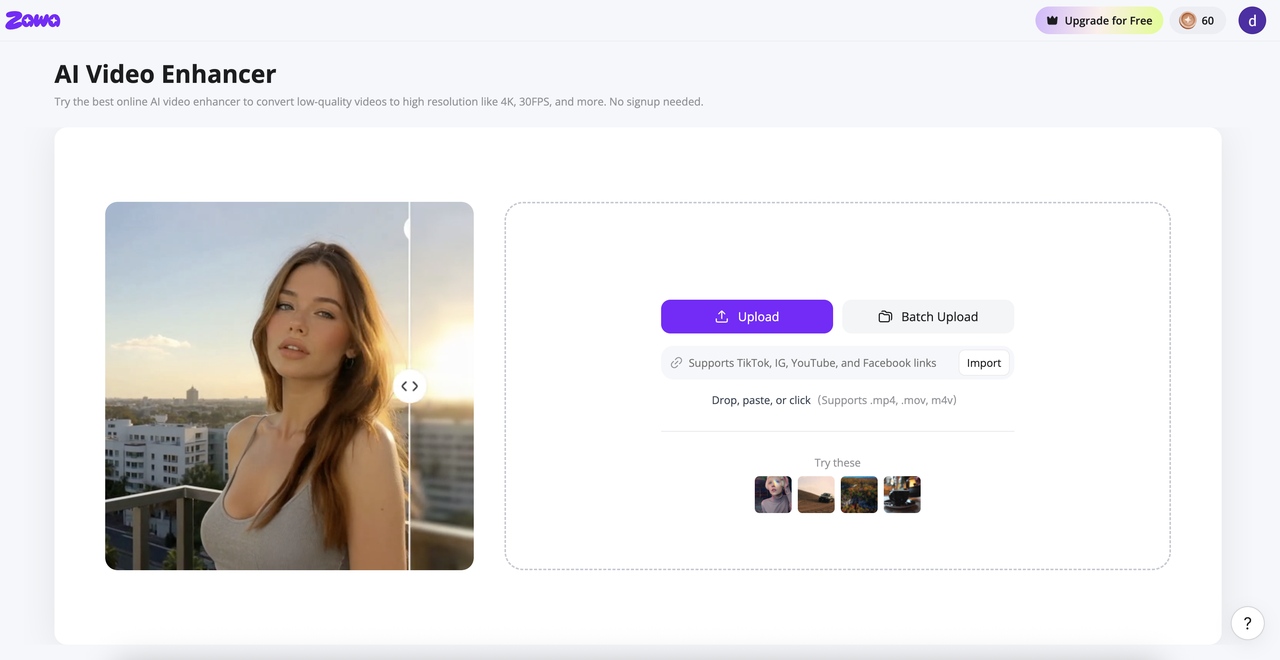
Step 1: Go to Zawa and upload your 720p video
Go to zawa.ai/video-enhancer/edit, or find Video Enhancer in the tool panel at the bottom-right of the Zawa workspace. Upload your file directly, in bulk, or paste a link. MP4, M4V, MOV, AVI, and 3PT formats are supported.
Step 2: Select 1080p as the output resolution and choose the enhancement mode
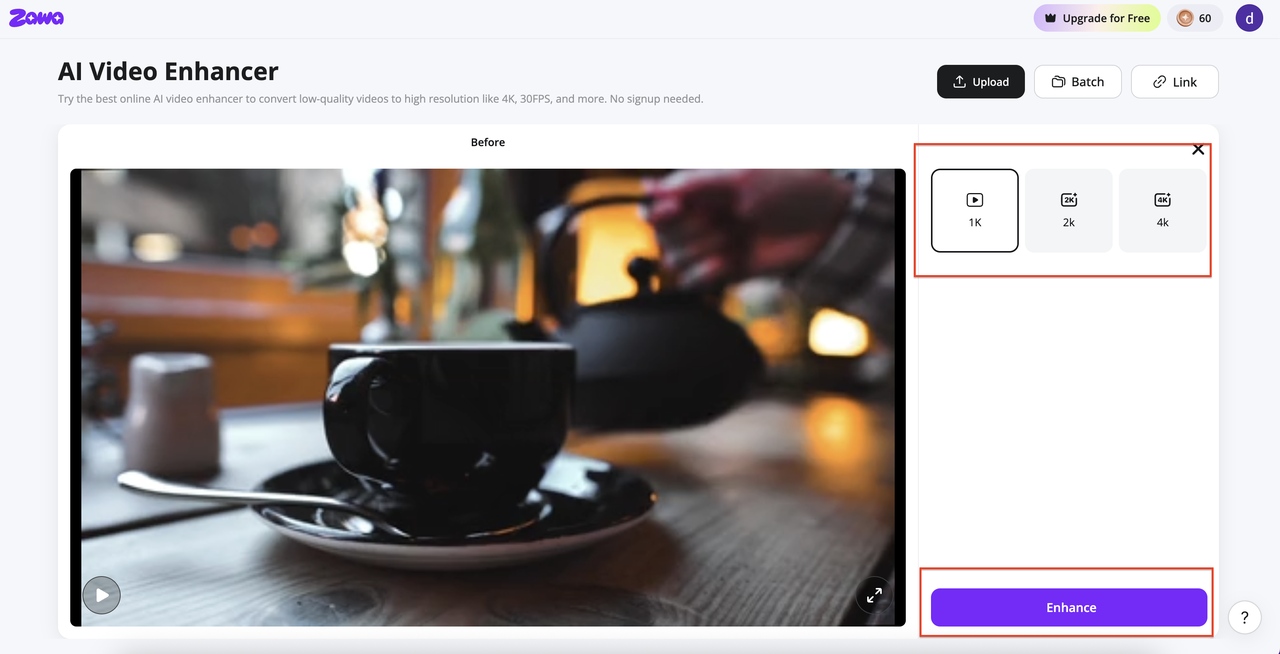
In the output panel, select your target resolution — 1K, 2K, or 4K. For upscaling 720p to standard HD quality, 1K is the practical target. Hit Enhance and the tool processes each frame, rebuilding edges and texture at the higher resolution and outputting at a smooth 30FPS. The tool goes frame by frame, rebuilding edges and texture at the higher resolution rather than stretching what is already there.
Step 3: Preview the result and download the enhanced file
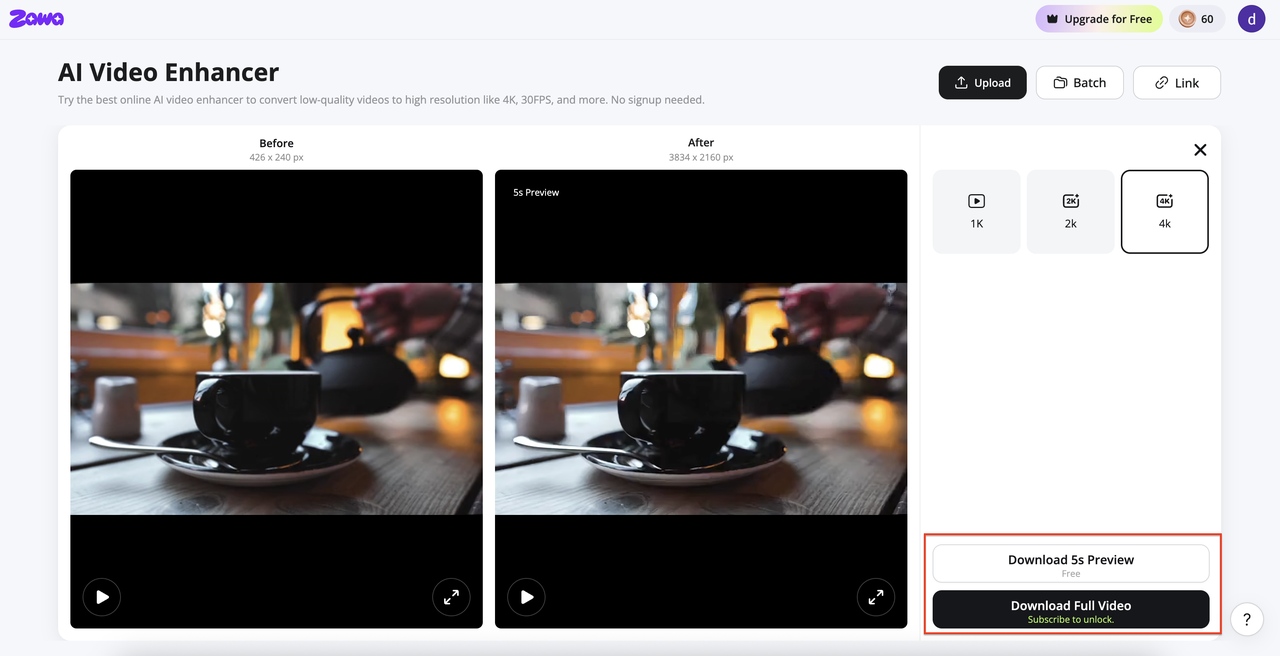
When processing is done, a split-view loads so you can compare before and after. Scrub through a few sections, especially anything with fine texture or fast movement. Download when it looks right.Download a 5-second preview to check first, or download the full video when the output looks right.
Video enhancement is just the beginning. Zawa also offers AI-powered video watermark removal and background removal tools, making it easy to manage your entire video editing workflow in one place.
Conclusion
The 720p and 1080p comparison comes down to a simple question: does the extra pixel count make a visible difference in your specific setup? On screens under 24 inches or at long viewing distances, often not. On screens 32 inches and above at typical viewing distances, yes.
In 2026, 1080p is the practical baseline for most real-world use. It is the standard for streaming, gaming, video production, and security cameras. 720p still serves a purpose where bandwidth is limited, storage is tight, or the display is small enough that the pixel gap disappears. If existing 720p footage needs to meet 1080p standards, AI upscaling recovers sharpness and detail that standard pixel-stretching cannot.
FAQs
Is 1080p better than 720p?
For most screens above 24 inches at normal viewing distance, yes. You get 2.25 times the pixels, which shows up in how sharp text looks, how clean edges are, and how much detail holds in fine-textured content. On a phone or small tablet, or when the connection is too slow to sustain 1080p, the practical difference shrinks. Whether 1080p or 720p makes sense comes down to the screen and the situation.
What is the actual pixel difference between 720p and 1080p?
720p is 1,280 x 720, totaling 921,600 pixels. 1080p is 1,920 x 1,080, totaling 2,073,600 pixels. 1080p carries exactly 2.25 times the pixel count of 720p across the same 16:9 frame. Both formats use progressive scan, so the comparison is direct.
Does video resolution 720p vs 1080p matter for streaming platforms?
It does. Yes. Platforms give 1080p uploads more bandwidth than 720p, so they compress better and come out cleaner on the viewer's screen. YouTube and Netflix both use 1080p as their standard quality tier. Uploading at 720p is allowed on most platforms, but the output quality at similar connection speeds will not match 1080p. Uploading at 720p is technically accepted on most platforms, but the output will not look as clean as 1080p at equivalent connection speeds.
Can I upscale 720p video to 1080p quality?
Standard upscaling takes the existing pixels and stretches them. The image gets bigger but not sharper, and detail that was not there to begin with stays missing. Zawa Video Enhancer runs each frame through a neural network that predicts what higher-resolution content would look like and fills in edges and texture based on learned patterns. The result is noticeably sharper than standard interpolation, though it will not be identical to footage that was actually shot at 1080p. The output is visibly sharper than standard interpolation, though it will not be identical to footage captured natively at 1080p.
Which uses more storage and bandwidth: 720p or 1080p?
1080p files run about 2.25 times larger than 720p at the same bitrate, codec, and duration. Streaming 1080p at 30fps takes around 5 Mbps. 720p at the same frame rate needs roughly 2.5 Mbps. For video creators managing large footage libraries, that storage difference is meaningful over time, particularly at 60fps where 1080p bandwidth climbs to 8 to 10 Mbps.
Is a resolution of 1920x1080 sufficient for a projector?
For most home and office projector use, yes. 1080p at 1,920 x 1,080 is the standard projection resolution for home cinema, business presentations, and classroom use. On projection surfaces under 150 inches diagonal, 1080p holds sharpness well at typical viewing distances. For very large installations above 150 to 200 inches or for professional production environments, 4K projection becomes the more appropriate choice.
You May Be Interested
How to Increase Resolution of Image Without Losing Quality
Veo 4 Could Change AI Video From Clip Generation to Scene Direction

10 Best AI Video Enhancers to Upscale Your Videos

15 Best AI Video Generators in 2025

Sora 2 vs Veo 3: A Head-to-Head Comparison for Video Content
What Is 1440p Resolution? QHD Explained (2026)