
HD vs 4K: Differences, Real Visual Impact & Which to Choose (2026)
HD and 4K are the two most common resolution labels in consumer tech, but they cover four different formats. This guide explains what each label actually means, how they compare head to head, when 4K genuinely matters, and how to upscale HD footage to 4K quality.


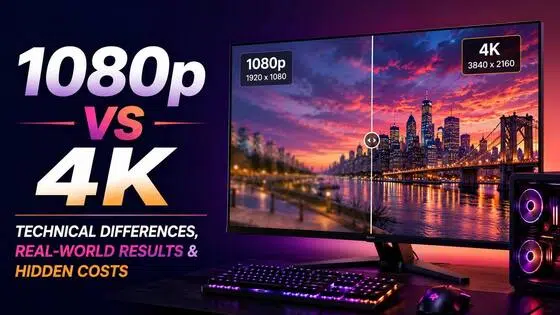
HD and 4K both show up on product boxes, streaming menus, and camera specs. Neither label maps to a single resolution. HD covers 720p (1,280 x 720) and Full HD at 1080p (1,920 x 1,080). 4K covers consumer UHD at 3,840 x 2,160 and cinema DCI 4K at 4,096 x 2,160.
Before the HD vs 4K comparison means anything, those distinctions need to be clear. This guide untangles the terminology, compares both directly across the metrics that matter, explains when the gap is visible, and covers what to do with HD footage in a 4K world.
Breaking Down the Terminology: HD, FHD, UHD, and 4K
The HD vs 4K comparison gets complicated because both terms get used loosely in marketing. Here is what each label actually refers to.
HD and Full HD
HD (High Definition) is 1,280 x 720 pixels, which equals 921,600 total pixels per frame. It is also called 720p or HD Ready. Full HD (FHD) is 1,920 x 1,080 pixels, or 2,073,600 pixels. That is the format most people know as 1080p. Both use a 16:9 aspect ratio and progressive scan.
When people ask whether HD or 4K is better, they almost always mean Full HD (1080p) versus 4K. That is the comparison that matters in 2026. An HD Ready label on a TV means the screen displays 720p natively and may or may not accept a 1080p input. Always check the spec sheet before assuming a device labeled HD supports Full HD.
HD advantages: lower bandwidth, smaller files, works on limited connections, runs on any hardware. HD disadvantages: loses visible sharpness on screens above 32 inches at close viewing, limited to 60Hz on most panels, below the current delivery standard for most professional content.
UHD and 4K
4K UHD (Ultra High Definition) is 3,840 x 2,160 pixels, totaling 8,294,400 pixels per frame. The aspect ratio is 16:9. This is the format behind every consumer TV, monitor, and streaming platform marketed as 4K ultra HD. It is also labeled UHD, Ultra HD, or 2160p.
DCI 4K is a different standard. It is 4,096 x 2,160 pixels, uses a roughly 17:9 aspect ratio, and is a cinema production format not used in consumer products. The 4K name comes from this cinema standard's approximate 4,000 horizontal pixel count. Consumer UHD is technically 3.84K but is universally sold and labeled as 4K.
4K advantages: four times the pixels of Full HD, visible sharpness on large screens, HDR support standard on most panels, native output on PS5 and Xbox Series X. 4K disadvantages: higher bandwidth and storage costs, more expensive GPU required for gaming, overkill for small screens and long viewing distances.
What's the Difference Between HD vs 4K?
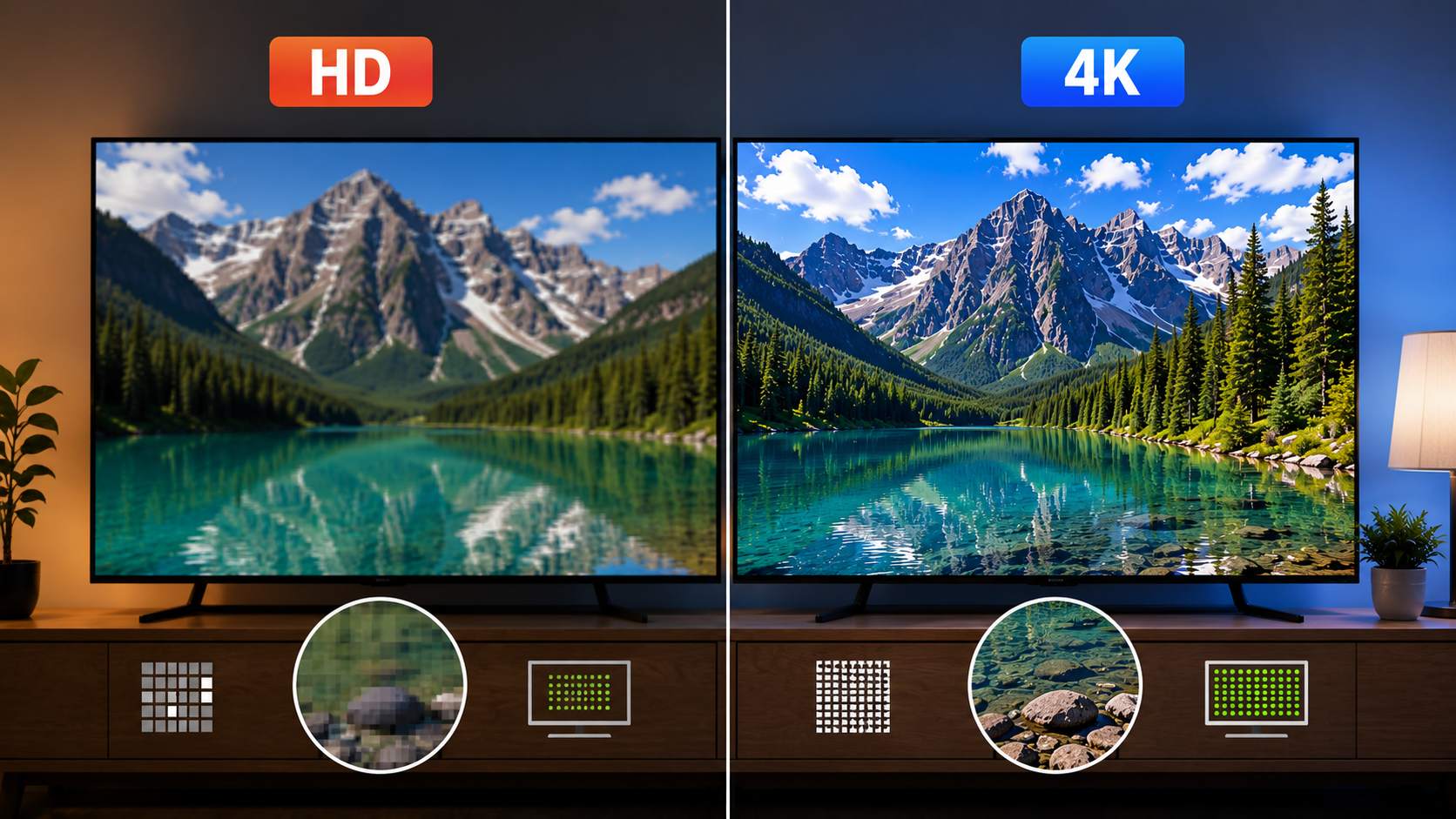
All comparisons below use Full HD (1080p) as the HD reference. The table covers the key specs side by side.
|
Spec |
Full HD (1080p) |
4K UHD |
Notes |
|---|---|---|---|
|
Resolution |
1,920 x 1,080 |
3,840 x 2,160 |
Both 16:9 aspect ratio |
|
Total Pixels |
2,073,600 |
8,294,400 |
4K = 4x more than FHD |
|
PPI at 55-inch TV |
~40 PPI |
~80 PPI |
4K doubles pixel density |
|
PPI at 27-inch monitor |
~82 PPI |
~163 PPI |
Difference clearly visible at desk distance |
|
HDR support |
Rare on HD displays |
Standard on most 4K panels |
HDR is independent of resolution |
|
Streaming bandwidth |
~5 Mbps (30fps) |
~15-25 Mbps (30fps) |
Netflix recommends 25 Mbps for 4K HDR |
|
File size (1hr H.264) |
~1.2 GB |
~4.8 GB |
4K files are ~4x larger |
|
Gaming GPU (60fps) |
RTX 4060 (~$299) |
RTX 5080 (~$999 MSRP) |
2026 verified pricing |
|
Console support |
All current consoles |
PS5 and Xbox Series X |
Up to 120fps on supported titles |
|
New TV standard? |
Budget/small screens |
Standard at 43in+ in 2026 |
Price premium largely gone at 43in+ |
Resolution and Pixel Density
Full HD is 1,920 x 1,080, totaling just over 2 million pixels per frame. 4K UHD is 3,840 x 2,160, totaling just over 8 million. That is four times the pixel count, not two. On a 55-inch TV, Full HD produces around 40 PPI and 4K produces around 80 PPI. That doubling in density is what makes 4K resolution vs HD look different at close viewing distances on large screens.
On a 27-inch monitor at desk distance, the gap is more dramatic. Full HD at 82 PPI sits below the threshold where text and fine detail start looking soft to many users at that distance. 4K at 163 PPI is near print quality. For desk work involving text, code, or detailed design, the 4K vs HD resolution jump on a monitor is more useful than the same jump on a large TV at room distance.
Bandwidth and Storage
Streaming Full HD at 30fps takes roughly 5 Mbps. Streaming 4K at 30fps takes 15 to 25 Mbps, and Netflix recommends 25 Mbps for 4K HDR. A 4K stream on a slow or congested connection at 10 Mbps will show more compression artifacts than a solid Full HD stream at 12 Mbps on the same line. Higher resolution does not help if the bandwidth cannot support it.
For stored files, one hour of Full HD H.264 at 30fps runs roughly 1.2 GB. The same hour in 4K runs roughly 4.8 GB, about four times larger. That gap adds up fast on large content libraries. H.265 reduces file sizes by 40 to 50% versus H.264 at equivalent quality, but increases CPU and GPU decoding load during editing.
HDR and Color
Most 4K displays include HDR (High Dynamic Range) support. Most HD displays do not. HDR expands contrast range and color volume independently of resolution. When a viewer describes a 4K upgrade as looking dramatically better than their old HD setup, part of that improvement often comes from HDR, not from the extra pixels alone.
This matters for purchase decisions. An SDR 4K display with poor local dimming can look worse than a well-calibrated 1080p HDR panel on the same content. When comparing full HD vs 4K in a store, check whether both displays are showing HDR content before drawing conclusions about the resolution difference.
Hardware Requirements
4K UHD is now the standard on new TVs at 43 inches and above in 2026. The price premium over 1080p has largely disappeared at that size. For streaming, you need a 4K-capable streaming device (Apple TV 4K, Chromecast with Google TV, Amazon Fire 4K Stick, Roku Ultra) alongside the 4K TV. For gaming, 4K at 60fps on high settings in current titles requires an RTX 5080 at around $999 MSRP on PC. Full HD on the same settings runs on an RTX 4060 at around $299. HDMI cable standard matters too: 4K at 60Hz needs HDMI 2.0, and 4K at 120Hz needs HDMI 2.1.
Can You Really See the Difference Between HD and 4K?
Pixel counts tell one story. What the human visual system can actually perceive under real conditions is a different one. Whether 4K is better than HD in a visible, practical sense depends on specific viewing conditions.
Viewing Distance and Screen Size
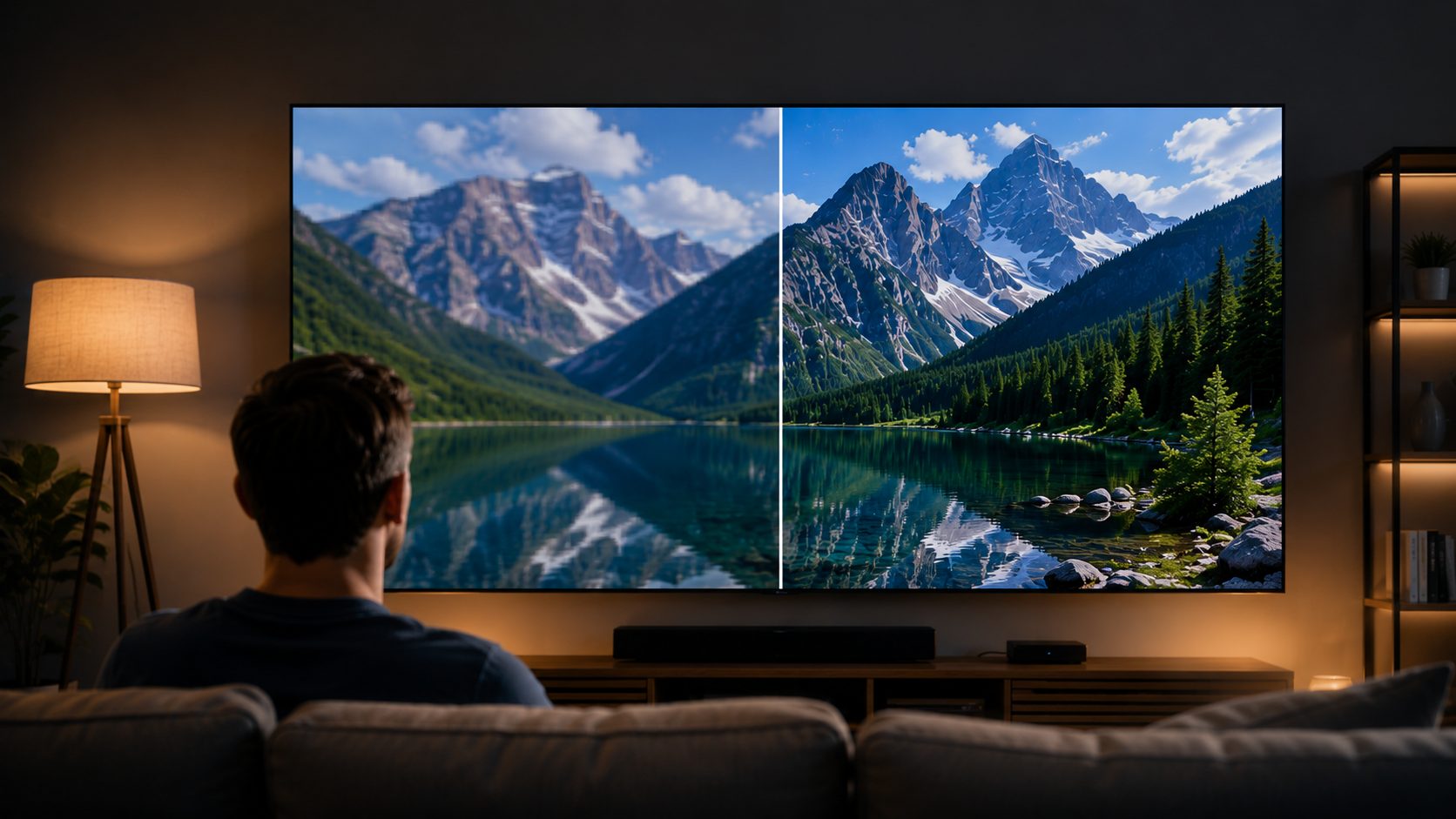
On a 55-inch TV, the threshold for seeing 4K's advantage over 1080p is roughly 6.5 feet or closer. At a typical living room distance of 10 to 12 feet, most viewers cannot reliably tell a 4K display from a Full HD display when both are showing the same content. The pixel density advantage of 4K is real, but the human eye resolves it only when sitting close enough.
The monitor use case is different. At 2 to 3 feet from a 27-inch screen, the jump from 82 PPI (1080p) to 163 PPI (4K) is clearly visible in everyday text and fine-detail rendering. For anyone using a monitor for extended reading, coding, or design work, 4K on a 27-inch panel is a meaningful upgrade. On screens under 40 inches at room distance, the advantage shrinks to the point where most people cannot identify the sharper image without a side-by-side comparison.
Content Source Matters More Than Screen Resolution
A 4K display showing upscaled HD content is not showing 4K. The display stretches 1080p pixels across the 4K grid using interpolation, producing a smoother but not sharper image. The resolution on the screen is 4K but the visual information is still HD. Native 4K sources, 4K UHD Blu-ray, native 4K streaming at full bitrate, and 4K-rendered games, are where the 4K vs HD gap shows up clearly.
Compressed 4K streams at low bitrates can actually look worse than high-bitrate HD. A throttled 4K stream at 10 Mbps will show blocking and banding that a solid 1080p stream at 12 Mbps handles cleanly. The best-case 4K performance requires native content, adequate bandwidth, and a large screen at close viewing distance. Outside those conditions the gap narrows considerably.
The HDR Factor in Perceived Quality
Upgrading from an HD SDR display to a 4K HDR display changes two things at once: resolution and dynamic range. Many viewers attribute all of the perceived improvement to 4K when HDR is doing significant work. This is worth knowing before spending on a 4K display upgrade. A calibrated 1080p HDR display can produce a more visually impressive result than an uncalibrated 4K SDR display when both show the same HDR-mastered content.
The Video Creator's Dilemma: HD or 4K?
For content creators, the resolution choice is not just about output quality. It feeds into file sizes, editing workflow, delivery requirements, and how long the footage stays usable.
Reasons to Shoot in 4K
Post-production flexibility is the main argument. Shooting 4K and delivering in 1080p gives meaningful room to crop, reframe, stabilize, and zoom in post without the export resolution dropping below the delivery target. A 4K frame has enough pixels that a tight crop still exports cleanly at 1080p. Future-proofing is a secondary argument. Footage shot at 4K today will still be usable for 4K delivery as the format becomes more standard across platforms and screens.
Platform support also favors 4K. YouTube, Vimeo, and major streaming platforms all support 4K uploads and give higher bitrates to 4K content. Even if the final viewer watches at 1080p, the 4K upload often looks cleaner after compression than a native 1080p upload because the platform has more data to work with.
Reasons to Stay with Full HD
Storage and file size are the practical constraints. 4K footage takes roughly four times the storage of equivalent 1080p at the same bitrate and codec. A busy shooting day in 4K can fill 100 to 300 GB before editing starts. Editing performance is another real cost: 4K timelines push CPU and GPU harder, and older editing hardware struggles with 4K proxy-free workflows without building proxies first.
For most YouTube and social media delivery, 1080p remains the standard quality tier. The majority of viewers watch on phones and laptop screens where the 4K advantage is not visible. 4K offers a marginal quality edge in that context, not a transformative one.
Recommended Workflow for 2026
Professional video, documentary, and cinematic work: shoot 4K, deliver in 1080p or 4K depending on the platform and client requirement. For YouTube and social content: 1080p is the practical choice for most creators unless the hardware and storage workflow supports 4K comfortably. For surveillance and security video: 4K provides the identification capability and digital zoom range that HD cannot match at longer distances. For live streaming: 1080p at 60fps is still the ceiling for most streamers; 4K live streaming needs 25 Mbps sustained upload and is not supported on all platforms.
HD vs. 4K: Which Should You Choose for Watching Videos?
The right resolution depends on the screen, the distance, and what the content is. The table below gives a direct answer by scenario.
|
Scenario |
Recommended |
Why |
|---|---|---|
|
Smartphone viewing |
HD (1080p) |
Screen density makes 4K imperceptible at phone size |
|
Laptop and office work |
HD (1080p) |
Most laptop panels are FHD; 4K is a premium option |
|
YouTube and casual streaming |
HD (1080p) |
Sufficient for most content at typical viewing distances |
|
Small TV under 40 inches |
HD (1080p) |
4K advantage not visible at this size and room distance |
|
Large TV 55 inches and above |
4K UHD |
Clearly visible at close viewing distances with native content |
|
Home theater |
4K UHD |
Large screen plus close distance = full 4K benefit |
|
PS5 and Xbox Series X gaming |
4K UHD |
Both consoles output 4K natively on supported titles |
|
Video editing and design |
4K UHD |
More pixels for cropping, reframing, and detail work |
How to Upscale HD to 4K with Zawa Video Enhancer
Standard display-side upscaling fills the 4K pixel grid by interpolating between existing HD pixels. Bicubic and Lanczos algorithms calculate new pixel values by averaging surrounding pixels. The output is larger but the visual detail is the same as the source. Edges stay soft, compression artifacts remain, and fine texture does not sharpen. The 4K pixel count is there but the 4K quality is not.
AI video upscaling works differently. Before looking at a specific tool, it is worth understanding what the algorithmic approaches cannot do. Standard interpolation predicts nothing. It fills gaps with mathematical estimates. It cannot recover detail the original file did not contain.
Zawa Video Enhancer uses a neural network trained on large datasets of matched low-resolution and high-resolution video. It analyzes each frame and predicts what the higher-resolution version would look like, reconstructing edges, texture, and fine detail rather than averaging pixels. The output holds up at 4K playback in a way that standard interpolation does not. The tool runs in the browser — free to try with new-user credits, no desktop install required.
Standard Upscaling vs AI Upscaling
Standard interpolation enlarges the pixel grid and fills the gaps using averages of surrounding pixels. The result is a soft, smooth image that is bigger but no sharper than the original. AI upscaling trains on real high-resolution footage and learns what detail should look like at higher resolution. It recovers edge sharpness, reduces compression artifacts baked into the source, and restores texture that standard blending smears. Side by side on the same 4K display, AI-upscaled HD footage shows cleaner edges and more defined texture than the same footage processed by standard interpolation.
Step-by-Step: Using Zawa Video Enhancer
Step 1: Open Zawa and upload your HD video
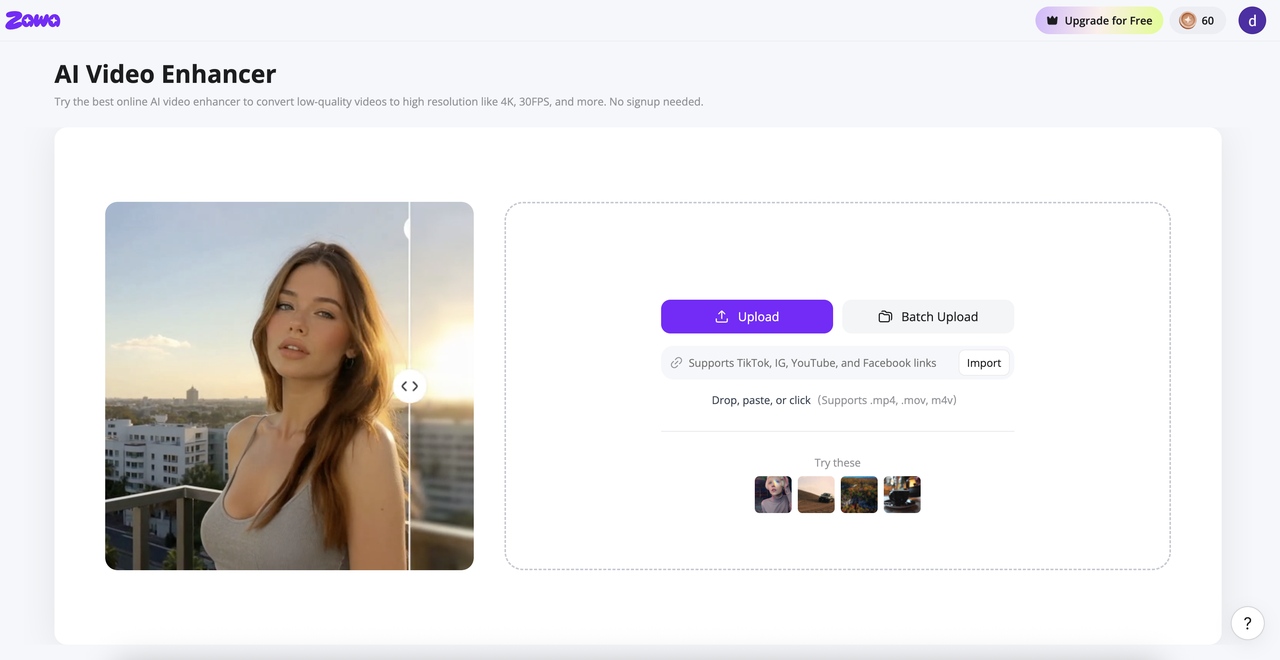
Find Video Enhancer in the tool panel at the bottom-right of the Zawa workspace. Upload your file directly, in bulk, or paste a link. MP4, M4V, MOV, AVI, and 3PT formats are supported.Nothing needs to be installed.
Step 2: Choose 4K and select the enhancement mode
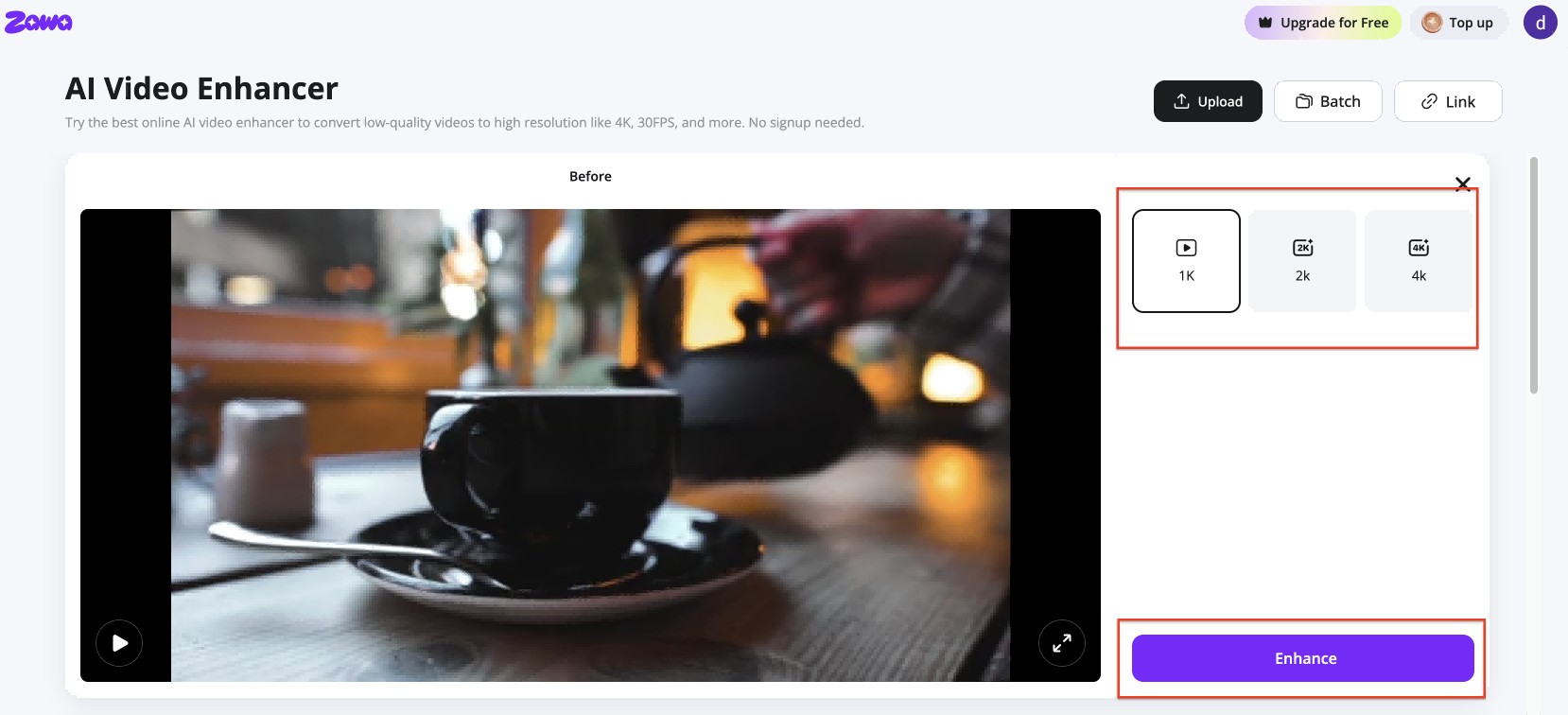
Pick 4K from the output panel. Select the enhancement mode that fits the footage type. The tool processes each frame and rebuilds edge and texture detail at the higher resolution rather than stretching source pixels.
Step 3: Preview and download the enhanced file
A before-and-after split view loads when processing finishes. Scrub through sections with fine detail or fast movement. Download when the output looks right.Download a 5-second preview to check first, or download the full video when the output looks right.
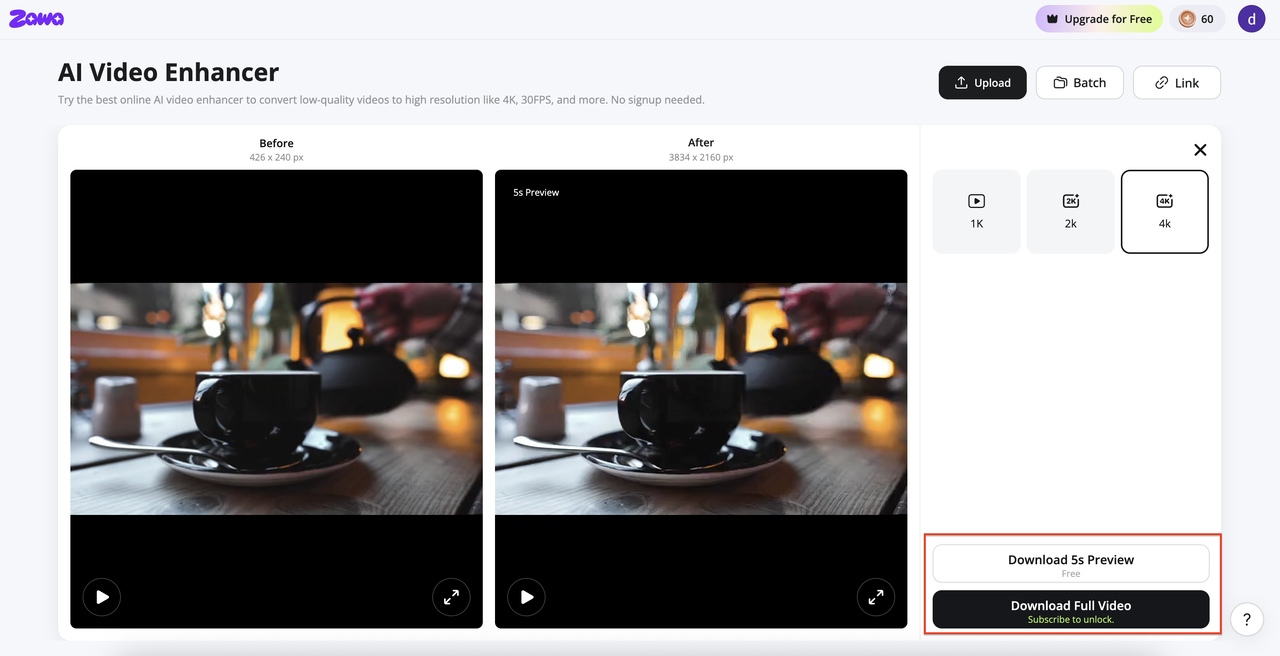
Once your video is enhanced, you can remove watermarks or adjust the background without switching tools — all available at Zawa.
Conclusion
HD and 4K are not a simple better-or-worse comparison. What's better 4K or HD? It depends on the screen size, viewing distance, content source, and hardware around it. On a 55-inch TV watched from 6 feet away with native 4K content, 4K wins clearly. On a phone screen or a small TV at room distance with upscaled content, the gap mostly disappears.
Full HD is still the practical baseline for most streaming, gaming, and content creation in 2026. 4K is the right choice for large screens, professional editing, and setups where the hardware supports it without compromise. For existing HD footage that needs to hold up on 4K displays, AI upscaling recovers sharpness that standard pixel-stretching cannot.
FAQs
Is 4K better than HD?
On large screens at close viewing distance with native 4K content, yes. 4K UHD has four times the pixel count of Full HD and produces sharper images, finer text, and better detail at large screen sizes. On small screens or at typical room distances, the gap narrows significantly. If you are asking whether 4K is better than HD for your specific setup, the screen size and viewing distance are the deciding factors. For HD footage that needs 4K-quality output, AI-based tools like Zawa Video Enhancer reconstruct detail at the frame level rather than stretching existing pixels.
What is the difference between HD, Full HD, UHD, and 4K?
HD is 720p: 1,280 x 720 pixels. Full HD is 1080p: 1,920 x 1,080 pixels. 4K UHD is 3,840 x 2,160 pixels. UHD and 4K are used interchangeably for consumer products. Technically, 4K refers to the DCI cinema standard of 4,096 x 2,160, but consumer products use 3,840 x 2,160. Full HD is roughly 2.25 times the pixels of 720p HD, and 4K UHD is four times the pixels of Full HD.
Does 4K vs HD matter for streaming platforms?
Yes, but with conditions. 4K streams need 15 to 25 Mbps sustained. On a slow or congested connection, a high-bitrate 1080p stream often looks cleaner than a throttled 4K stream. Platform access varies too. Netflix 4K requires the Premium plan. YouTube 4K is available on the standard plan. For most viewers on typical broadband, 4K streaming is accessible and worth it on large screens.
Is full HD vs 4K a significant difference for gaming?
Significant, but the hardware cost is the real story. 4K at 60fps on high settings in current games needs an RTX 5080 at around $999 MSRP. Full HD at the same settings runs on an RTX 4060 at around $299. For competitive multiplayer, most players stay at 1080p or 1440p on high-refresh monitors rather than trading frame rate for 4K. Console players on PS5 or Xbox Series X get 4K output without a separate GPU cost.
Can I upscale HD video to 4K quality?
Standard display upscaling fills the 4K grid by interpolating HD pixels, producing a larger but not sharper image. AI tools like Zawa Video Enhancer analyze each frame and reconstruct detail at higher resolution rather than stretching existing pixels. The result is visibly sharper than standard interpolation. It will not be identical to footage captured natively at 4K, but it is a meaningfully better outcome than pixel stretching.
You May Be Interested
How to Increase Resolution of Image Without Losing Quality
Veo 4 Could Change AI Video From Clip Generation to Scene Direction

10 Best AI Video Enhancers to Upscale Your Videos

15 Best AI Video Generators in 2025

Sora 2 vs Veo 3: A Head-to-Head Comparison for Video Content
What Is 1440p Resolution? QHD Explained (2026)
1080p vs 4K: Key Differences, Real-World Results (2026)
