
SD vs HD Video: Key Differences, Practical Impact & How to Upgrade (2026)
SD and HD are the two foundational video quality levels, but the difference between them goes well beyond pixel count. This guide covers both formats, compares them directly, explains where each still makes sense today, and shows how to restore and upscale SD video to HD quality.


SD and HD represent two distinct eras of video quality. SD (Standard Definition) predates the HD transition and covers resolutions up to 480p in NTSC markets and 576p in PAL markets. HD spans 720p and 1080p and has been the mainstream standard since the mid-2000s.
The HD vs SD video difference goes further than sharpness. It touches aspect ratio, bandwidth, storage, scan method, and how the footage holds up on modern screens. This guide covers both formats, compares them directly across every metric that matters, and explains how to restore and upscale SD footage to HD quality.
Understanding SD: What Standard Definition Actually Means
SD predates HD by decades and still shows up in more contexts than most people expect.
Technical Definition
SD covers resolutions up to 480 vertical lines in NTSC format and 576 lines in PAL format. NTSC SD is 720 x 480 pixels, totaling 345,600 pixels per frame. PAL SD is 720 x 576 pixels, totaling 414,720 pixels. Both fall under the SD label. The 'SD' designation covers everything below 720p rather than pointing to a single fixed resolution.
SD was primarily delivered in interlaced format: 480i and 576i. Interlaced video draws alternating lines of the frame on each refresh cycle rather than all lines in sequence. This was an engineering solution for analog broadcast that reduced bandwidth while maintaining apparent motion smoothness. On modern progressive-scan HD displays, interlaced SD content can produce visible combing artifacts on fast-moving subjects.
Aspect Ratio History
The original SD broadcast standard used a 4:3 aspect ratio, the square-ish format of pre-2000s television. As the transition toward HD began, 16:9 widescreen versions of 480p and 576p were introduced. DVD used a clever workaround: anamorphic encoding squeezed widescreen content into a 4:3 frame, which the DVD player expanded to 16:9 on playback.
Many people conflate the aspect ratio change with the resolution change when describing old versus new television. The move from 4:3 to 16:9 and the move from SD to HD happened around the same time, but they are independent changes. Some SD content exists in 16:9, and some early HD content kept a 4:3 crop window.
Where SD Is Still Used Today
SD has not disappeared. It still shows up in several active contexts. Legacy cable and satellite providers in some markets still carry channels in SD, particularly where older distribution hardware has not been upgraded. Most streaming platforms drop to 480p or lower on connections below 1.5 Mbps, making SD the fallback tier for constrained connections.
Large volumes of archived footage from the VHS, DVD, and early digital camera era exist only in SD. News archives, home video libraries, and early documentary work often have no HD version available. Older security camera systems still record at D1 resolution (704 x 480), a variant of SD. DVD remains an active physical format for SD delivery at 480i or 576i depending on region.
Advantages and Disadvantages of SD
Advantages
-
Very low bandwidth demand, SD streams at 0.7 to 1.5 Mbps, practical on slow or data-capped connections
-
Small file sizes, roughly 0.5 to 1 GB per hour at H.264, 30fps
-
Universal compatibility with legacy playback hardware including DVD players, older set-top boxes, and embedded display systems
-
Large existing content libraries in SD format from the VHS, broadcast, and DVD era
Disadvantages
-
Visibly soft and degraded on modern HD and 4K displays when upscaled
-
4:3 content shows black bars or distortion on 16:9 screens
-
Interlaced SD produces combing artifacts on progressive-scan monitors
-
Text and fine detail are frequently illegible when SD content is displayed full-screen on large modern panels
Understanding HD: What High Definition Covers
HD is now the baseline for consumer video across virtually every modern platform and device. Its two tiers, 720p and 1080p, each serve different delivery contexts.
Technical Definition
HD covers 720p and 1080p under the same broad label. 720p is 1,280 x 720 pixels, totaling 921,600 pixels at a 16:9 aspect ratio in progressive scan. Full HD (FHD) at 1080p is 1,920 x 1,080, totaling 2,073,600 pixels, also 16:9 and progressive. A broadcast variant called 1080i delivers 1,080 lines in interlaced format, used by some ATSC broadcast channels and satellite services.
When people discuss SD vs HD video in a practical context, they almost always mean 1080p Full HD as the HD reference. That is the current mainstream standard for streaming, Blu-ray, and production delivery.
Where HD Is Used Today
720p handles streaming on connections from roughly 2.5 Mbps upward and is the standard fallback tier on most platforms before dropping to SD. Over-the-air HD broadcasts in ATSC format split between 720p (ABC, Fox, ESPN) and 1080i (CBS, NBC, PBS) depending on the broadcaster.
1080p is the native format for Blu-ray, the default quality tier on Netflix and YouTube at standard broadband speeds, and the minimum recording resolution on virtually all current smartphones and consumer cameras. The Steam Hardware Survey for 2025 to 2026 shows 1080p as the most common active gaming resolution. Video conferencing platforms including Zoom, Teams, and Google Meet use 720p as the standard and 1080p on premium plans and stronger connections.
HD Ready vs Full HD Label Distinction
HD Ready on a display means the screen outputs 720p natively and may or may not accept a 1080p input signal. Full HD confirms 1,920 x 1,080 native output. This distinction still matters when buying projectors, budget monitors, and secondary screens where HD Ready hardware is sold at lower price points. Always check the spec sheet rather than relying on the label when the difference between 720p and 1080p output matters for the use case.
Advantages and Disadvantages of HD
Advantages
-
Sharp and clean on all modern screens from phones to large TVs
-
16:9 aspect ratio matches all current widescreen displays natively
-
Progressive scan eliminates the combing artifacts of interlaced SD
-
Standard quality tier across all major streaming, broadcast, and production platforms
-
1080p supports 120Hz refresh rates on current monitors for gaming
Disadvantages
-
Requires more bandwidth than SD, 5 Mbps for 1080p versus 1.5 Mbps for SD
-
Larger file sizes than SD, roughly 2.5 to 4 GB per hour at 1080p H.264, 30fps
-
Not accessible on connections below 2.5 Mbps without buffering or quality drops
SD vs HD Video: Head-to-Head Comparison
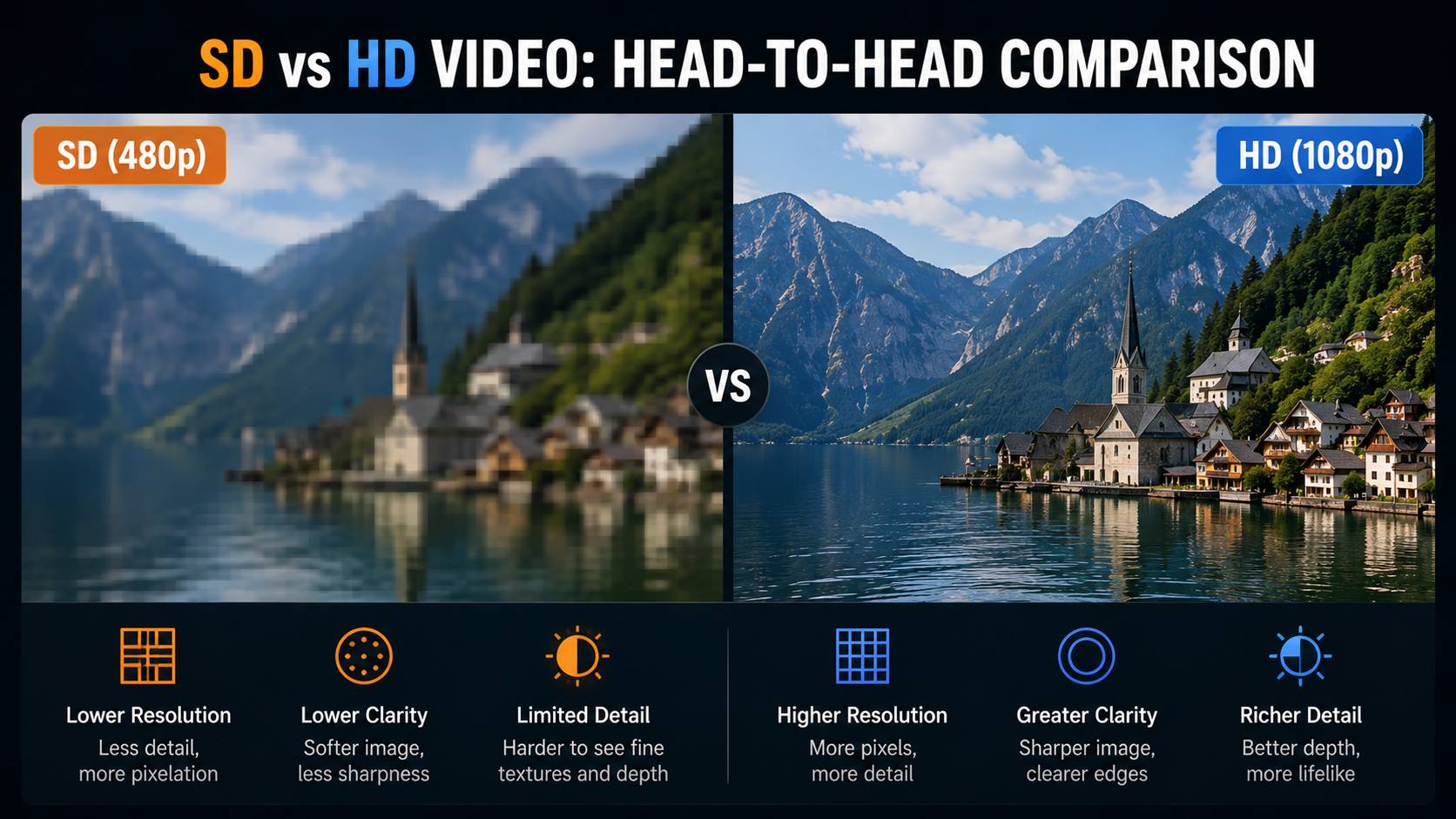
The table below compares the three main resolution tiers across the metrics that define the practical difference between SD and HD video formats.
|
Spec |
SD 480p (NTSC) |
HD 720p |
Full HD 1080p |
Notes |
|---|---|---|---|---|
|
Resolution |
720 x 480 |
1,280 x 720 |
1,920 x 1,080 |
All progressive versions |
|
Total Pixels |
345,600 |
921,600 |
2,073,600 |
1080p = 6x more than SD |
|
Aspect Ratio |
4:3 or 16:9 |
16:9 only |
16:9 only |
SD originated in 4:3 |
|
Scan Method |
Interlaced (480i) typical |
Progressive |
Progressive / 1080i broadcast |
Progressive = smoother motion |
|
Streaming BW |
~0.7-1.5 Mbps |
~2.5 Mbps |
~5 Mbps |
SD uses 3-4x less than 1080p |
|
Storage (1hr H.264) |
~0.5-1 GB |
~1.5-2.5 GB |
~2.5-4 GB |
At 30fps |
|
Modern display look |
Soft; requires upscaling |
Clean and sharp |
Native HD quality |
SD visibly degraded on large screens |
|
Common delivery |
DVD, legacy broadcast |
Streaming fallback, broadcast |
Blu-ray, streaming standard |
/ |
Key Numbers at a Glance
The pixel gap between SD and HD is larger than most people expect. 480p SD carries 345,600 pixels per frame. 720p HD carries 921,600 pixels, which is 2.67 times more than SD. 1080p Full HD carries 2,073,600 pixels, which is six times more than 480p SD. That gap is not subtle. It is the difference between content that reads clearly on a large screen and content that looks blurry and soft.
The aspect ratio shift compounds the visual difference. SD originated in 4:3. HD is exclusively 16:9. SD content on a modern widescreen display either shows black bars on the sides or gets stretched to fill the frame, distorting faces and geometry. Scan method adds another layer: interlaced SD (480i) was designed for CRT televisions. On progressive-scan HD monitors, interlaced content can show horizontal line artifacts on fast movement.
Visual Quality Comparison
Put SD on a modern HD or 4K display and the display upscales it to fill the screen using interpolation. The result is visibly soft. Text becomes hard to read. Fine edges smear. The gap between SD and HD on a modern TV is not subtle and does not require a side-by-side to see. This is different from the HD to 4K comparison, which requires specific screen sizes and viewing distances to perceive reliably. Anyone can see the HD and SD difference on any screen, at any viewing distance.
The visual degradation of SD is more visible on large modern screens than it was on the smaller CRT televisions SD was designed for. A 55-inch 1080p TV at normal room distance makes SD content look noticeably worse than a 14-inch CRT at close range. The content has not changed. The screen has.
Bandwidth, Storage, and the Modern Display Problem
The practical impact of the SD video vs HD video choice goes beyond image quality. For internet users, content distributors, and anyone managing video infrastructure, data consumption and display compatibility are real constraints.
Data Consumption and Internet Speed
SD streaming at 480p uses roughly 0.7 to 1.5 Mbps and consumes about 1 GB per hour. HD at 720p uses approximately 2.5 Mbps. Full HD at 1080p uses approximately 5 Mbps and 3 to 4 GB per hour at Netflix quality settings. SD uses three to four times less data than 1080p per hour of viewing. For users on mobile data plans, rural broadband, or data-capped connections, that difference is not trivial.
Live streaming has its own constraints. SD at 480p needs roughly 1 to 2 Mbps upload. HD 1080p at 60fps needs 6 to 9 Mbps upload. Streamers on asymmetric broadband connections where upload speed is the bottleneck often find 720p or even 480p is the practical ceiling regardless of the connection's download speed.
Storage Requirements
SD 480p H.264 video at 30fps runs roughly 0.5 to 1 GB per hour. HD 720p runs 1.5 to 2.5 GB per hour. Full HD 1080p runs 2.5 to 4 GB per hour. For security camera systems recording continuously across multiple cameras, the storage difference between SD and HD over weeks is substantial. A four-camera system running SD 24 hours a day generates roughly 50 to 100 GB per week. The same system at 1080p generates 200 to 400 GB. That difference is a primary reason some legacy security installations still run SD despite the image quality trade-off.
The Modern Display Problem for SD Content
Every current TV and monitor is HD or higher. When a device plays SD content, it upscales the image to fill the native HD resolution using interpolation, which estimates missing pixel values by averaging surrounding pixels. No new detail is added. The image is bigger but not sharper. On a 55-inch 4K TV, 480p SD content stretched to fill the screen looks noticeably degraded. 4:3 content on widescreen displays adds a further problem: either black bars on both sides (letterboxed) or horizontal stretching that distorts everything in frame.
SD vs HD Video: When Does Each One Make Sense?
SD is not simply an outdated format that should always be replaced. There are specific situations where it remains the practical or only viable option.
When HD Is the Right Choice
Any new video production in 2026 should use 1080p as the minimum. There is no practical reason to produce new content in SD. Streaming to modern displays, video conferencing on standard broadband, content for YouTube or any online platform, and security camera systems where identification matters all require HD. The difference between HD and SD video is visible to everyone on any modern screen. When the viewer's experience matters, HD is not optional.
When SD Still Makes Sense
Severely bandwidth-limited streaming is the clearest case. Below 1.5 Mbps, SD prevents buffering where HD would stutter. Mobile data conservation is another: SD uses three to four times less data per hour than HD, which matters for users on capped plans. Legacy broadcast infrastructure in some markets still operates in SD with no HD alternative. Working with existing SD archives from the VHS, DVD, and early digital era is often unavoidable, particularly in journalism, documentary, and historical production work. SD delivery for compatibility with DVD players, older set-top boxes, and embedded public venue displays remains necessary in specific deployment contexts.
How to Restore and Upgrade SD Video to HD with Zawa AI Video Enhancer
SD footage that needs to work on modern HD displays has two problems. The first is low pixel count. The second is source quality: compression artifacts, interlacing noise, and analog grain from the original capture or transfer. Standard display-side upscaling handles only the first problem by stretching pixels to fill the HD frame. It cannot recover detail that was never captured, and it does nothing for artifacts already baked into the file.
AI video enhancement addresses both. Before looking at specific tools, it is worth being clear about what standard upscaling actually fails to do. Bicubic and Lanczos algorithms fill missing pixel positions by averaging the surrounding pixels. The result is smooth but soft. Fine edges stay blurry, text stays hard to read, and compression blocking stays visible.
Zawa Video Enhancer uses a neural network to analyze each frame and predict what the higher-resolution version would look like, trained on large datasets of matched low and high resolution footage. It reconstructs edges and texture rather than blending them. It also reduces compression artifacts and noise in the source file rather than passing them through at a larger size. The output holds up on HD displays in a way that standard-upscaled SD does not. The tool runs in the browser — free to try with new-user credits, no desktop installation required.
What AI Video Enhancement Does for SD Footage
-
Resolution upscaling: reconstructs missing pixel detail at higher resolution rather than interpolating; output edges are sharper than standard display upscaling on the same footage
-
Compression artifact reduction: SD footage from DVDs, cassette transfers, and early digital cameras carries heavy blocking and smearing; AI enhancement reduces these without softening genuine detail
-
Noise reduction: analog-sourced SD footage contains grain, chroma noise, and flickering; trained AI models reduce these while preserving sharp edges
-
Practical output: AI-enhanced SD footage works on HD displays and modern video workflows better than standard-upscaled SD, even if it does not equal natively captured HD
Step-by-Step: Using Zawa Video Enhancer
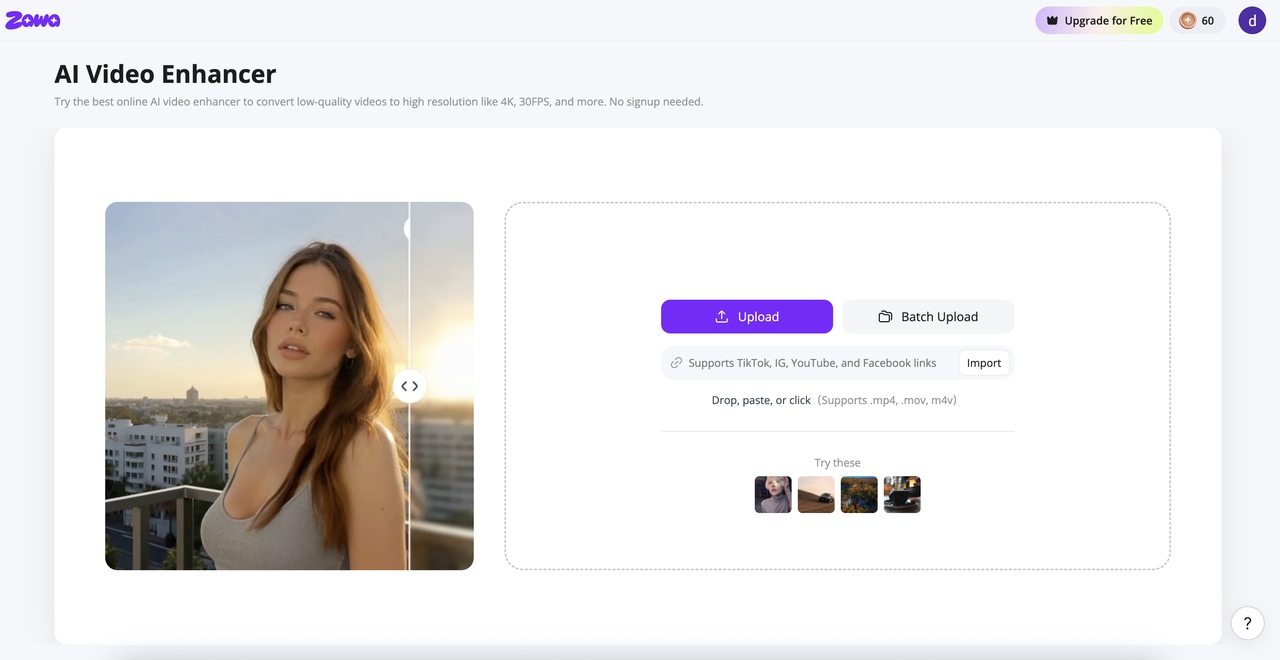
Step 1: Open Zawa video enhancer and upload your SD footage
Find Video Enhancer in the tool panel at the bottom-right of the Zawa workspace. Upload your file directly, in bulk, or paste a link. MP4, M4V, MOV, AVI, and 3PT formats are supported.The tool runs in the browser with no installation required. Both local files and linked sources work.
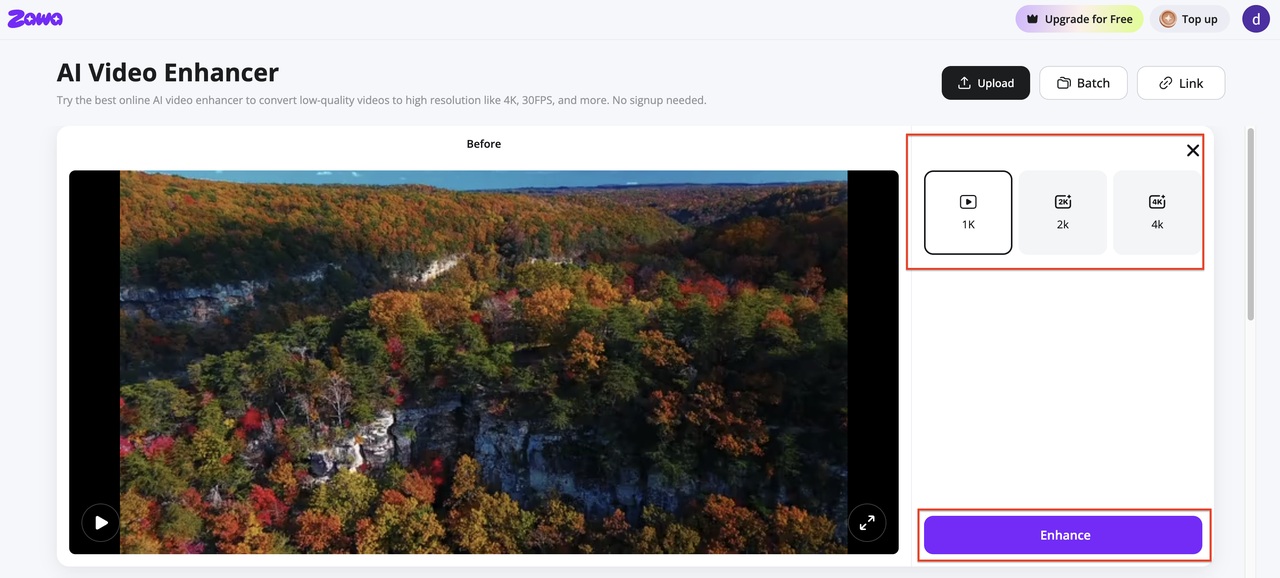
Step 2: Select the output resolution and enhancement mode
In the output panel, select your target resolution — 1K for HD delivery, or 2K/4K if the destination requires higher output. Hit Enhance — the tool processes each frame, rebuilding edge and texture detail at the higher resolution and outputting at a smooth 30FPS. The tool processes each frame individually, rebuilding edge and texture detail at the higher resolution rather than stretching existing pixels.
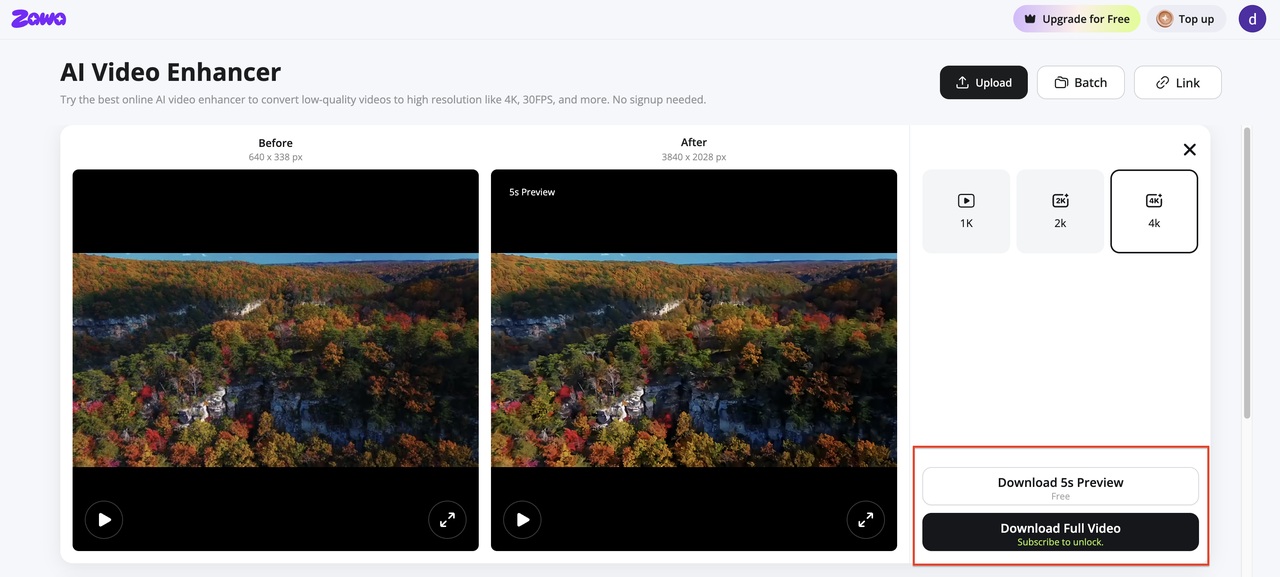
Step 3: Preview and download the enhanced file
A split-view comparison loads when processing finishes. Scrub through sections with text, faces, and fast movement to check output quality. Download the enhanced file when the result meets the requirement.Download a 5-second preview to check first, or download the full video when the output looks right.
Once your video is enhanced, you can remove watermarks or adjust the background without switching tools — all available at Zawa.
Conclusion
The difference between HD video and SD video is one of the clearest visible quality gaps in consumer media. Six times more pixels, a native 16:9 aspect ratio, and progressive scan make HD the right choice for any new content and any modern display. HD is not optional for streaming, production, or professional use in 2026.
SD still has a place. Slow connections, data-capped mobile plans, legacy broadcast infrastructure, and large existing archives all represent real situations where SD remains practical or unavoidable. For SD footage that needs to work on modern HD displays, standard upscaling fills the pixel gap without recovering the quality. AI video enhancement from tools like Zawa Video Enhancer reconstructs detail at the frame level, which produces output that holds up on HD screens in a way pixel-stretching cannot.
FAQs
What affects video streaming quality the most?
Internet connection speed is the single biggest factor. Platforms scale video quality to match the available bandwidth. Below 1.5 Mbps, most platforms drop to SD. 720p HD needs around 2.5 Mbps. 1080p HD needs around 5 Mbps. A fast, stable connection lets the platform deliver the highest available quality tier. After connection speed, the display size and source content quality determine how much difference those tiers actually look.
Is HD video better than SD?
For modern displays, yes. HD delivers sharper images, the correct 16:9 aspect ratio for current screens, and progressive scan for smoother motion. The SD vs HD video gap is visible on any screen at any viewing distance, which is not true of the HD to 4K jump. SD remains practical only in bandwidth-constrained streaming, mobile data conservation, legacy broadcast infrastructure, and archival work where SD is the only source format.
How much more bandwidth does HD use than SD?
Three to four times more. SD streaming at 480p uses roughly 0.7 to 1.5 Mbps and about 1 GB per hour. 720p HD uses approximately 2.5 Mbps. 1080p HD uses approximately 5 Mbps and 3 to 4 GB per hour. The difference is meaningful for mobile data users and for live streamers where upload speed is the bottleneck.
Why does old SD video look worse on new TVs?
Modern TVs are all HD or above. When a TV displays SD content, it upscales the image to fill the HD resolution using interpolation, which stretches pixels without adding detail. SD was designed for smaller CRT screens at closer viewing distances. That same content stretched to fill a 55-inch 1080p panel looks considerably worse than it did on the screen it was designed for. The display size, not just the upscaling, is what makes old SD footage look so degraded today.
Can SD video be upgraded to HD quality?
Standard upscaling in displays and media players stretches SD pixels to fill HD frames without recovering lost detail. AI tools like Zawa Video Enhancer use neural networks to reconstruct edge sharpness and texture at higher resolution and reduce compression artifacts from the source footage. The result holds up better on modern HD displays than standard upscaling, though it will not be identical to footage captured natively at HD.
You May Be Interested
Veo 4 Could Change AI Video From Clip Generation to Scene Direction

10 Best AI Video Enhancers to Upscale Your Videos

15 Best AI Video Generators in 2025

Sora 2 vs Veo 3: A Head-to-Head Comparison for Video Content
What Is 1440p Resolution? QHD Explained (2026)
1080p vs 4K: Key Differences, Real-World Results (2026)

1440p vs 4K: Key Differences, Real Scenarios & Blur Fix
