
Creative AI Music Video Prompts to Inspire Your Next Visual Masterpiece
Learn how to modify prompts for better results with top prompts for music videos. Create clearer visuals and improve AI-generated video quality.


AI video generators turn a written idea into a finished scene, but the output is only as strong as the prompt behind it. A vague line produces a generic clip, while a detailed prompt controls the camera angle, lighting, mood, and pacing that make a music video feel intentional.
This list of top prompts for music videos covers six styles, from live performance shots to sci-fi visuals. A pop anthem, lo-fi beat, rock performance, or EDM visualizer all have a starting point here. Copy a prompt as written, or adjust the details covered below to match the exact scene in mind.
What Makes an AI Music Video Prompt Effective?
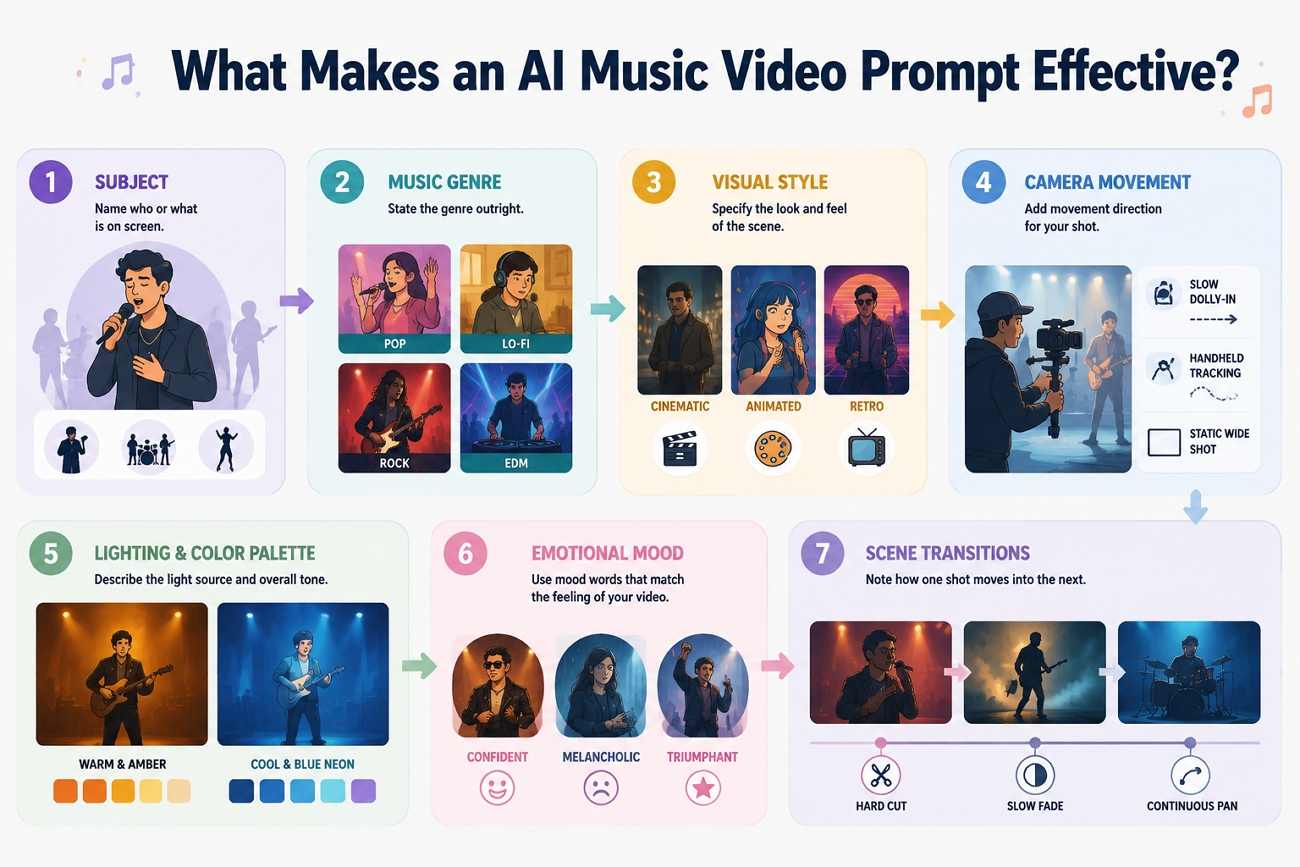
A strong prompt reads like a shot list, not a vibe. These 7 details separate a prompt that generates a usable scene from one that produces something generic:
-
Subject: Name who or what is on screen, a solo singer, a full band, a dancer, so the AI doesn't default to a random figure.
-
Music Genre: State the genre outright. Pop, lo-fi, rock, and EDM each pull different lighting, pacing, and camera choices from the model.
-
Visual Style: Specify whether the scene should look cinematic, animated, retro, or futuristic, since style words shift the entire render.
-
Camera Movement: Add a direction like slow dolly-in, handheld tracking, or static wide shot. Without one, most tools default to a flat, locked frame that feels closer to a photo than a video.
-
Lighting and Color Palette: Describe the light source and tone, such as “warm amber stage light” or “cool blue neon,” so the mood reads correctly instead of creating flat, even lighting.
-
Emotional Mood: One or two mood words, confident, melancholic, triumphant, keep the performance and the visuals working toward the same feeling.
-
Scene Transitions: For longer prompts, note how one shot should move into the next: “a hard cut,” “a slow fade,” or “a continuous pan.”
Ready-to-Use AI Music Video Prompts
Each category below includes 3 top prompts for music videos built around the details covered above. Copy one as written, or swap the subject, setting, or mood to fit the track.
Performance Music Video Prompts
Performance prompts put the artist front and center, the most direct fit for pop, rock, or acoustic tracks built around a lead vocal.
-
Solo Pop Stage Performance: "A solo pop artist singing center stage under pulsing magenta and blue spotlights, slow dolly-in shot, smoke drifting across the stage floor, confident and energetic mood, 4K cinematic quality."
-
Live Band Performance: "A four-piece rock band performing on a small club stage, handheld camera weaving between musicians, warm amber stage lighting with lens flare, raw and energetic atmosphere, medium shots cutting to close-ups on the beat."
-
Acoustic Close-Up Session: "A singer-songwriter performing acoustic guitar in a dim, candlelit room, static close-up shot on the face and hands, soft warm lighting, intimate and reflective mood, shallow depth of field."
Cinematic Music Video Prompts
Cinematic prompts favor wide shots, and deliberate camera moves over a locked-on performer, better suited to a song that tells a visual story.
-
Golden Hour Wide Shot: "A wide establishing shot of a lone figure walking across an open field at golden hour, slow crane shot rising upward, warm orange and pink color grading, cinematic and hopeful mood."
-
Urban Night Tracking Shot: "A tracking shot following a performer walking through rain-soaked city streets at night, neon signs reflecting on wet pavement, cool blue and purple tones, moody and cinematic atmosphere."
-
Slow-Motion Emotional Close-Up: "A slow-motion close-up of a performer's face in profile, backlit by a single window light, soft desaturated color grading, quiet and cinematic mood, shallow focus with a blurred background."
Animated Music Video Prompts
Animated prompts trade real footage for a drawn or rendered look, useful when the artist prefers not to appear on camera at all.
-
Flat 2D Animation: "A flat 2D animated sequence of a character dancing through a pastel-colored city, bold outlines and minimal shading, playful and upbeat mood, smooth looping camera pan."
-
Stylized 3D Character: "A stylized 3D animated character performing on a floating stage surrounded by glowing particles, dynamic camera orbit, vibrant saturated colors, energetic and whimsical mood."
-
Hand-Drawn Rotoscope Style: "A hand-drawn rotoscope animation of a dancer's silhouette moving against a shifting watercolor background, fluid line work, warm earthy tones, dreamlike and artistic mood."
Sci-Fi & Fantasy Prompts
These top prompts for music videos build a setting the camera couldn't actually film, which works well for EDM, synthwave, or any track leaning into an escapist theme.
-
Neon Futuristic Cityscape: "A performer standing on a rooftop overlooking a futuristic neon-lit cityscape, flying vehicles in the background, wide aerial pull-back shot, cyberpunk color palette, bold and futuristic mood."
-
Mystical Forest Setting: "A figure walking through a glowing enchanted forest with floating light particles, slow tracking shot through fog, deep green and violet tones, mysterious and magical mood."
-
Cosmic Space Visual: "A performer floating weightlessly among stars and nebula clouds, slow rotating camera movement, deep purple and blue cosmic lighting, otherworldly and epic mood."
Emotional & Storytelling Prompts
These prompts follow a small emotional arc rather than a single mood, a fit for ballads or lyric-driven tracks with a clear narrative.
-
Heartbreak Narrative: "A performer sitting alone by a rain-streaked window, static wide shot transitioning to a close-up on clasped hands, muted gray-blue tones, melancholic and reflective mood."
-
Nostalgic Memory Sequence: "A montage of a performer walking through a childhood home, soft grainy film texture throughout, warm faded color grading, nostalgic and bittersweet mood, gentle handheld camera movement."
-
Triumphant Redemption Arc: "A performer standing atop a hill at sunrise after a long journey, arms raised, slow-motion wide shot pulling back to reveal the landscape, warm golden light, triumphant and uplifting mood."
Dance & Viral Short-Form Prompts
The following top prompts for music videos are built for TikTok, Reels, and Shorts, where quick cuts and bold lighting read better than a slow cinematic pace.
-
Trending Dance Challenge: "A dancer performing a trending choreography routine in a bright minimal studio, static vertical framing, bold high-contrast lighting, fun and energetic mood, quick beat-synced cuts."
-
Street Dance Battle: "Two dancers facing off in an urban alley at dusk, dynamic handheld camera circling the action, gritty street lighting with warm sodium tones, competitive and high-energy mood."
-
Aesthetic Vertical Reel: "A performer posing and moving through soft transitions in front of a pastel gradient backdrop, vertical 9:16 framing, soft diffused lighting, trendy and aesthetic mood, quick jump cuts."
How to Modify Prompts for Better Results
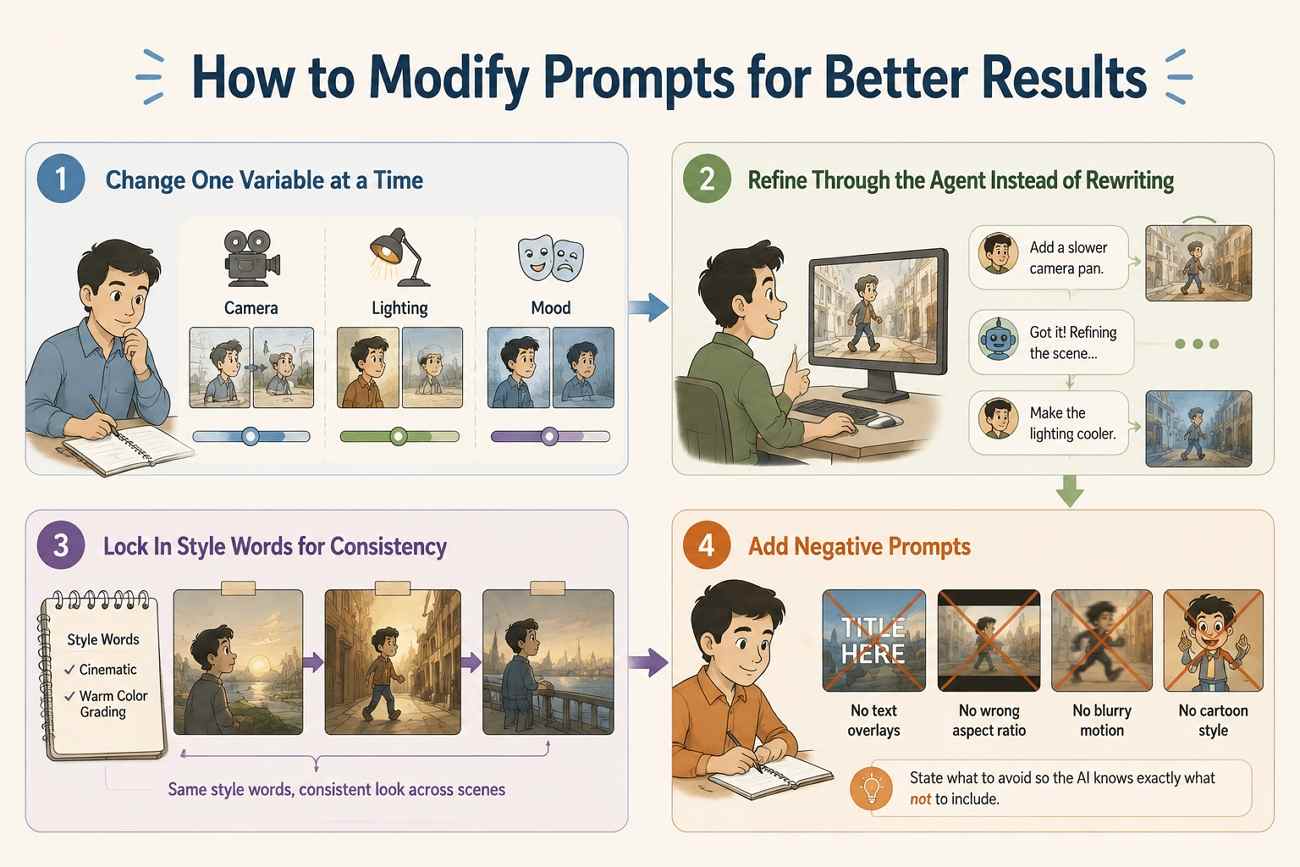
A prompt rarely works perfectly on the first try. These 4 adjustments cover most of what turns a rough first draft into a usable scene:
-
Change One Variable at a Time: Adjust the camera, lighting, or mood, not all three at once, so it stays clear which change affected the output. If a shot looks too static, add a specific camera movement instead of a vague word like "dynamic." If the color feels off, name the actual tone, amber, teal, magenta, rather than just "colorful."
-
Refine Through the Agent Instead of Rewriting: A prompt that stacks several ideas at once usually renders worse than a shorter, focused version. Zawa's Agent supports this directly, as you have to describe the change in the conversational thread after a scene generates. Add short details such as "add a slower camera pan" or "make the lighting cooler," and it refines the existing scenes.
-
Lock In Style Words for Consistency: When a video needs several scenes strung together, repeat one or two style words in every prompt for that video. The visual language stays consistent even as the subject, camera angle, or setting changes from one scene to the next.
-
Add Negative Prompts: When a specific element keeps showing up as unwanted, state what to avoid directly in the prompt instead of assuming the AI will infer it. A line like "no text overlays, no cartoon style" removes ambiguity the same way a positive description does.
Common Prompt Mistakes That Produce Poor Videos
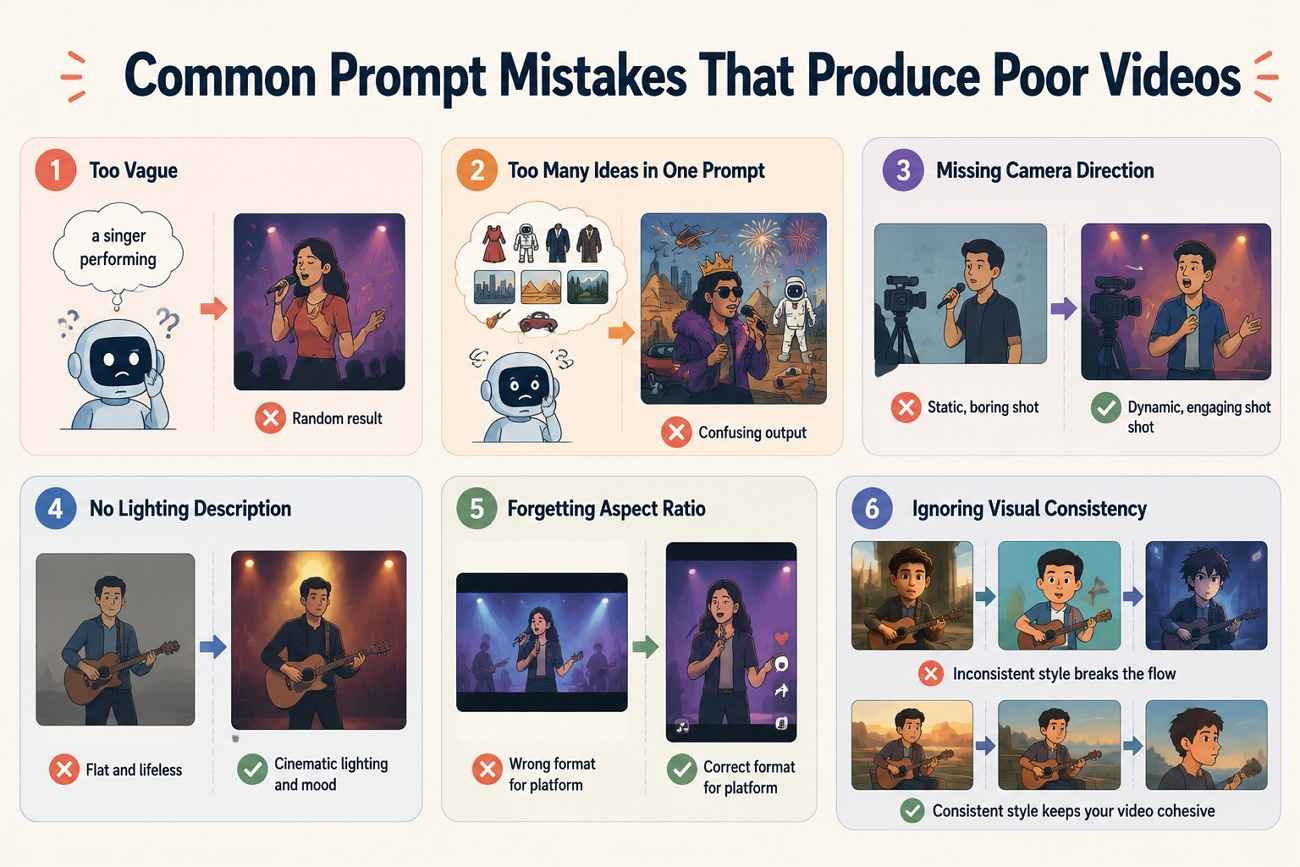
These recurring mistakes are also the fastest way to end up regenerating a clip 5 times instead of once:
-
Too Vague: A prompt like "a singer performing" gives the AI almost nothing to work with, so it fills in every gap randomly.
-
Too Many Ideas in One Prompt: Combining a costume change, multiple settings, and a genre switch in one line usually confuses the render instead of guiding it.
-
Missing Camera Direction: Without a specified movement or angle, most generators default to the same static mid-shot regardless of the mood the prompt describes.
-
No Lighting Description: Leaving out the light source and color tone hands the mood over to chance instead of matching it to the song.
-
Forgetting Aspect Ratio: A prompt built for a widescreen cinematic shot still needs to say so when the final video is meant for a vertical format.
-
Ignoring Visual Consistency: Switching style words between prompts, cinematic in one, animated in the next, breaks the look of a video built from multiple scenes.
Conclusion
The difference between a forgettable AI music video and one that looks intentional usually comes down to the prompt, not the tool. For creators looking to turn detailed music video prompts into cinematic visuals quickly, Zawa provides an intuitive way to generate, customize, and export AI-powered music videos.
Frequently Asked Questions
-
What is a good AI prompt for a music video?
An effective prompt describes everything about the topic, genre, visual elements and atmospheres in one or two sentences, similar to the performance and cinematic examples above.
-
How detailed should AI music video prompts be?
They should be detailed enough to include the topic, style, visual concept, camera movement, lighting, and emotion, yet not be a combination of unrelated ideas.
-
Can AI generate music videos from text prompts?
Yes, with the help of text to video tool like Zawa's Agent. One can input idea and generate the entire video by setting camera angles and lighting without requiring any prior clips.
-
Does Zawa support cinematic music video creation?
Yes, Zawa's agent generates film-like performative clips by utilizing pre-existing texts while also allowing detailed editing of every single video aspect.
-
How do I match visuals to a song's mood?
Match the mood word to concrete lighting and color choices. For instance, a cheerful and upbeat song needs warm lights, while a sad song will rely on cooler hues and softer lighting.
-
Can I create short-form music videos for TikTok?
Yes. Use the Dance & Viral Short-Form prompts above as a starting point, and specify a vertical 9:16 frame, since short-form platforms crop widescreen video automatically.
-
What makes an AI music video look more professional?
Specific camera direction and consistent lighting language across every prompt are what usually separate a polished result from a generic one, more than the subject matter itself.
CTA: Turn creative music video prompts into stunning AI-generated visuals with Zawa's powerful text-to-video generation and cinematic editing tools.
You May Be Interested

SD vs HD Video: Differences, Use Cases & How to Upgrade
Create TikTok Video Ads with AI: Generate High-Converting Ads in Minutes
AI Prompt for Creating Viral Videos on YouTube (2026)

20 Seedance Prompts for AI Video Creation: Ready-to-Use Examples

10 Best AI Video Enhancers to Upscale Your Videos
