[Proven Ways] How to Create Engaging Video Content With AI
A 3D isometric banner illustrating the key elements of engaging video content: a central video player with a 3‑second hook timer, on‑screen captions, motion graphics, and floating icons representing audience targeting, storytelling, and brand identity – all set against a modern tech gradient background.

![[Proven Ways] How to Create Engaging Video Content With AI](https://x-design-release.stariicloud.com/seo/ao3bz0f86l6snyfq.jpg?imageView2/2/q/80/format/webp/ignore-error/1/w/1120)
Engaging videos always keep viewers engaged instead of influencing them to scroll past them. They hold attention, spark reaction, and get shared across other platforms instead of getting forgotten. With the help of AI-powered tools, creators and businesses generated professional videos more quickly while keeping all visuals and formats intact.
If your goal is to work on social media, marketing, or education, using the right techniques helps turn ordinary content into visuals that people finish watching. This guide helps you understand how to create engaging video content, from planning to creating visuals. It features how tools like Zawa improve production without changing the overall quality.
Start with a Clear Goal Before You Hit Record
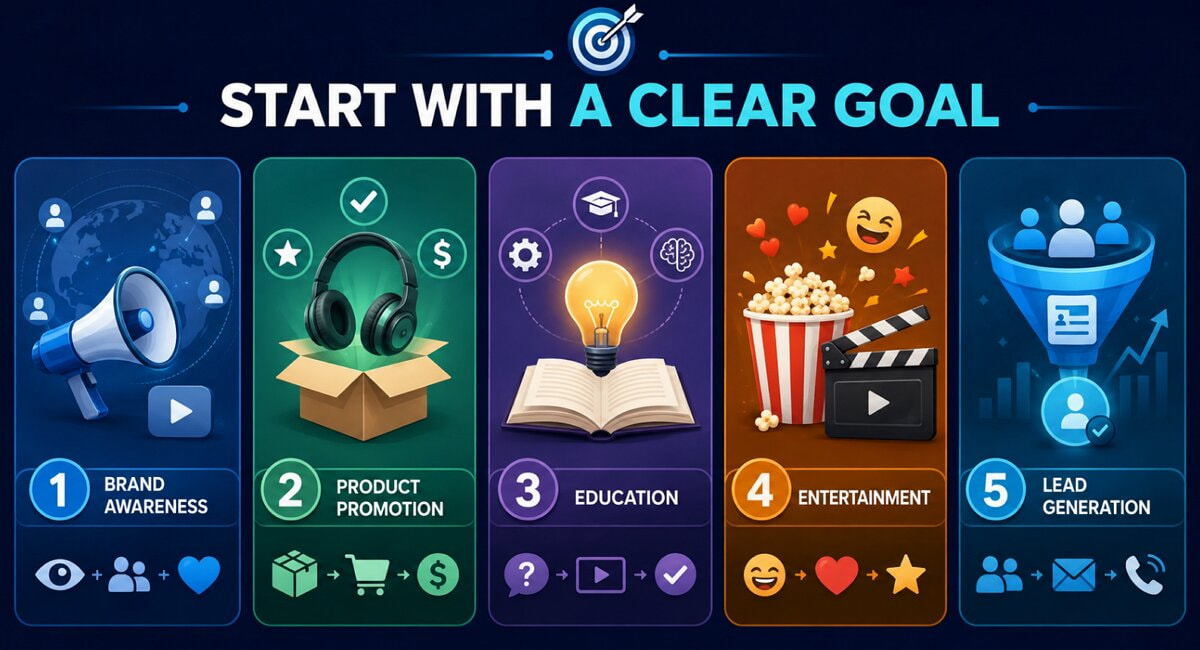
Every strong video starts with a goal, not a camera. Before hitting record, decide what the video needs to achieve, since the goal shapes tone, pacing, and structure from the first frame. Skipping this step often leads to footage that looks polished but says nothing useful.
-
Brand Awareness: A first-time viewer shouldn't have to guess who made this. That's the whole job of a brand awareness video, burn a name and a look into someone's memory before they scroll past.
-
Product Promotion: Keep it simple. Show what the product does, why it's worth the money, and let the footage do the selling instead of the voiceover.
-
Education: You're teaching something real, a skill, a process, a concept nobody's bothered to simplify yet. If people don't leave the video actually understanding it, it didn't do its job.
-
Entertainment: Nobody owes you their attention span. Earn it with a joke, a story, or a moment that feels true, then don't let go of it.
-
Lead Generation: End with an ask. Sign up, download, call, whatever it is, make the next step so obvious nobody has to think about it.
A single video can serve more than one of these goals at once. Even so, it usually performs best when one goal leads, and the rest support it.
Know Who You're Creating Videos For
A clear goal means little without a defined audience. Knowing who watches the video shapes the script, visuals, and even the length of the final cut. While learning how to create engaging video content, videos made for everyone usually end up connecting with no one in particular.
-
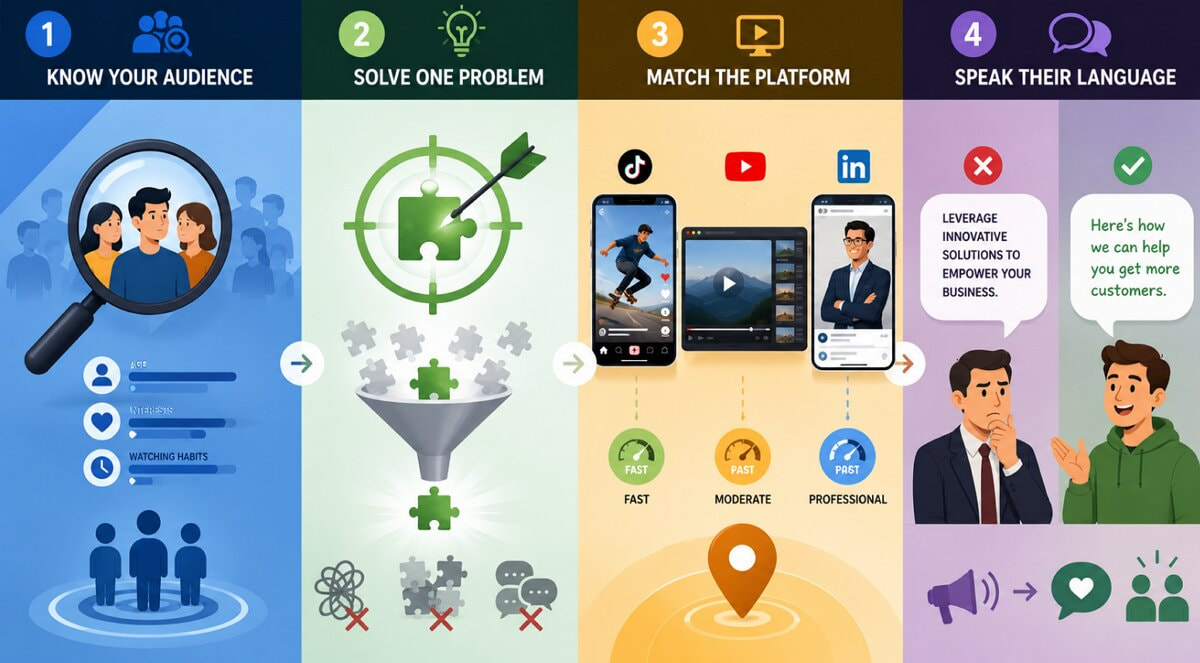
Identify Your Audience: Know who's watching before you write a single line. Their age, their interests, what they're actually doing when they hit play, all of that shapes the script more than any single creative decision you'll make.
-
Solve One Problem: Pick one pain point and stay there. The moment a video tries to fix everything at once, it ends up fixing nothing.
-
Match the Platform: A TikTok pace falls flat on LinkedIn, and a YouTube-style intro drags on Reels. Build the format and pacing around wherever the video is actually going to live, not a generic template.
-
Speak Their Language: Talk the way your audience actually talks, not the way a marketing deck talks. If a line sounds like a slogan, cut it.
Audience research does not need to be complicated. A quick look at comments, questions, or past video performance often reveals enough to move forward.
The Anatomy of an Engaging Video
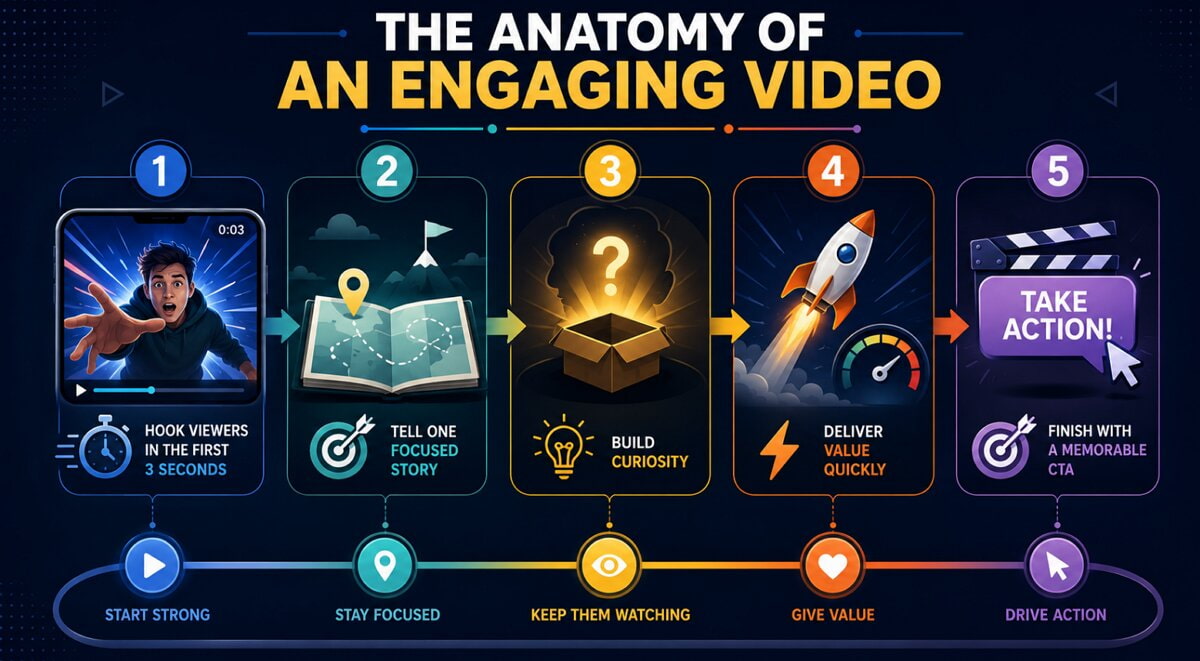
Every high-performing video follows a similar structure underneath the surface. Understanding this anatomy makes it easier to plan how to create engaging video content that holds attention from start to finish, no matter the platform.
-
Hook Viewers in the First 3 Seconds: You've got about three seconds before someone's thumb decides your fate. Open with motion, a sharp statement, or a question that makes scrolling past feel like a mistake.
-
Tell One Focused Story: Pick one idea and stay with it. The moment a video tries to say three things at once, it usually ends up saying none of them well.
-
Build Curiosity: Don't hand over the payoff right away. Tease it, then let it unfold; that's what keeps a thumb still instead of swiping.
-
Deliver Value Quickly: Skip the wind-up. Every second before you reach the useful part is a second someone might not stick around for.
-
Finish with a Memorable CTA: Close with something concrete, a follow, a click, a purchase, whatever it is, and make it the last thing they see instead of an afterthought tacked on at the end.
These 5 elements rarely work in isolation. The strongest videos blend them into one smooth sequence instead of treating each one as a separate checkbox.
Visual Elements That Keep People Watching
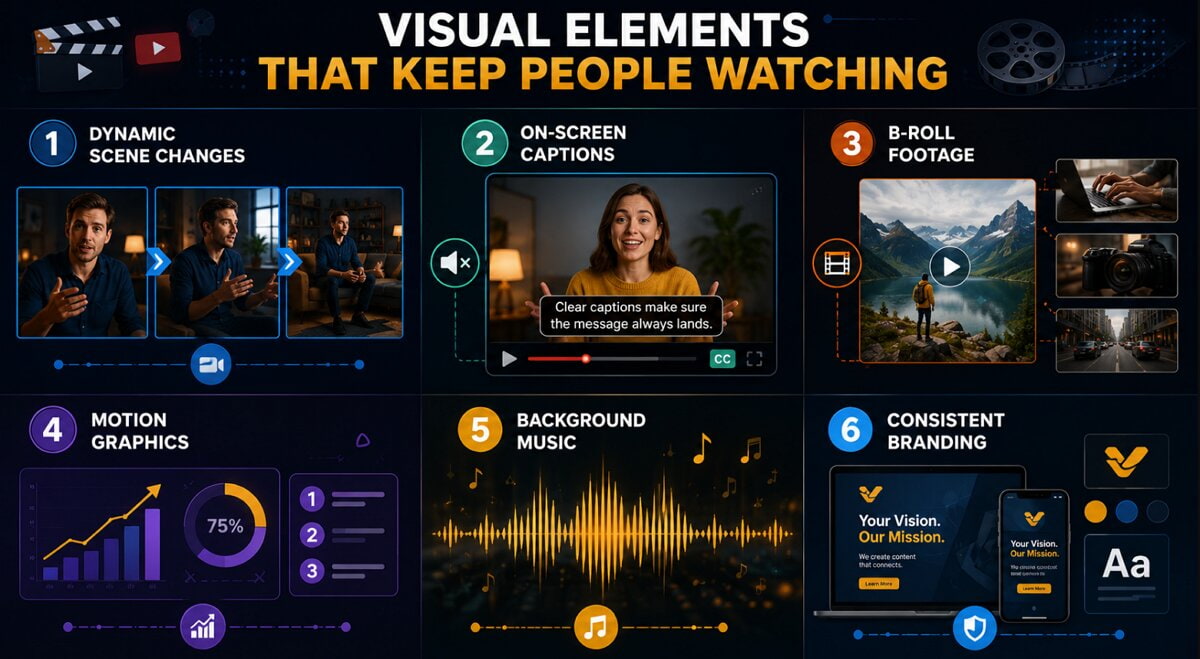
Strong writing only carries a video so far. Visual elements keep the pacing lively and give viewers a reason to stay past the first few seconds. Using a script without proper visuals does not work, even when the message is proper. The following elements are always present in videos that perform well.
-
Dynamic Scene Changes: Move to another angle when the current shot starts dragging. This helps hold the viewer's attention on the topic.
-
On-Screen Captions: Most people watch with the sound off, whether they're at work, in bed, or scrolling on the train. Captions make sure the video still lands without a single word of audio.
-
B-Roll Footage: Talking heads get old fast. Cut in footage that shows what you're describing instead of just saying it, and the pace never has to drop to make the point.
-
Motion Graphics: Numbers and steps are easy to say and easy to forget. Put them on screen with a bit of animation, and they actually stick.
-
Background Music: The track should sit under the message, not compete with it. If someone notices the music before they notice what you're saying, it's too loud.
-
Consistent Branding: Same colors, same fonts, same logo placement, every time. That's how someone scrolling fast still knows it's you before they've read a word.
Even a small budget can cover most of them with the right planning and the right tools.
Speed Up Video Creation with Zawa
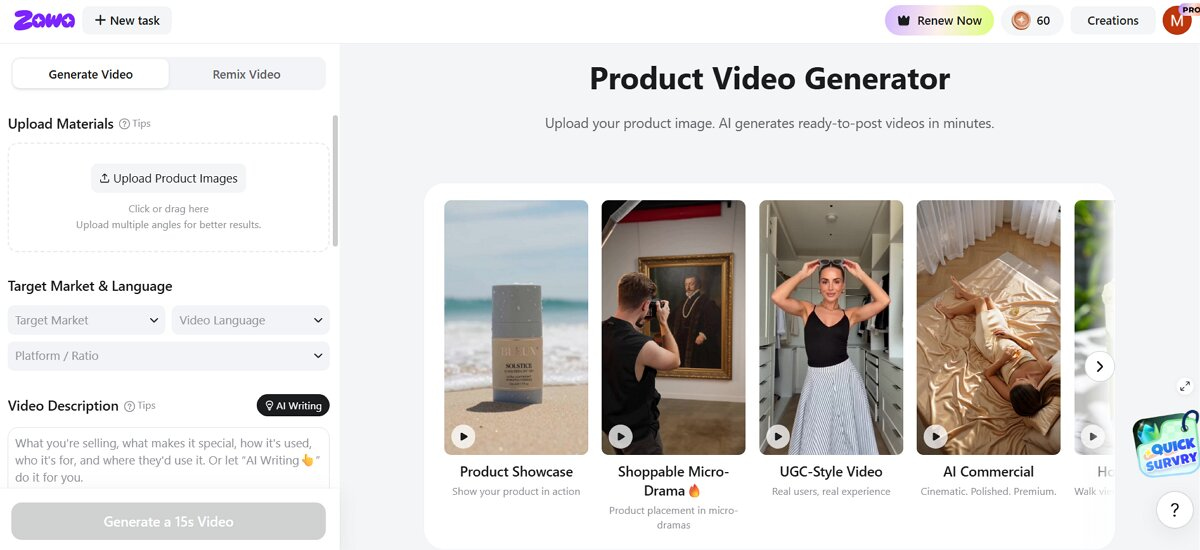
Manual planning, filming, and editing every video takes time that most creators do not have. Zawa speeds up how to create engaging video content with AI, from the first prompt all the way to the final export. The features below show what the platform can do.
-
Generate Videos from a Simple Prompt: Describe the topic briefly; Zawa turns that instruction into a complete video draft.
-
Turn Articles, URLs, or Product Pages into Videos: Drop in a link. Zawa reads the page, figures out what's worth keeping, and turns it into something people will actually watch instead of a tab they never get back to.
-
AI Writes Audience-Focused Scripts: The script isn't generic. Zawa writes toward the person on the other end of the screen, so the message doesn't end up sounding like it was written for everyone, and by extension, no one.
-
Create Videos with Realistic AI Avatars: Skip the camera, the lighting setup, the retake because someone sneezed mid-take. Zawa's avatars present the video themselves, and they hold up.
-
Add Human-Like AI Voiceovers: Pick a voice. It matches your pacing and tone, and it sounds like someone talking to you, not a machine reading text off a page.
-
Auto-Generate Captions and Scene Transitions: Captions go in on their own. So do transitions. That's hours of manual editing gone before you've even opened a timeline.
-
Customize Colors, Fonts, Logos, and CTAs: Match your brand before you export. Colors, fonts, logo placement, the call to action, adjust whatever needs adjusting.
Together, these features cut production time from days down to minutes. Creators still keep full control over the tone, visuals, and message, without needing a full editing team on hand.
How to Create an Engaging Video with Zawa
After you decide on your goal and idea, Zawa helps you turn it into a video in just a few steps. Follow the given steps to help you learn how to use this tool:
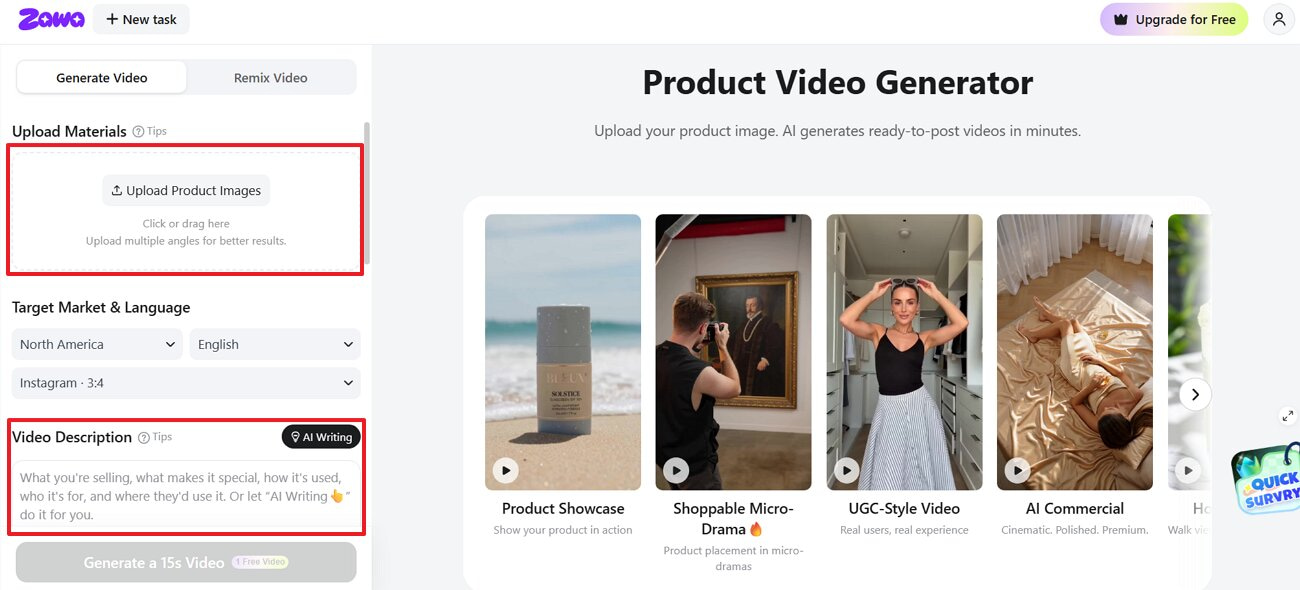
Step 1. Enter Your Topic or Upload Existing Content
When you access the “Zawa” tool, click the “Upload Material” area to import your desired photo and select the target market and language. After that, type in a prompt under “Video Description” to generate an engaging video.
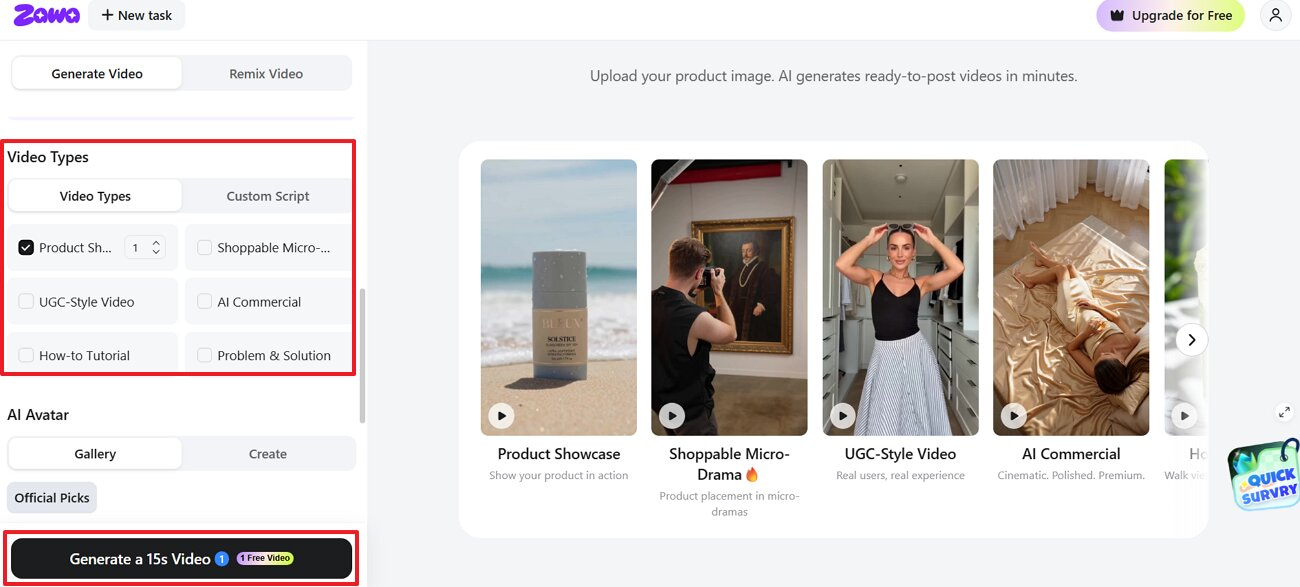
Step 2. Select Your Desired Video Style
Moving forward, scroll down to select the “Video Type” and press “Generate a 15s Video.”
Step 3. Preview the Generated Visuals and Export
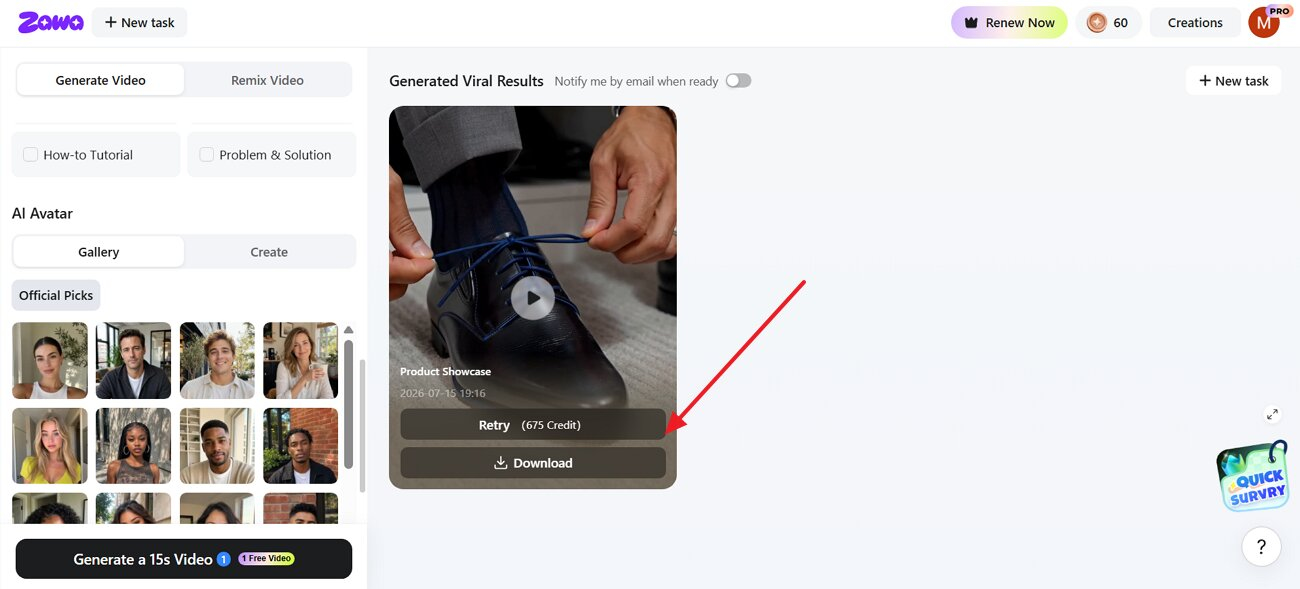
As the tool generates an engaging video, preview it to adjust captions or branding. After that, press the "Download" button and export the final video in HD quality.
Common Reasons Viewers Stop Watching Videos
Because of a few common mistakes, even a good video can lose viewers. That’s why avoiding these mistakes can help keep people watching until the end:
-
Slow Introductions: A slow opening hands viewers their exit. Three seconds of nothing happening, and the thumb moves on.
-
Information Overload: Six points crammed into ninety seconds don't inform anyone; it just overwhelms them. Pick what actually matters and cut the rest.
-
Poor Audio Quality: Bad audio kills a video faster than bad footage ever will. Viewers forgive shaky visuals. They don't forgive not being able to hear you.
-
Too Much Text: A screen packed with text stops being something people read and turns into something they skip. Keep it short enough to catch at a glance.
-
Repetitive Visuals: The video can become dull if you hold the same shot too long. Even a good message may not hold the viewer’s attention.
-
No Emotional Connection: Nobody shares a video that didn't make them feel something. That's usually the real reason a video with solid information still gets zero shares.
Most of these issues surface during editing rather than filming. A careful review before publishing catches many of them before viewers ever see the final cut.
How to Measure Whether Your Videos Are Actually Engaging
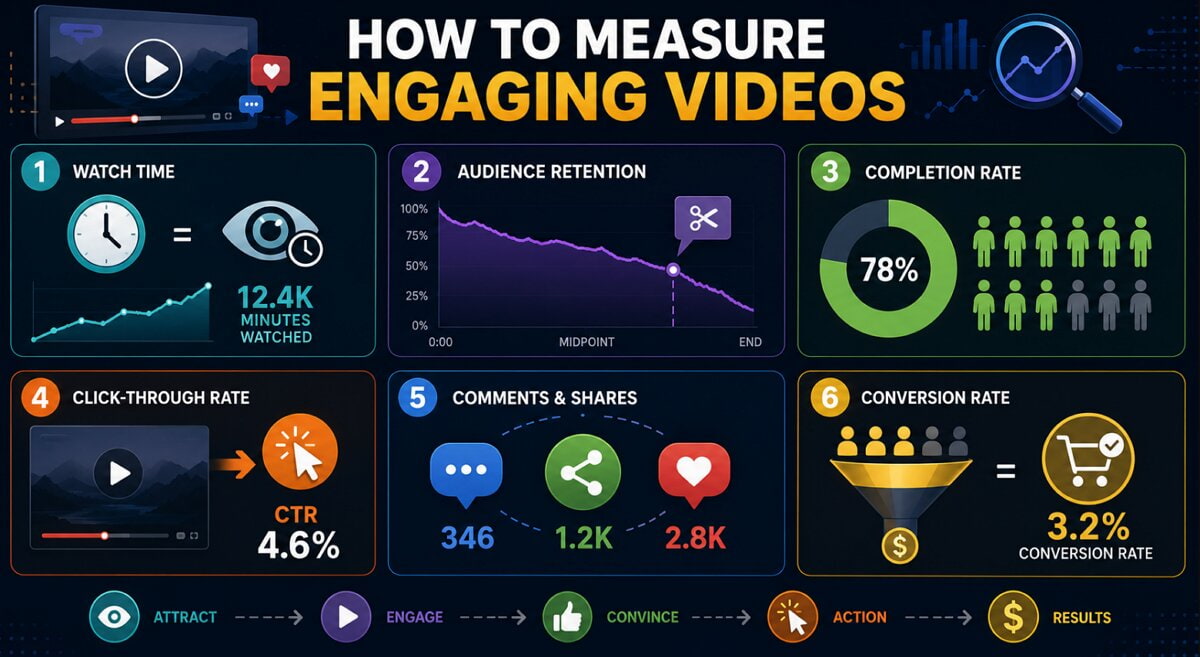
Engagement is not just a feeling; it shows up in measurable numbers over time. Tracking the right metrics reveals whether learning how to create engaging video content is actually working for a given audience.
-
Watch Time: Total minutes people actually spend watching. Add it up across a video, and you get a pretty honest read on whether the content is holding attention or just getting clicked.
-
Audience Retention: This is the graph that tells you. Watch where it dips, and you'll usually find the exact cut, transition, or slow stretch that made someone leave.
-
Completion Rate: The percentage of people who stick around for the whole thing, start to finish. High completion usually means the pacing worked.
-
Click-Through Rate: Not just who watched, but who did something after. This is what tells you if the CTA actually landed or just sat there at the end of the video.
-
Comments and Shares: Views are passive. Comments and shares mean the content hit hard enough that someone stopped to react or wanted a friend to see it too.
-
Conversion Rate: The most significant figure is the action viewers take. This may be signing up or buying a product.
Looking at a few videos together gives a clearer picture of what is actually working.
Conclusion
Good video content starts with a clear purpose and a specific audience. Keep the video interesting from the beginning. Tools like Zawa help you create high-quality videos faster. Tracking the right metrics afterward shows what to repeat and what to change next time, so each new video improves on the last. Anyone still working out how to create engaging video content can start with a simple prompt in Zawa and build from there.
Frequently Asked Questions
1.What makes video content engaging?
A great video needs a strong hook to capture your audience immediately. You should also use clear audio and very interesting pictures throughout.
2.How long should an engaging video be?
The best video length depends entirely on the platform you are using. Quick social media clips usually work best when kept under 60 seconds. Longer educational videos can run several minutes if the pacing is fast.
3.Can AI create engaging videos automatically?
Yes, though the first result is rarely perfect. Zawa can write the script, build scenes, add a voice, and place captions. Check the complete video before posting it.
4.How does Zawa improve video creation?
Zawa begins with your script. It creates the avatar video and adds the voice. Creators can still change the captions and scenes before export.
5.Which platforms benefit most from engaging videos?
Video matters on TikTok, Instagram, YouTube, Facebook, and LinkedIn. Still, one cut rarely works everywhere. The pace, length, and frame often need to change.
6.What metrics measure video engagement?
See where viewers stop watching. Then check how many finished, clicked, commented, shared, saved, or converted. Those data tell you what worked and what lost traction.
7.Can beginners create professional videos with AI?
Yes. Beginners can enter a topic in Zawa and pick a template. It does not even need video editing skills. Simple prompts and ready-made templates do most of the work.
You May Be Interested

Media.io AI Video Upscaler Review: Is It Worth It in 2026?

10 Best AI Video Upscalers Tested and Ranked (2026)

15 Best AI Video Generators in 2025

10 Best AI Video Enhancers to Upscale Your Videos