Pixbim Video Watermark Remover AI Review: Pros, Cons & Alternatives
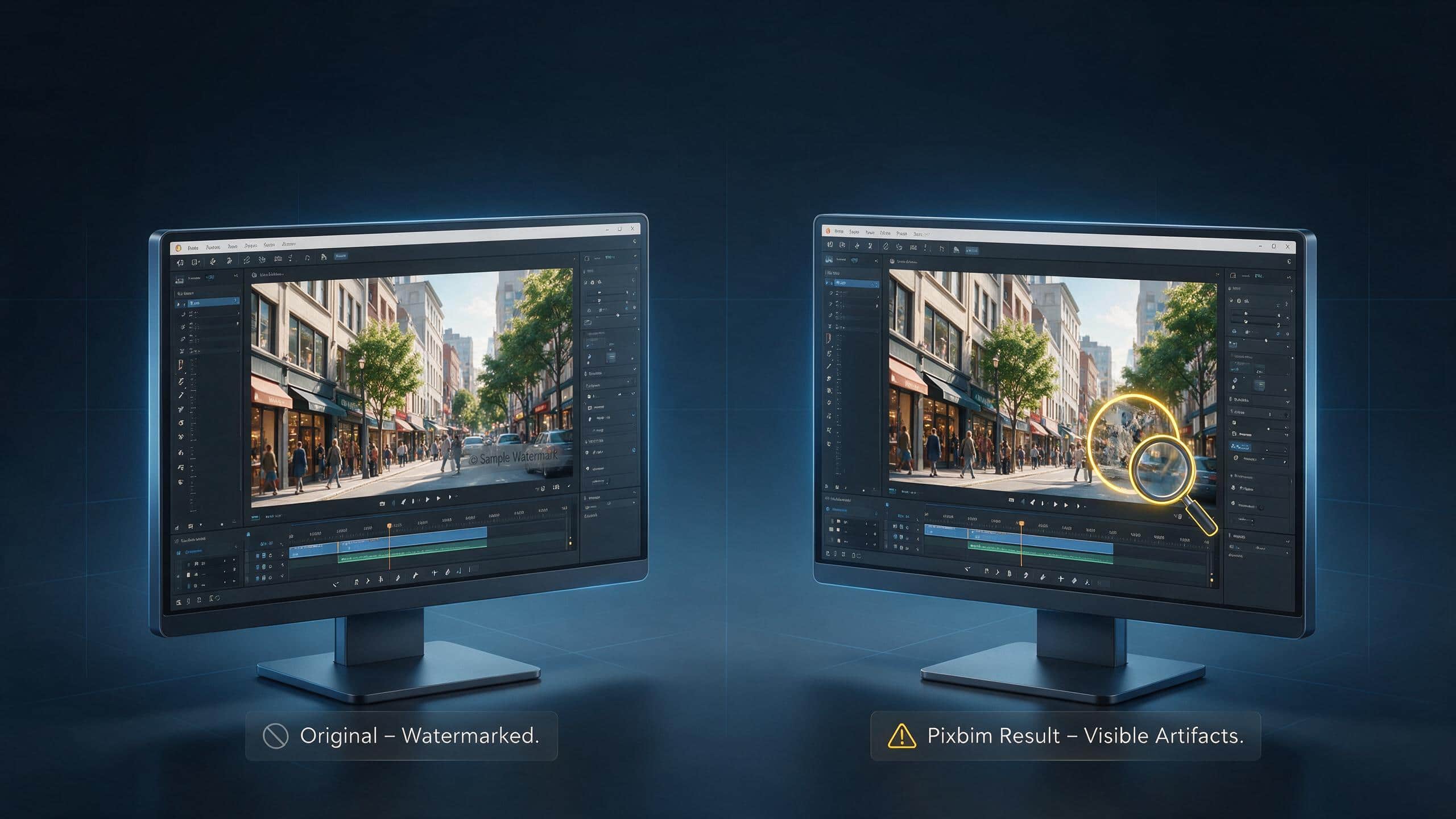
A split‑screen banner comparing original watermarked video (left) with Pixbim Video Watermark Remover AI output (right) on a desktop monitor. The right panel shows the watermark removed but reveals visible blurring and texture artifacts in the reconstructed area.

You found a video that you want to use for work or personal projects. The only problem is a watermark sitting on the screen. That is where Pixbim video watermark remover AI can help. It promises to remove watermarks from your visuals, but does it create clear results? We decided to test it ourselves.
In this guide, you will learn what Pixbim Video Watermark Remover does. Moreover, we also compared it with Zawa to see which tool gives better-looking videos with less effort.
What Is Pixbim Video Watermark Remover AI?
A desktop platform designed for people who want to clean up videos without complicated tools. It uses advanced technology to remove the video watermark rather than blur the text. Pixbim rebuilds the hidden area in the video and generates a clean result. The tool runs locally on the Windows device so the files remain on your device throughout the process.
Supported Formats
| Format | Common Uses |
|---|---|
| MP4 | The most common format for videos |
| MOV | Videos recorded on Apple devices |
| AVI | High-quality video files |
| WMV | Windows Media video format |
Pixbim Video Watermark Remover AI Features Reviewed
This tool makes watermark removal easier with advanced technology. Mentioned below are some of the key features of this tool:
AI Watermark Detection and Removal
Pixbim Video Watermark Remover AI allows users to select the watermark before starting the process. It then analyzes the selected area and removes the object or text frame-wise. The process is simple and does not require any editing. Results are usually better on videos with clean and consistent backgrounds.
Background Reconstruction Quality
The tool rebuilds the hidden background after removing the watermark from the video. The reconstructed area mixes well with the surrounding scene on plain surfaces. However, small virtual artifacts are observed on more detailed backgrounds.
Static vs. Moving Watermark Support
Pixbim can remove fixed and moving watermarks from videos. The fixed watermarks are easier to clean because they stay in one position. Moving watermarks require the tool to find their location. This feature works well, but complex motion can affect the final results.
User Interface and Ease of Use
This platform has a clean and easy-to-understand interface. The process begins without any difficult startup setups. Its controls are limited to the basic options and new users can learn the workflow without spending much time on setup.
Performance on Large Video Files
Pixbim Video Watermark Remover AI can process long videos and high-resolution files. However, the processing time depends on your computer hardware. Larger files take more time because each frame must be analyzed. Computers with fast processors and better graphics hardware complete watermark removal in much less time.
How to Remove Watermarks with Pixbim AI
Provided below are the steps to use Pixbim for removing a watermark from videos:
Step 1. Add Video to Erase Watermark
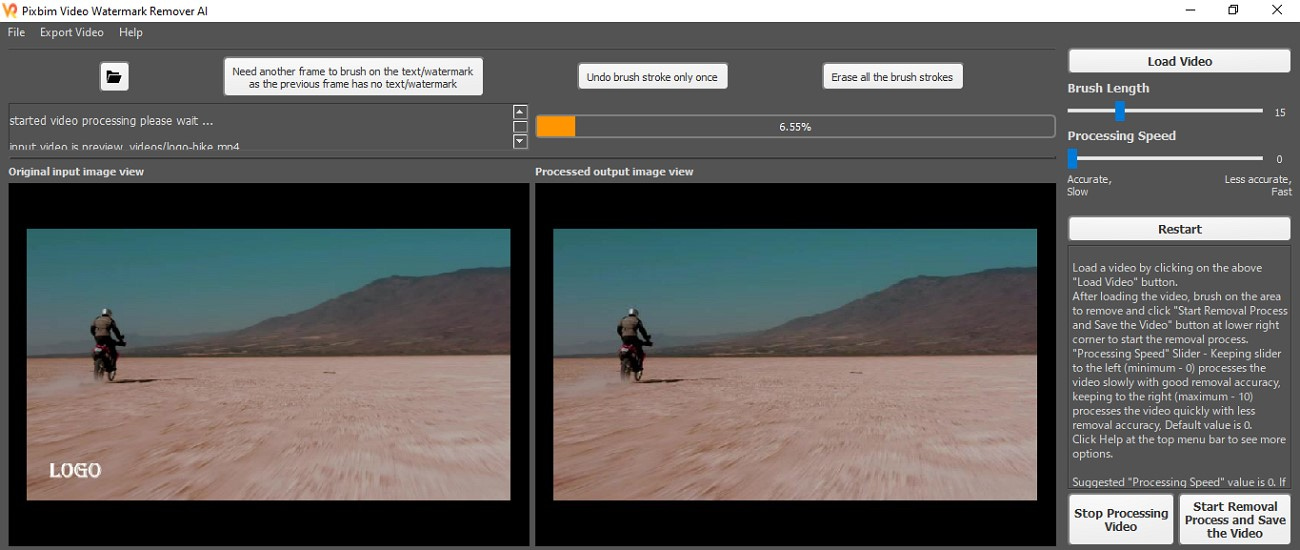
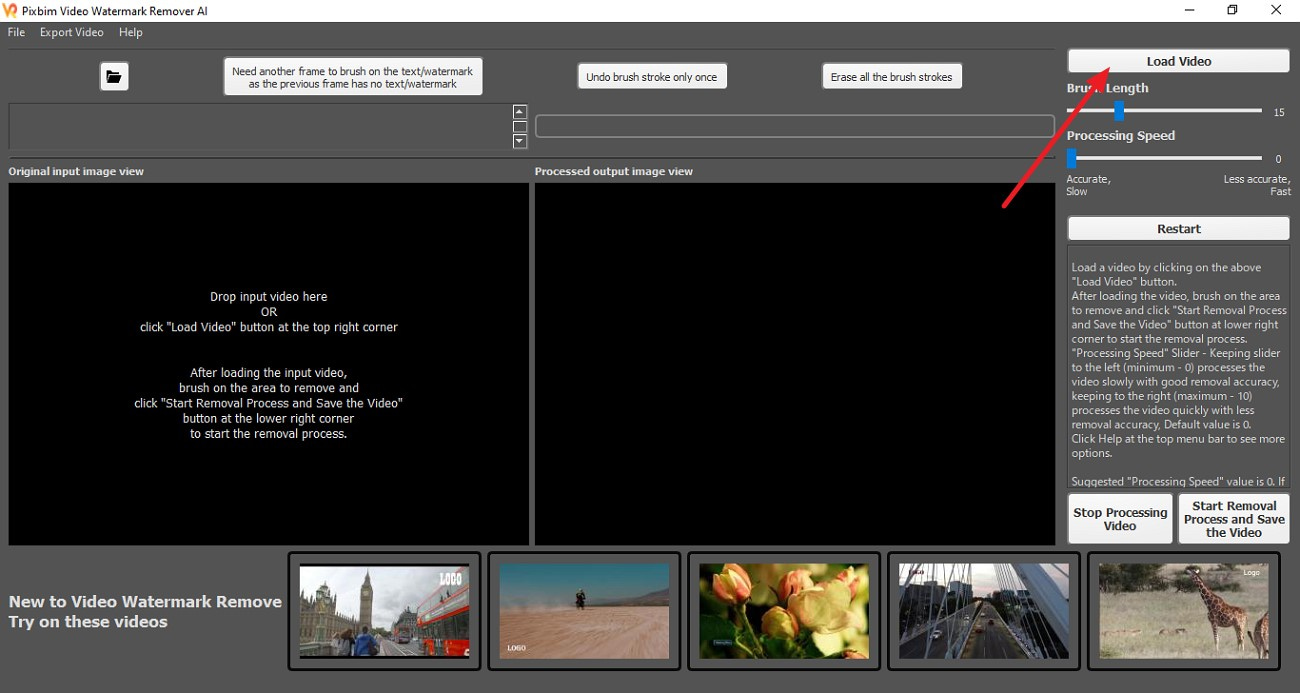
Use the “Load Video” button on the right to load the video with a watermark when you open the tool on your computer.
Step 2. Select Watermark Area
Select the region by brushing over it with a watermark. Drag the slider to adjust the brush length. To begin the process, click on the “Start Removal Process and Save the Video” button.

Step 3. Export the Clean Video
Compare the results once the watermark is removed. The final video will be saved to your device automatically once the process completes.

Result Review
The results show obvious blurred spots after using the Pixbim Video Watermark Remover AI. It is clear that something was covering the part because the new background does not match the video.

Pixbim Pricing and System Requirements
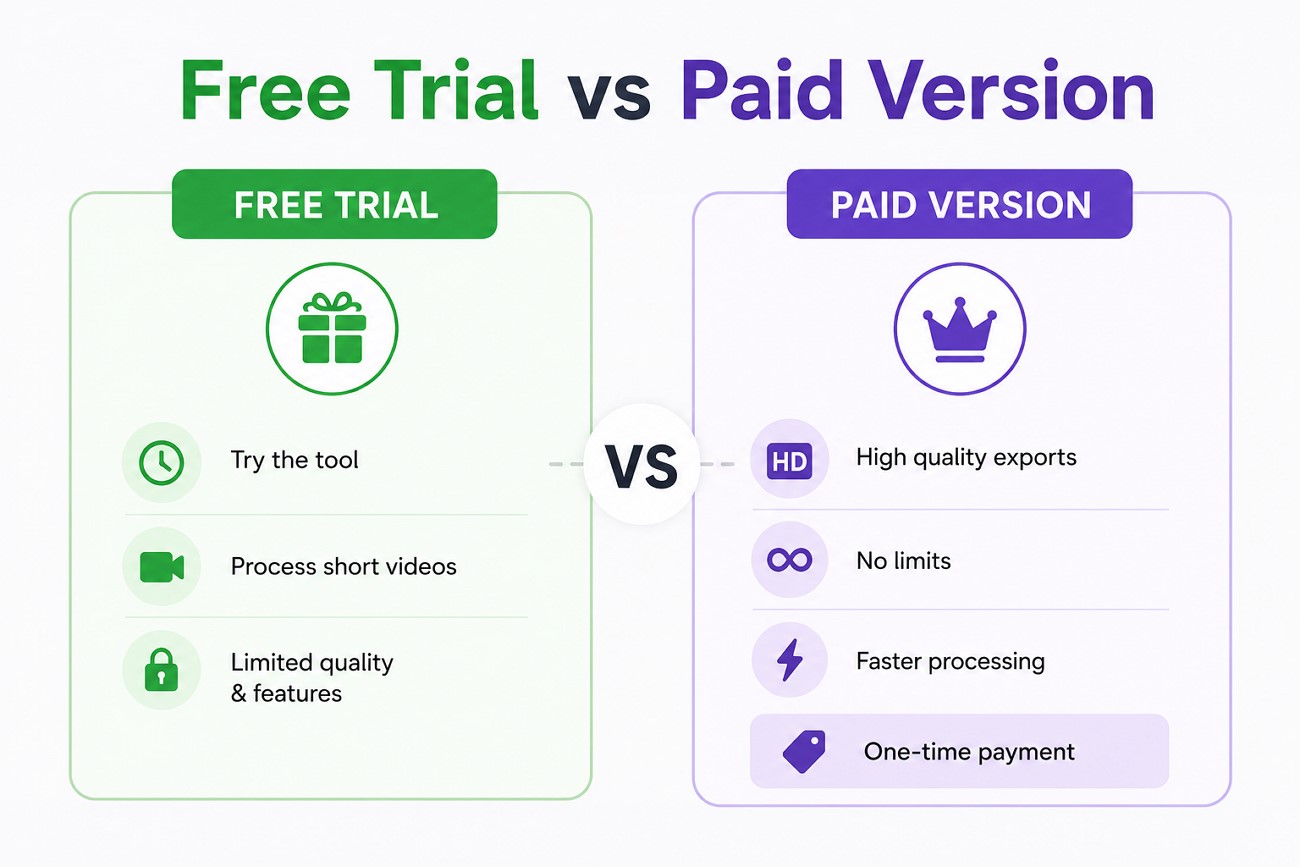
Pixbim Video Watermark Remover AI provides free trial and a premium version. The version that does not cost anything is good for testing the tool. Its paid version provides support for high resolution and fast processing.
Free Trial vs. Paid Version
Free Trial: Try out the platform and analyze short videos much faster. It's good to look through the interface and see if you like it. The free version is limited in output quality and application but the paid version is not.
Paid Version: This platform is a one-time purchase, no ongoing subscription required. The tool used to cost $69.00 but is now on sale for $25.99. Supports high quality exports and allows you to process videos with no limits of trial. The premium version removes the trial restrictions and gives you full access to it.
System Requirements of Pixbim Watermark Remover
-
Windows - Vista, 7, 8, 10, 11 (64-bit only). Most laptops and desktop computers are 64-bit systems.
-
Mac - Not supported.
-
Tablets and iPads - Not Supported.
-
Linux - Not Supported.
Pros and Cons of Pixbim Video Watermark Remover AI
Pixbim Video Watermark Remover AI offers a simple way to remove watermarks without requiring professional editing skills. Ir performs the task well, but has some limitations that users should know before purchasing. Here are some of the pros and cons of the tool:
What We Liked
-
The interface is simple and easy to understand even for first-time users.
-
Pixbim also offers a lifetime license while many other tools offer monthly subscriptions.
-
It lets you adjust the brush strength for the watermark removal.
-
Users can start and pause the process whenever they want.
-
The tool also lets you adjust the process speed as per your choice.
Where Pixbim Could Improve
-
Complex scenes with heavy textures leave artifacts.
-
The software is built for Windows users and does not offer support for Mac.
-
High-resolution videos take longer to complete on devices with older processors.
-
No other video editing features are offered by the tool.
Pixbim AI vs. Zawa: Which Is Better?
Pixbim Video Watermark Remover AIis made for one main purpose, which is to remove watermarks on Windows devices. The tool is great for users who prefer desktop software with one-time purchase. However, it does not include other video editing tools. In these cases, users choose other products that provide different features.
Zawa is one such tool, made for creators who want more than just watermark removal. An online platform where you can find different video editing functions, as well as remove watermarks. The tool intelligently completes the hidden parts by using advanced technology after watermark removal. You get the ability to upload videos in formats like MP4, MOV, and M4V.
Why Choose Zawa for AI Watermark Removal?
Zawa does much more than hide unwanted logos or text. It analyzes the frames and preserves video quality to generate natural results. Mentioned below are some of the reasons why you should choose this Pixbim Watermark Remover AIalternative for watermark removal:
Remove Watermarks Without Blur
Various tools replace the watermark with blurred patches that are easy to notice. Zawa examines the nearby pixels and keeps the edited area consistent with the video. The results look cleaner and require less correction.
Rebuild Missing Backgrounds with AI
Removing a watermark leaves missing visual information when a watermark covers part of the scene. Zawa uses advanced technology to reconstruct the area with matching textures and colors.
Maintain HD and 4K Video Quality
Using tools like Zawa helps you maintain the original resolution after editing. It provides support for high–definition and 4K video while keeping them sharp.
No Software Installation Required
Zawa is a browser-based tool and is working fully online. This allows users to upload and edit videos without having to install desktop tools. Editing in a browser also makes it easier to work across different devices.
Faster Cloud-Based Processing
Instead of your computer’s hardware you get the ability to perform heavy processes like watermark remover on remote servers. This means processing is faster and larger files are processed in less time.
Improved Workflow for Content Creators
Zawa features Auto mode and a simple workflow that is easy to use. It locates the watermark and removes it. That means less manual editing, and helps creators finish projects faster.
How to Remove Watermarks from Videos Using Zawa
Now that we know its features, here are the procedures for removing a watermark with thisPixbim Video Watermark Remover AI alternative:
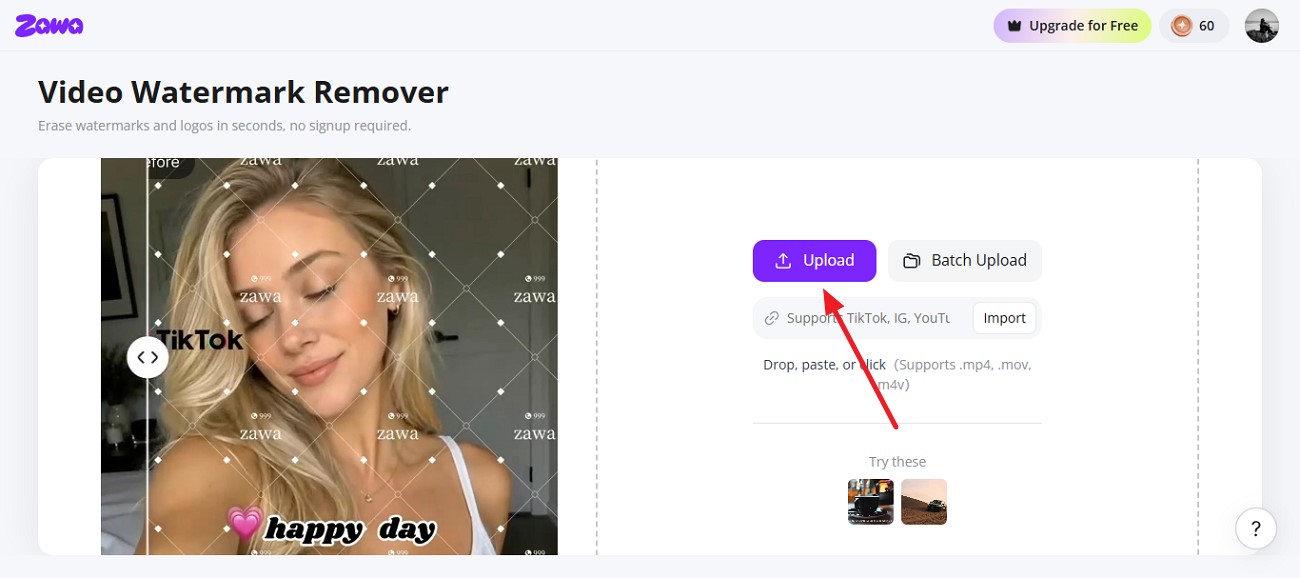
Step 1. Upload Your Watermarked Video
Open your web browser and search Zawa watermark remover on the web. To add the watermark video, click on the “Upload” button in the interface.
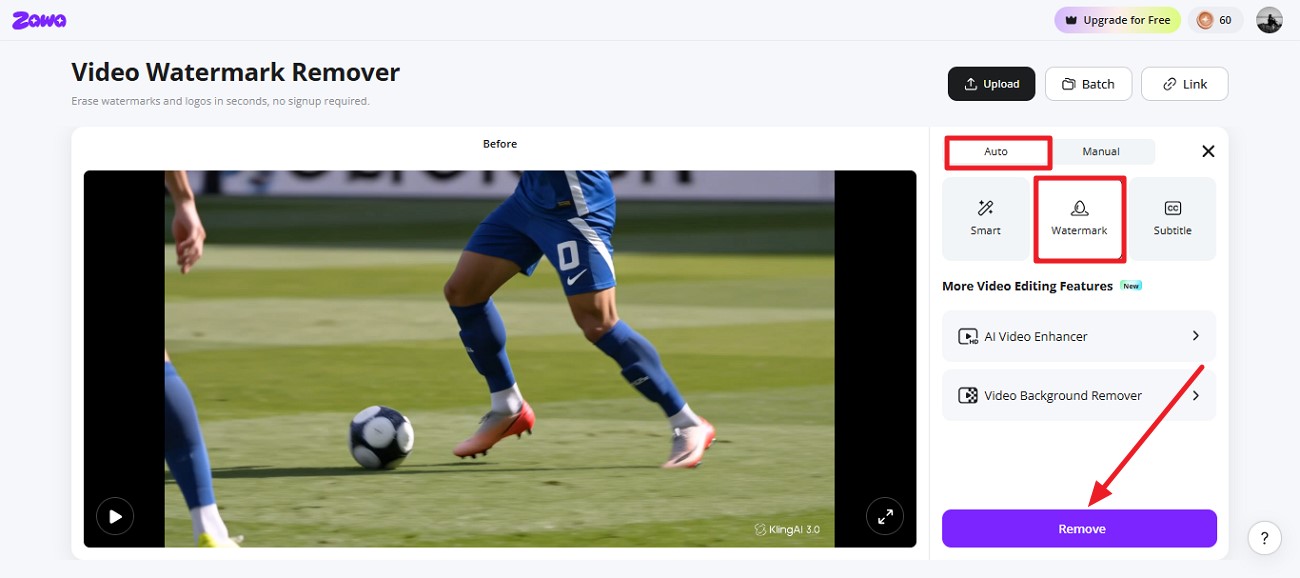
Step 2. Select AI Watermark Remover
Select the “Auto” mode and choose the “Watermark” option from the options on the right. Click on “Remove” and the tool will automatically detect and remove the watermark.
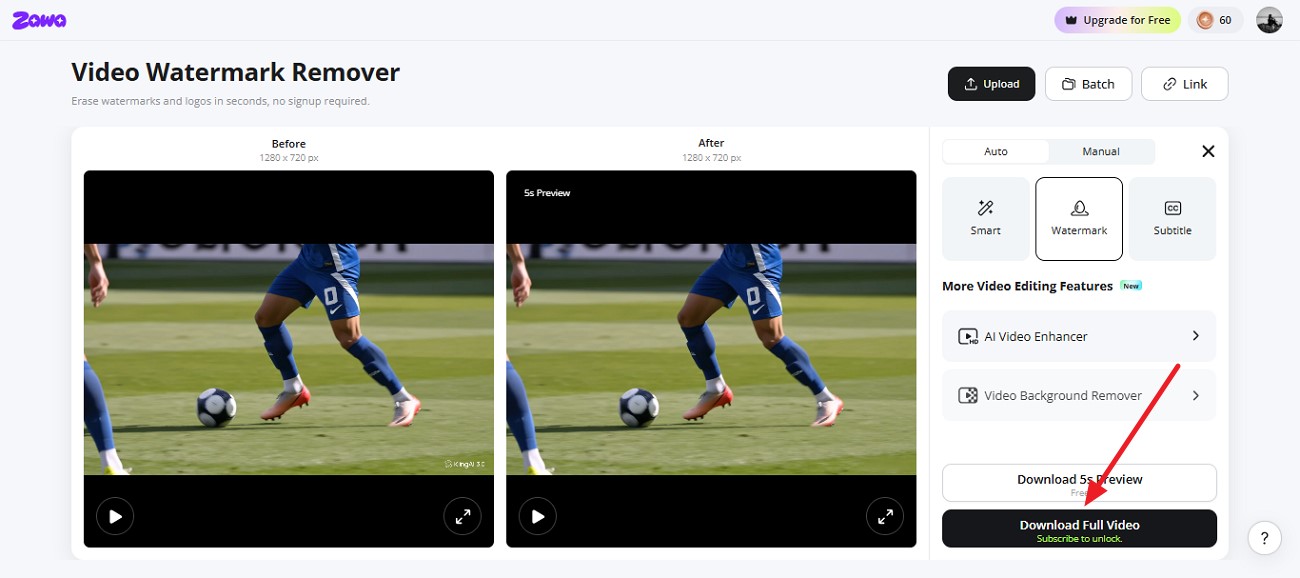
Step 3. Export the Cleaned Video
Once the watermark is removed, compare the before and after video results. When you are happy with the results, click on “Download Full Video.”
Is Pixbim Video Watermark Remover AI Worth It?
To conclude, Pixbim Video Watermark Remover AIis a good choice for users who want a simple desktop tool to remove watermarks. It is user-friendly and supports multiple formats. It works well on many videos but can be blurry on videos with difficult backgrounds. If you want a more full-featured tool with automated features and cleaner results, tools like Zawa are a good option.
Frequently Asked Questions
-
Is Pixbim Video Watermark Remover AI free?
The platform offers a trial for first time users which is free of cost. this version has trial and quality limitations. You need to buy the full version which is paid to remove the restrictions.
-
Can Pixbim remove moving watermarks?
The tool can remove moving and still watermarks. However, the results generated in moving watermark removal can leave artifacts. If you want cleaner results, you can use tools like Zawa.
-
Does Pixbim reduce video quality?
Videos with detailed backgrounds or large watermarks may show artifacts and reduce the video quality. Tools like Zawa allow users to get rid of the watermark without disturbing the quality.
-
Is Pixbim available for Mac?
Pixbim is a dedicated tool used only on Windows devices. Mac users can use online tools like Zawa to remove watermarks from their videos.
-
Which is better: Pixbim or Zawa?
For users who want a desktop tool, Pixbim is a good option. However, Zawa is a reliable choice if you want a tool that offers high-quality results and other video editing features.
You May Be Interested
Apowersoft Watermark Remover: Review, Pricing & Alternatives

How to Remove Gemini Watermark?

How to Remove CapCut Watermark: Manual & AI Methods Guide

How to Remove Moving Watermark in Filmora: Official & AI Solutions

How to Remove the Kling AI Watermark