Supawork AI Video Watermark Remover Review: Is It Worth Using in 2026?
We tested Supawork AI Video Watermark Remover on real videos — and compared it with Zawa to see which one actually delivers clean results. The banner shows the tool in action on a real workspace. Read our full review to find out which tool wins.

Many people waste hours trying different ways to clear unwanted watermarks from their videos. Some methods fail badly, while others lower video quality after the editing process finishes. So they search for tools that help to clean things up fast. This Supawork AI Video Watermark Remover review explores its main features along with performance and pricing. You will also see how Zawa works as an alternative to clean watermark removal.
What Is Supawork AI Video Watermark Remover?
Supawork AI is an all-in-one online workspace with many smart tools. The covers video generation and face swap tools and also offers headshots and a watermark remover for clips. All types of people, such as students and creators, can use it without any editing skills.
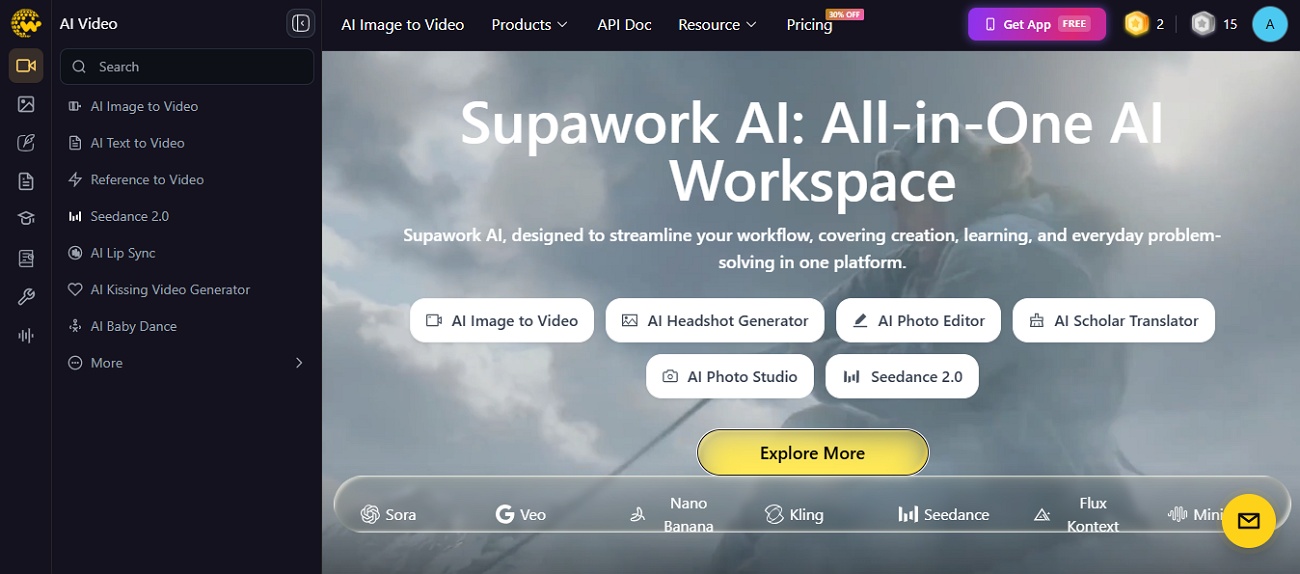
The Supawork AI video watermark remover helps remove unwanted marks from videos using AI. While removing the watermarks, it does not damage the video quality. Moreover, the tool supports common formats such as MP4 and WEBM easily.
Supawork AI Video Watermark Remover Features Reviewed
Its built-in features make video watermark removal easier and faster for everyday editing tasks. Thus, below are the core features of Supawork AI video watermark remover that help users create cleaner videos with ease:
AI-Powered Watermark Detection
Supawork finds watermarks and timestamps across video frames using smart AI. It checks each frame before it removes any unwanted marks by itself. This helps keep other video parts safe from any unwanted modification.
Automatic Background Reconstruction
After removing the watermark, the tool fills the hidden background using nearby picture parts. This helps the cleaned area look natural instead of blurry or with strange marks. During the complete video editing process, all colors and moving objects stay more natural.
Batch Video Processing
Supawork follows a simple upload, clean, and download process for every single video project. This online tool currently manages one video instead of many videos at once. Users can upload files up to 100 MB to remove unnecessary marks from the video.
HD Video Export Quality
It keeps the original video quality after removing unwanted watermarks from every scene. The tool saves video resolution and frame speed during the editing process. It avoids heavy blur and maintains important picture details clearly after editing.
Web Editing Experience
Supawork works inside your browser without installing extra software. Users upload videos and remove watermarks. Then, download finished files using simple editing steps. The free tool does not require creating an account before starting basic editing tasks.
Hands-On Test: Is Supawork Good at Removing Watermarks?
We tested the Supawork tool with different watermark styles across everyday video samples. Adhere to each step below to see the final results from every simple test:
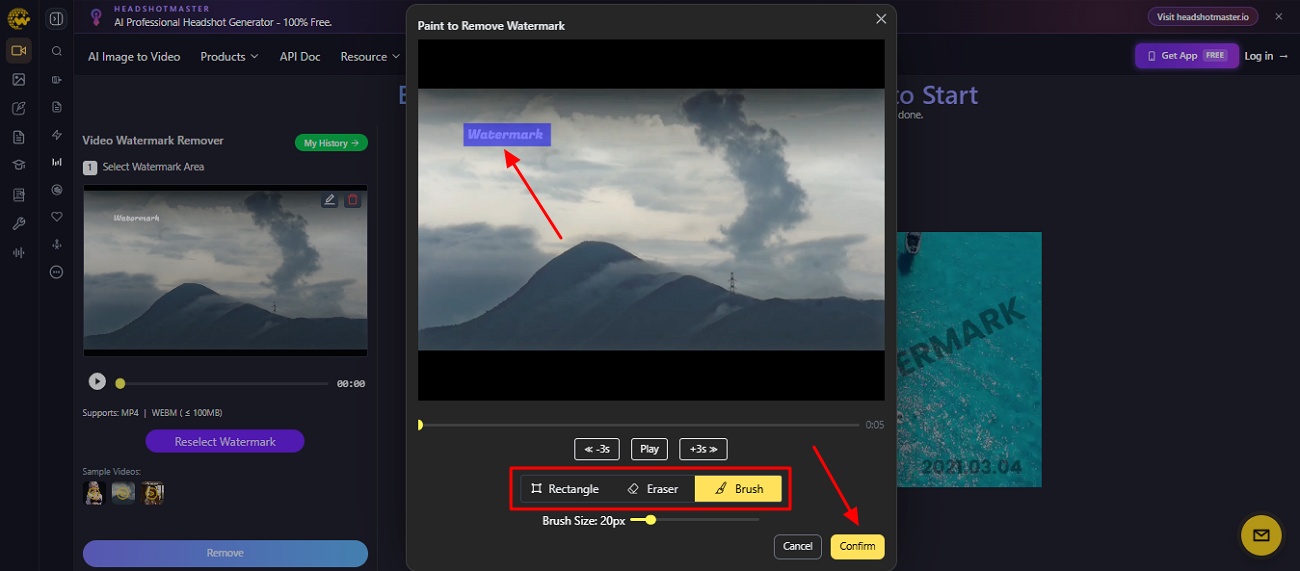
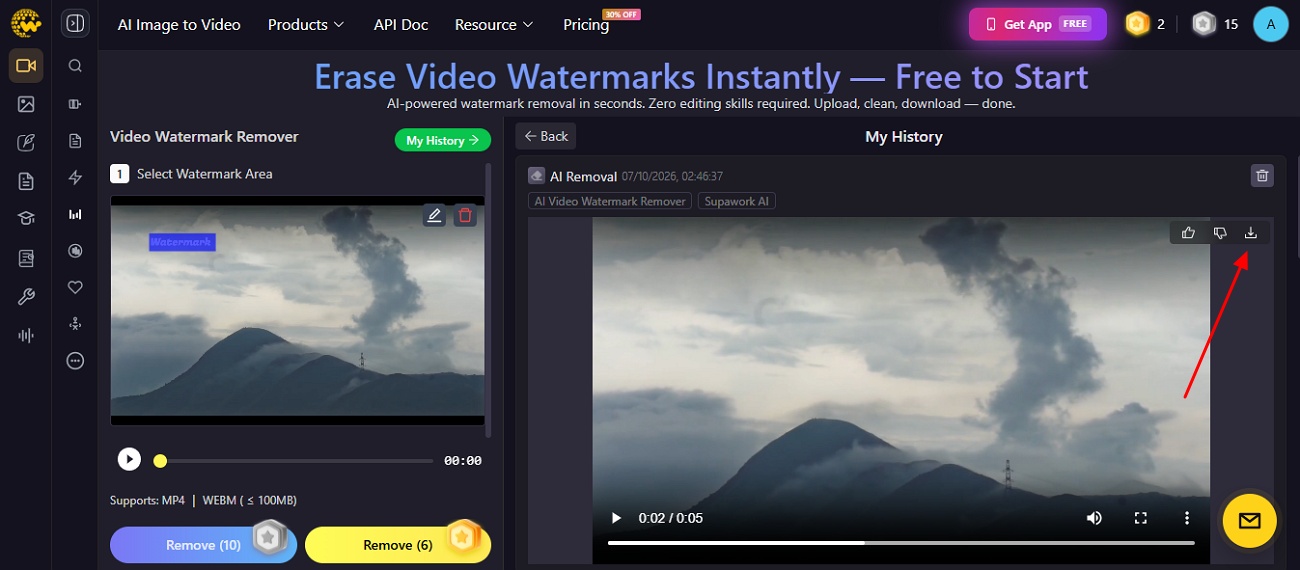
Step 1. Visit the official webpage of “Supawork AI Video Watermark Remover” and click “Upload” to add a video. When a video is added, select the watermark area using “Brush” and “Rectangle”, then opt for “Confirm.”
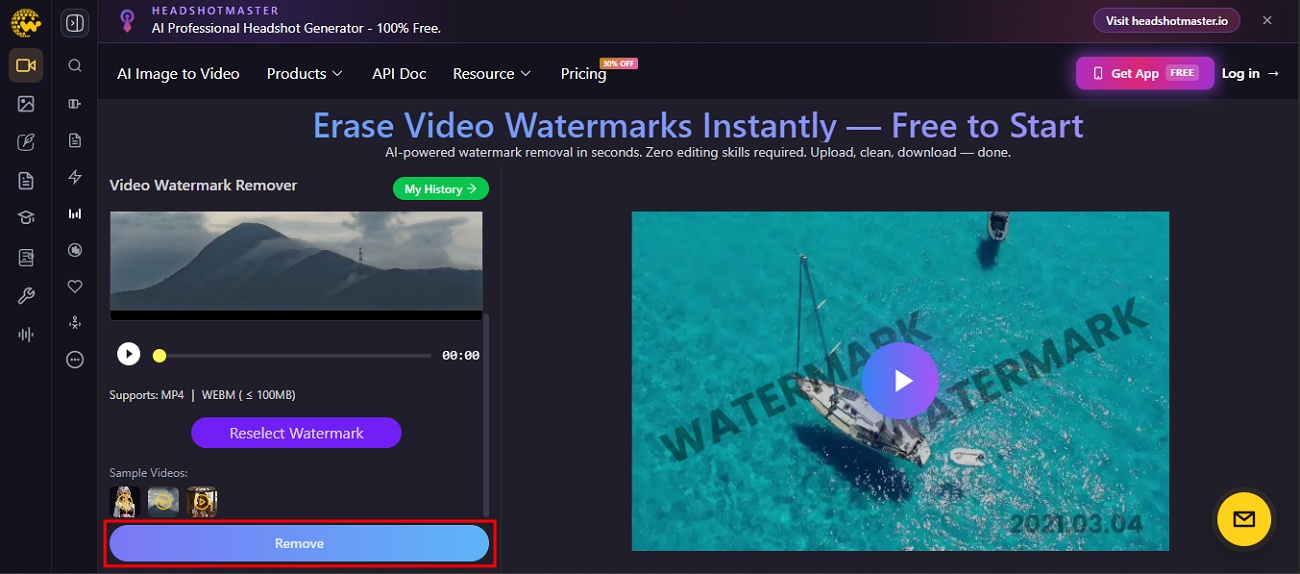
Step 2. Once all the settings are done, press the “Remove” button to start the removal process.
Step 3. When the watermark is removed from the video, opt for the “Download” icon to save it.
How Well Did Supawork AI Work?
Supawork AI worked well for removing simple watermarks from video editing tasks. It kept most videos clear after removing unwanted marks from different video scenes. Some hard watermarks and crowded backgrounds may show small problems after editing a video. Overall, the program performed well, but it was not good for every single video type.
Supawork AI Pricing: Is It Worth the Cost?
Supawork AI video watermark remover has different plans with different editing needs. Read the given table to know all prices before making your final choice:
| Price | Coins | Best For |
|---|---|---|
| $0 | 30 | Daily watermark removal |
| $4.99 | 400 | Light AI use |
| $9.99 | 800 | Casual AI creation |
| $37.99 | 3000 | Frequent AI creators |
| $89.99 | 8000 | Heavy agency use |
Which Plan Is Best for Your Needs?
The best plan depends on your needs and how often you use the tools. If you only remove watermarks now and then, the free plan is enough. It works fast and costs nothing at all. Plus, if you also want to create AI videos or swap faces, choose a coin pack instead. Since batch tools are missing, the time cost matters just as much.
Pros and Cons of Supawork AI
Supawork AI video watermark remover has many features along with limitations for creators. The following section explains its pros and cons for better understanding:
Pros
-
Detects logos and text automatically before starting the watermark removal process.
-
Cleans watermark areas without cropping important parts from the original video frame.
-
Works well for many social platforms like TikTok for video watermark removal tasks.
Cons
-
Large video files above 100 MB cannot be uploaded through the browser tool.
-
Moving watermarks may sometimes leave less accurate results in busy video backgrounds.
-
Results can change between videos depending on watermark position and background complexity.
Who Should Use Supawork AI?
Many people can use Supawork AI video watermark remover, such as students and content creators. The program is good for those people who want to erase watermarks without having to learn advanced skills. If you’re creating business videos, you might want to use more advanced software for consistent results.
Supawork AI vs. Zawa: Which Watermark Remover Is Better?
Supawork handles simple tasks, while Zawa removes watermarks without blur and supports HD quality. So, explore the table below to find the better option for you:
| Feature | Supawork AI | Zawa |
|---|---|---|
| Watermark Detection | Finds marks using AI | Removes marks without blur |
| Background Fix | Rebuilds background smoothly | Fixes the background frame by frame |
| Batch Processing | Handles one video only | Cleans multiple videos together |
| Video Quality | Keeps original video quality | Keeps HD and 4K quality |
| Blur After Removal | May vary sometimes | Clear without blur |
Best Supawork Alternative: Zawa
Although Supawork AI video watermark remover is good for simple watermark removal, some users have higher expectations. In this case, it makes sense to switch to another tool when the video quality becomes more important. For this, Zawa offers a stronger solution for clean and natural mark removal results. Its AI removes undesired marks and keeps videos clear and natural, with no blurry parts.
You can upload and clean multiple videos together to finish more work in less time. Apart from that, this program supports different video formats such as MP4. After removing marks, every video frame is fixed carefully to keep the background natural. Its fast AI engine removes watermarks without any sort of manual work to save editing time. Plus, the software keeps video quality clear without losing picture details after editing.
How to Remove Video Watermarks with Zawa
Zawa gives beginners an easy way to remove unwanted marks from videos. Thus, adhere to the steps below to remove watermarks with clean and natural results:
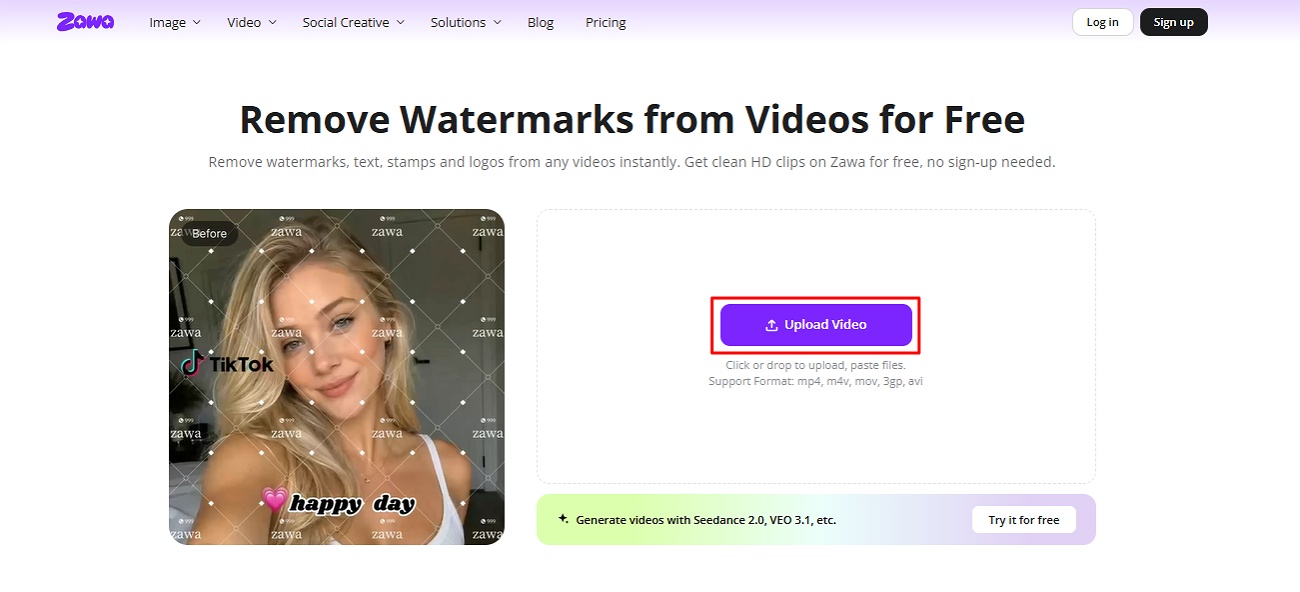
Step 1. Upload Your Watermarked Video
Visit the official “Zawa” website and click the “Upload Video” option to add watermark videos.
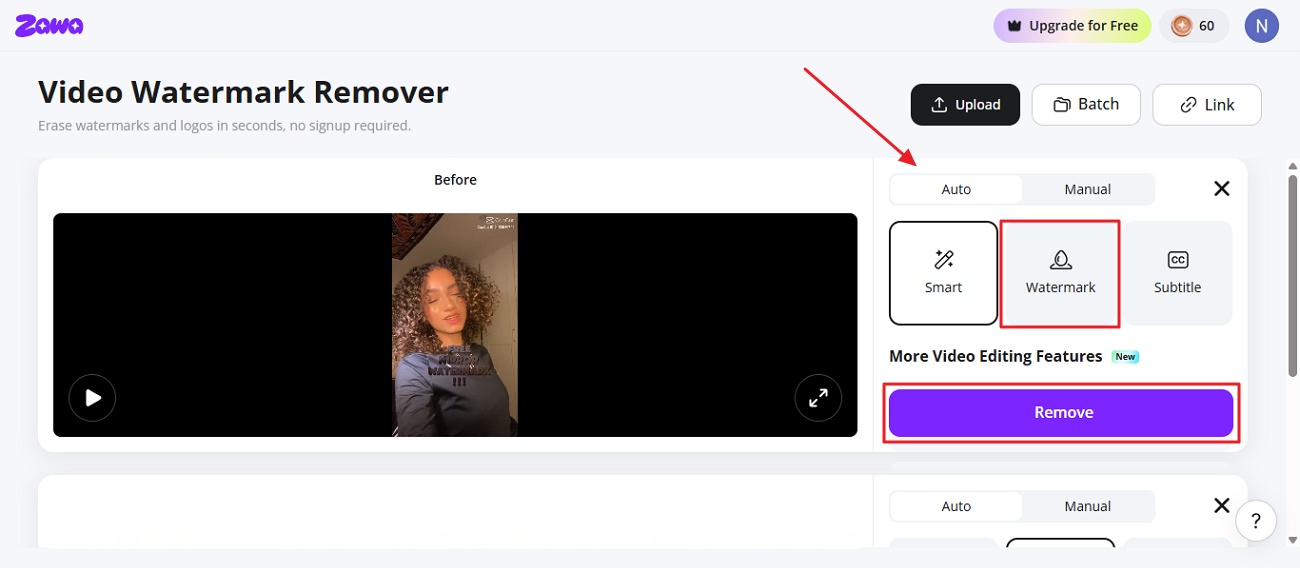
Step 2. Select AI Watermark Removal
When the video is imported, choose the “Auto” option, then select “Watermark”, then press the “Remove” button.
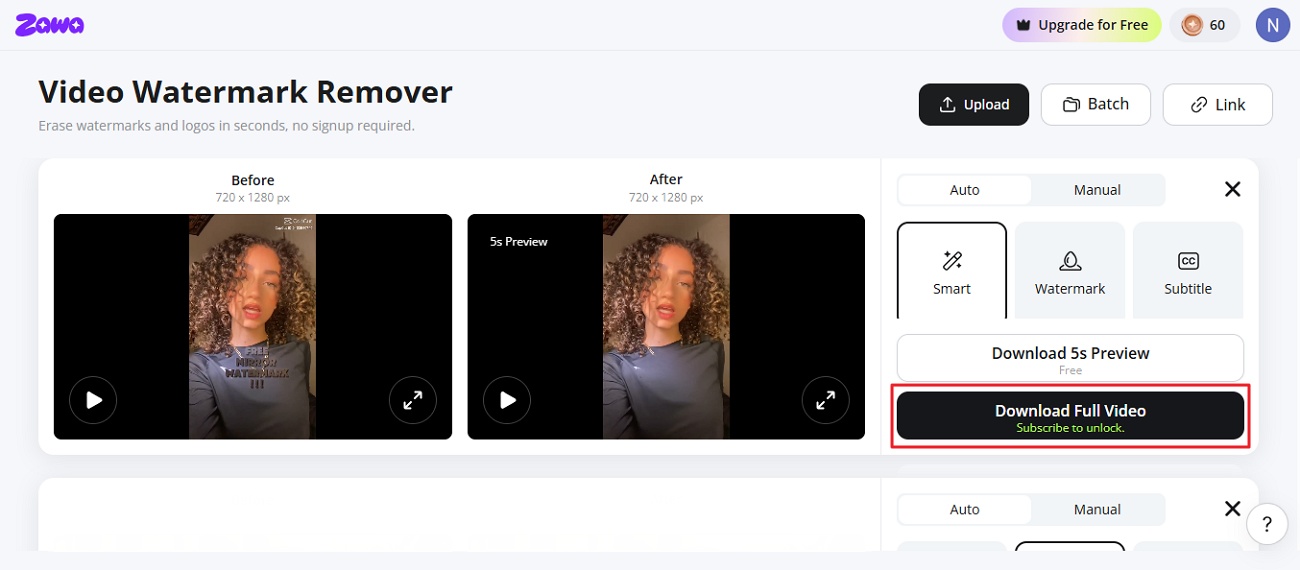
Step 3. Download the Final Video
When the marks are removed from the video, opt for the “Download Full Video” option to export it.
Why Zawa Is the Better Alternative - Verdict
Our test showed Zawa handled watermark removal across different types of video clips. Most cleaned areas matched nearby backgrounds without leaving clear marks after the editing process. The batch feature also helped finish several videos much faster than editing a single video. Overall, Zawa gives more steady and better output across the complete process.
Conclusion
In summary, many creators need a tool that saves real time on video editing tasks. Supawork AI video watermark remover works well but only handles one video at a time. This can slow things down for busy creators and growing small businesses. That is why Zawa works better for serious and growing content creators. It handles many video projects faster and keeps HD and 4K quality intact.
Frequently Asked Questions
-
Is Supawork AI Video Watermark Remover free?
Yes, Supawork offers free mark removal tools with limited daily use for everyone. It lets you remove watermarks from videos without any cost involved. Paid coin packs are only needed for extra tools and advanced creative features.
-
Does Supawork reduce video quality?
No, Supawork tries to keep your original video quality during the edit. Most simple videos stay clear when watermarks are removed using the available AI tools. The result can change due to different marks and backgrounds that modify the video quality.
-
Can Supawork remove moving watermarks?
Supawork is good for performing better with marks that remain in one place. Moving watermarks may be more difficult for the program to locate each time. So results may not be perfect every time for videos with moving marks.
-
Is Supawork safe to use online?
Yes, Supawork works safely as an online tool inside your search engine. You do not need to install any extra software or unsafe hidden plugins. Still, always check your internet connection and do not share private personal information.
-
What is the best alternative to Supawork AI?
Zawa is a strong alternative for people needing cleaner watermark removal every single time. It removes watermarks without blurring while keeping video quality clear after every editing task. The program also supports multiple videos together and helps users finish projects much faster overall.
-
Which AI watermark remover offers the best results?
The best program depends on your video needs and the quality you want each time. Supawork is good at doing some simple editing and removing marks from everyday videos. Zawa produces cleaner results and retains the final video quality much better.
You May Be Interested
Apowersoft Watermark Remover: Review, Pricing & Alternatives

How to Remove Gemini Watermark?

How to Remove CapCut Watermark: Manual & AI Methods Guide

How to Remove Moving Watermark in Filmora: Official & AI Solutions

How to Remove the Kling AI Watermark