How to Design a Menu Online
Learn how to design a menu online with a clear structure, readable typography, consistent branding, accurate prices, and mobile-friendly formatting. This guide also covers menu tools, food photos, dietary icons, export settings, and final checks too.

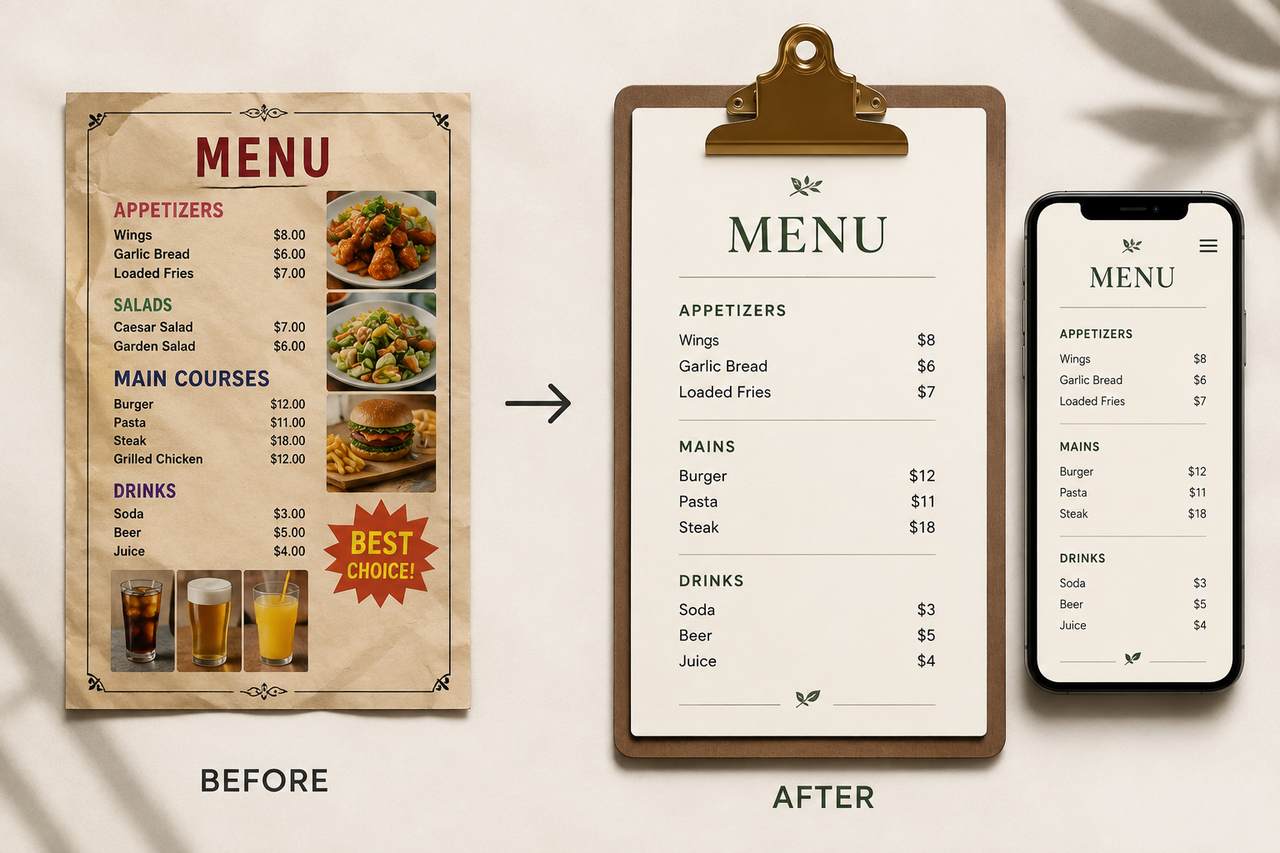
A restaurant menu has to do more than display dishes and prices. It should help customers understand their options, compare dishes, and decide what to order without feeling overwhelmed. The design also needs to reflect the restaurant’s identity while remaining practical across printed menus, mobile screens, takeout materials, and QR-linked pages.
Designing a menu online makes it easier to test layouts, update prices, replace photos, and create versions for different services or times of day. Still, a polished template cannot fix missing information, unclear categories, or inconsistent branding. Starting with accurate content and a clear ordering goal will make the final menu easier for guests to use and simpler for staff to maintain.
What to Prepare Before Designing a Menu Online
Before choosing colors or testing templates, decide what the menu needs to accomplish and gather everything that will appear in it. These early decisions determine the menu format, structure, visual hierarchy, and level of detail.
Define the Menu’s Audience and Ordering Goal
The design process should begin with where customers will see the menu and what they are expected to do next. A dine-in dinner menu may emphasize categories, descriptions, and premium dishes, while a takeout menu needs clear prices and items that travel well. For online ordering, customers should be able to compare their options and reach the ordering button without searching through decorative content.
Build a Complete Menu Content Sheet
Keeping all menu information in one spreadsheet or document gives staff a reliable source to review. It also reduces the risk of inconsistent prices, missing modifiers, or outdated descriptions appearing in the finished design.
The content sheet should include:
Dish and drink names
Short, accurate descriptions
Current prices
Categories and subcategories
Portion sizes and add-ons
Allergen and dietary labels
Availability or serving times
Recommended or high-margin items
Kitchen and front-of-house teams should review the information before design begins. Correcting a price in one source document is much easier than locating it across several finished menu pages.
Collect Brand Assets and High-Quality Photos
Work from original asset files rather than screenshots, compressed social media images, or copied website graphics. Logos should remain sharp at different sizes, while food photos need sufficient resolution for their intended print or screen placement. Restaurants planning a new shoot can apply practical food photography techniques to improve lighting, composition, color accuracy, and consistency across dishes.
Check that each asset is ready for production:
Logo: Vector file or transparent PNG
Brand colors: Exact HEX, RGB, or CMYK values
Fonts: Licensed files with readable weights
Food photos: Original high-resolution images
Icons: A matching set with a consistent line or fill style
How to Design a Menu Online Step by Step
A strong menu takes shape in layers. The format comes first, followed by the layout, content hierarchy, branding, and supporting visuals. Working in this sequence leaves enough room for essential information and prevents decorative elements from making the menu harder to read.
Step 1: Set the Menu Size and Final Format
The viewing environment determines the appropriate menu dimensions. Starting with the correct canvas reduces the risk of cropped content, undersized text, and awkward page breaks later.
Printed menu: Letter, Legal, Tabloid, or a custom size supported by the printer
QR menu: A responsive layout designed for narrow mobile screens
Digital display: Horizontal or vertical dimensions matching the screen
Table card: A compact format that remains readable from a seated position
Commercial printing also requires enough bleed and safe margin around important content. When one menu will appear across several channels, separate layouts usually work better than resizing a single design for every page and screen.
Step 2: Select a Template or Generate a Layout
Menu length and service style matter more than a template’s decorative appeal. A short cocktail list has room for large type and generous spacing, whereas a full dinner menu may require columns and tighter category blocks. Restaurants that do not want to begin with a blank canvas can generate an editable menu layout from a prompt or existing design, then refine the structure around their actual dishes. The finished layout should remain stable when prices, sections, or descriptions change.
Step 3: Build Menu Categories and Sections
Customers usually scan by category before reading individual dish descriptions. Familiar headings such as “Small Plates,” “Pizza,” and “Desserts” provide faster orientation than creative labels that require explanation. A natural order should follow the dining experience, with sides, sauces, and add-ons placed close to the dishes they complement. Categories containing only one item can often be combined with a related section.
Step 4: Place Dish Names, Descriptions, and Prices
Dish names should form the primary scanning point, with descriptions placed directly below and prices appearing in the same position for every item. Enough spacing between entries prevents one description from being mistaken for the dish above or below it. Within multi-column layouts, each name, description, and price should remain together rather than being split across columns or pages. This structure lets customers compare options without losing their place.
Step 5: Apply Your Restaurant Branding
Brand assets become more useful when they follow repeatable placement rules. The logo might appear on the cover and footer, while one brand color marks category headings and another supports selected callouts. These treatments should remain consistent across dinner menus, drink lists, takeaway sheets, and digital versions. Saving them as reusable styles also prevents each seasonal update from drifting away from the restaurant’s established identity.
Step 6: Add Food Photos and Dietary Icons
Photos and icons are most useful when they clarify choices or draw attention to specific dishes. Too many competing visuals can slow down browsing and weaken the menu hierarchy.
Food photos: Reserved for signature dishes, unfamiliar items, or selected specials
Dietary icons: Consistent symbols for vegetarian, vegan, gluten-free, spicy, and allergen-related information
Icon key: A short legend explaining every symbol used on the menu
Digital accessibility: Descriptive alt text and labels that do not rely on color alone
Every icon should sit close to the item it describes, with the legend placed where customers can find it without leaving the category. On digital menus, written labels or accessible text should support the symbols so dietary information does not depend on color or visual recognition alone.
Best Tools to Design a Restaurant Menu Online
The right menu design tool depends on how much creative control the restaurant needs and how often its content changes. Some platforms prioritize fast template editing, while others are better suited to brand consistency, restaurant-specific publishing, or simple staff collaboration.
Zawa: Best for Branded AI Menu Design
For restaurants that need more control over visual consistency, Zawa brings menu generation and brand editing into the same workspace. Logos, dish photos, descriptions, prices, colors, and fonts can be added or refined without rebuilding the design in several programs. Multiple export options support printed menus, websites, and other digital uses, making the platform practical for restaurants that regularly rotate dishes, prices, or seasonal promotions.
Canva: Best for Editable Menu Templates
Canva works well for restaurants that prefer to begin with a ready-made visual style instead of a blank page. Its restaurant design collection includes customizable menu templates alongside matching flyers and social graphics. Templates that already match the approximate number of categories and dishes require fewer layout adjustments; forcing a long menu into a short template often produces cramped text and uneven spacing. The platform is particularly useful for cafés, pop-ups, and small restaurants producing their own marketing materials.
Adobe Express: Best for Detailed Brand Control
More deliberate brand customization is possible with Adobe Express, which supports custom dimensions, logos, images, fonts, color combinations, and shared editing. One visual identity can therefore be adapted across dinner menus, drink cards, and event menus without making every version look identical. The platform remains approachable for non-designers, although detailed layouts still require manual spacing and alignment checks before printing. Printable templates are also available in several common menu sizes.
MustHaveMenus: Best for Restaurant Menu Layouts
Unlike general design platforms, MustHaveMenus is built specifically around restaurant materials. Its template library covers food menus, takeout menus, bar menus, table displays, and digital menu boards, while centralized tools support updates across print, web, and signage. That restaurant focus is valuable for operators managing several formats or locations, but it may be more than a small business needs for a single one-page menu. The platform is strongest when menu publishing is an ongoing operational task rather than a one-time design project.
Google Docs: Best for a Simple Text Menu
Google Docs is a practical option for short menus that prioritize clear text over elaborate graphics. Tables, paragraph styles, shared editing, and comments allow kitchen staff and managers to update names and prices without learning a design program. Once approved, the document can be saved as a PDF for printing or online sharing. Limited layout control makes it less suitable for photo-heavy menus, complex columns, or precise brand presentation.
How to Make a Restaurant Menu Easy to Read
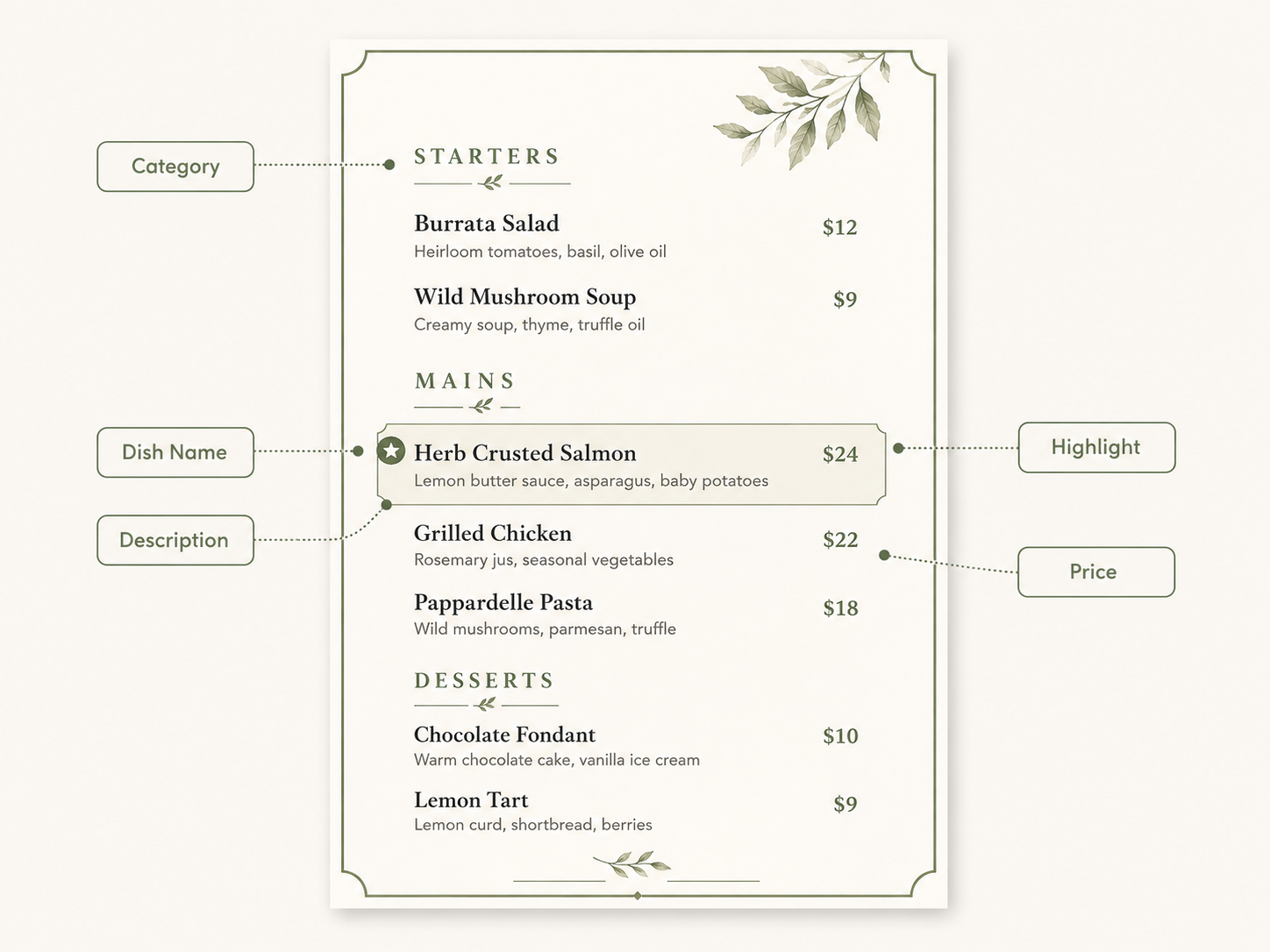
Readability depends on how quickly customers can move from a category to a dish and understand what they will receive. Clear hierarchy, controlled emphasis, and consistent formatting reduce hesitation without making the menu feel plain.
Create a Clear Reading Path
Most diners scan a menu before reading individual items. A predictable path begins with a visible category heading, moves through a short group of related dishes, and ends before the next section begins. Spacing between categories should be wider than spacing between dishes, while long lines of text can be divided into shorter blocks. Popular items should remain easy to find without forcing customers to jump between boxes, sidebars, and scattered labels.
Use Menu Engineering to Highlight Key Dishes
Menu engineering compares item popularity with contribution margin, helping restaurants decide which dishes deserve attention and which ones need adjustment.
Stars: Popular, profitable dishes that can receive a subtle highlight
Plowhorses: Popular items with lower margins that may need portion or cost review
Puzzles: Profitable but less frequently ordered dishes that may benefit from clearer names or better placement
Dogs: Low-selling, low-margin items that should be revised, repositioned, or removed
One box, badge, or accent color can direct attention toward a priority item. When too many dishes receive the same treatment, however, none of them appears important.
Write Concise and Specific Menu Descriptions
Useful descriptions answer three questions: what the main ingredient is, how it is prepared, and what comes with it. Specific wording such as “Braised short rib, red wine jus, potato purée, and roasted shallots” provides more value than subjective claims like “our irresistible house favorite.” Details that affect the ordering decision—such as spice level, portion style, or an unfamiliar ingredient—deserve space, while generic praise can be removed.
Limit Fonts, Colors, and Decorative Elements
Visual restraint improves legibility, especially under dim restaurant lighting or on lower-quality prints. Decorative typefaces are better reserved for short headings, while dish names and descriptions need open letterforms, adequate line spacing, and strong contrast. Restaurants still defining their visual identity can review brand color palette examples before assigning colors to headings, specials, and category markers. Shadows, outlines, textures, and illustrated borders should remain outside the main reading area.
Balance Food Photos and Price Styling
The appropriate balance depends on whether customers rely more heavily on images or written information.
Photo-led menus: Better for unfamiliar dishes, fast-casual ordering, or multilingual audiences; a smaller number of large, accurate images is usually more effective than many thumbnails.
Text-led menus: Better suited to fine dining, tasting menus, or restaurants where descriptions and ingredients drive the decision.
Prices should remain easy to locate without overpowering the dish names. Consistent placement and restrained styling allow customers to compare costs without turning the menu into a price list.
How to Export and Check Your Finished Menu
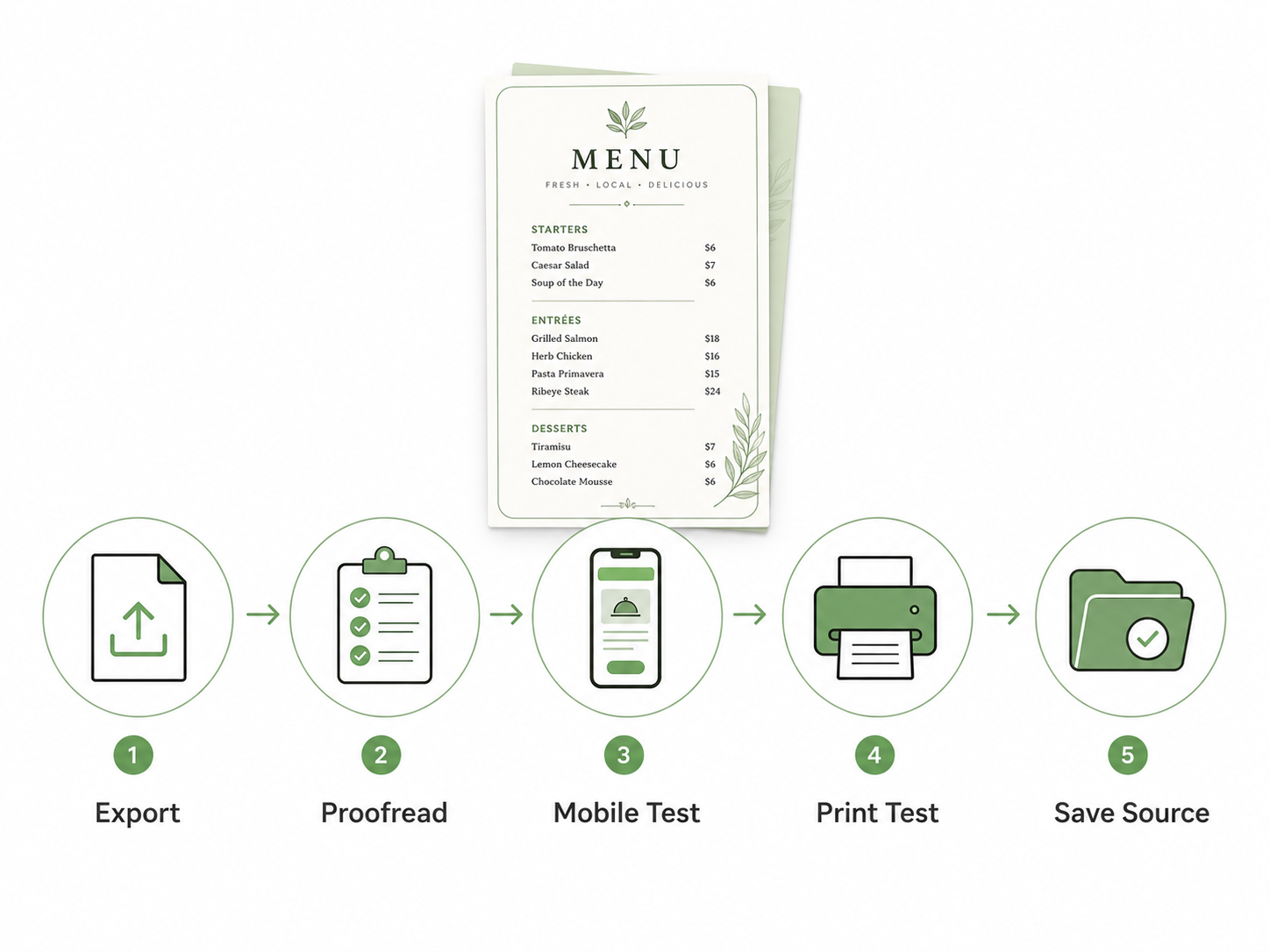
A design is not finished simply because the layout looks complete on screen. Export settings, content accuracy, and real-world testing determine whether the menu remains readable and reliable after printing or publishing.
Choose PDF, PNG, JPEG, or HTML
Each file format serves a different purpose, so one restaurant may need several exports from the same editable design.
PDF: PDF: Commonly used for professional printing, downloadable menus, and preserving fonts and page layout
PNG: Suitable for sharp graphics, logos, text-heavy images, and transparent backgrounds
JPEG: Produces smaller files for websites or email, although heavy compression can soften text
HTML: Adapts more naturally to mobile screens and supports links, search, accessibility features, and live updates
File names should identify the menu type, location, and date, such as Downtown_Dinner_Menu_July_2026.pdf. This prevents staff from accidentally publishing or printing an outdated version.
Check Spelling, Prices, and Allergen Details
A final content review should involve someone other than the person who designed the menu. Fresh eyes are more likely to catch duplicated items, inconsistent capitalization, missing prices, and descriptions that no longer match the current recipe.
The review should confirm:
Dish names and descriptions against the approved content sheet
Prices and add-on charges against the POS
Serving times and item availability
Dietary and allergen labels with the kitchen team
Phone numbers, website addresses, and ordering links
Allergen information deserves a separate check rather than being treated as ordinary proofreading. Ingredients, preparation methods, and cross-contact risks should reflect the restaurant’s actual kitchen practices and applicable local requirements.
Test the Menu on Mobile and in Print
Digital menus should be opened on several screen sizes, not only viewed inside the design editor. Text, buttons, category links, and QR codes must remain usable without excessive zooming or sideways scrolling. For print, one full-size proof can reveal trimming problems, weak contrast, undersized text, or colors that look different on paper. Testing under the restaurant’s normal lighting also shows whether glare or low light affects readability.
Save an Editable Copy for Future Updates
The editable source file should remain separate from the version customers receive. Logos, fonts, original food photos, and linked assets should stay in the same organized project folder so future updates do not require rebuilding the design. Version names such as Dinner_Menu_v03_Approved make the current file easier to identify, while archived copies provide a record of previous prices and seasonal offerings.
FAQs
Can I Design a Restaurant Menu Online for Free?
Yes, several online tools offer free templates and basic editing features. Free plans are usually sufficient for a simple one-page menu, but custom fonts, premium templates, high-resolution exports, brand controls, or commercial printing may require payment. Export quality and watermark restrictions should be checked before the entire design is completed.
How Many Items Should a Restaurant Menu Have?
There is no ideal number that works for every restaurant. Menu length should reflect the kitchen’s capacity, service model, ingredient overlap, and the number of choices customers can compare comfortably. If several dishes rarely sell, require unique ingredients, or make categories difficult to scan, a shorter menu may improve both ordering and kitchen efficiency.
Can I Design a Restaurant Menu on My Phone?
Yes, especially when working with a short menu or making a small price or text update. A phone screen becomes less practical for multi-page layouts, detailed alignment, and print preparation because spacing problems are harder to detect. Complex designs are usually easier to finish on a tablet or computer, followed by a final phone check of the customer-facing version.
Conclusion
A well-designed menu helps diners understand their choices while giving the restaurant a practical system for presenting its food. The strongest result is not necessarily the most decorative version, but the one customers can navigate quickly and staff can maintain accurately. With a clear content structure and a layout suited to the restaurant’s service style, future menu changes become much easier to manage.
You May Be Interested

100+ Funny Mother's Day Jokes That Will Make Mom Laugh
105 Independence Day Trivia Questions 2026
165 Father’s Day Card Messages & Ideas
30+ Father’s Day Poems for dad (Short, Funny & Heartfelt)

50+ Happy Mother’s Day Dog Mom Quotes & Messages