
Retouching Wedding Photos: A Step-by-Step Editing Guide
Retouching wedding photos starts with organized RAW files and scene-based edits. Balance exposure, color, skin tones, sharpness, and distractions, then export files for galleries, albums, and archives while keeping the gallery natural and consistent.

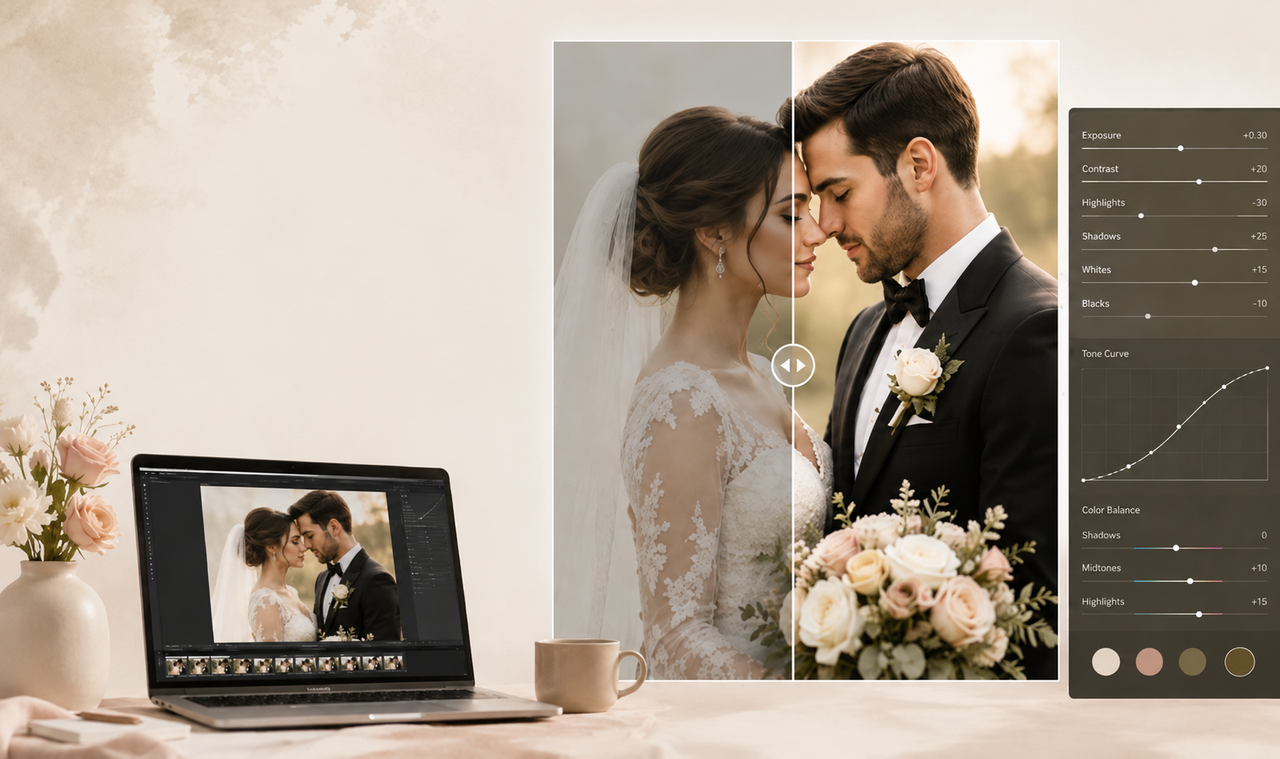
Wedding photos rarely come from one controlled setup. A gallery may move from window-lit preparation and outdoor portraits to dim reception rooms, mixed color temperatures, and direct flash. Retouching brings those scenes together through careful corrections to exposure, color, skin, clothing, noise, and distracting details without flattening the original mood. That consistency begins before any detailed editing, with a clear system for protecting, sorting, and grouping the source files.
How to Prepare Wedding Photos for Retouching?
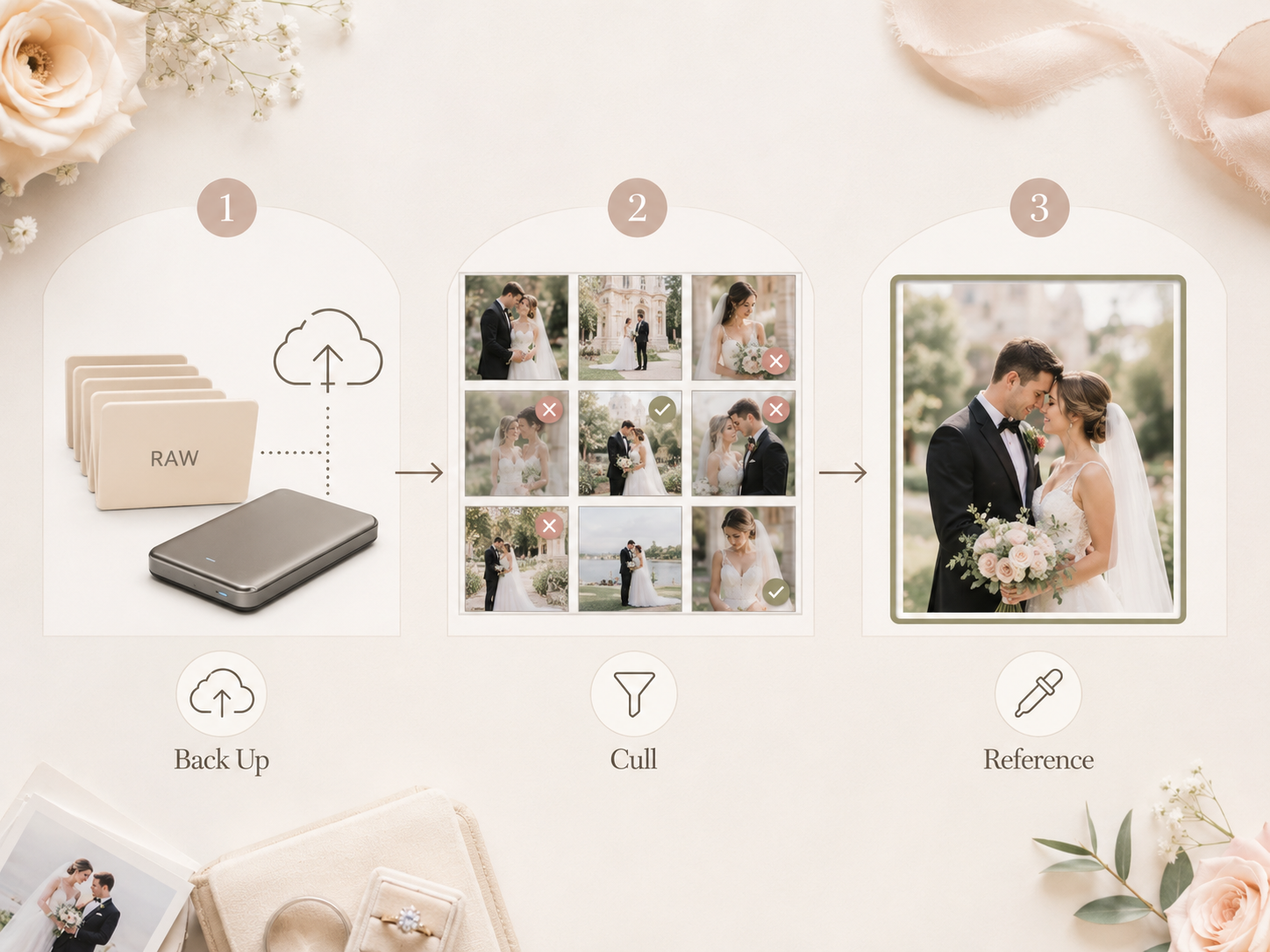
Preparation protects the original files and makes a large wedding gallery easier to manage. It also creates a reliable foundation for consistent editing.
Back Up and Organize the RAW Files
Wedding RAW files are irreplaceable and should exist in at least two verified locations. Before any memory card is formatted, folders can be arranged by photographer, camera, and part of the day. For a two-photographer wedding, synchronized capture times keep ceremony moments and guest reactions in the correct order.
Remove Duplicates, Blinks, and Missed Shots
A first culling pass should separate usable photographs from test frames, closed eyes, missed focus, and severe motion blur. Within a ten-frame first-kiss sequence, only one or two images may combine a clear expression with a clean composition. The final selection should favor emotional value instead of keeping several nearly identical shots.
Choose a Reference Photo for Each Setup
Consistency within each scene depends on having a strong visual reference. One well-exposed frame can establish the white balance, skin tone, brightness, and contrast for nearby images. Because outdoor portraits, candlelit ceremonies, and colorful receptions create different moods, each setup needs its own reference photograph.
How to Retouch Wedding Photos?
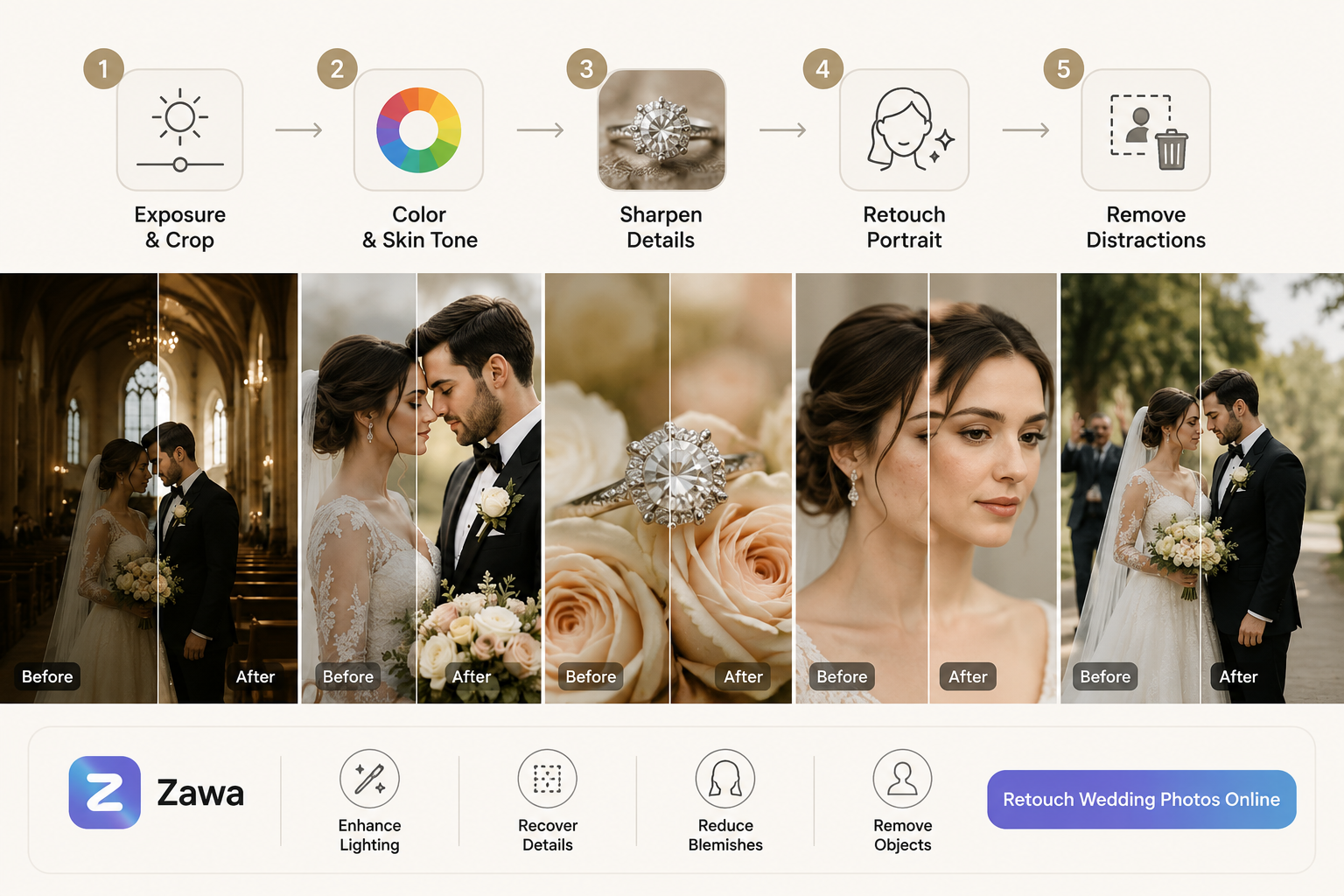
Retouching wedding photos works best when the edits move from broad corrections to smaller details. Most changes should remain subtle so the final image still feels true to the day. The five steps below follow a practical order that reduces unnecessary rework.
Portraits that need extra attention can be refined with Zawa, where online image tools can improve lighting, recover soft details, reduce temporary blemishes, and remove unwanted people or objects from the background.
Step 1: Fix Exposure, White Balance, and Crop
The first pass establishes the overall brightness and color of the image. A backlit ceremony photo may need recovered highlights in the dress, lifted facial shadows, and a warmer white balance before any local work begins. Cropping can then straighten the frame, remove awkward edge elements, and improve the placement of the couple.
Step 2: Match Color and Skin Tones Across Photos
Color consistency is best judged within each lighting setup rather than across the entire wedding. Settings from a strong reference frame can be applied to nearby images, followed by small adjustments for changing light and camera angle. In a reception with amber chandeliers and colored uplighting, skin should remain believable without removing the warmth of the room.
Step 3: Sharpen Key Details
Not every part of a wedding photo needs the same amount of sharpness. Selective adjustments can bring definition to the eyes, rings, lace, flowers, and suit fabric while leaving skin and soft backgrounds untouched. On a first-dance image, the same methods used to fix grainy photos can reduce high-ISO noise before sharpening brings definition to the couple’s faces.
Step 4: Retouch Skin, Hair, Makeup, and Clothing
Portrait retouching calls for small corrections that preserve the couple’s real appearance. Temporary blemishes, makeup smudges, flyaway hairs, lint, and isolated fabric wrinkles can be softened when they distract from the expression. Fine skin texture, natural body shape, dress construction, and meaningful features should remain intact.
Step 5: Remove Distractions and Finish the Photo
Background cleanup comes last because cropping and tonal corrections may already reduce some distractions. Exit signs, cables, stray objects, and people crossing behind the couple can be cleared with an AI object remover when they compete with the main moment. A final review should check edge quality, noise, color, and output sharpness before the photograph is added to the gallery.
How to Export Retouched Wedding Photos?
A finished wedding gallery usually needs separate files for online viewing, printing, and long-term storage. Matching each export to its final use protects image quality without creating unnecessarily large deliveries.
Export JPEGs for the Online Gallery
Online galleries need files that load quickly without making the photographs look heavily compressed. A practical export setup includes:
File format: JPEG at a high-quality setting
Color space: sRGB for consistent browser and device display
Image size: The gallery provider’s recommended pixel dimensions
Quality check: Review several files on desktop and mobile
These settings keep the gallery responsive while preserving enough detail for comfortable online viewing.
Save High-Resolution Files for Albums
Album production requires the full pixel dimensions of the edited photographs with minimal compression. Resolution, color profile, and output sharpening should follow the specifications supplied by the print lab. Reviewing common standard photo print sizes can help determine the aspect ratio and cropping space needed for a full-page portrait or double-page spread.
Archive RAW Files and Layered Photoshop Files
Long-term storage should preserve the original RAW files, editing catalog, metadata, and final exports. Layered PSD or TIFF files are especially useful for portraits and complex composites that may need future revisions. A three-copy archive stored across separate drives and an off-site location reduces the risk of losing an irreplaceable wedding collection.
How to Keep a Wedding Gallery Consistent?
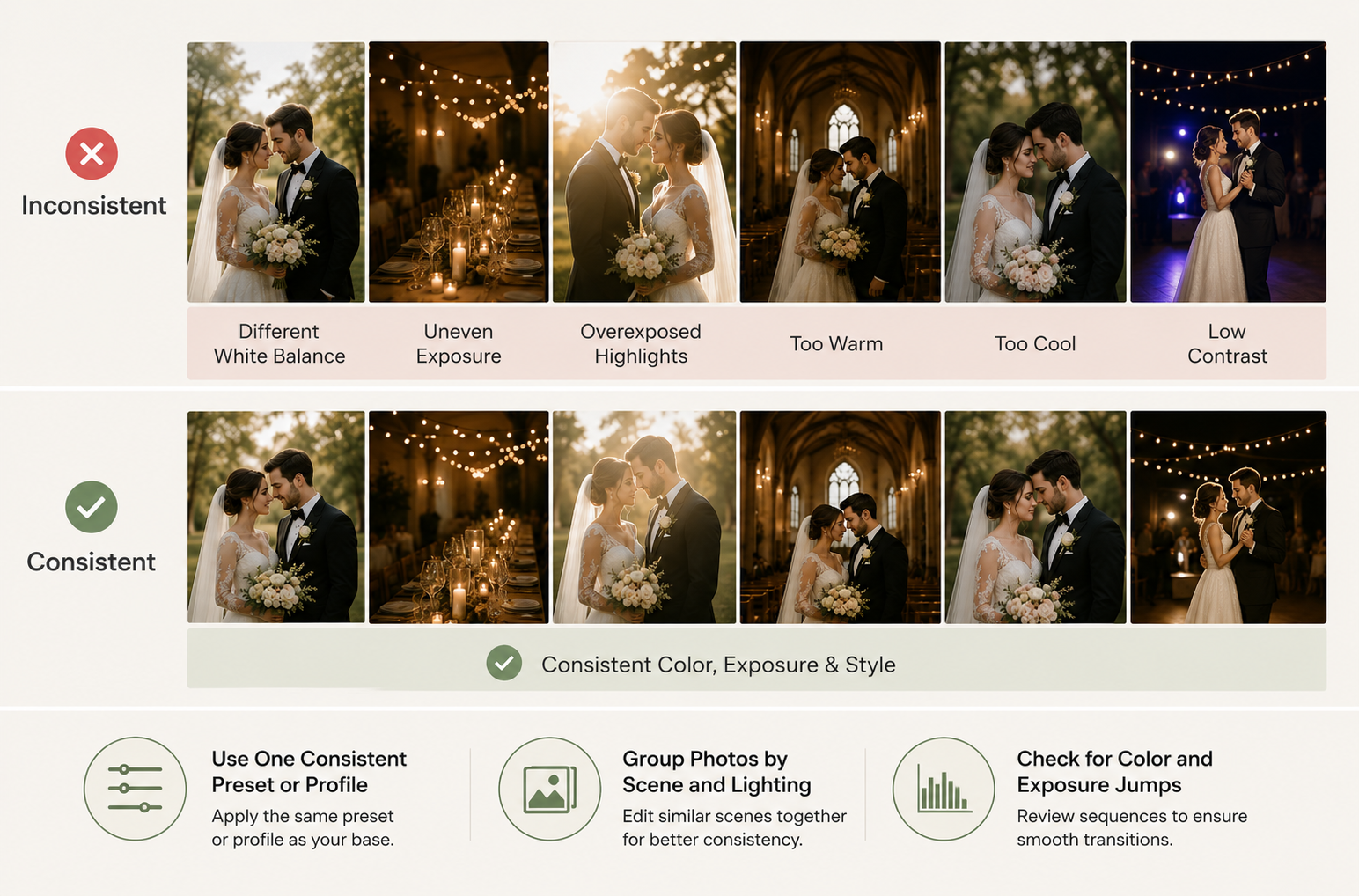
Gallery consistency is judged across sequences rather than individual photographs. A shared editing style should connect the day even as locations, cameras, and lighting conditions change.
Use One Consistent Preset or Profile
A preset should provide a common foundation for contrast, color rendering, and overall mood. Applying the same base profile across cameras prevents one file set from appearing noticeably warmer, flatter, or more saturated than another. Strength can still be adjusted when a preset overwhelms soft window light or darkens a reception scene. The purpose is visual continuity, not identical slider settings.
Group Photos by Scene and Lighting
Scene-based grouping makes editing more controlled and efficient. Bridal preparation, outdoor portraits, the ceremony, dinner, and the dance floor can each be treated as separate working groups. A batch photo editor can speed up synchronized adjustments within each group, while individual frames still receive a final review. This structure preserves intentional changes in atmosphere as the wedding moves from daylight into evening.
Check for Color and Exposure Jumps
Abrupt shifts are easiest to notice when the gallery is viewed as a grid or slideshow. Two individually strong photographs may feel disconnected when one suddenly appears darker, cooler, or more saturated than the image beside it. Pay particular attention where cameras switch or indoor and outdoor sequences meet. Small corrections at these transition points make the gallery flow more smoothly without changing its overall style.
FAQs
How Long Does Wedding Photo Retouching Take?
A full wedding gallery may take several days to a few weeks to retouch. The timeline depends on the number of selected images, the condition of the source files, and the amount of detailed portrait or background work required.
How Much Does Wedding Photo Retouching Cost?
Wedding photo retouching costs vary by image count, editing complexity, turnaround time, and revision policy. Basic color and exposure corrections usually cost less than detailed skin work, object removal, clothing repair, or photo compositing. Services may charge per image, by the hour, or for the entire gallery.
Can You Fix a Blurry Wedding Photo?
Mild softness or motion blur can often be improved, but severe missed focus cannot always be fully repaired. Sharpening and AI enhancement may recover visible definition, although they cannot recreate every detail missing from the original file.
Can Wedding Photos Be Retouched After Delivery?
Yes, wedding photos can be retouched after delivery when the original or high-resolution files remain available. RAW files offer the greatest editing flexibility, while compressed JPEGs provide less room for major corrections. Photographer permission may also be required before a third party edits delivered images.
Conclusion
The strongest wedding retouching supports the story of the day without drawing attention to the editing. Careful file preparation, scene-based corrections, selective detail work, and purpose-specific exports keep the gallery polished while preserving its atmosphere. Consistency matters more than forcing every photograph into an identical look. When expressions remain genuine and each setting still feels distinct, the finished collection will hold together naturally.
You May Be Interested
165 Father’s Day Card Messages & Ideas
2D Animation vs. 3D Animation: A Detailed Guide for 2026

45 Brand Color Palette Examples To Consider For Businesses
50 Father’s Day Bible Verses to Honor Dad with Faith
70+ Happy Father’s Day in Heaven Quotes & Messages
